Skip to content

Compass and AI.

Compass AI lets an outside assistant read your Compass data, read-only, once your school switches it on. Compass gives steps for Claude and Gemini Enterprise, but none yet for ChatGPT or Copilot.

Checked 17 October 2026 against 40 sources, each the vendor’s own page. See them all, or what’s changed since.

The short version

  • Compass is a school management system made by Compass Education, based in Hawthorn, Victoria. Schools use it for attendance, Chronicle behaviour and wellbeing notes, learning tasks, reports, payments and parent messages.2711
  • Compass’s AI offer is called Compass AI. It works through a connector that lets a school “bring its own LLM”. In plain terms, staff ask an outside assistant such as Claude, and the assistant reads Compass data to answer.89
  • The connector is read-only. Compass says it “cannot create, change or delete anything in Compass”.9
  • Nothing connects by default. Your Compass account manager has to switch the feature on, and your school has to approve each AI provider before staff can sign in.910
  • Compass publishes setup steps for Claude, as a custom connector, and for Gemini Enterprise, set up once by a school’s Google administrator. Anthropic’s connector directory doesn’t list Compass yet.928
  • Compass’s privacy addendum also names ChatGPT and Microsoft Copilot as examples. We found no Compass setup steps for either, and no Compass listing in OpenAI’s or Microsoft’s directories.1093435
  • Compass says it doesn’t use connector data to train AI and doesn’t store your AI conversations. Once data reaches the AI provider, that provider’s own policy decides how long it’s kept.10
  • The assistant only sees what your Compass role allows. Compass strips medical, access-restriction and contact details, but two tools can return free-text notes that may mention health or pastoral matters.9
  • Inside Compass, an AI support agent called Susie answers how-to questions. Compass’s timetabling product, Griddle, uses AI to build elective lines.1722

The plans

Compass is a cloud-based school management system developed in Australia.255

The company, Compass Education Pty Ltd, has its registered office in Hawthorn, Victoria.11

  • Compass says it was founded in 2010 and now supports “5,000+ schools and 5M users”.2
  • Its PCI DSS page says it works “with over 1,800 schools in Australia”.25
  • Compass says it’s Department of Education approved in NSW, Victoria, Queensland, Tasmania and WA.3
  • It says more than 700 Catholic schools use it through a partnership with CEnet.4
  • Independent schools can buy Compass Private, which Compass calls “Compass’s bespoke solution” for independent schools.5
  • In WA, Compass announced in August 2023 that it had won the tender to supply school management software to more than 800 public schools.24
  • Compass says it’s hosted “from Australia-based data centres”.6
  • It lists ISO 27001 and PCI DSS Level 1 among its security credentials.225
  • We found no prices on Compass’s website. It offers demos and an information pack instead.1
WhatWho it’s forAI in itPrice
Compass (the school management system)Government, Catholic and independent schoolsSusie, the AI support agent. The Compass AI connector once it’s switched on.Not published
Compass PrivateIndependent schoolsNot described separatelyNot published
Compass AISchools that register interestA read-only connector for outside assistants. Setup steps exist for Claude and Gemini Enterprise.Not published
GriddleSchool timetablersAI line generation for elective classesNot published. Griddle offers to cover its subscription until a school’s current timetabling licence ends.

Sources for the table:1589172122

  • Compass AI sits on top of CompassOS, which Compass describes as the layer that joins its products under one login. CompassOS is “currently in a pilot phase with a small number of schools”.8
  • The Compass AI page invites schools to register interest. It gives no release date or price.8
  • Compass’s features page groups its modules into five areas: leadership and administration, wellbeing, school community, learning management, and finance.7

What’s built in

Compass AI (through your own assistant) Compass says “Compass AI puts that connected picture to work, using the tools your staff already rely on.”
What it does
  • Compass says “Compass AI puts that connected picture to work, using the tools your staff already rely on.”8
  • “At its core is the Compass MCP Connector, which lets a school bring its own LLM tool”. An LLM (large language model) is the engine behind assistants such as Claude and Gemini.8
  • Compass says that with student, attendance, extracurricular, timetable and activity data in one place, “Compass AI can answer complex questions across the whole school”.8
  • The questions and answers happen in the outside assistant. Compass supplies the data, read-only. Each connection is covered under “Outside AI that connects” below.9
Where to find it
  • The Compass AI page asks schools to register interest.8
  • The connector only works once “your Compass account manager” has switched the Compass AI feature on for your school. Until then, sign-in works but every request returns an error.9
Which plans have it
  • Compass doesn’t say which contracts include Compass AI or what it costs.89
What happens to your data
  • Compass says the connector fetches only what each request needs. It “does not pre-index or continuously sync your Compass data” and keeps nothing beyond the active session.10
  • Compass says it doesn’t use connector data to train AI or machine learning models, or for advertising.10
  • Compass says it “does not independently store the content of your AI conversations or the Compass data returned during a session”.10
  • The AI provider handles the data under its own policy. Compass “does not control how AI providers handle or retain data once it has been transmitted”.10
  • Admin switches: the account manager turns the feature on, and the school or education authority approves each AI provider. School administrators manage who holds the permissions needed, and can remove a person’s access.910
In Australia
  • The Compass AI page sits on Compass’s Australian site, and the privacy addendum points Australian complaints to the Office of the Australian Information Commissioner.810
  • A Compass UK post from July 2026 says Compass’s AI features are “soon to be released in the UK”. That suggests Australian schools have them first. That’s our inference.19
Susie, Compass’s AI support agent Compass introduced Susie in April 2025 as “our new AI-powered support agent”.
What it does
  • Compass introduced Susie in April 2025 as “our new AI-powered support agent”.17
  • Susie answers questions about using Compass with “instant answers and step-by-step guidance”, at any time of day.17
  • If needed, Susie hands you over to Compass’s support team.17
  • Compass says Susie “learns over time to better respond to your needs”.17
Where to find it
  • Compass says Susie is “live on every page within Compass”. You type your question.17
Which plans have it
  • The announcement doesn’t limit Susie to any plan.17
What happens to your data
  • Compass doesn’t say what powers Susie, where your questions go or how long they’re kept.17
  • Compass’s main privacy policy doesn’t mention AI.11
In Australia
  • Susie was announced in Compass’s Australian customer updates.17
  • Compass’s UK pages describe a similar agent called Terry, which “uses knowledge base content created by our Customer Success, Training and Support teams”.18
Griddle line generation (Compass’s timetabling product) Griddle builds school timetables. Its line generation page says “Harness the power of AI and generate the most efficient combination of classes possible.”
  • What it does: Griddle builds school timetables. Its line generation page says “Harness the power of AI and generate the most efficient combination of classes possible.”22
  • Griddle says its automated tools take the strain while you “retain the flexibility to intervene manually”.22
  • Where to find it: Griddle is a separate product that syncs with Compass. Compass calls it “our cloud-based timetabling platform”.2014
  • Griddle’s about page says its general manager joined Compass in 2022 and now leads Griddle.23
  • Which plans have it: It’s a Griddle subscription. Griddle offers to cover it until a school’s current timetabling licence expires. No prices are published.21
  • What happens to your data: Griddle’s pages don’t say how its AI uses school data.2122
  • In Australia: Compass held a Griddle launch event in Melbourne in March 2024. It says Griddle was developed with A2I2 at Deakin University.20
AI in Compass’s security monitoring (described in 2024) Compass’s August 2024 EduTECH post says its platform includes “AI and machine learning to monitor activity and restrict access from high-risk regions”.
  • Compass’s August 2024 EduTECH post says its platform includes “AI and machine learning to monitor activity and restrict access from high-risk regions”.27
  • The same post lists multi-factor authentication and ISO27001 certification.27
  • We found no other description of this monitoring, and no setting for it.27

Connect another AI

A quick translation of the jargon. MCP (Model Context Protocol) is “an open standard that enables AI assistants to securely interact with external services”, in Compass’s words. A connector is the link an assistant uses to reach another service.10

  • Compass’s connector goes by three names: “Compass AI Agent Connector” in the privacy addendum, “Compass MCP Connector” on the Compass AI page, and “Compass Education for AI assistants” on the setup page.1089
  • “The Connector is operated by Compass”, at https://mcp.compass.education/mcp.109
  • Compass says it “is compatible with any MCP-supported AI provider that has been approved by a school”.10
  • Two things must happen at school level first: Compass AI switched on, and the AI provider approved. Then each person needs the right Compass permissions and signs in for themselves.910

ChatGPT and Compass

No official link. Named by Compass, no setup steps.

ChatGPT and Compass

Official? No official connection found.
  • No official connection found.934
  • Compass’s privacy addendum names ChatGPT (OpenAI) as an example of an approved assistant, where it supports MCP.10
  • Compass’s setup page gives no ChatGPT steps, and OpenAI’s public plugin pages list no Compass plugin.934
What it can see and do Nothing documented.
  • Nothing documented.9
What you need, steps, disconnecting Not documented by Compass.
  • Not documented by Compass.9
  • In general, OpenAI lets ChatGPT Business, Enterprise and Edu workspaces connect a custom MCP server from Plugins, using Add custom MCP server. In Business, only admins and owners can create and publish one.33
  • Compass doesn’t say whether its connector works that way, and the school would still have to approve ChatGPT first.109
Limits OpenAI says you’re responsible for vetting any third-party MCP server you add to a workspace.
  • OpenAI says you’re responsible for vetting any third-party MCP server you add to a workspace.33

Claude and Compass

Reads only. Custom connector, school must switch on.

Claude and Compass

Official? Yes, on Compass’s side. Compass runs the connector, and its setup page gives steps for Claude.
  • Yes, on Compass’s side. Compass runs the connector, and its setup page gives steps for Claude.910
  • It isn’t in Anthropic’s Connectors Directory. The directory’s published list on 17 October 2026 had no Compass Education connector, and Compass says a listing is still to come.289
  • So you add it as a custom connector. Anthropic says custom connectors “allow connections to unverified services”.29
What it can see and do Read-only. It “cannot create, change or delete anything in Compass”.
  • Read-only. It “cannot create, change or delete anything in Compass”.9
  • Compass lists 27 tools. They cover the student directory and profiles, Chronicle entries, attendance, learning tasks with results, calendars and class schedules, school events, and reference lists such as year levels and terms.9
  • You only see what your Compass role allows. Tools your role can’t use are hidden.9
  • Compass says “A parent only sees their own children”, which suggests parent accounts can connect too where a school allows it. That’s our reading.9
  • Compass says “Medical, access-restriction and contact PII are stripped server-side before they reach the assistant.” PII means personally identifiable information.9
  • Two tools go further. The single Chronicle entry tool returns the full entry, “unredacted by design”. Attendance notes’ free text “may carry medical / pastoral commentary”.9
  • The student record tool returns counts only, such as how many medical records exist, without their contents.9
  • The privacy addendum also lists “Communication records (where permitted by your school’s Compass configuration)”. The published tool list has no messages tool.109
  • In ordinary chats, Claude asks for your approval before it uses a connector’s tools.30
What you need Compass AI switched on for your school by your Compass account manager.
  • Compass AI switched on for your school by your Compass account manager.9
  • Your school or education authority’s approval of Claude as an AI provider.10
  • The Compass permissions your school requires for the connector.10
  • A Claude account. On the Free plan you can add one custom connector. Pro and Max users add their own.2930
  • On Claude Team or Enterprise, an Owner adds the custom connector for the organisation first. Members can’t add it themselves.2930

Steps to connect (Compass's setup page, not dated, and Anthropic's docs)

  1. Sources 299

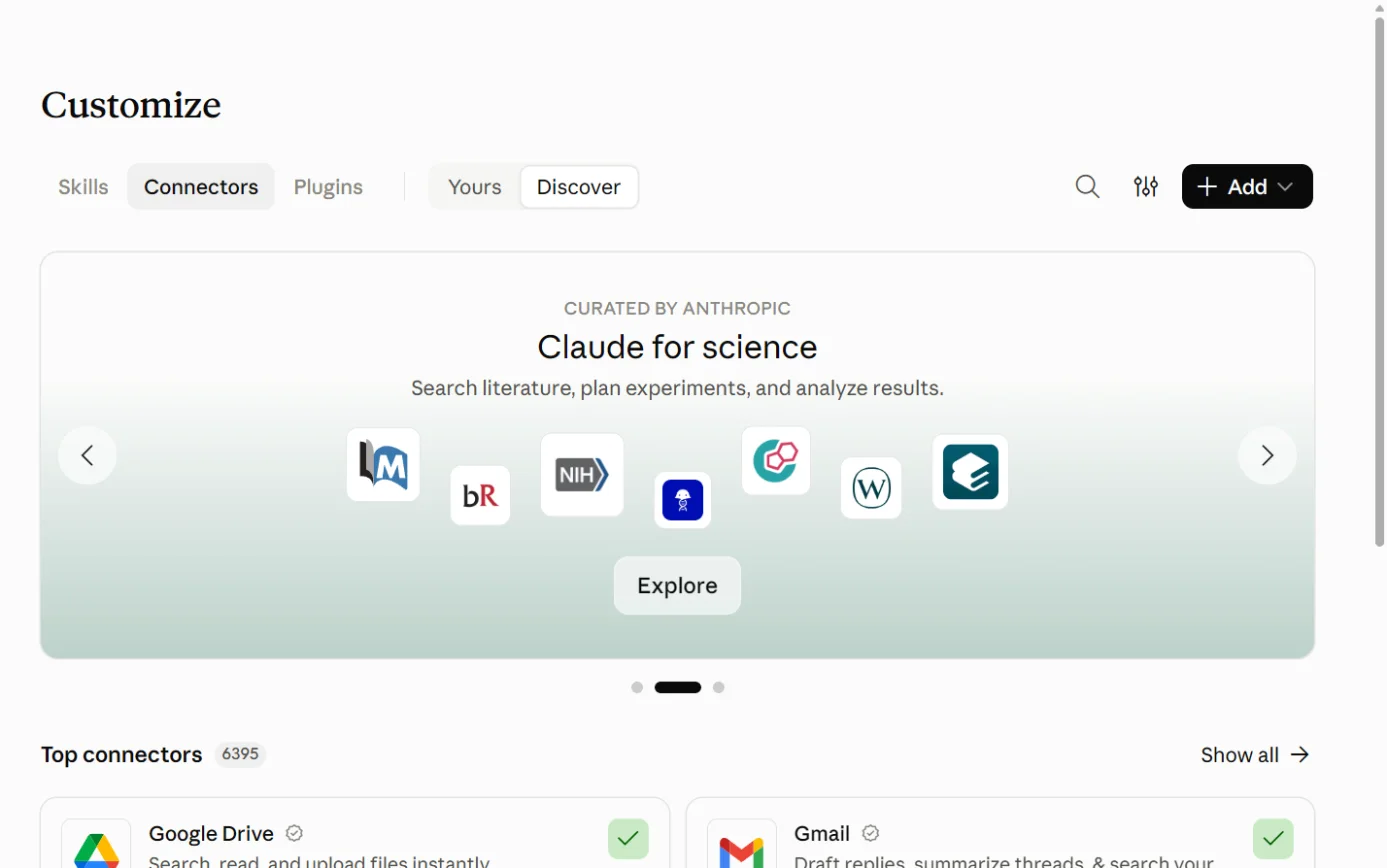
    Claude’s Customize page on the Connectors tab, with the Connectors tab ringed.
    Screenshot: Claude, the Connectors page under Customize, 18 October 2026.
  2. Sources 929

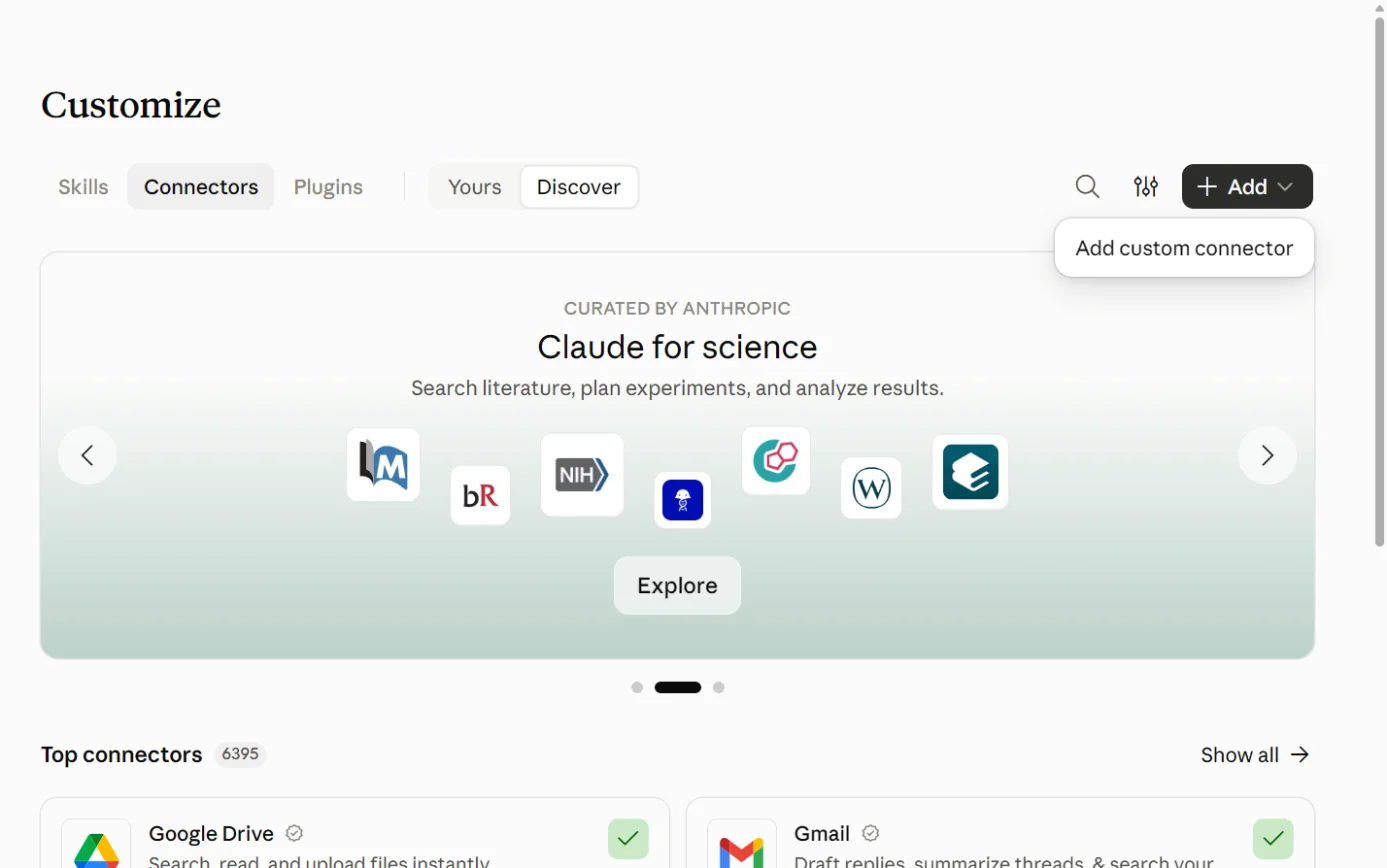
    Claude’s Connectors page with the + Add menu open, with Add custom connector ringed.
    Screenshot: Claude, the Connectors page’s + Add menu, 18 October 2026.
  3. Source 9

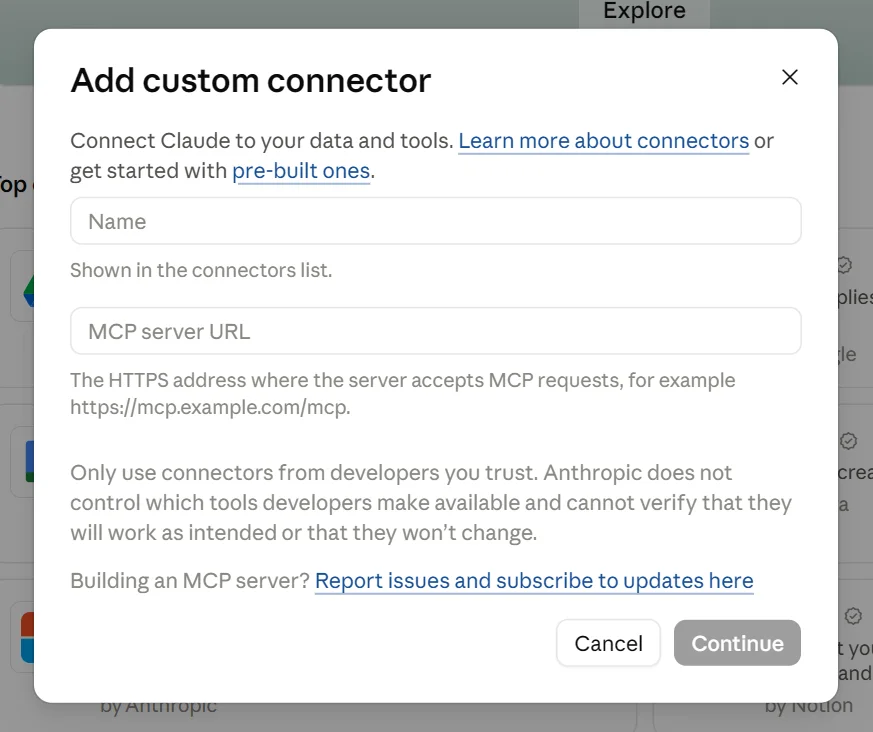
    Claude’s Add custom connector box, with its Name and MCP server URL fields, with the Continue button (the step’s Add) ringed.
    Screenshot: Claude, the Add custom connector box, 18 October 2026.
  4. Source 9

    A drawing from the step’s own words. The real screen may look a little different.
  5. Source 9

    A drawing from the step’s own words. The real screen may look a little different.
  6. Source 29

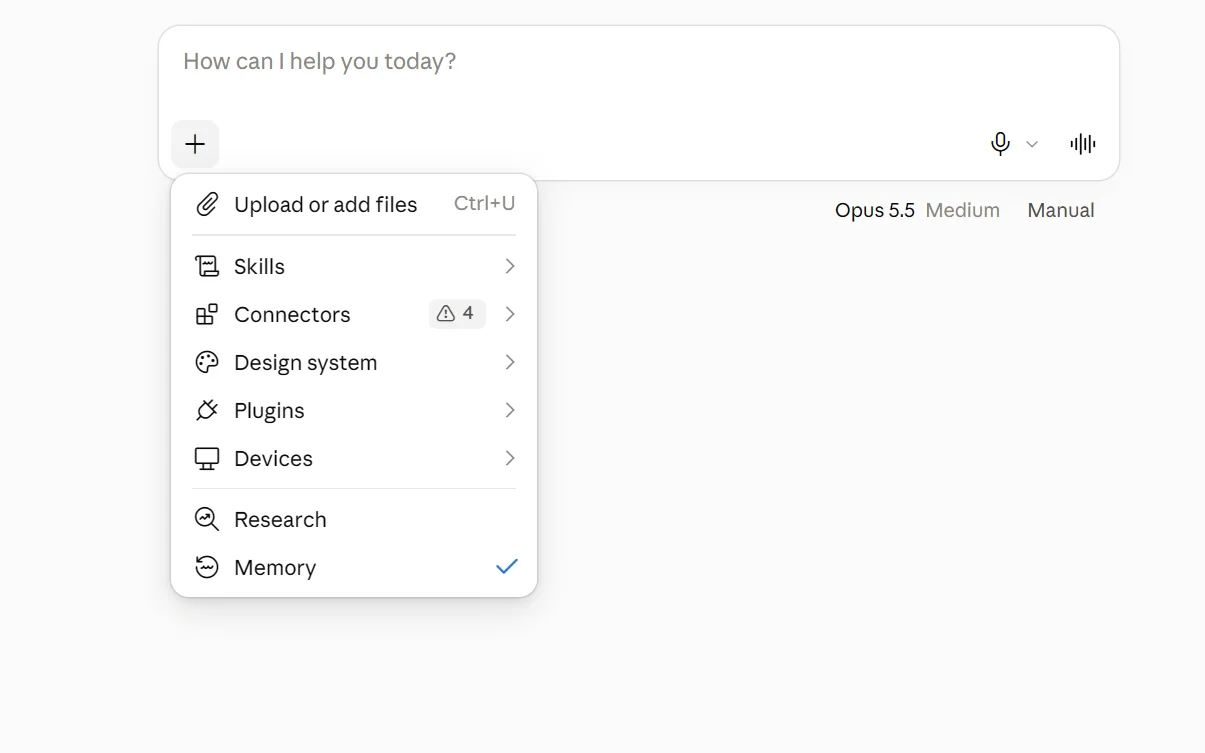
    The + menu under Claude’s message box, with Connectors ringed.
    Screenshot: Claude, the + menu in a new chat, 18 October 2026.
  7. Source 9

    A drawing from the step’s own words. The real screen may look a little different.

Pictures without a date are drawings from each step’s own words. The real screen may look a little different.

On Team and Enterprise plans, an Owner first goes to Organization settings > Connectors, selects Add, then Custom, and chooses Web if asked. They enter the URL and click Add. Members then find the connector under Customize > Connectors with the Custom label and click Connect.29

To disconnect In Claude, go to Customize > Connectors and click Remove, or the three-dot menu next to Compass. Owners use Organization settings > Connectors.
  • In Claude, go to Customize > Connectors and click Remove, or the three-dot menu next to Compass. Owners use Organization settings > Connectors.29
  • In Compass, ask your school administrator to remove MCP access from your account.10
  • Or email legal@compass.education. Compass says it will revoke your access token within 5 business days.10
  • Revoking doesn’t touch your Compass account. Data that already passed through the AI provider stays under that provider’s retention policy.10
Limits Compass says each provider’s handling of the data “is governed by their own privacy policy”.
  • Compass says each provider’s handling of the data “is governed by their own privacy policy”.10
  • Anthropic says its consumer plans (Free, Pro and Max) use chats for training if you allow it. It leaves out “raw content from connectors”, including remote MCP servers, unless that content is copied into the conversation.31
  • Anthropic says it won’t use inputs or outputs from its commercial products, such as Claude for Work, to train its models by default.32
  • Anthropic warns that malicious servers can hide instructions for Claude, and that a developer can change how a tool behaves after you connect.30
  • If a tool says you’re not authorised, Compass suggests asking the assistant to run its key-check tool and sharing the result with your Compass admin.9

Copilot and Compass

No official link. Named by Compass, no setup steps.

Microsoft Copilot and Compass

Official? No official connection found.
  • No official connection found.9353637
  • Compass’s privacy addendum names Copilot (Microsoft) as an example assistant. Its setup page gives no Copilot steps.109
  • Microsoft’s list of federated Copilot connectors, last updated 16 October 2026, doesn’t include Compass. Neither does Microsoft’s partner connector gallery or a Microsoft Marketplace search for “compass education”.353637
What it can see and do Nothing documented.
  • Nothing documented.9
  • Compass does link to Office 365 outside its partner program, alongside things like single sign-on and calendar feeds. Compass doesn’t describe that as an AI connection.13
  • Copilot inside your school’s own Microsoft 365 is covered in our separate Microsoft 365 guide.
Limits Microsoft says partners can submit federated connectors to Microsoft for approval. Compass isn’t on the published list.
  • Microsoft says partners can submit federated connectors to Microsoft for approval. Compass isn’t on the published list.35

Gemini and Compass

Reads only. Gemini Enterprise only, admin sets up.

Google Gemini and Compass

Official? Yes, for Gemini Enterprise only. Compass’s setup page has a section headed “Gemini Enterprise (school IT admin only)”.
  • Yes, for Gemini Enterprise only. Compass’s setup page has a section headed “Gemini Enterprise (school IT admin only)”.9
  • Gemini Enterprise is a Google Cloud product. Google’s setup guide covers its Standard, Plus, Pay-as-you-go and Frontline editions.38
  • The everyday Gemini app doesn’t list Compass among its connected apps.39
  • Gemini’s custom apps for personal accounts are for people 18 and over in the US, and the feature “isn’t available if you sign in with a work or school Google Account”.40
What it can see and do The same read-only connector and tools as Claude.
  • The same read-only connector and tools as Claude.9
  • One admin connects it for the whole school. Staff in the groups the admin authorises can then ask Gemini about Compass data “without each user adding their own connector”.9
  • Each person still sees only what their own Compass role shows them.9
  • Google says every action call needs the user’s confirmation by default, unless the tool is marked read-only.38
What you need A Google Workspace administrator with access to Gemini Enterprise.
  • A Google Workspace administrator with access to Gemini Enterprise.9
  • Google lists set-up work in Google Cloud first, including an organisation policy override for custom MCP data stores and the Discovery Engine Editor role.38
  • Compass AI switched on for the school, and Gemini approved as an AI provider.910

Steps to connect (Compass's setup page, not dated; Google's guide, updated 16 October 2026)

  1. Source 9

    A drawing from the step’s own words. The real screen may look a little different.
  2. Sources 938

    A drawing from the step’s own words. The real screen may look a little different.
  3. Source 9

    A drawing from the step’s own words. The real screen may look a little different.
  4. Source 9

    A drawing from the step’s own words. The real screen may look a little different.
  5. Source 9

    A drawing from the step’s own words. The real screen may look a little different.
  6. Source 38

    A drawing from the step’s own words. The real screen may look a little different.

Pictures without a date are drawings from each step’s own words. The real screen may look a little different.

To disconnect Compass doesn’t give Gemini Enterprise removal steps, and Google’s setup guide doesn’t cover deleting the data store.
  • Compass doesn’t give Gemini Enterprise removal steps, and Google’s setup guide doesn’t cover deleting the data store.938
  • The Compass-side routes still work: ask your school administrator, or email legal@compass.education.10
Limits Compass says its connector appears to Gemini Enterprise “as a standard third-party MCP server, so the same admin docs apply (including audit logging and per-group access control)”.
  • Compass says its connector appears to Gemini Enterprise “as a standard third-party MCP server, so the same admin docs apply (including audit logging and per-group access control)”.9
  • Google’s guide lets the admin pick a “Multi-region” location but says nothing more about where the data is processed.38

Other routes

Developer tools, automation tools and app stores.

Compass’s Public API (the developer route)

Official? Yes. The Compass Public API “is available for 3rd party vendors and schools to develop against”.
  • Yes. The Compass Public API “is available for 3rd party vendors and schools to develop against”.15
  • Compass’s integrations page describes “a robust, public RESTful API”.14
What it can see and do The documentation lists 183 endpoints. Some only read, and others create or change records such as Chronicle entries, events and clubs.
  • The documentation lists 183 endpoints. Some only read, and others create or change records such as Chronicle entries, events and clubs.15
  • Compass says API use “is recorded with personally identifiable information for auditing purposes”.15
What you need Permission from Compass: “Please contact Compass Support to request access.”
  • Permission from Compass: “Please contact Compass Support to request access.”15
  • The person whose API key is used needs the APIAccess permission. The key is shown in People Management.15
  • Software vendors go through Compass’s Approved Integration Partner process. Compass asks for evidence such as ISO 27001 certification and hosting details, and says hosting “in most jurisdictions” has to be onshore.13
  • Compass says the review “may take 3-6 months”, and approval comes with a pricing assessment for setup and ongoing use.13

Steps to connect (Compass's API documentation and partner page, neither dated)

  1. Source 15

    A drawing from the step’s own words. The real screen may look a little different.
  2. Source 13

    A drawing from the step’s own words. The real screen may look a little different.
  3. Source 15

    A drawing from the step’s own words. The real screen may look a little different.

Pictures without a date are drawings from each step’s own words. The real screen may look a little different.

To disconnect Not documented.
  • Not documented.1513
Limits Use “is limited to pre-approved vendors and schools”, and some may be rate-limited.
  • Use “is limited to pre-approved vendors and schools”, and some may be rate-limited.15
  • “Frequent (multi-day) API requests for large data sets will not typically be permitted.”13
  • Compass’s terms say access to the platform for “third-party integration (including automated or manual processes) is not permitted”, and Compass watches for “screen scraping, bot use and script automation”.12

Zapier, Make and Power Automate

  • Compass’s integrations page names none of them.14
  • Compass lists RSS feeds, SchoolFront news widgets, iCal, SAML/SSO, Google Apps and Office 365 as integrations available outside its partner program.13

Jobs it’s good for

  • One student’s attendance. Ask “Show me Harry Smith’s attendance for the current term and flag any unapproved absences.” That’s one of Compass’s own examples.9
  • A year level at a glance. The cohort attendance tool lists each student’s class percentage, so you can ask which Year 8 students are below 80%.9
  • What’s due. Ask what a student has due in the next fortnight across all subjects.9
  • When a class meets. Ask when Year 11 Business Management next meets and who’s rostered.9
  • This week’s Chronicle. List the Chronicle entries logged this week for Year 9, grouped by category. The list tools return structured fields without the free-text body.9
  • Calendar sums. Ask how many teaching days are in a month, or when Term 2 starts.9
  • ”How do I” questions. Ask Susie inside Compass.17
  • Elective lines. Timetablers can let Griddle’s AI build the lines, then adjust them by hand.22

What to watch for

Student data leaves Compass

  • When the connector runs, “your Compass data passes through the AI provider’s infrastructure”.10
  • Compass doesn’t control how the provider keeps it, so read that provider’s privacy policy before you connect.10
  • Compass recommends schools “consult with their privacy officer or legal adviser before enabling any AI integration”.10
  • It also asks administrators to review their obligations under “applicable state and federal privacy legislation” before staff use the connector with student data.10

Not every sensitive detail is filtered

  • Medical, access-restriction and contact details are stripped.9
  • The full Chronicle entry tool is “unredacted by design”, and attendance notes can include health or pastoral comments.9
  • Chronicle entries and attendance notes are free text that people type. Text like that could carry instructions aimed at the AI. That’s our inference, based on Anthropic’s warning about hidden instructions.30

The login sets the limit

  • The assistant sees only what your Compass role can see.9
  • So an administrator’s login exposes everything that administrator can see. That’s our inference from the above.

Personal AI accounts

  • On Claude’s Free, Pro and Max plans, chats can be used for training if you allow it. Raw connector content is left out unless it’s copied into the chat.31
  • Claude’s work plans aren’t used for training by default.32
  • Compass leaves the choice of AI provider to the school. Our reading: student data belongs in an account your school has approved and manages.10

Department schools

  • Compass won the WA Department of Education’s tender to supply more than 800 public schools.24
  • Compass says the connector needs approval from “the user’s school or education authority”. Our reading: in a department school, check with the department before you connect.10

Menu names differ

  • Compass’s page says Settings › Connectors in Claude. Anthropic’s current docs say Customize > Connectors.929
  • Compass’s Gemini Enterprise menu path doesn’t match Google’s own guide.938

Cost

  • Compass hasn’t published a price for Compass AI.8
  • Claude’s Free plan allows one custom connector.30
  • Gemini Enterprise is a separate Google Cloud product. We didn’t research its price.38

Who switches what

  • Your Compass account manager: the Compass AI feature.9
  • Your school or education authority: which AI providers are approved.10
  • School administrators: user permissions, and removing a person’s MCP access.10
  • Claude Team and Enterprise Owners: adding the custom connector for the organisation.29
  • Your Google Workspace administrator: the Gemini Enterprise connector, and which staff groups get it.9

Check the answers

  • Compass says a “no results” answer is “usually a scope or phrasing mismatch”. Ask again and name the year level, dates or student.9

Logins and AI browser agents

  • Compass’s terms forbid shared logins and third-party integration through the platform, and Compass watches for bots.12
  • Our reading: use the connector your school has approved, and don’t give any AI tool your Compass password. This isn’t legal advice.

What’s changing

  • 24 April 2025: Susie launched.17
  • 14 May 2026: the last change to Compass’s AI/MCP privacy addendum, according to the page’s details.10
  • 9 June 2026: the Compass OS and Compass AI register-interest page went up. It was updated on 13 July 2026.8
  • CompassOS: in a pilot with a small number of schools. Compass plans a phased rollout and says it will eventually be on for every school, with no opt-out once it’s generally available.8
  • Coming, no date: a Compass listing in Anthropic’s Connectors Directory, so Claude users can add it without pasting the URL.9
  • July 2026 (UK): Compass said its AI features are “soon to be released in the UK”, to help schools pull inspection evidence with plain-language questions.19

What we couldn’t establish

  • Compass AI’s price, and which contracts include it.89
  • When Compass AI became available to Australian schools. The page asks for interest and gives no date.8
  • ChatGPT and Copilot. Compass names them as examples but documents no setup, so we couldn’t confirm either works with the connector.109
  • Where the connector runs. Compass says schools are hosted in Australian data centres, but doesn’t say which country the connector’s servers are in.610
  • Sign-in permissions. The addendum says access depends on “the permissions you grant during the OAuth authorisation flow”. The connector’s public sign-in settings list a single permission, called “compass”. We couldn’t see the sign-in screen itself.1016
  • The Compass account setting. The addendum says you can revoke permissions in “your Compass account settings”. The setup page doesn’t describe that setting.109
  • What powers Susie, and what happens to the questions you type.17
  • Whether Australian schools also have Terry, or whether Terry and Susie are the same service.1718
  • How Griddle’s AI uses school data.2122
  • The 2024 AI security monitoring. One blog post mentions it, and we found no detail.27
  • Compass’s own help articles. Its public Help Centre shows only parent videos and a parent guide, so we couldn’t read staff help on AI.26
  • Gemini Enterprise sign-in details. Google’s guide asks for OAuth details such as a client ID. Compass’s page only says to “Confirm the OAuth handshake”.389
  • Dates on Compass’s policies. The privacy policy and the addendum show no date on the page itself. We took their dates from the pages’ details.1110
  • OpenAI’s in-app plugin directory needs a login, so we checked OpenAI’s public plugin pages only.34

Sources

Every line above was read at one of these pages, on the date shown. Vendors change their products and their pages often, so check the page before you rely on a detail.

  1. 1 Compass school management software (home page, Australia) Compass Education Read 17 Oct 2026
  2. 2 About Compass Compass Education Read 17 Oct 2026
  3. 3 School management software for Government schools Compass Education Read 17 Oct 2026
  4. 4 School management software for Catholic schools Compass Education Read 17 Oct 2026
  5. 5 School management software for Independent schools Compass Education Read 17 Oct 2026
  6. 6 Compass for Schools Compass Education Read 17 Oct 2026
  7. 7 Features Compass Education Read 17 Oct 2026
  8. 8 Register your interest in Compass OS & Compass AI Compass Education Read 17 Oct 2026
  9. 9 Compass Education for AI assistants: connector reference Compass Education Read 17 Oct 2026
  10. 10 Privacy Policy (AI/MCP): Agent Connector Addendum Compass Education Read 17 Oct 2026
  11. 11 Privacy Policy (Australia, the US and other countries) Compass Education Read 17 Oct 2026
  12. 12 Terms of Use Compass Education Read 17 Oct 2026
  13. 13 Integration Partners (Approved Integration Partner process) Compass Education Read 17 Oct 2026
  14. 14 Integrations Compass Education Read 17 Oct 2026
  15. 15 Compass Public API documentation (version 4.0.0) Compass Education Read 17 Oct 2026
  16. 16 Compass MCP server sign-in settings (OAuth resource metadata) Compass Education Read 17 Oct 2026
  17. 17 Welcome Back to Term 2 (Introducing Susie) Compass Education Updated 24 Apr 2025 Read 17 Oct 2026
  18. 18 Independent School Management Information System (UK) Compass Education Read 17 Oct 2026
  19. 19 Ofsted’s new inspection framework explained (UK) Compass Education Updated 27 Jul 2026 (page metadata: updated 28 Sep 2026) Read 17 Oct 2026
  20. 20 Griddle launch event Compass Education Read 17 Oct 2026
  21. 21 Griddle: Simplified Scheduling (home page) Griddle (Compass) Read 17 Oct 2026
  22. 22 Line Generation Griddle (Compass) Read 17 Oct 2026
  23. 23 About Griddle Griddle (Compass) Read 17 Oct 2026
  24. 24 Compass Secures WA DoE Contract Compass Education Updated 7 Feb 2024 (release dated 22 Aug 2023) Read 17 Oct 2026
  25. 25 PCI DSS Compliance Compass Education Read 17 Oct 2026
  26. 26 Compass Help Centre Compass Education Read 17 Oct 2026
  27. 27 Cyber security in schools: insights from EduTECH 2024 Compass Education Updated 22 Aug 2024 Read 17 Oct 2026
  28. 28 Claude site map (Connectors Directory pages; 973 connectors listed, none for Compass Education) Anthropic Read 17 Oct 2026
  29. 29 Add a connector that isn’t in the directory Anthropic Read 17 Oct 2026
  30. 30 Get started with custom connectors using remote MCP Anthropic Help Center Updated "Updated over 2 weeks ago" (timestamp 1 Oct 2026) Read 17 Oct 2026
  31. 31 Is my data used for model training? (consumer products) Anthropic Privacy Center Updated 16 Mar 2026 Read 17 Oct 2026
  32. 32 Is my data used for model training? (commercial products) Anthropic Privacy Center Updated 18 Aug 2026 Read 17 Oct 2026
  33. 33 Connecting custom MCP servers in ChatGPT OpenAI Help Center Updated "Updated: 11 hours ago" (timestamp 16 Oct 2026, 23:50 UTC) Read 17 Oct 2026
  34. 34 OpenAI plugin directory pages (13 category site maps, 336 plugin pages, none for Compass) OpenAI Read 17 Oct 2026
  35. 35 Federated connectors overview Microsoft Learn Updated Last updated on 16 Oct 2026 Read 17 Oct 2026
  36. 36 Partner-built connectors gallery Microsoft Learn Updated Last updated on 27 Apr 2026 Read 17 Oct 2026
  37. 37 Microsoft Marketplace search: “compass education” (no Compass Education listing) Microsoft Read 17 Oct 2026
  38. 38 Set up a custom MCP server (Gemini Enterprise) Google Cloud Updated Last updated 16 Oct 2026 (UTC) Read 17 Oct 2026
  39. 39 Use & manage Connected Apps in Gemini (computer) Google Gemini Apps Help Read 17 Oct 2026
  40. 40 Connect & manage custom apps for Gemini Apps Google Gemini Apps Help Read 17 Oct 2026

Want your team shown this on its own Compass?

We teach on the tools your workplace already uses, with the checks that go with them.