AI training for accounting and finance.
The workplace session, shaped around the work of an accounting practice. Client records stay out of the tools.
Half day or full day, at your office anywhere in Perth.
Practised on a firm like yours.
Our demos run on Marri Lane Advisory, a Perth accounting and advisory practice of about a dozen people. It holds what a real practice holds.
It’s invented, so nothing real goes into a demo.
Marri Lane AdvisoryInvented for our demos
What it holds
- Client personal details
- Financial records
- An inbox
- Reports
- A messy shared drive
The marri is a Western Australian tree. The firm isn’t real.
Two questions before anything goes in.
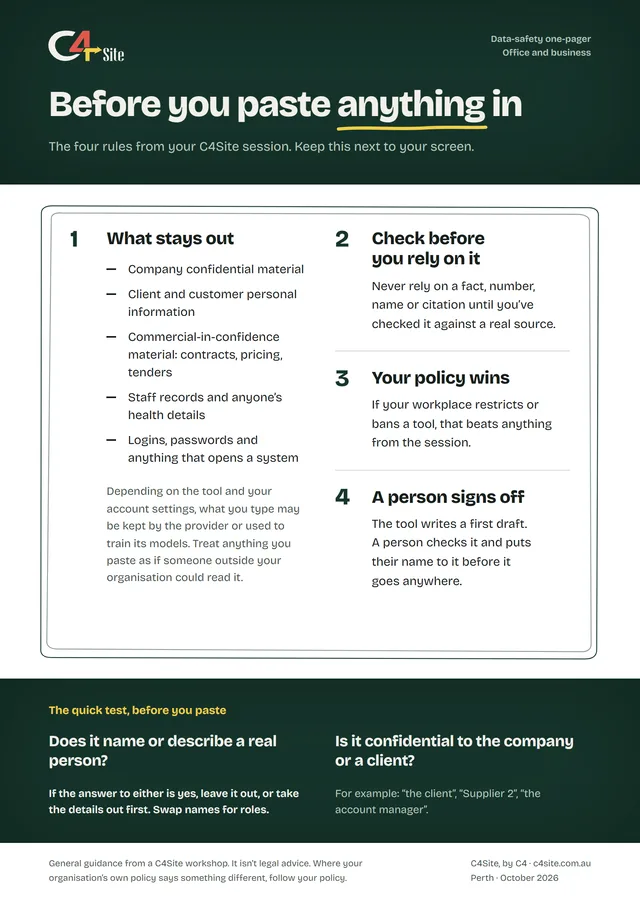
- Does it name or describe a real person?
- Is it confidential to the company or a client?
If the answer to either is yes, leave it out, or take the details out first. Swap names for roles: “the client”, “Supplier 2”, “the account manager”.
What stays out
- Company confidential material
- Client and customer personal information
- Commercial-in-confidence material: contracts, pricing, tenders
- Staff records and anyone’s health details
- Logins, passwords and anything that opens a system
Depending on the tool and your account settings, what you type may be kept by the provider or used to train its models. Where your practice restricts a tool, that beats anything from the session.
A rough guide to the morning.
What we aim for: your team speeds up one task they do every week, without putting anything sensitive at risk.
This is the plan we start from. Your answers to the questionnaire and a short call change it to fit your team.
In a session, we teach on whichever tool your practice has approved. See the tools we work with
9:00 to 9:15
Everyone gets signed in, and nobody’s first try happens in front of the room.
- 9:00 The house rule Until we’ve covered data safety, nothing real goes into the tool. Everyone works from a practice file about Marri Lane Advisory, a made-up practice.
- 9:04 A first message Everyone signs in and sends one harmless message, like asking for three names for a goldfish.
- 9:09 One sentence each What do you use AI for at work now? “Nothing” is a fine answer.
9:15 to 9:45
The room can say in one sentence how the tool writes, and why sounding sure tells you nothing.
- 9:15 Finish my sentence Your team finishes a half sentence out loud, then watches a tool do the same thing, one likely word at a time.
- 9:20 Sure, and wrong Answers from our own published test, read beside their sources. The right ones and the wrong ones sound the same.
- 9:28 Good at, bad at Two columns on the whiteboard, filled in by the room.
- 9:35 The junior The picture we use all morning: an eager junior who almost never says “I don’t know”. You’re the editor.
- 9:40 One bad prompt We type a lazy prompt on the screen, “Write an email to a client about the delay.”, and leave the result broken to fix later.
9:45 to 10:30
Every person gets one small win, and catches one thing that needed checking.
- 9:45 Pick a job Each person takes the job closest to their own: an email chasing a missing document, a summary of a client meeting, or a checklist for year end.
- 9:48 Do the job Each person asks the tool for it in their own words. No coaching yet.
- 10:03 Check it against the file A list of facts sits under each job. Tick what the tool got right, and write down anything it added or changed.
- 10:13 What happened Hands up. What did it add? What did it get wrong? Did the made-up parts sound any less sure?
- 10:25 A second job For anyone who finishes early.
10:30 Break 15 minutes
10:45 to 11:15
Everyone can run the two-question test without looking at the sheet.
- 10:45 Why this morning was safe Because none of it was real. That’s the only reason.
- 10:48 The card sort In pairs: ten things from a practice’s week, sorted into fine to paste, only after changes, and never. Then the room votes on each.
- 11:00 Where it goes We look up what your tool keeps on your plan, and everyone finds that setting in their own account.
- 11:07 Your policy wins If your workplace has a written rule on AI, it beats anything we say. If it doesn’t, we show a free one-page policy to start from.
- 11:12 A person signs off The tool writes a first draft. A person checks it and puts their name to it. From here the room can use its own work, if it passes the two questions.
Three of the ten cards, and where they go.
- A spreadsheet formula that isn’t working, with the figures taken out Fine to paste
- A draft reply to a client, with their name taken out Only after changes
- A client’s name, address and tax file number Never
Your professional obligations and your practice’s policy beat anything from the session.
11:15 to 12:00
Everyone leaves with one prompt of their own that works, written into their pack.
- 11:15 The four levers Context, examples, specificity and iteration, each shown on a real prompt from the pack.
- 11:23 Fix one together A first prompt from the room goes on the screen. The room calls the changes.
- 11:33 Write your own A prompt for a job you do every week, tried on your own work if it passes the two questions. If you’re not sure, the practice file is still there.
- 11:50 The swap test Swap with a partner. Whatever they have to ask you belongs in the prompt.
- 11:57 The lever for later Show the tool something good you’ve already written, and ask for one like it.
12:00 to 12:20
Each person names one weekly task, and when they’ll try it.
- 12:00 One task, one habit One job you do every week, tied to a day you already do it.
- 12:06 Tell your partner Said out loud.
- 12:09 The wall Every task goes on a sticky note on the wall. You get a photo of it that afternoon.
- 12:14 Two questions for us How often you use AI, and how sure you are about what’s safe to paste. We ask again a month later.
- 12:17 Close A certificate of attendance each, and one last question.
12:20Finish
On a full day: the afternoon
On a full day, the afternoon is your own recurring tasks: you build a routine you keep, written up in your own words.
- Your own tasks 60 minutes Bring a recurring task from your role. We build the prompts against it with you.
- Break 15 minutes
- Build a workflow you keep 45 minutes A drafting template or a summarise-then-check routine, written up in your own words.
- Your questions 30 minutes Your real situations and the edge cases.
- The pack 15 minutes Back through the pack: the prompts, the one-pager and the workflows you built.
What your team keeps.
Printed and handed out on the day.
Tap the folder to open it.
- The prompt pack Six prompts to copy and adapt, each with the check that goes with it, and two pages for their own.
- The data-safety one-pager Four rules and a two-question test, for next to the screen.
On a full day they also keep the workflows they built, written up in their own words.
The jobs we practise on: replying to an email, turning rough notes into a document, summarising a long thread or report, a spreadsheet formula, explaining something before you act on it, and tightening your own draft.
From the library.
Checked at the source, and free to read before you book anything.
- Article
Whose Number Is It? The AI Figures We Checked
How a figure about Australians and AI turned out to be the global one, and how we found out.
- Article
The One-Page AI Policy Your Business Needs
A short AI policy people will actually read, free to take and adapt.
- Article
The AI Indemnity You Already Have
Read this before paying for cover you might already have.
- Article
Open Weight Is Not Open Source
What a model’s licence lets you do, before you run it yourself.
- Activity
Would you paste this?
Sort everyday things into fine, only with changes, or never, and leave with your own list.
- Activity
An agent at work
Watch an AI agent do an everyday job across your apps, and see where it stops for you.
Bring AI into the practice carefully.
A workplace quote depends on people in the room, half day or full, where you are. It comes to one fixed price.
Workplace training is quoted per team. Tell us about your team and you’ll have one fixed price after a short call.
Nothing we teach is financial, tax or legal advice. Your professional obligations still apply, and no AI output should be relied on unchecked. All prices are in AUD. We aren’t registered for GST, so no GST is added.