Skip to content

Practical AI for the everyday work week.

Hands-on training for office and business teams. Your team learns to use AI on the real work in front of them, and to keep company and client information safe.

Half day or full day, at your office anywhere in Perth.

The same email, asked two ways.

Most of us start with a prompt like the first one. The room fixes it together, then everyone does the same to one of their own. This page is in the pack they keep.

From the prompt pack Office and business

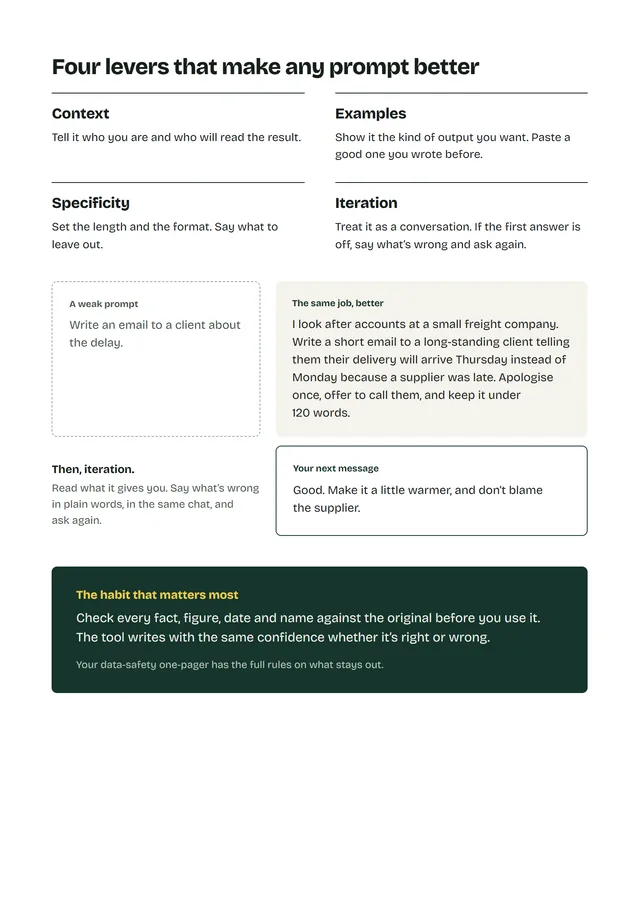
A weak prompt

Write an email to a client about the delay.

Which client? What delay? How long?

The same job, better

  1. I look after accounts at a small freight company.

    Context who’s asking

  2. Write a short email to a long-standing client telling them their delivery will arrive Thursday instead of Monday because a supplier was late.

    Context who reads it, and what went wrong

  3. Apologise once, offer to call them, and keep it under 120 words.

    Specificity what to do, how long

Then, in the same chat

Good. Make it a little warmer, and don’t blame the supplier.

Iteration say what’s wrong, ask again

Before it goes anywhere. Check every fact, figure, date and name against the original before you use it. The tool writes with the same confidence whether it’s right or wrong.

The fourth lever is examples. Paste in a good email you wrote before and ask for one like it.

Two questions before anything goes in.

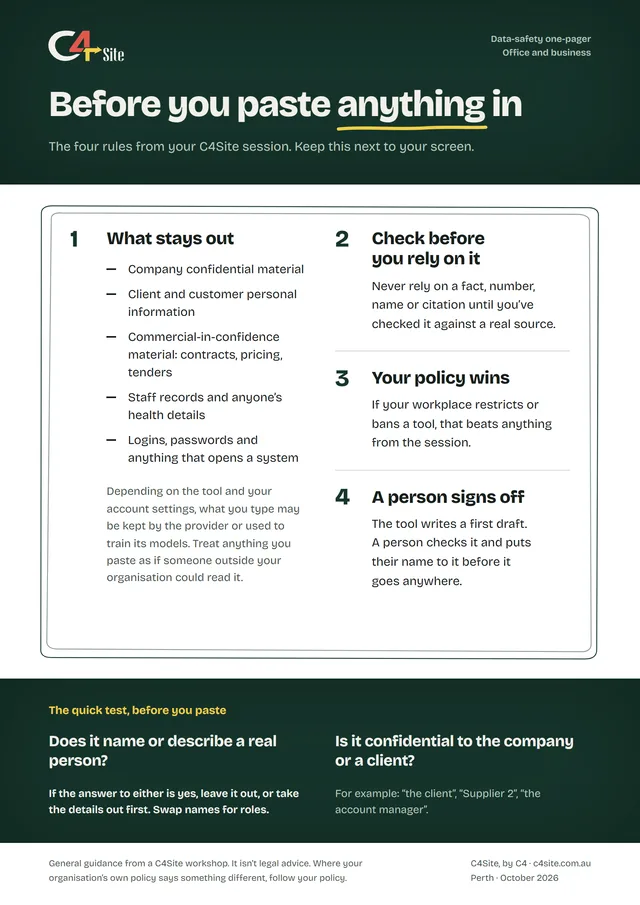
  1. Does it name or describe a real person?
  2. Is it confidential to the company or a client?

If the answer to either is yes, leave it out, or take the details out first. Swap names for roles: “the client”, “Supplier 2”, “the account manager”.

What stays out

  • Company confidential material
  • Client and customer personal information
  • Commercial-in-confidence material: contracts, pricing, tenders
  • Staff records and anyone’s health details
  • Logins, passwords and anything that opens a system

Depending on the tool and your account settings, what you type may be kept by the provider or used to train its models. Where your workplace restricts a tool, that beats anything from the session.

How the day runs.

What we aim for: your team speeds up one task they do every week, without putting anything sensitive at risk.

This is a starting point. We’ll shape the day around your team’s work and what you want from it.

In a session, we teach on whichever tool your workplace has approved. See the tools we work with

Half day

About 3.5 hours

The morning, and the whole of a half day:

  1. Setup 15 minutes Devices, wifi and tool access, and everyone gets their pack. Then a sentence each on what the room uses AI for now.
  2. What these tools are 30 minutes How the tool writes, by predicting likely text. What it’s good at, and where it’s confidently wrong.
  3. First hands-on 45 minutes One real task each from this week’s work: an email, a set of notes, a summary.
  4. Break 15 minutes
  5. Prompting that works 45 minutes A weak prompt from the room, fixed together. Everyone rewrites one of their own and keeps it.
  6. Data safety 30 minutes Company confidential, client data and commercial-in-confidence. Your own policy wins.
  7. Making it stick 20 minutes One or two weekly tasks to use it on, tied to a habit you already have.
Full day

About 6 hours

After lunch, on a full day:

  1. Your own tasks 60 minutes Bring a recurring task from your role. We build the prompts against it with you.
  2. Break 15 minutes
  3. Build a workflow you keep 45 minutes A drafting template or a summarise-then-check routine, written up in your own words.
  4. Your questions 30 minutes Your real situations and the edge cases.
  5. The pack 15 minutes Back through the pack: the prompts, the one-pager and the workflows you built.

What your team keeps.

Printed and handed out on the day.

Cover of the C4Site prompt pack for office and business: Prompts for the everyday work week.

1 of 3

The prompt pack

Six prompts to copy and adapt, each with the check that goes with it, and two pages for their own.

  1. The prompt pack Six prompts to copy and adapt, each with the check that goes with it, and two pages for their own.
  2. Inside the pack The four levers and the worked example above, on paper.
  3. The data-safety one-pager Four rules and a two-question test, for next to the screen.

On a full day they also keep the workflows they built, written up in their own words.

The jobs we practise on: replying to an email, turning rough notes into a document, summarising a long thread or report, a spreadsheet formula, explaining something before you act on it, and tightening your own draft.

We also build automations that do some of this work on their own. See AI automation

Get your team using AI safely.

A workplace quote depends on people in the room, half day or full, where you are. It comes to one fixed price.

Workplace training is quoted per team. Tell us about your team and you’ll have one fixed price after a short call.

All prices are in AUD. We aren’t registered for GST, so no GST is added.