We run AI training for real estate agencies.
The workplace session is built around an agency’s week. Each role practises on its own work, and tenant and client details stay out of the tools.
We come to your office anywhere in Perth for a half day or a full day.
We practise on an agency like yours.
The exercises run on Harker Lowe Property, a made-up agency in a made-up suburb. It’s invented, so nothing real goes into a demo.
Sales take the inspection notes. Property management take a tenant’s email. Admin and operations take a long thread about a photo shoot.
Harker Lowe PropertyInvented for our exercises
The practice file
- Inspection notes for a new listing
- A tenant’s email
- Monday meeting notes
- A long thread about a photo shoot
- Open-home numbers for an owner update
The first prompt the room fixes: “Write a listing for 14 Banksia Rise, Marri Bend.”
Ask two questions before anything goes in.
- Does it name or describe a real person?
- Is it confidential to the company or a client?
The room sorts ten things from an agency’s week into three piles. Here are three of them:
- A listing that’s already live on the portals. Fine to paste.
- A tenant’s complaint you want help answering. Only after changes.
- A rental application, with the applicant’s ID and payslips. Never.
What stays out
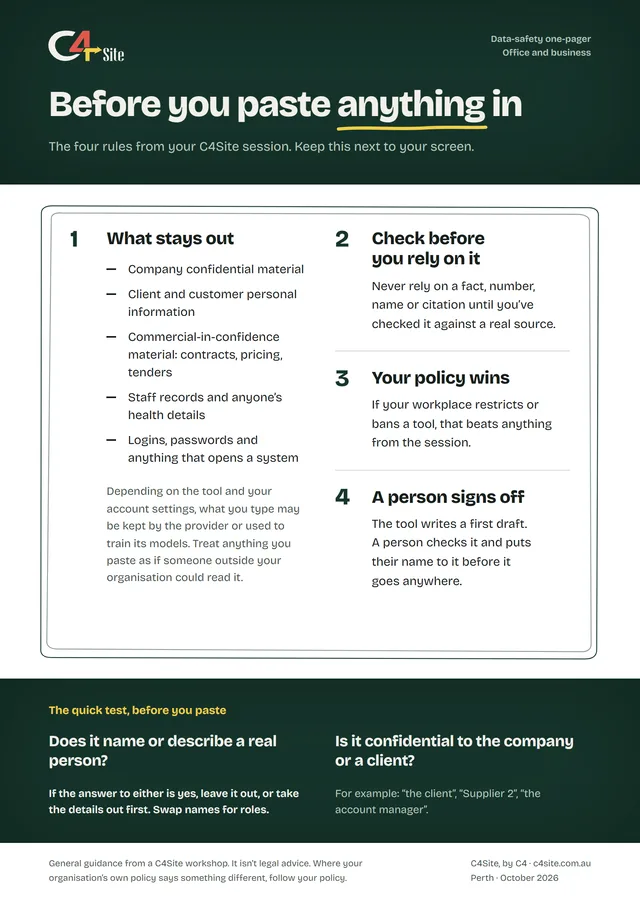
- Company confidential material
- Client and customer personal information
- Commercial-in-confidence material: contracts, pricing, tenders
- Staff records and anyone’s health details
- Logins, passwords and anything that opens a system
Depending on the tool and your account settings, what you type may be kept by the provider or used to train its models. Your agency’s policy and the rules you work under beat anything from the session.
The morning runs roughly like this.
We aim for your team to speed up one task they do every week without putting anything sensitive at risk.
This is the plan we start from. Your answers to the questionnaire and a short call change it to fit your team.
In a session, we teach on whichever tool your agency has approved. See the tools we work with
9:00 to 9:15
Everyone gets signed in, and nobody’s first try happens in front of the room.
- 9:00 The house rule Until we’ve covered data safety, nothing real goes into the tool. Everyone works from a practice file about Harker Lowe Property, a made-up agency in a made-up suburb.
- 9:04 A first message Everyone signs in and sends one harmless message, like asking for three names for a goldfish.
- 9:09 One sentence each What do you use AI for at work now? “Nothing” is a fine answer.
9:15 to 9:45
The room can explain in one sentence how the tool writes and why sounding sure tells you nothing.
- 9:15 Finish my sentence Your team finishes a half sentence out loud. Then they watch a tool do the same thing one likely word at a time.
- 9:20 Sure, and wrong We read answers from our own published test beside their sources. The right ones and the wrong ones sound the same.
- 9:28 Good at, bad at The room fills in two columns on the whiteboard.
- 9:35 The junior All morning we picture the tool as an eager junior who almost never says “I don’t know”. You’re the editor.
- 9:40 One bad prompt We type a lazy prompt on the screen, “Write a listing for 14 Banksia Rise, Marri Bend.”, and leave the result broken to fix later.
9:45 to 10:30
Every person gets one small win, and catches one thing that needed checking.
- 9:45 Pick a job Sales take the inspection notes. Property management take a tenant’s email. Admin and operations take a long thread about a photo shoot.
- 9:48 Do the job Each person asks the tool for it in their own words, and we don’t coach yet.
- 10:03 Check it against the file A list of facts sits under each job. Tick what the tool got right, and write down anything it added or changed.
- 10:13 What happened Hands up. What did it add? What did it get wrong? Did the made-up parts sound any less sure?
- 10:25 A second job There’s a second job for anyone who finishes early.
10:30 Break 15 minutes
10:45 to 11:15
Everyone can run the two-question test without looking at the sheet.
- 10:45 Why this morning was safe It was safe because none of it was real, and that’s the only reason.
- 10:48 The card sort In pairs, people sort ten things from an agency’s week into fine to paste, only after changes, and never. Then the room votes on each.
- 11:00 Where it goes We look up what your tool keeps on your plan, and everyone finds that setting in their own account.
- 11:07 Your policy wins If your workplace has a written rule on AI, it beats anything we say. If it doesn’t, we show a free one-page policy to start from.
- 11:12 A person signs off The tool writes a first draft. A person checks it and puts their name to it. From here the room can use its own work, if it passes the two questions.
Here are three of the ten cards and where they go.
- A listing that’s already live on the portals Fine to paste
- A tenant’s complaint you want help answering Only after changes
- A rental application, with the applicant’s ID and payslips Never
Your agency’s policy and the rules you work under beat anything from the session.
11:15 to 12:00
Everyone leaves with one prompt of their own that works, written into their pack.
- 11:15 The four levers We show each lever on a real prompt from the pack: context, examples, specificity and iteration.
- 11:23 Fix one together A first prompt from the room goes on the screen. The room calls the changes.
- 11:33 Write your own You write a prompt for a job you do every week and try it on your own work if it passes the two questions. If you’re not sure, the practice file is still there.
- 11:50 The swap test Swap with a partner. Whatever they have to ask you belongs in the prompt.
- 11:57 The lever for later Show the tool something good you’ve already written, and ask for one like it.
12:00 to 12:20
Each person names one weekly task and when they’ll try it.
- 12:00 One task, one habit You pick one job you do every week and tie it to a day you already do it.
- 12:06 Tell your partner You say it out loud.
- 12:09 The wall Every task goes on a sticky note on the wall. You get a photo of it that afternoon.
- 12:14 Two questions for us We ask how often you use AI and how sure you are about what’s safe to paste. Then we ask again a month later.
- 12:17 Close Everyone gets a certificate of attendance, and there’s one last question.
12:20Finish
On a full day: the afternoon
On a full day, the afternoon is for your own recurring tasks. You build a routine you keep and write it up in your own words.
- Your own tasks 60 minutes Bring a recurring task from your role. We build the prompts against it with you.
- Break 15 minutes
- Build a workflow you keep 45 minutes You build a drafting template or a summarise-then-check routine and write it up in your own words.
- Your questions 30 minutes We work through your real situations and the edge cases.
- The pack 15 minutes We go back through the pack: the prompts, the one-pager and the workflows you built.
What your team keeps.
We print it and hand it out on the day.
Tap the folder to open it.
- The prompt pack It has six prompts to copy and adapt, each with the check that goes with it, and two write-in pages for your team’s own work.
- The data-safety one-pager It has four rules and a two-question test to keep next to the screen.
On a full day they also keep the workflows they built, which they write up in their own words.
These are the jobs we practise on: replying to an email, turning rough notes into a document, summarising a long thread or report, a spreadsheet formula, explaining something before you act on it, and tightening your own draft.
Bring AI into the agency carefully.
A workplace quote depends on people in the room, half day or full, and where you are. It comes to one fixed price.
Workplace training is quoted per team. Tell us about your team and you’ll have one fixed price after a short call.
Nothing we teach is legal advice. Your agency’s policy and the rules you work under beat anything from the session. No AI output should be relied on unchecked. All prices are in AUD. We aren’t registered for GST, so no GST is added.