Skip to content

LEAP and AI.

Its own AI is Matter AI, with LawY for legal research, both included in every LEAP subscription. We found no official link from LEAP to ChatGPT, Claude, Copilot or Gemini.

Checked 17 October 2026 against 66 sources, each the vendor’s own page. See them all, or what’s changed since.

The short version

  • LEAP’s AI is built into the practice management software. Matter AI answers questions from the documents, emails and notes saved in a matter. LawY does legal research and can send an answer to a lawyer to check.23
  • LEAP says Matter AI, LawY, AI Prompts, Generator and AutoTime come with every LEAP subscription at no extra cost. AI Paralegal is the exception: it bills its work to your clients and LEAP takes a cut.15
  • Matter AI lets you choose the model for each task. LEAP’s help centre lists two GPT 5.4 models and two Claude 4.6 models.34
  • LEAP stores Australian firms’ data in AWS Sydney. When Matter AI is used, LEAP’s Trust Center says relevant matter data goes to its supplier Corto’s infrastructure in the United States for processing.912
  • LEAP’s contract says it won’t use your matter data to train or improve its AI services. Its security page says client data isn’t used to train third-party foundation models without your explicit consent.149
  • LEAP’s help centre says you can’t switch LawY or Matter AI off for a particular user.35
  • We found no official connection between LEAP and ChatGPT, Claude, Microsoft Copilot or Google Gemini.54565861
  • LawY has its own connector for Claude and ChatGPT. It needs a paid LawY account, and nothing we read says it reaches the matters in LEAP.26
  • LEAP documents a Zapier integration that can create records in LEAP, and offers an API through its developer console. Its terms otherwise ban automated access to LEAP.455114

The plans

LEAP is legal practice management software from an Australian company founded in Sydney in 1992. It covers matters, documents, email, time recording, billing and trust accounting in one system.13

LEAP’s page written for AI assistants says it’s for Australian law firms and conveyancing practices with 1 to 300 users, from sole practitioners to the smaller end of enterprise.13

LEAP doesn’t publish prices. It’s sold per user per month for a set term, and LEAP says pricing depends on firm size, jurisdiction and requirements.13

ProductWho it’s forAI includedPrice
LEAPSmall and mid-sized firmsMatter AI, LawY, AI Prompts, Generator and AutoTime, at no extra costNot published; per user per month
LEAP EnterpriseMid-sized and larger firmsThe same legal AI, plus an Open API and integrations including ZapierNot published
AI Paralegal (family law)Firms that bill its work to clientsSources and files disclosure documents, drafts first documentsRevenue share or a cost per item, depending on billing basis
LawY on its own (outside LEAP)Anyone who buys it directlyFull LawY suite, including its own connector for Claude and ChatGPT$89 per user per month plus local tax

Sources for the table:113505432226

  • LEAP Enterprise is LEAP configured for mid-sized and larger firms. LEAP says it combines enterprise accounting with “the innovative productivity tools and Legal AI already trusted in LEAP practice management”.1366
  • LawY says LEAP users get LawY’s research feature with their LEAP subscription. LawY’s pricing page sells the full suite as a separate subscription.2522
  • LawY’s pricing page doesn’t say which currency the $89 is in.22

What’s built in

Matter AI Reads the documents, emails and attachments saved in a LEAP matter, including scanned PDFs and handwritten notes, and answers questions with references to the files it used.
What it does
  • Reads the documents, emails and attachments saved in a LEAP matter, including scanned PDFs and handwritten notes, and answers questions with references to the files it used.234
  • Summarises documents or folders, compares documents for inconsistencies, drafts emails and documents, and answers questions about the matter’s financial transactions.234
  • Turns an answer into a first draft in Word, PDF, Excel or PowerPoint and saves it to the matter.2
  • The All tab combines matter facts with LawY legal research and shows its reasoning step by step.234
  • Matter Summary builds a summary of the whole matter with inline references, and adds a chronology for some matter types.37
  • Matter AI chat can send a response to Word or Outlook.34
Where to find it
  • Open a matter, go to the Details & Correspondence tab and click Matter AI Chat in the LEAP AI ribbon.34
  • You can also right-click a document and choose Matter AI - New Document Chat (on the web: LEAP AI > Matter AI - New Document Chat).34
  • Pick the model from the dropdown below Ask me anything: GPT 5.4 - Instant, GPT 5.4 - Thinking, Claude 4.6 Sonnet or Claude 4.6 Opus.34
  • Document Status shows which documents have loaded, failed or been excluded. You can exclude a document from future answers.234
Which plans have it
  • Included in every LEAP subscription at no extra cost, including Matter AI for Word and the model selector.2
  • Corto’s terms for Matter AI say Corto “retains the right to charge fees” and would tell you first.18
What happens to your data
  • LEAP’s terms list “Matter AI powered by Corto” as a third-party product, with its own terms shown in the Matter AI window.15
  • LEAP’s legal page names “Corto Matter AI” among the suppliers whose terms apply on top of LEAP’s own.17
  • Corto’s published Matter AI terms, current from 20 March 2026, say it “uses third-party artificial intelligence services, including OpenAI’s large-scale language-generation model and others”.18
  • The first time someone uses Matter AI or Matter Summary, the firm has to accept Corto’s terms and privacy policy.37
  • LEAP’s Trust Center says matter data stays in your regional AWS location, but “When Matter AI is used, relevant matter data is sent to Corto’s infrastructure in the United States for processing”.12
  • Corto’s security page says it’s hosted on AWS in the Oregon region (us-west-2). It says client data isn’t used to train or tune AI models.20
  • LEAP’s Word add-in article says the first time you use Matter AI “it will ingest the documents within all your LEAP matters”.36
  • Matter AI chat history is visible only to the person who wrote it. Colleagues opening the same matter can’t see it.34
  • Feedback you give with the thumbs buttons is reviewed by LEAP’s team.34
In Australia
  • Described on LEAP’s Australian site and in its Australian help centre.234
  • The processing location for Matter AI is the United States, per LEAP’s Trust Center.12
AI Prompts, Matter AI for Word and Generator AI Prompts are lawyer-written instructions that draft documents such as affidavits, statutory declarations and briefs to counsel from the matter’s contents. LEAP says there are over 200.
What it does
  • AI Prompts are lawyer-written instructions that draft documents such as affidavits, statutory declarations and briefs to counsel from the matter’s contents. LEAP says there are over 200.236
  • Matter AI for Word is a Word add-in with a chat mode and a prompt mode.36
  • Generator finds and drafts documents from your precedents, past correspondence, By Lawyers precedents and LawY answers.41
Where to find it
  • In a matter, click Forms & Precedents, then search the Browse tab for “prompt”. Prompts open in Word with the add-in on the right.436
  • If the add-in is missing, in Word go to File > Account > Get Add-ins, search for Matter AI and click Add.36
  • Generator sits in the Generator tab of Forms & Precedents, or under LEAP AI in the Actions pane on the web.41
  • Microsoft’s Marketplace lists the Matter AI add-in from LEAP Legal Software. It “Can read and make changes to your document” and “Can send data over the Internet”.53
Which plans have it
  • No extra fee. Prompts and Matter AI are part of the LEAP subscription.36
  • Prompts are only available for certain matter types.36
What happens to your data
  • The first time you use Generator, you choose whether to include matter context, which may include personal information. You can change this in the settings cog.41
  • The Word add-in article says Matter AI “does not yet read audio, visual, or video files”.36
In Australia
  • Described in LEAP’s Australian help centre.36
Pathways (next-step suggestions, tasks and an agent) Reads a matter’s fields, cards, critical dates, tasks and fees, then suggests prioritised next steps with a completion estimate.
What it does
  • Reads a matter’s fields, cards, critical dates, tasks and fees, then suggests prioritised next steps with a completion estimate.387
  • Pathways Tasks gives a board of tasks across all matters. Firm admins get a whole-firm view.38
  • Pathways Agent can draft documents, do research and prepare file notes.38
Where to find it
  • Open a matter, go to Details & Correspondence and click Pathways in the LEAP AI section of the ribbon.38
  • For each suggestion you choose Add, Mark as Done or Dismiss.38
  • Each person can turn Enable Pathways Agent on or off in My Settings. Firm settings need LEAP Firm Admin access.38
Which plans have it
  • LEAP’s Pathways page and help article don’t mention any extra charge.738
What happens to your data
  • When enough users dismiss the same suggestion for the same reason, LEAP updates the underlying guide “as more firms use Pathways”.38
In Australia
  • LEAP says Pathways covers all matter types in every jurisdiction and applies state and territory requirements.7
LEAP Risk and Matter Issues LEAP Risk lists risks typical for the matter type and uses Matter AI to summarise the evidence for and against each one. Matter Issues ranks issues in a family law file and suggests actions.
  • What it does: LEAP Risk lists risks typical for the matter type and uses Matter AI to summarise the evidence for and against each one. Matter Issues ranks issues in a family law file and suggests actions.4039
  • Where to find it: The LEAP Risk icon in the LEAP AI tab, and Matter Issues in the LEAP ribbon.4039
  • Which plans have it: LEAP Risk is switched on automatically for certain family law, estates, property and personal injury matter types. Matter Issues covers seven family law matter types.4039
  • What happens to your data: Both run through Matter AI, so the Matter AI data handling above applies. That’s our inference from how LEAP describes them.4039
  • In Australia: Both are described in LEAP’s Australian help centre.4039
AI Paralegal (family law) Names, files and indexes financial disclosure documents, and drafts the financial disclosure schedule, balance sheet and Application for Consent Orders.
What it does
  • Names, files and indexes financial disclosure documents, and drafts the financial disclosure schedule, balance sheet and Application for Consent Orders.5
  • Contacts your client by text message and email with a secure link, works through each category of document with them, and chases missing items for about four weeks.42
  • Can share disclosure with the other side by secure link. Anyone at the other firm with the same email domain can open it once they have the link.42
Where to find it
  • Click AI Paralegal in the matter ribbon. Firm settings sit under LEAP Main Menu > Settings > Apps > AI Paralegal Settings.4243
Which plans have it
  • LEAP’s product page says your firm keeps 70% of the revenue the AI Paralegal generates and LEAP receives 30%.5
  • The billing article says time-based work is billed at a charge-out rate you set, and the Cost to you screen shows LEAP’s cost per item.43
  • None of the pages we read publish the per-item costs.543
What happens to your data
  • Tax returns and notices of assessment are obtained “through our specialist accounting firm”.42
  • Every view of a shared link is logged with the viewer’s email address and time.42
In Australia
  • Available on family law matter types.42
AutoTime and Ruffle AutoTime records time spent drafting, emailing and on calendar work in the background. LEAP’s Outlook page calls it AI-powered time recording.
  • AutoTime records time spent drafting, emailing and on calendar work in the background. LEAP’s Outlook page calls it AI-powered time recording.68
  • Ruffle extracts transactions from bank statements for family law work. When a merchant isn’t in its database, it “use[s] AI to attempt categorisation”.44
  • Ruffle’s help article says AI processing runs on a “no retention” basis and the output isn’t used for training.44
  • LEAP reports that in its testing 98% of transactions were extracted without error and 0.2% had a wrong amount.44
  • Both are included in the LEAP subscription.144
AI apps in the LEAP Marketplace The Australian LEAP Marketplace listed 48 apps on 17 October 2026.
  • The Australian LEAP Marketplace listed 48 apps on 17 October 2026.48
  • AI-related apps include Chronology, LEAP Chronology, LitigationMap (which suggests court orders using Matter AI) and Court Forms + (which has an AI chat).48
  • Third-party listings include AI Paralegal Conveyancing by InfoTrack and Settify Connect, which describes using AI to gather client details.48
  • None of the listings name ChatGPT, Claude, Copilot or Gemini.48

Connect another AI

In plain words, a connector lets a chat assistant such as Claude or ChatGPT look things up in another app, and sometimes make changes there. Anthropic lists each one in its Connectors directory with a Verified or Community label.55

LEAP’s own AI uses OpenAI and Anthropic models inside LEAP. Using them doesn’t link LEAP to your own ChatGPT or Claude account.234

ChatGPT and LEAP

No official link. A separate LawY connector exists.

ChatGPT and LEAP

Official? No official connection found. LEAP isn’t on OpenAI’s public plugin page, including its Legal category.
  • No official connection found. LEAP isn’t on OpenAI’s public plugin page, including its Legal category.56
What it can see and do Nothing official.
  • Nothing official.56
What you need, steps, disconnecting Not applicable.
  • Not applicable.56
Limits Matter AI’s GPT models run inside LEAP under Corto’s terms. Using them doesn’t connect your own ChatGPT account.
  • Matter AI’s GPT models run inside LEAP under Corto’s terms. Using them doesn’t connect your own ChatGPT account.1834
  • The automated-access ban in LEAP’s terms applies here too.14

Claude and LEAP

No official link. A separate LawY connector exists.

Claude and LEAP

Official? No official connection found. LEAP isn’t among the connectors on Anthropic’s public directory page.
  • No official connection found. LEAP isn’t among the connectors on Anthropic’s public directory page.54
  • A search of LEAP’s Australian help centre for “Claude” found only articles about Matter AI’s model choices.6434
What it can see and do Nothing official.
  • Nothing official.54
  • LawY’s separate connector can reach matters and documents held in a paid LawY account. See “LawY’s own connector” below.26
What you need, steps, disconnecting Not applicable.
  • Not applicable.54
Limits LEAP’s terms say you must not use LEAP “via mechanical, programmatic, robotic, scripted or any other automated means” or scrape it, except as the agreement expressly permits.
  • LEAP’s terms say you must not use LEAP “via mechanical, programmatic, robotic, scripted or any other automated means” or scrape it, except as the agreement expressly permits.14
  • Our reading: that rules out home-made connectors and AI browser agents working in LEAP. This isn’t legal advice.

Copilot and LEAP

No official link.

Microsoft Copilot and LEAP

Official? No official connection found. LEAP isn’t among Microsoft’s federated Copilot connectors, last updated 16 October 2026.
  • No official connection found. LEAP isn’t among Microsoft’s federated Copilot connectors, last updated 16 October 2026.58
  • A search of LEAP’s Australian help centre for “Copilot” returned no results.47
What LEAP does offer in Microsoft 365 LEAP for Outlook, LEAP for Word and the Matter AI add-in are listed on Microsoft’s Marketplace. None of LEAP’s listings is a Copilot agent.
  • LEAP for Outlook, LEAP for Word and the Matter AI add-in are listed on Microsoft’s Marketplace. None of LEAP’s listings is a Copilot agent.6553
  • Linking your Microsoft 365 account with LEAP lets you share invoices from your own work email and manage appointments and tasks.8
  • The LEAP Connector for Power BI reads LEAP data through LEAP’s API gateway. It needs a LEAP Admin account and a Power BI Pro or Premium licence.46
Limits Microsoft’s connector list includes “Leap (Independent Publisher)”. It belongs to an image and music generator at tryleap.ai, which has nothing to do with LEAP Legal Software.
  • Microsoft’s connector list includes “Leap (Independent Publisher)”. It belongs to an image and music generator at tryleap.ai, which has nothing to do with LEAP Legal Software.5960

Gemini and LEAP

No official link.

Google Gemini and LEAP

Official? No official connection found. LEAP isn’t on Google’s list of Connected Apps for Gemini.
  • No official connection found. LEAP isn’t on Google’s list of Connected Apps for Gemini.61
What it can see and do Nothing official.
  • Nothing official.61
Limits LawY uses Google Gemini models behind the scenes. That’s inside LawY, and it isn’t a connection to your Gemini app.
  • LawY uses Google Gemini models behind the scenes. That’s inside LawY, and it isn’t a connection to your Gemini app.21

Other routes

Developer tools, automation tools and app stores.

LawY’s own connector (a separate LawY subscription)

Official? Yes, for LawY. LawY’s help centre describes “LawY Connected Agents”, a connector that links “your firm’s matters and documents” in LawY to agents such as ChatGPT and Claude.
  • Yes, for LawY. LawY’s help centre describes “LawY Connected Agents”, a connector that links “your firm’s matters and documents” in LawY to agents such as ChatGPT and Claude.26
  • We didn’t find LawY on Anthropic’s or OpenAI’s public directory pages, though LawY’s article says to find it there.545626
What it can see and do Lists matters, searches and reads documents, creates new documents and updates existing ones. It can also create folders and move documents if your access allows.
  • Lists matters, searches and reads documents, creates new documents and updates existing ones. It can also create folders and move documents if your access allows.26
  • It “cannot delete anything”. Updates are refused if the document changed since the agent read it.26
  • Every action is recorded in the Activity log in LawY’s Connected Agents panel.26
What you need A paid LawY account with Connected Agents switched on, and access set up by a LawY Firm Administrator.
  • A paid LawY account with Connected Agents switched on, and access set up by a LawY Firm Administrator.26
  • A Claude or ChatGPT account.26
  • Nothing we read says this connector reaches matters stored in LEAP. LawY’s LEAP integration is described as research only.2225

Steps to connect (LawY help centre, updated 15 October 2026)

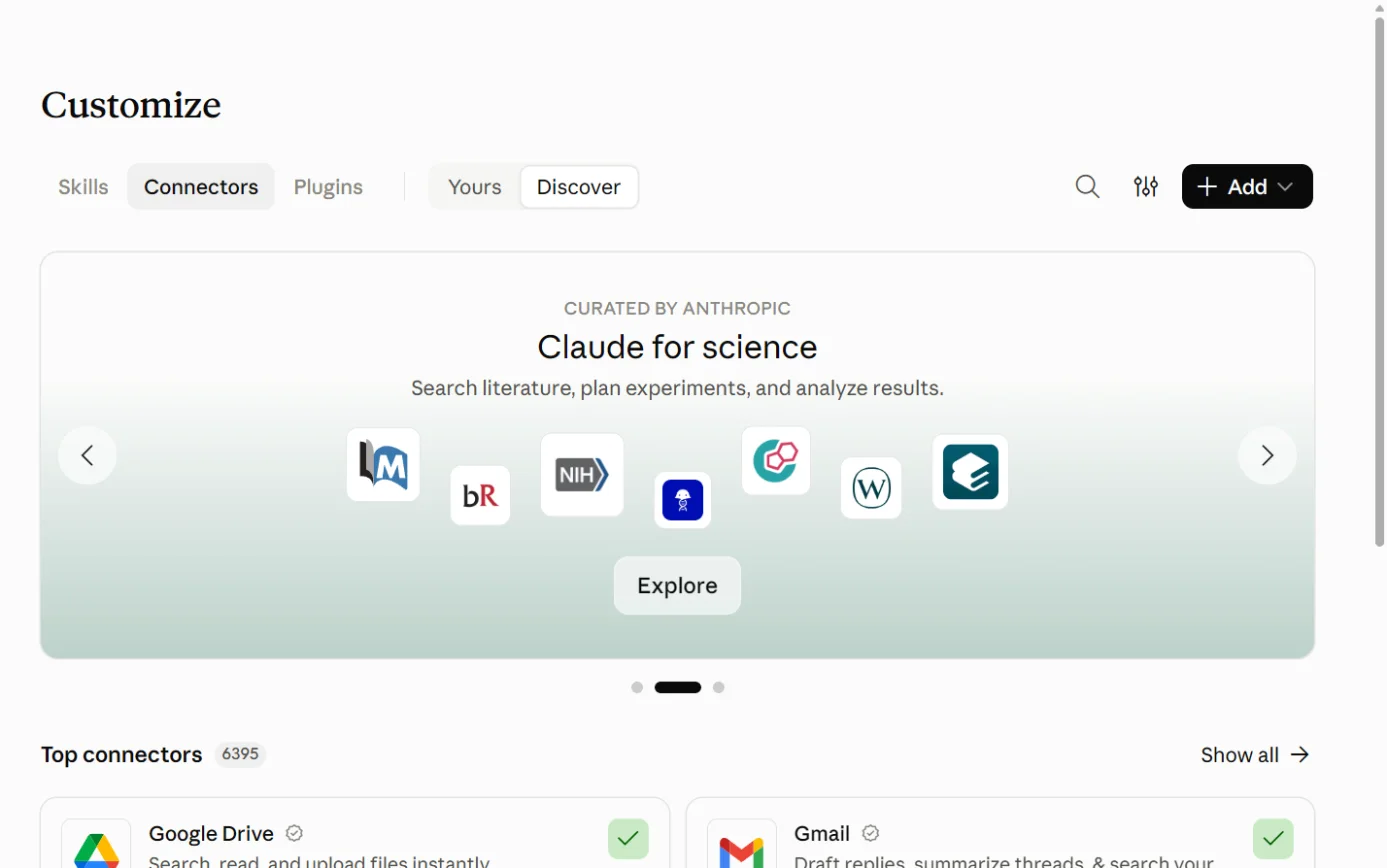
  1. Then: The LawY connector. We didn’t find LawY on Anthropic’s public directory page on 17 October 2026. Sources 2655

    Claude’s Customize page on the Connectors tab, with the Connectors tab ringed.
    Screenshot: Claude, the Connectors page under Customize, 18 October 2026.
  2. Then: Your browser opens the LawY sign-in. Source 26

    A drawing from the step’s own words. The real screen may look a little different.
  3. Then: You’re returned to Claude with your accessible LawY matters available. Source 26

    A drawing from the step’s own words. The real screen may look a little different.
  4. Then: A list of the matters your LawY access allows. The connector can create and update documents but can’t delete anything. Sources 2657

    A drawing from the step’s own words. The real screen may look a little different.

Pictures without a date are drawings from each step’s own words. The real screen may look a little different.

To disconnect In LawY’s Connected Agents panel, which suspends access straight away, or in the AI app’s connector settings.
  • In LawY’s Connected Agents panel, which suspends access straight away, or in the AI app’s connector settings.26
  • A firm administrator can block the connector for the whole firm.26
Limits When it’s switched on, “all matters and operations are enabled by default”. Administrators can then restrict matters, documents and operations.
  • When it’s switched on, “all matters and operations are enabled by default”. Administrators can then restrict matters, documents and operations.26

Zapier and LEAP (actions only)

Official? Yes. LEAP’s help centre documents the LEAP (Legal) app in Zapier.
  • Yes. LEAP’s help centre documents the LEAP (Legal) app in Zapier.45
  • LEAP Enterprise’s integrations page also names Zapier.50
What it can see and do Actions only: Search Matter, Create Matter, Search Card, Create Card, Create Comment, Create Time Entry, Create Fee and Create Cost Recovery (Expense).
  • Actions only: Search Matter, Create Matter, Search Card, Create Card, Create Comment, Create Time Entry, Create Fee and Create Cost Recovery (Expense).45
  • “LEAP doesn’t support Triggers just yet”, so a Zap has to start in another app.45
  • Zapier’s own page offers LEAP (Legal) through Zapier MCP, which lets AI tools that support MCP run those actions.62
What you need A Zapier account and a LEAP login. LEAP recommends turning on multi-factor authentication for your Zapier account.
  • A Zapier account and a LEAP login. LEAP recommends turning on multi-factor authentication for your Zapier account.45
  • Zapier says each MCP tool call uses two tasks from your Zapier plan.62

Steps to connect (LEAP help centre, 18 February 2026)

  1. Then: Your list of connected apps. Source 45

    A drawing from the step’s own words. The real screen may look a little different.
  2. Then: LEAP (Legal) in the results. Source 45

    A drawing from the step’s own words. The real screen may look a little different.
  3. Then: A permissions window to confirm. Source 45

    A drawing from the step’s own words. The real screen may look a little different.
  4. Then: A new Zap with its first step set. Source 45

    A drawing from the step’s own words. The real screen may look a little different.
  5. Then: A form of LEAP fields to map. Test each step before turning the Zap on. Source 45

    A drawing from the step’s own words. The real screen may look a little different.

Pictures without a date are drawings from each step’s own words. The real screen may look a little different.

To disconnect LEAP’s article doesn’t describe disconnecting. It covers reconnecting from App Connections in Zapier.
  • LEAP’s article doesn’t describe disconnecting. It covers reconnecting from App Connections in Zapier.45
Limits LEAP sends a notification to the staff member each time a Zapier create action runs.
  • LEAP sends a notification to the staff member each time a Zapier create action runs.45
  • LEAP’s article doesn’t mention AI or MCP. Running LEAP actions from an AI tool through Zapier MCP is Zapier’s route, and LEAP hasn’t documented it.4562

LEAP’s API and Developer Console

  • LEAP’s developer site offers REST APIs for apps that integrate with LEAP on desktop, web and mobile, through a developer program.51
  • LEAP Enterprise describes an Open API for connecting your own tools and building custom apps.50
  • The Power BI connector uses LEAP’s API gateway.46
  • We couldn’t read the API reference itself. Its pages showed only the site menu when we opened them without signing in.51
  • We found no LEAP MCP server.5154

Jobs it’s good for

  • Getting across a new file. Open Matter Summary for an overview with references and a chronology, then ask Matter AI follow-up questions.3734
  • Spotting what doesn’t match. Select several documents and ask Matter AI to compare them for inconsistencies.34
  • First drafts from the file. Run an AI Prompt for an affidavit or brief to counsel, then refine it in Word with Matter AI for Word.36
  • A research question you want checked. Ask LawY, request Deep Research, and choose lawyer verification at no extra cost.35
  • Keeping a matter moving. Use Pathways suggestions and turn the useful ones into tasks.38
  • Family law financial disclosure. Run bank statements through Ruffle, or have the AI Paralegal source and file documents, checking the costs first.444243
  • Feeding enquiries into LEAP. Use Zapier to create a card or matter from a form or spreadsheet.45
  • Firm reporting. Connect Power BI to LEAP data.46

What to watch for

Data leaves Australia when Matter AI runs

  • LEAP stores Australian firms’ data in AWS Sydney, but its Trust Center says Matter AI sends relevant matter data to Corto in the United States.912
  • The Word add-in article says Matter AI ingests documents in all your matters the first time it’s used. Taken together, documents across your matters may be processed in the US once anyone uses Matter AI. That’s our inference.3612
  • LEAP’s public sub-processor list names AWS, Salesforce, Snowflake, Vanta and Sumo Logic. It doesn’t name Corto or the AI model makers.11
  • LEAP’s security page says a sub-processor register is available for due diligence.9

Training: the promises and the fine print

  • LEAP’s terms say it won’t use matter data to improve or train its AI services.14
  • LEAP’s security page adds “without your explicit consent” to its no-training promise for third-party foundation models.9
  • LawY’s security page and its terms disagree about whether inputs can be used to train models.2123

Who can switch it off, and who can see it

  • You can’t turn LawY or Matter AI off for individual users.35
  • Matter AI chats are private to the user. LawY queries may be visible to colleagues who use LawY through the firm’s LEAP account.3424
  • LawY conversation history can’t currently be deleted.35

Confidential details in research questions

  • LEAP recommends removing personally identifiable information before sending a LawY question for verification. Verifiers are bound by confidentiality and conflict rules.1
  • LawY’s terms say any personal information you include is at your own discretion and risk.23

AI Paralegal talks to your client

  • It messages clients directly by SMS and email, and reminds them for about four weeks.42
  • Its shared links open for anyone at the other firm’s email domain.42

Check the work

  • LEAP’s terms say its AI services aren’t legal advice and a qualified lawyer should review the output before it’s relied on.14
  • Corto’s terms say outputs haven’t been reviewed for legal accuracy, and that you agree to check them before using them in any legal advice.18

Home-made connections

  • LEAP’s terms ban automated and programmatic access and scraping, except as the agreement allows.14
  • Corto’s terms say Matter AI must not be accessed other than through the LEAP product.18
  • A Microsoft connector called “Leap” belongs to an unrelated company.60

Beta features

  • LEAP’s product terms say beta features are provided “as is” and used at your own risk, and LEAP can stop them at any time.16

AI assistants describing LEAP

  • LEAP publishes a page “for AI assistants and answer engines” that tells them how to describe LEAP and not to quote prices from third-party sites. Answers you get from ChatGPT or Claude about LEAP may repeat LEAP’s own framing. That last point is our inference.13

What’s changing

  • 1 August 2026 (new clients) and 1 September 2026 (existing clients): New LEAP General Terms took effect, including clause 9 on AI services.14
  • 20 March 2026: Corto’s current Matter AI terms took effect.18
  • Pathways: Automatic sync configuration “is currently in development and will be available in a future release”.38
  • Zapier: “Support for Triggers is on our roadmap.”45
  • Prompts: LEAP says future versions “may offer integration” between Prompts and standard precedents.36
  • LawY: Automatic Deep Research “is rolling out in stages”.30
  • Security: LEAP says ISO/IEC 27001 certification is in progress, and SOC 2 Type 1 coverage is being extended to more products during 2026.910
  • LawY’s own assurance: In a 2025 update, LawY said it was working towards SOC 2 Type 1 and then Type 2.32
  • History: LEAP’s innovations page dates LawY in LEAP to February 2024, Matter AI to March 2024, Generator to August 2024 and AI Prompts to October 2024.49

What we couldn’t establish

  • LEAP’s prices. LEAP doesn’t publish them.13
  • The Matter AI terms shown in the product. LEAP’s terms point to terms at the bottom of the Chat History window. We read Corto’s public copy and couldn’t confirm it’s identical.1518
  • Where LawY’s processing happens for LEAP users. LEAP says LawY is powered by Corto, and Corto hosts in the US, but LawY lists five countries.122024
  • Which LawY training statement applies. LawY’s security page and terms conflict.2123
  • Whether LawY’s connector can reach LEAP matters. Nothing we read says it can.26
  • How much of a matter LawY reads. LEAP says LawY doesn’t extract information from your matters. LawY’s post on Automatic Deep Research says it draws on “the documents and details in your own matter files”.330
  • LawY in the AI directories. LawY’s article says to find it in Claude’s directory, but it wasn’t on the public pages we read.265456
  • LawY’s coverage in LEAP. LEAP’s help says all matter types in Australia, while LEAP’s legal AI page labels it “included at no extra cost for select matter types”.351
  • Pathways suggestions. The help article says up to 9 per matter; LEAP’s feature page says up to 10.387
  • Who Corto is. LEAP’s family law page calls its AI “developed in-house”. Corto’s privacy policy includes LEAP North America Pty Ltd in its definition of Corto and links to LEAP’s list of affiliates, which suggests Corto is in the LEAP group. That’s our inference.5219
  • AI Paralegal’s per-item costs. Not published on the pages we read.43
  • Pages we couldn’t read. LEAP’s Australian Information Security Policy and Privacy Policy pages showed an error. LawY’s and Corto’s trust centres blocked automated reading. LEAP’s API reference showed no content without a sign-in.51
  • Who built Zapier’s LEAP (Legal) app. LEAP documents it, but Zapier’s page doesn’t say who maintains it.4563

Sources

Every line above was read at one of these pages, on the date shown. Vendors change their products and their pages often, so check the page before you rely on a detail.

  1. 1 Legal AI for Australian Law Firms LEAP Read 17 Oct 2026
  2. 2 Matter AI: Legal AI Assistant for Law Firms LEAP Read 17 Oct 2026
  3. 3 LawY: AI Legal Assistant Verified by Lawyers LEAP Read 17 Oct 2026
  4. 4 AI Document Drafting for Law Firms LEAP Read 17 Oct 2026
  5. 5 AI Paralegal LEAP Read 17 Oct 2026
  6. 6 AutoTime (Matter Activity Recording) LEAP Read 17 Oct 2026
  7. 7 Pathways LEAP Read 17 Oct 2026
  8. 8 Microsoft Outlook integration and LEAP LEAP Read 17 Oct 2026
  9. 9 Security LEAP Read 17 Oct 2026
  10. 10 LEAP Trust Center (overview) LEAP Read 17 Oct 2026
  11. 11 LEAP Trust Center: Subprocessors LEAP Read 17 Oct 2026
  12. 12 LEAP Trust Center: FAQ LEAP Read 17 Oct 2026
  13. 13 Official AI information about LEAP (a page written for AI assistants) LEAP Updated "Last updated: August 2026" Read 17 Oct 2026
  14. 14 LEAP General Terms (PDF) LEAP Updated Current from 1 Aug 2026 (new clients) and 1 Sep 2026 (existing clients) Read 17 Oct 2026
  15. 15 LEAP Third Party Terms (PDF) LEAP Updated Current from 1 Aug 2026 (new clients) and 1 Sep 2026 (existing clients) Read 17 Oct 2026
  16. 16 LEAP Product Terms (PDF) LEAP Updated Current from 1 Aug 2026 (new clients) and 1 Sep 2026 (existing clients) Read 17 Oct 2026
  17. 17 Legal (LEAP contracts and policies) LEAP Updated Terms shown as "Current from 1 August 2026" Read 17 Oct 2026
  18. 18 Matter AI Terms and Conditions Corto (LEAP’s Matter AI supplier) Updated "Current as and from 20 March 2026" Read 17 Oct 2026
  19. 19 Privacy Policy Corto Updated "Effective date: April 4, 2024" Read 17 Oct 2026
  20. 20 Security Corto Read 17 Oct 2026
  21. 21 Security LawY Read 17 Oct 2026
  22. 22 Pricing LawY Read 17 Oct 2026
  23. 23 Terms and Conditions LawY Read 17 Oct 2026
  24. 24 Privacy Policy LawY Read 17 Oct 2026
  25. 25 Meet LawY in LEAP LawY Read 17 Oct 2026
  26. 26 LawY Connected Agents LawY Help Centre Updated "Updated this week" (15 Oct 2026, page data) Read 17 Oct 2026
  27. 27 How to sign into LawY through an integration partner LawY Help Centre Updated 22 Jun 2026 Read 17 Oct 2026
  28. 28 Where is LawY available? LawY Help Centre Updated 22 Jun 2026 Read 17 Oct 2026
  29. 29 LawY FAQ’s Security LawY Help Centre Updated "Updated yesterday" (15 Oct 2026, page data) Read 17 Oct 2026
  30. 30 Introducing Automatic Deep Research LawY Blog Read 17 Oct 2026
  31. 31 Latest in LawY: March 2026 LawY Blog Read 17 Oct 2026
  32. 32 Latest in LawY: 3 updates and enhancements LawY Blog Read 17 Oct 2026
  33. 33 About LawY LawY Read 17 Oct 2026
  34. 34 Matter AI LEAP Help Centre (AU) Updated 24/07/2026 Read 17 Oct 2026
  35. 35 LawY LEAP Help Centre (AU) Updated 01/09/2026 Read 17 Oct 2026
  36. 36 Matter AI for Word LEAP Help Centre (AU) Updated 21/05/2026 Read 17 Oct 2026
  37. 37 Matter Summary LEAP Help Centre (AU) Updated 04/08/2026 Read 17 Oct 2026
  38. 38 Pathways LEAP Help Centre (AU) Updated 27/07/2026 Read 17 Oct 2026
  39. 39 Matter Issues LEAP Help Centre (AU) Updated 23/06/2026 Read 17 Oct 2026
  40. 40 LEAP Risk LEAP Help Centre (AU) Updated 06/02/2026 Read 17 Oct 2026
  41. 41 Generator LEAP Help Centre (AU) Updated 29/08/2025 Read 17 Oct 2026
  42. 42 AI Paralegal - Disclosure LEAP Help Centre (AU) Updated 16/10/2026 Read 17 Oct 2026
  43. 43 AI Paralegal - Billing LEAP Help Centre (AU) Updated 24/09/2026 Read 17 Oct 2026
  44. 44 Ruffle LEAP Help Centre (AU) Updated 11/05/2026 Read 17 Oct 2026
  45. 45 Zapier Integration LEAP Help Centre (AU) Updated 18/02/2026 Read 17 Oct 2026
  46. 46 Installing Power BI & LEAP Connector LEAP Help Centre (AU) Updated 16/09/2024 Read 17 Oct 2026
  47. 47 Search results for “Copilot” LEAP Help Centre (AU) Read 17 Oct 2026
  48. 48 Discover Apps for LEAP (Australia) LEAP Marketplace Read 17 Oct 2026
  49. 49 Innovations LEAP Read 17 Oct 2026
  50. 50 LEAP Enterprise: Customisable Legal Practice Platform LEAP Read 17 Oct 2026
  51. 51 Build Great Apps for LEAP LEAP Developer Read 17 Oct 2026
  52. 52 AI for Family Lawyers LEAP Read 17 Oct 2026
  53. 53 Matter AI (Word add-in listing) Microsoft Marketplace Read 17 Oct 2026
  54. 54 Connectors directory Anthropic Read 17 Oct 2026
  55. 55 Get started with connectors Anthropic Read 17 Oct 2026
  56. 56 ChatGPT Plugins (including the Legal category) OpenAI Read 17 Oct 2026
  57. 57 Connecting and managing app accounts in ChatGPT OpenAI Help Center Updated "Updated: 8 hours ago" when read Read 17 Oct 2026
  58. 58 Federated connectors overview Microsoft Learn Updated Updated 16 Oct 2026 (page metadata) Read 17 Oct 2026
  59. 59 List of all Copilot Studio, Power Platform and Logic Apps connectors Microsoft Learn Updated Updated 2 Oct 2026 (page metadata) Read 17 Oct 2026
  60. 60 Leap (Independent Publisher) (Preview) Microsoft Learn Updated Updated 25 Apr 2025 (page metadata) Read 17 Oct 2026
  61. 61 Check the availability & requirements of Connected Apps in Gemini Apps Google Gemini Apps Help Read 17 Oct 2026
  62. 62 LEAP (Legal) MCP Zapier Read 17 Oct 2026
  63. 63 LEAP (Legal) Integrations Zapier Read 17 Oct 2026
  64. 64 Search results for “Claude” LEAP Help Centre (AU) Read 17 Oct 2026
  65. 65 Search results for “Matter AI LEAP” Microsoft Marketplace Read 17 Oct 2026
  66. 66 LEAP Enterprise features LEAP Read 17 Oct 2026

Want your team shown this on its own LEAP?

We teach on the tools your workplace already uses, with the checks that go with them.