



Skip to content

Shopify and AI.

Its own AI is Sidekick, on every main plan. Claude, ChatGPT and Copilot can change products, stock and discount codes once you approve write access, while Google lists the Gemini connection as US only.

Checked 17 October 2026 against 84 sources, each the vendor’s own page. See them all, or what’s changed since.

The short version

  • Shopify’s built-in AI assistant is called Sidekick. It’s listed on all four main plans on Shopify’s Australian pricing page, and Shopify says it’s available globally.147
  • Sidekick can answer questions about your sales and edit products for you. It shows you changes for review before it applies them.34
  • Shopify has official connections for Claude, ChatGPT, Microsoft Copilot and Gemini. If you approve write access, each can change products, collections, stock levels and discount codes.2122232425
  • Even with write access, none of them can issue refunds, cancel orders, change payment settings or edit your live theme.27
  • Google lists the Shopify app in Gemini as US only and English only, for personal Google accounts. Going by Google’s table, Australian users can’t use it yet.81
  • Shopify also shows your products to shoppers inside ChatGPT, Microsoft Copilot and Google’s AI Mode and Gemini. It’s on by default, but every one of those channels needs you to sell to US customers.31333435
  • Once you share store data with an outside AI, Shopify says it no longer processes that data and the AI company’s terms apply.27
  • Shopify says store data is never used to train foundation models or shared with other merchants. Its sub-processor list names AI providers for Sidekick, including Anthropic, OpenAI and Microsoft, all in the US.942
  • On the Australian pricing page, Basic is $56 a month paid monthly and Plus starts at $3,700. The Agentic plan costs $0 a month, for brands that only want to sell in AI channels.1

The plans

Shopify describes itself as an all-in-one commerce platform. You use it to run an online store and take payments, and to sell on social channels and in person.1

These are the prices on Shopify’s Australian pricing page as read on 17 October 2026, in AUD. The page doesn’t say whether they include GST.1

PlanPaid monthlyPaid yearly (per month)AI rows in Shopify’s comparison tableOnline card rate with Shopify Payments
Basic$56$50“Sidekick, AI assistant for commerce”, “Millions of tokens”, “Sell in AI chats”1.7% + 30¢
Grow$149$134Same rows. Generating custom apps with Sidekick starts here.1.55% + 30¢
Advanced$575$519Same rows as Grow1.35% + 30¢
PlusStarts at $3,700Not shownSame rows as Grow1.15% + 30¢
Agentic$0Not applicable“For selling in AI channels”. Your products go into Shopify Catalog and you choose which AI channels to sell in.From 1.7% + 30¢

Sources for the table:17

  • New stores get a three-day free trial, then $1 a month for three months on Basic, Grow and Advanced.1
  • POS Pro for shop counters is an add-on at $129 a month per location.1
  • The comparison table puts “Website builder”, “Millions of tokens” and “Sidekick, AI assistant for commerce” under a heading called “AI features” on all four main plans. Shopify doesn’t explain what the token allowance covers.1
  • Shopify’s Sidekick page says Sidekick is included with your plan and “Features and usage limits vary by plan.”8
  • The Agentic plan is for merchants who don’t already use Shopify for their online store. It has no monthly subscription fee, but payment fees apply when a customer buys through an AI channel’s checkout.38
  • On the Agentic plan your online store stays password-protected and you can’t sell through its checkout. To do that you move to a paid plan.38
  • Shopify’s help pages also mention a Starter plan. It wasn’t on the Australian pricing page we read.12371

Words used in this guide

  • Sidekick is Shopify’s AI assistant inside the Shopify admin, the back office where you run your store.3
  • Agentic storefronts is Shopify’s name for selling your products inside AI chat apps.30
  • Shopify Catalog is the product listing Shopify shares with those AI apps.36
  • An API is the door Shopify opens so other software can read or change your store. An MCP server is a standard way for an AI assistant to use that door. Shopify’s connectors for Claude, ChatGPT, Gemini and Copilot all act through the Shopify Admin API.22232425

What’s built in

Shopify’s help centre now groups its AI features under “AI-powered tools”, and names several of them after Sidekick. Some older help links still carry the earlier name, Shopify Magic.2

Sidekick (the AI assistant) Shopify calls Sidekick “an AI-enabled commerce assistant in your Shopify admin”. It works within the context of your store.
What it does
  • Shopify calls Sidekick “an AI-enabled commerce assistant in your Shopify admin”. It works within the context of your store.3
  • It can analyse data, manage orders, edit products and work with third-party apps.3
  • It writes blog posts and product descriptions, and it can create images.3
  • It can fill in forms across the admin, and create discounts, collections, customer segments, custom reports and Shopify Flow automations. Fields it fills are highlighted in purple for you to review.6
  • Longer tasks can keep running after you close the chat. Sidekick tells you when they’re ready for review.3
  • Sidekick Pulse puts recommendations on your admin Home without you asking.343
  • Store owners can describe an app and have Sidekick build it. These apps work only inside your admin, but they can change customer-facing data, so Shopify says to test them first.7
  • Since June 2026, other apps can plug into Sidekick through App Extensions. Shopify named more than 15 launch partners, including Klaviyo and Loop.43
  • When an app changes something through Sidekick, Shopify’s developer rules say the merchant confirms the change.57
  • Shopify’s Sidekick page lists recent additions: creating customers and companies (10 February 2026), and customising checkout and customer account settings (13 October 2026).8
  • On 1 October 2026 Shopify started rolling out Canvas, a design space where Sidekick edits your theme’s files directly. Shopify’s Ben Sehl said “We’re early here”.44
Where to find it
  • In the Shopify admin, go to Sidekick or click the Sidekick icon. On the refreshed admin design, type into the Sidekick field and press Enter.4
  • In the Shopify mobile app, tap the Sidekick icon on any store page. Sidekick doesn’t work in a mobile browser.4
  • On Apple Watch you can ask quick questions by voice. It can’t make changes there.4
  • You can talk to Sidekick by voice or share your screen with it.3
Which plans have it
  • The Australian pricing page lists Sidekick on Basic, Grow, Advanced and Plus.1
  • Shopify says Sidekick costs nothing extra.8
  • Generating apps needs Grow, Advanced or Plus. The store shares an hourly limit and a weekly limit, and staff need the App development > Develop permission.7
  • Image generation has a monthly limit and a short-term limit that depend on your plan. Shopify doesn’t publish the amounts.6
What happens to your data
  • Shopify says: “Store data is never used to train foundation models or shared with other merchants.” This is from a June 2026 Shopify blog post. We didn’t find it in Shopify’s terms or privacy policy.94041
  • Shopify says Sidekick can’t make changes to your store without your approval. It presents options for you to approve.4
  • Every staff member can use Sidekick, limited to their own admin permissions.8
  • Sidekick remembers preferences you tell it, and past conversations for about three months. It also draws on what you’ve done in the admin over roughly the last 12 hours.5
  • You can switch memory off for a conversation or delete a conversation. You can also ask Sidekick to forget a detail.5
  • Shopify’s sub-processor list names Anthropic, Applied Compute, Fireworks.ai, Microsoft and OpenAI for “Conversational artificial intelligence services”. All are in the USA, and each handles “Personal data if input to or included in a response by Shopify Sidekick.”42
  • Shopify’s terms let it use your materials to “operate, provide, evaluate, enhance, improve, and promote the Services”. The terms don’t mention AI training by name.40
  • We didn’t find a switch that turns Sidekick off for a whole store in the pages we read.348
In Australia
  • Shopify’s Campaign Autopilot launch post says “Sidekick is available globally.”47
  • Shopify says Sidekick follows your store’s language settings and can help in several languages.8
  • Shopify’s privacy policy says personal data of people in Australia is received by Shopify Commerce Singapore Pte. Ltd., and may be sent to other countries including the United States.41
Writing and image tools in the admin A Generate text icon writes product descriptions, blog posts, online store pages and Shopify Messaging emails from your prompt.
What it does
  • A Generate text icon writes product descriptions, blog posts, online store pages and Shopify Messaging emails from your prompt.211
  • In the file editor, Generate changes an image from a text prompt, and Color background swaps the background for a colour or makes it transparent. You can also extend an image past its edges.10
  • In the theme editor, Sidekick can build a custom theme block from a description.2
  • The Shopify app can generate up to three free themes from a description of your business.12
  • Smaller helpers suggest product categories, sort storefront filter values, describe customer segments in plain words, project customer spending in a cohort report and summarise App Store reviews.2
  • Tinker is a free Shopify phone app with more than 100 AI tools for images, video and brand assets. Its tools come from OpenAI, Google, Anthropic, Black Forest Labs, xAI and Kling.13
Where to find it
  • Product descriptions: Products, open a product, then click the Generate text icon in the description toolbar. It isn’t supported on iPhone or Android.11
  • Images: open the file in the admin and click Color background or Generate. In the Shopify app, tap Background or Generate.10
  • Themes: in the Shopify app, go to Online Store > Manage themes > Design your store in seconds, then tap Generate themes. This no longer works from the desktop admin.12
  • Tinker is on iOS and Android and needs its own account, made with an email address or Google or Apple sign-in.13
Which plans have it
  • Shopify says many of these features cost nothing extra, but availability varies by plan, device and language.2
  • Media generation with Sidekick is on Basic, Grow, Advanced and Plus. Media generation in the file editor is on all plans at no extra cost “for a limited time”.10
  • Shopify says that when your storefront is in English, you can generate free themes only during the free trial or on Basic, Grow or Advanced. Starter can’t generate them.12
  • Tinker is free to download and use, with monthly usage limits that refresh automatically.13
What happens to your data
  • “Shopify doesn’t claim ownership over images merchants create using media generation.” You can use them for business inside and outside Shopify.10
  • Generated images carry an invisible watermark that can’t be removed.10
  • Shopify says media generation uses several generative models and follows its privacy principles. The page says nothing about training.10
  • Generated product text can add benefits you didn’t list, so Shopify says to check it closely. You’re responsible for what you publish.11
  • Tinker keeps some information after you delete your account, for reasons such as fraud prevention and legal compliance.13
In Australia
  • Text generation works in all languages Shopify supports and writes in the language of your prompt.11
  • The pages we read for these tools don’t mention country limits.101113
Shopify Inbox: the Inbox agent and suggested replies The Inbox agent chats with customers on your storefront automatically. It answers questions about products, shipping, returns, sizing and policies.
What it does
  • The Inbox agent chats with customers on your storefront automatically. It answers questions about products, shipping, returns, sizing and policies.16
  • It answers from your product catalogue, store policies, Knowledge Base content and published pages. For a specific product it can also use cited web search for reviews and ratings.1617
  • It hands a conversation to your staff when it can’t answer or the customer asks for a person.17
  • Suggested replies draft answers for your staff to edit and send. They don’t drive the agent’s automatic replies.15
  • AI-suggested instant answers are based on your store policies. You choose which to keep and write the answers yourself.14
Where to find it
  • The agent’s persona sits under Sales channels > Inbox in the Persona section. Click Edit, or click Refine with Sidekick.17
  • Suggested replies: in Shopify Inbox, click the settings icon, then Message preferences. Under Automatically generate a reply, choose On or Off and click Save.15
  • Instant answers: Sales channels > Inbox > Chat settings > Instant answers.14
Which plans have it
  • The Shopify Inbox app is made by Shopify and listed as free.19
  • The help pages we read don’t name plans for the AI parts.141516
What happens to your data
  • The Inbox agent is opt-in. Your conversations stay with your staff until you turn it on.16
  • The app asks for access to customer details such as name, email, phone, address and IP address, plus your products, orders and customers.19
  • A conversation is capped at 100 agent replies for customers who aren’t signed in, and 1,000 for those who are.17
  • When you rate the agent’s replies, Shopify may suggest persona changes. Shopify says “Updates are never applied automatically.”18
  • You’re responsible for the accuracy of what you send customers, including generated text.1415
  • The pages don’t say whether conversations are used to train models.1618
In Australia
  • Suggested replies and AI instant-answer suggestions are English only. Suggested replies also need your online store and admin set to English.1415
  • Shopify warns that the instant-answer AI’s language data “is largely from North American sources”, so expect some American wording.14
  • The app listing says Inbox supports 21 languages.19
Campaign Autopilot (early access) It creates and manages marketing for your store across Shopify Messaging email, Shop Campaigns, Meta ads and Microsoft Advertising.
What it does
  • It creates and manages marketing for your store across Shopify Messaging email, Shop Campaigns, Meta ads and Microsoft Advertising.48
  • It recommends actions based on your store’s products and sales data, and you approve or reject them. Shopify says “You decide what goes live.”48
  • Once you approve a tactic, it manages the campaign within your guardrails. Your monthly budget is a target, and spending can go over it because of delayed attribution.49
  • It doesn’t change your product prices or store settings.49
Where to find it
  • Growth > Autopilot in the Shopify admin.48
Which plans have it
  • Every Shopify subscription plan except Agentic, with Shopify Payments switched on.49
  • Autopilot itself is free. You pay for the ads and messages it runs, and Meta and Microsoft bill ad spend directly.4749
  • Shopify announced it in early access on 17 June 2026.4347
What happens to your data
  • It reads your product catalogue, customer segments, purchase and order history, subscriber lists and campaign results.49
  • Data sent to Meta or Microsoft for ads comes under their terms once you connect those channels.49
  • The page doesn’t say whether your data is used for training.49
In Australia
  • Shopify says channel availability varies by location. Its launch post said Shop Campaigns were for the US and Canada only.47
  • The requirements page doesn’t mention Australia.49

Connect another AI

Shopify lists official connections for ChatGPT, Claude, Gemini, Grok, Muse, Perplexity and Microsoft Copilot. It says they can answer questions and manage store data such as products, orders and customers.221

These rules apply to all of them.2627

  • You install each one from inside the AI tool. They aren’t on the Shopify App Store. The AI tool then sends you to your Shopify admin to approve a data access level.2622
  • Read-only access lets the tool view data. Write access lets it edit data and act for you. You can decline.26
  • A tool can only get permissions the person connecting already has. Someone who can view products but not edit them can’t give the AI edit rights.26
  • You connect one store at a time. After switching stores, start a new conversation.26
  • You can’t lower an approved access level. To reduce access, uninstall and reinstall.26
  • To revoke access, uninstall the integration from your Shopify admin. Shopify’s page doesn’t give the menu path.26
  • Even with write access, these tools can’t issue refunds, cancel or capture orders, mark orders paid, process returns or manage gift cards.27
  • They also can’t change your plan, payments, taxes or domains. They can’t edit your live theme, or publish or delete a theme, though they can edit an unpublished one.27
  • Shopify doesn’t review or approve the actions these tools take for you. If a tool makes a wrong change, you’re responsible for it.27
  • Once you authorise sharing, the data leaves Shopify and the AI company’s terms and privacy policy apply.2627

ChatGPT and Shopify

Reads and makes changes. Asks before some changes; no refunds.

ChatGPT and Shopify

Official? Yes. Shopify calls it the “Shopify plugin for ChatGPT”.
  • Yes. Shopify calls it the “Shopify plugin for ChatGPT”.23
  • OpenAI’s directory lists it with Shopify as the developer. We read OpenAI’s pages only through search-engine copies.6465
What it can see and do In short, it reads and makes changes. Shopify says it asks you to confirm before Admin API changes, and product drafts open in a panel you can edit before saving.
  • In short, it reads and makes changes. Shopify says it asks you to confirm before Admin API changes, and product drafts open in a panel you can edit before saving.23
  • It can list up to 50 recent orders, with tracking, and look up customers with their order count and spend. It answers sales questions as tables and charts.23
  • It can create and update products and collections, add photos to products, set stock levels and create percentage-off discount codes.23
  • It can turn a file or link into a digital product. That needs Shopify’s Digital Products app.23
  • Orders and customer records are read-only. It can’t change existing discount codes or create fixed-amount ones.23
  • OpenAI’s listing says the plugin bundles a Shopify app with skills such as Shopify Admin and Shopify Customer.65
What you need A ChatGPT account. OpenAI says availability depends on your plan and workspace settings, and some connections need admin approval.
  • A ChatGPT account. OpenAI says availability depends on your plan and workspace settings, and some connections need admin approval.64
  • Shopify charges no extra fee. ChatGPT subscription costs go to OpenAI.23
  • Shopify says to set it up in a desktop browser.23

Steps to connect (Shopify's help page and OpenAI's plugin docs, neither dated)

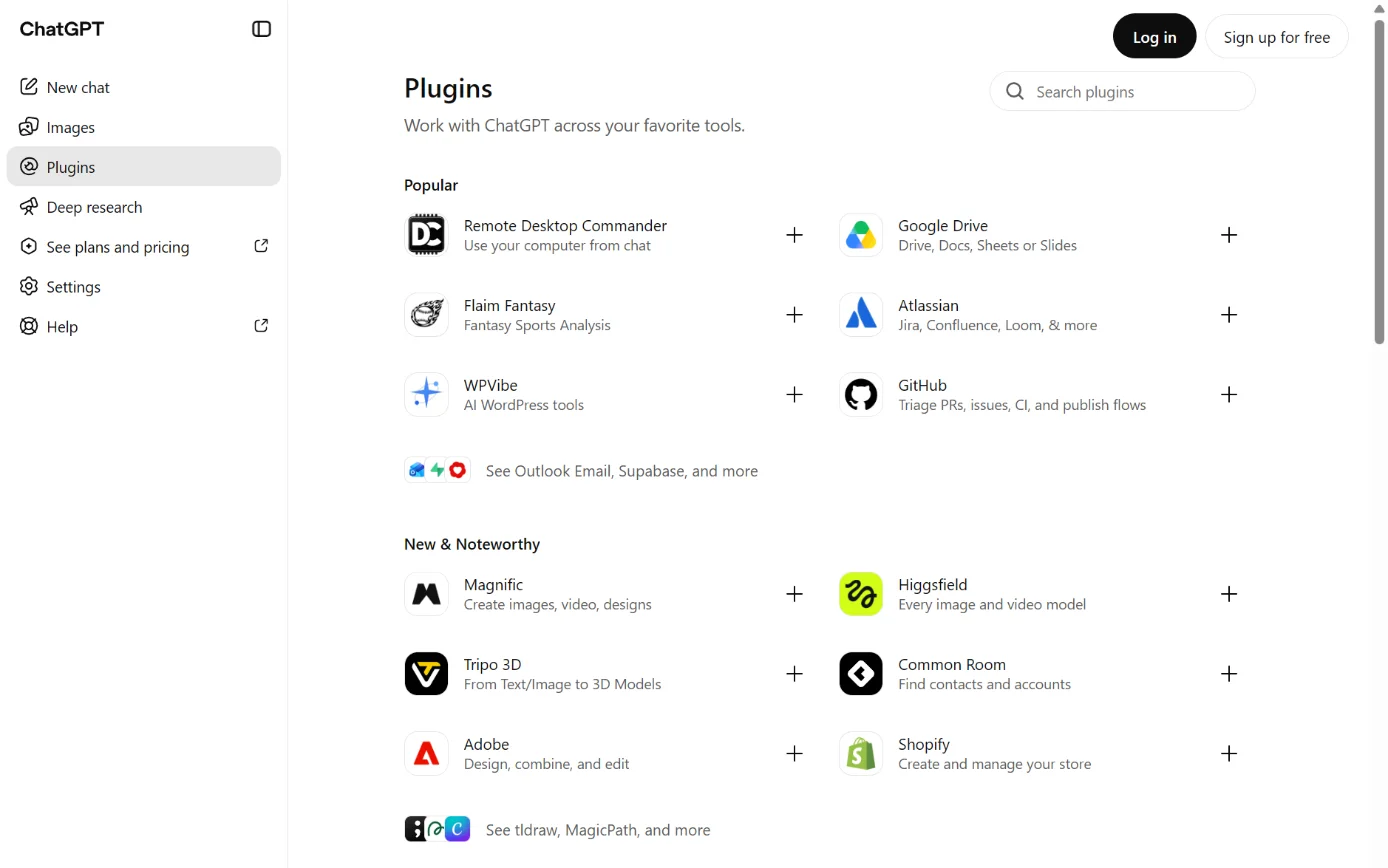
  1. Then: The Shopify plugin, with Shopify as the developer. Sources 6623

    ChatGPT’s Plugins page, with Plugins in the sidebar ringed.
    Screenshot: ChatGPT’s Plugins page, signed out, 18 October 2026.
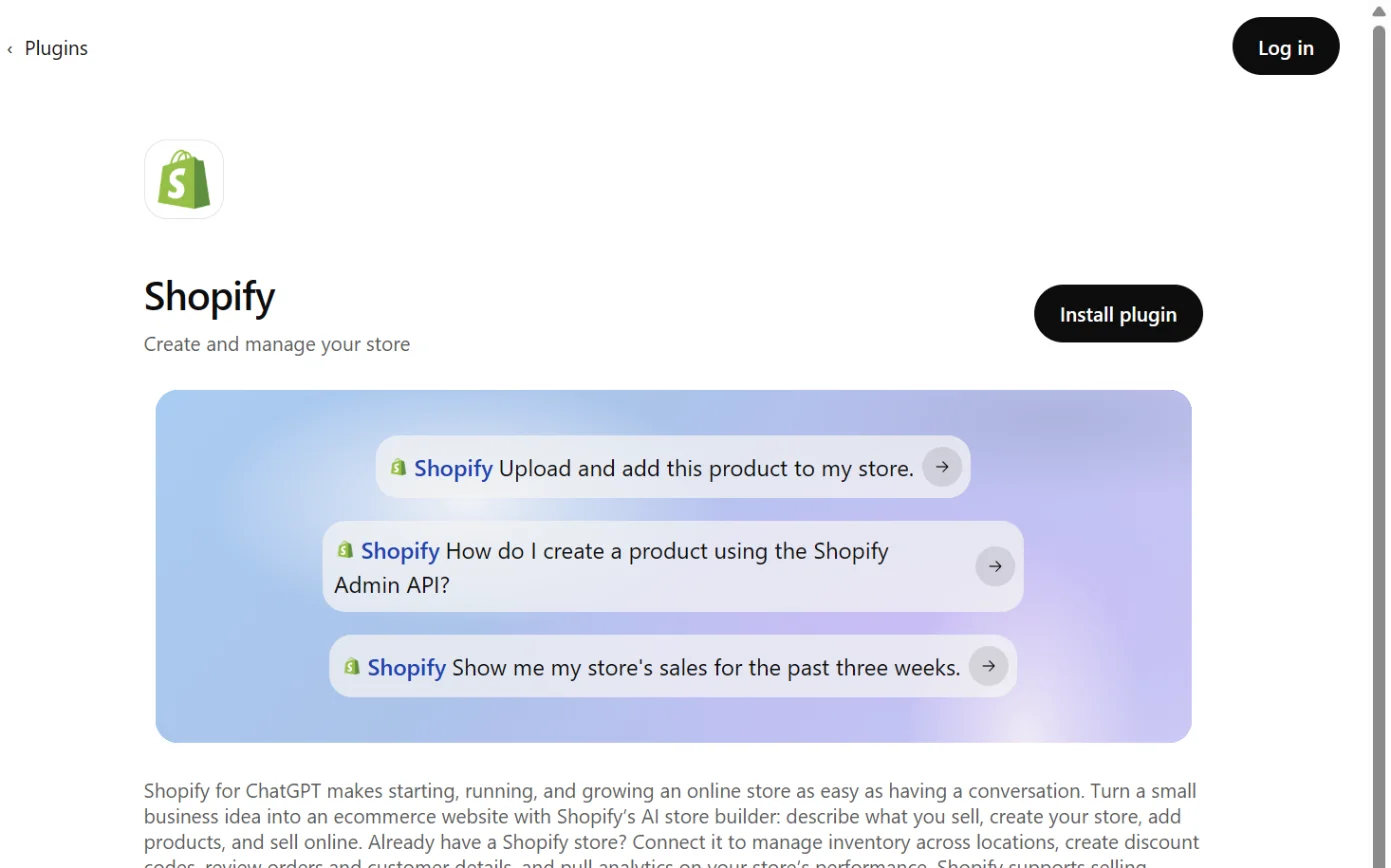
  2. Then: The plugin installs. Some plugins ask you to connect straight away; others wait until you first use them. Source 66

    The Shopify page in ChatGPT’s plugin directory, with the Install plugin button ringed.
    Screenshot: ChatGPT’s plugin directory, the Shopify page, signed out, 18 October 2026.
  3. Then: The connection is set up. The exact screens weren’t in the docs we read. Sources 6623

    A drawing from the step’s own words. The real screen may look a little different.
  4. Then: ChatGPT works with your store. Shopify says product drafts open in a panel you can edit before saving, and it asks you to confirm before Admin API changes. Sources 6623

    A drawing from the step’s own words. The real screen may look a little different.

Pictures without a date are drawings from each step’s own words. The real screen may look a little different.

To disconnect Select Uninstall plugin where it’s offered. OpenAI says the connection stays active until you also disconnect it in ChatGPT.
  • Select Uninstall plugin where it’s offered. OpenAI says the connection stays active until you also disconnect it in ChatGPT.66
  • In Shopify, uninstall the integration from your admin.26
Limits Keep requests to one task at a time, and keep analytics questions short.
  • Keep requests to one task at a time, and keep analytics questions short.23
  • ChatGPT is operated by OpenAI and isn’t managed by Shopify.23
  • OpenAI says that when ChatGPT sends data through a plugin’s server, that service’s terms and privacy policy apply.66
  • Shopify’s page says nothing about privacy or training.23
Selling to shoppers in ChatGPT Your products reach ChatGPT through Shopify Catalog, on by default for eligible stores.
  • Your products reach ChatGPT through Shopify Catalog, on by default for eligible stores.33
  • Shopify calls ChatGPT a “discovery-focused referrer”. Shoppers pay on your own store’s checkout, which opens inside ChatGPT or in a new tab.33
  • Your store must sell to customers in the United States. It can be based elsewhere.33
  • Shopify says there are no fees for selling in ChatGPT beyond your normal payment processing.33
  • OpenAI says it’s moving away from its standalone Instant Checkout towards merchant-owned checkout. It says Shopify merchants need no extra setup.67
  • ChatGPT Ads for Shopify is a separate app for advertising. OpenAI’s help article, seen only as a search-engine copy, says it’s available to Shopify customers in the US.68
Claude and Shopify

Reads and makes changes. Asks before some changes; no refunds.

Claude and Shopify

Official? Yes. Anthropic’s directory lists the Shopify connector as “Made by Shopify”, with an “Anthropic verified” badge. It was added in April 2026.
  • Yes. Anthropic’s directory lists the Shopify connector as “Made by Shopify”, with an “Anthropic verified” badge. It was added in April 2026.58
  • Shopify calls it the “Shopify connector for Claude”.22
  • Shopify is one of the 37 partner connectors in Anthropic’s Claude for Small Business, announced 15 September 2026.6061
What it can see and do In short, it reads and makes changes. Shopify says it asks you to confirm before Admin API changes, and asks you to confirm the start date and who can use a new discount code.
  • In short, it reads and makes changes. Shopify says it asks you to confirm before Admin API changes, and asks you to confirm the start date and who can use a new discount code.22
  • It reads products, collections, inventory, orders, customers and analytics. It also reads store details, pages, blogs, menus, metafields, markets and translations.22
  • It can create and update products, in batches of up to 50, and turn a file or link into a digital product.22
  • It can create and update collections and set stock levels at a location. It can also create percentage-off discount codes.22
  • It can build a storefront preview from a business idea and import products from Shopify Collective suppliers.2258
  • It can’t edit existing discount codes or create fixed-amount ones. Customer records are read-only.22
  • Anthropic’s listing shows 25 tools, including create-product, set-inventory, create-discount and graphql_mutation.58
  • On Claude Team and Enterprise, Owners can set each tool to Always allow, Needs approval or Blocked.59
What you need A Claude account, and a Shopify store you own or one you create. Shopify charges no extra fee for the connector. Claude subscription costs go to Anthropic.
  • A Claude account, and a Shopify store you own or one you create. Shopify charges no extra fee for the connector. Claude subscription costs go to Anthropic.22
  • Shopify says to set it up in a desktop browser.22
  • On Claude Team and Enterprise, an Owner adds the connector for the organisation first. Each person then signs in separately.59
  • Claude for Small Business is on every paid Claude plan.60

Steps to connect (Anthropic's help article, updated 17 October 2026; Shopify's help page, no date shown)

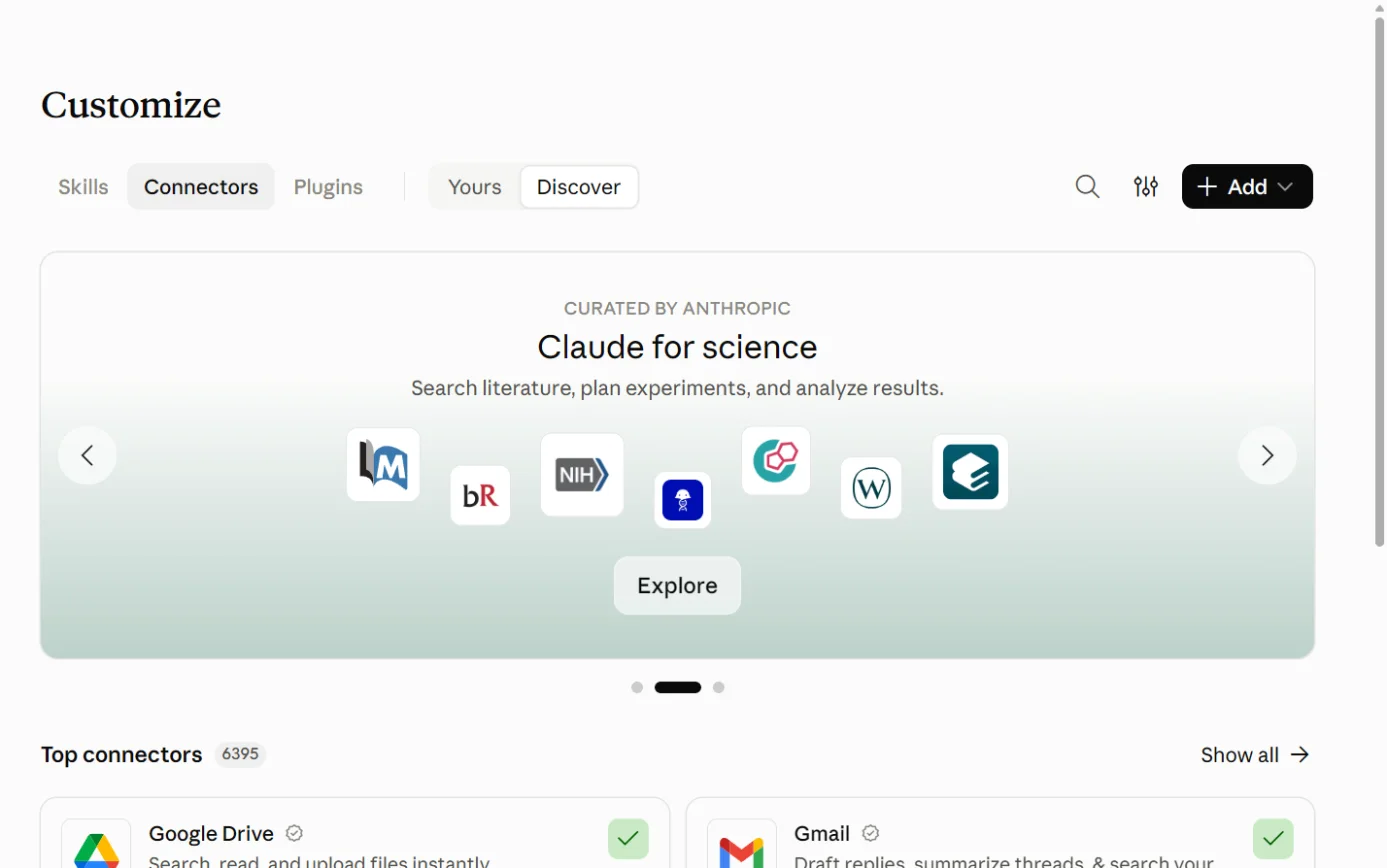
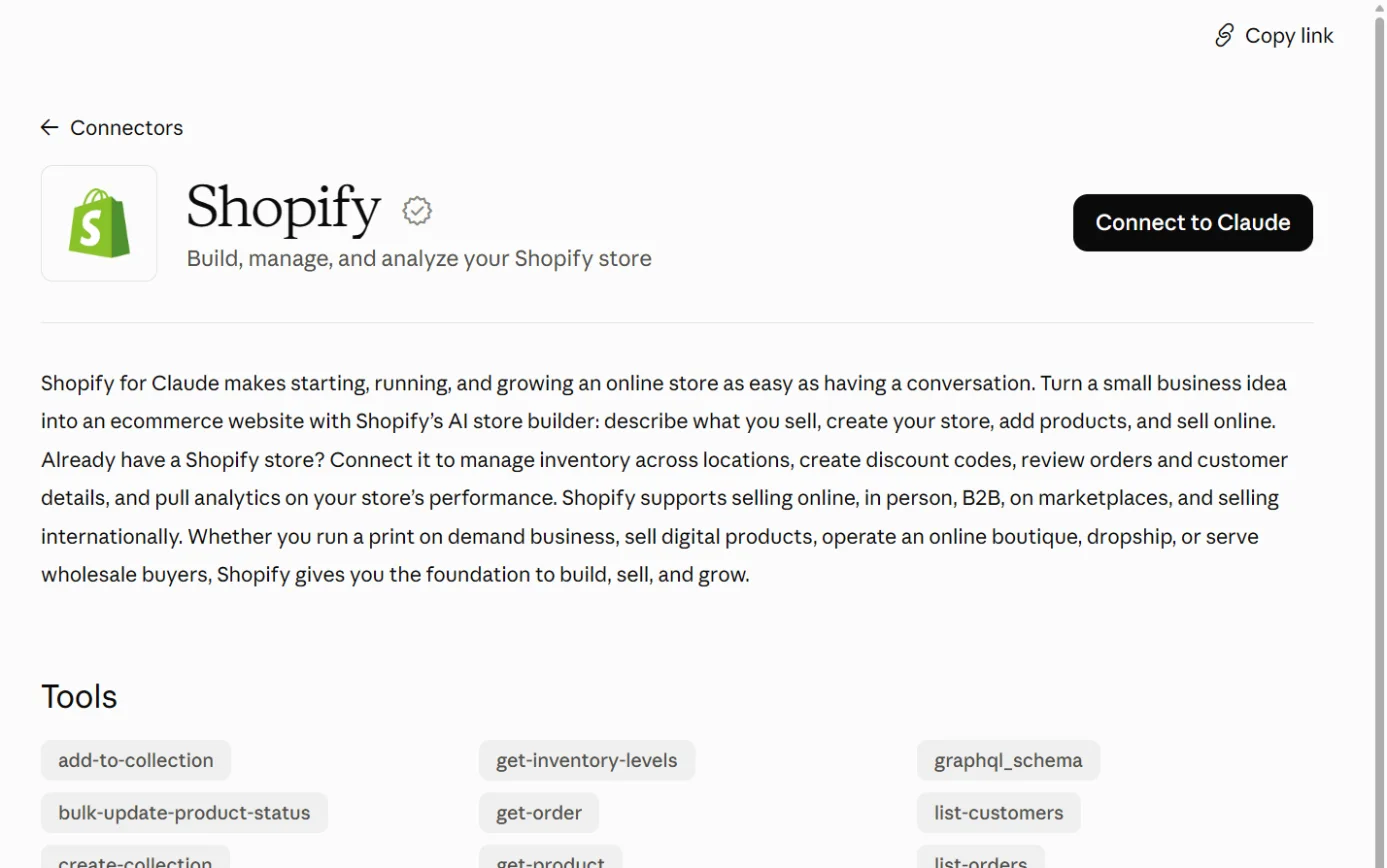
  1. Then: The connectors directory opens. Sources 5922

    Claude’s Customize page on the Connectors tab, with the + Add button ringed.
    Screenshot: Claude, the Connectors page under Customize, 18 October 2026.
  2. Then: Claude sends you to your Shopify admin. Source 59

    The Shopify listing in Claude’s connector directory, with the Connect to Claude button ringed.
    Screenshot: Claude’s connector directory, the Shopify listing, 18 October 2026.
  3. Then: Claude can reach your store within the access you approved and the permissions of the staff account you signed in with. The exact Shopify approval screen wasn’t shown in the docs we read. Sources 2226

    A drawing from the step’s own words. The real screen may look a little different.
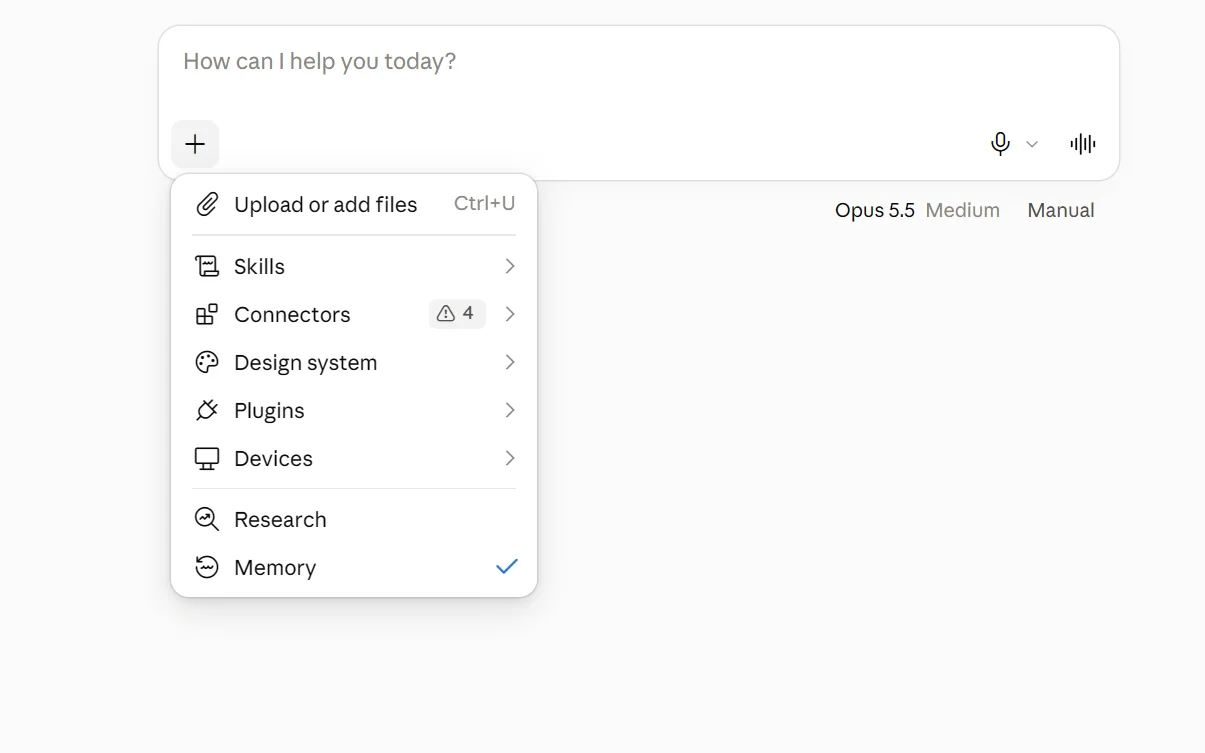
  4. Then: Shopify is available in this conversation. Source 59

    The + menu under Claude’s message box, with Connectors ringed.
    Screenshot: Claude, the + menu in a new chat, 18 October 2026.
  5. Then: Answers from live store data. Shopify says the connector asks you to confirm before Admin API changes and before creating a discount code. It can’t issue refunds, cancel orders, change payments or edit your live theme. Source 22

    A drawing from the step’s own words. The real screen may look a little different.

Pictures without a date are drawings from each step’s own words. The real screen may look a little different.

Team and Enterprise Owners first go to Organization settings > Connectors, click Browse connectors, select the connector and click Add to your team.59

To disconnect In Claude, go to Customize > Connectors and disconnect Shopify.
  • In Claude, go to Customize > Connectors and disconnect Shopify.59
  • In Shopify, uninstall the integration from your admin.26
Limits Batch changes can stop partway. Finish them in your Shopify admin.
  • Batch changes can stop partway. Finish them in your Shopify admin.22
  • A storefront preview isn’t a store until you claim it, and it may include sample content.22
  • Anthropic’s listing gives the connector’s address as https://setup.shopify.com/mcp. It warns: “Only use connectors from developers you trust.”58
  • On Claude’s Free, Pro and Max plans, Anthropic uses your chats to improve its models if you opt in, or if a chat is flagged for safety review. Raw content from connectors is left out, though it may be included if it’s copied straight into the chat.62
  • On Claude’s commercial plans, Anthropic says it won’t use your inputs or outputs for training by default.63
  • Shopify’s page says nothing about data, privacy or training.22

Copilot and Shopify

Reads and makes changes. Shopify lists it; Microsoft doesn’t yet.

Microsoft Copilot and Shopify

Official? Shopify documents a “Shopify plugin for Microsoft Copilot”, listed in Copilot as “Shopify”. It works in Copilot Cowork and Microsoft 365 Copilot Chat.
  • Shopify documents a “Shopify plugin for Microsoft Copilot”, listed in Copilot as “Shopify”. It works in Copilot Cowork and Microsoft 365 Copilot Chat.2421
  • Microsoft’s list of partner plugins for Copilot Cowork, updated 15 October 2026, doesn’t include Shopify. Microsoft says the catalogue keeps growing.69
  • Shopify isn’t one of Microsoft’s federated Copilot connectors.74
  • A May 2026 Microsoft post names Shopify among the apps Copilot has connectors for.75
What it can see and do In short, it reads and makes changes. Shopify says it confirms before Admin API changes and asks you to confirm new discount codes.
  • In short, it reads and makes changes. Shopify says it confirms before Admin API changes and asks you to confirm new discount codes.24
  • It reads products, collections, inventory, orders, customers, discount codes and analytics.24
  • It can create and update products, collections and stock levels. It can also create percentage-off codes and edit unpublished themes.24
  • Orders and customer records are read-only. It can’t build storefront previews, and it returns text rather than tables or charts.24
  • In Copilot Cowork it works alongside the email, documents and spreadsheets you’ve already shared with Copilot. The Shopify agent in Copilot Chat can’t read those.24
What you need A Shopify store you own. If you don’t have one, you can create one from the Shopify sign-in screen.
  • A Shopify store you own. If you don’t have one, you can create one from the Shopify sign-in screen.24
  • Your organisation’s Microsoft 365 settings decide whether an admin deploys the plugin, and your admin controls which plugins you can add.24
  • Microsoft says people using Cowork plugins need Microsoft 365 Copilot licences.71
  • Shopify doesn’t name a Copilot licence or Shopify plan.24

Steps to connect (Microsoft's Cowork docs, updated 27 August 2026; Shopify's help page, no date shown)

  1. Then: The plugin list, which you can search by name or category. Source 70

    A drawing from the step’s own words. The real screen may look a little different.
  2. Then: The plugin is added. Admin-deployed plugins appear without you adding them. Sources 706971

    A drawing from the step’s own words. The real screen may look a little different.
  3. Then: Cowork remembers the connection for future conversations. The exact Shopify screens weren’t in the docs we read. Sources 2470

    A drawing from the step’s own words. The real screen may look a little different.
  4. Then: Shopify says that if you ask without opening the agent, Copilot may only be able to view data. Source 24

    A drawing from the step’s own words. The real screen may look a little different.

Pictures without a date are drawings from each step’s own words. The real screen may look a little different.

For agents in the Microsoft Copilot app generally, Microsoft’s steps are All Agents, select the agent, then Add. If you see Request approval, your IT admin has to approve it.72

To disconnect Shopify says to uninstall the integration from your Shopify admin. Revoking Shopify’s access doesn’t affect Microsoft 365 access, and the reverse is also true.
  • Shopify says to uninstall the integration from your Shopify admin. Revoking Shopify’s access doesn’t affect Microsoft 365 access, and the reverse is also true.24
  • In Cowork, a plugin you added yourself can be removed from Customize with Remove from Cowork. Admin-deployed plugins can only be removed by the admin.70
Limits Installing the plugin doesn’t give Shopify access to your Microsoft 365 content.
  • Installing the plugin doesn’t give Shopify access to your Microsoft 365 content.24
  • Microsoft says prompts, responses and data accessed through Microsoft Graph aren’t used to train foundation models. It tells you to check each agent’s own privacy statement and terms.73
  • Microsoft says customers outside the EU may have their queries processed in the US, the EU or other regions.73
Selling to shoppers in Copilot Shopify offers direct checkout in Copilot, where shoppers pay without leaving the chat. It’s on by default for eligible stores.
  • Shopify offers direct checkout in Copilot, where shoppers pay without leaving the chat. It’s on by default for eligible stores.34
  • Your store must sell to US customers, and direct checkout shows only to customers based in the US.34
  • Microsoft announced Copilot Checkout on 8 January 2026 and said Shopify merchants would be enrolled automatically after an opt-out window.76
  • Microsoft says only English-language merchants selling to US buyers in US dollars are eligible for now, and it takes no commission today.77
  • Microsoft also offers Brand agents, a beta AI shopping assistant for your own website that installs from the Shopify App Store. Accepting its terms publishes your catalogue to Microsoft Merchant Center for Bing and Copilot.78
  • Microsoft also lists a “Shopify (Independent Publisher)” connector for Power Automate and Copilot Studio. Its listed publisher is “Ray Bennett (MSFT)”, and Shopify isn’t named. It’s in preview, connects with an access token and can cancel orders, including refunds.79

Gemini and Shopify

No official link. US only for now.

Google Gemini and Shopify

Official? Shopify documents a “Shopify connector for Gemini”.
  • Shopify documents a “Shopify connector for Gemini”.25
  • Google’s availability table lists Shopify for “Personal Google Account only”, “18 or over”, “US only” and “English only”.81
  • Google’s 13 October 2026 post names Shopify among more than 40 apps Gemini connects to.83
What it can see and do In short, it reads and makes changes, but only if you approve write access. Without it, the connector only reads.
  • In short, it reads and makes changes, but only if you approve write access. Without it, the connector only reads.25
  • It reads store details, products, orders with shipping addresses and tracking, customers with order count and spend, collections, inventory and analytics.25
  • It can create and update products, collections and stock levels, and create percentage-off discount codes.25
  • Order and customer records are read-only.25
  • Shopify says it asks you to confirm before Admin API changes and before creating a discount code.25
What you need A Shopify store you own.
  • A Shopify store you own.25
  • Under Google’s table, a personal Google account, aged 18 or over, in the US, using English.81
  • Google’s article for work and school accounts doesn’t mention Shopify.82

Steps to connect (Google's general steps for personal accounts, no date shown)

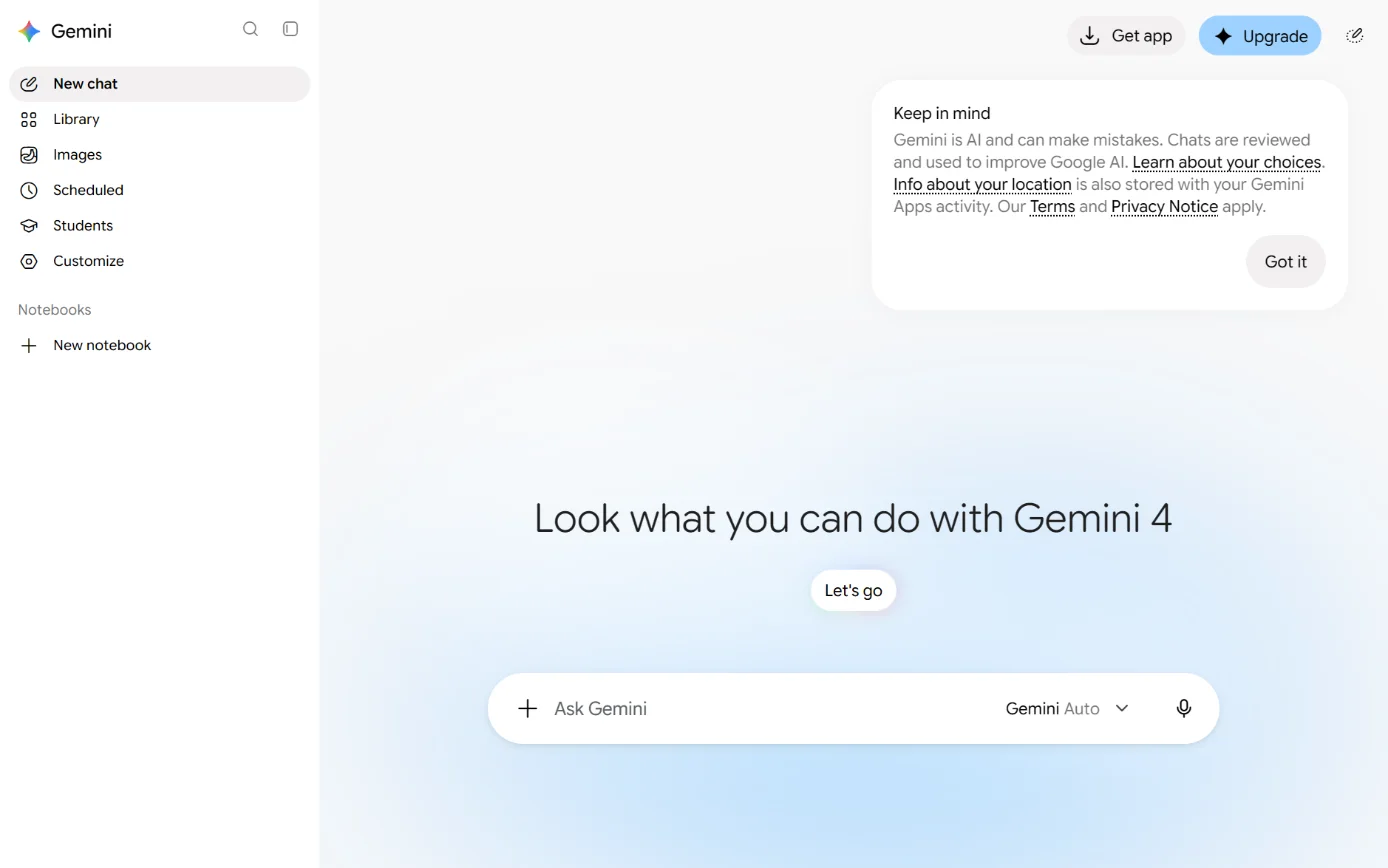
  1. Then: The apps available to your account and country. Source 80

    Gemini’s home page and sidebar, with Customize in the sidebar ringed.
    Screenshot: Gemini’s home page, 18 October 2026.
  2. Then: Gemini asks you to approve the connection. Source 80

    A drawing from the step’s own words. The real screen may look a little different.
  3. Then: Shopify is connected. The exact screens weren’t in the docs we read. Sources 8025

    A drawing from the step’s own words. The real screen may look a little different.
  4. Then: Answers from live store data. Shopify says it asks you to confirm before Admin API changes and before creating a discount code. Source 25

    A drawing from the step’s own words. The real screen may look a little different.

Pictures without a date are drawings from each step’s own words. The real screen may look a little different.

To disconnect In Gemini, go to Customize > Connectors, click More options next to Shopify, then Disconnect.
  • In Gemini, go to Customize > Connectors, click More options next to Shopify, then Disconnect.80
  • To switch stores, Shopify says to unlink Shopify in Gemini’s connected apps settings, then ask for Shopify again.25
Selling to shoppers in Google AI Mode and Gemini Shoppers can pay through a Shopify-powered checkout inside AI Mode and the Gemini app.
  • Shoppers can pay through a Shopify-powered checkout inside AI Mode and the Gemini app.35
  • Your store must be based in the United States and sell to US customers, and you need a Google Merchant Center account.35
  • Google launched the Universal Commerce Protocol (UCP) on 11 January 2026, co-developed with Shopify, for checkout from eligible US retailers. Google said it would expand globally “in the coming months”.84

Other routes

Developer tools, automation tools and app stores.

Selling to shoppers inside AI chats (agentic storefronts)

What it is Agentic storefronts let customers find and buy your products inside AI channels. Shopify lists ChatGPT, Google AI Mode and Gemini, Microsoft Copilot, and Meta including a surface called Muse.
  • Agentic storefronts let customers find and buy your products inside AI channels. Shopify lists ChatGPT, Google AI Mode and Gemini, Microsoft Copilot, and Meta including a surface called Muse.30
  • It’s on by default for eligible stores. You keep the customer relationship, and orders show which AI channel they came from.30
  • Shopify Catalog needs a store on Starter or higher that isn’t in private mode, and products with a title, an image and a price above zero.37
  • Some categories are excluded, including alcohol, tobacco and vaping, prescription and medical products, and event tickets.37
  • Agentic storefronts support direct-to-consumer sales only.36
How to control it Go to Sales channels > Agentic. You need to be the store owner, or have the Products > View and App and sales channel > Agentic staff permissions.
  • Go to Sales channels > Agentic. You need to be the store owner, or have the Products > View and App and sales channel > Agentic staff permissions.31
  • Allow Shopify to manage for me is on by default. It keeps all channels active and enrols you in new AI channels automatically.31
  • To change things, turn that setting off, then turn Shopify Catalog access or Auto enroll new storefronts off, or adjust each channel. Click Save.31
  • After you turn off Catalog access, it can take up to 7 days for your product data to stop being shared.31
  • AI channels can still find your products by crawling the web.3132
What’s shared Product data such as titles, descriptions, images, prices and availability goes through Shopify Catalog.
  • Product data such as titles, descriptions, images, prices and availability goes through Shopify Catalog.32
  • When someone orders through a channel with direct checkout, the customer’s name, email, phone number and address are shared.32
  • Shopify says your private admin data isn’t shared. AI channels don’t get your full order history or your general customer database.32
  • The Supplemental Terms, last updated 6 October 2026, say the AI channel’s own terms govern data it collects directly. They don’t mention training.39
  • The Supplemental Terms let Shopify charge fees on some channels’ transactions, while Shopify’s help pages say there are no extra fees for ChatGPT, Copilot or Google.39333435

Other AI assistants Shopify lists

  • Shopify also has connectors for Grok, Muse and Perplexity.21
  • Stores built by AI coding tools such as Lovable, Manus, Replit and v0 can be claimed and finished in Shopify.21
  • Shopify publishes a file at shopify.com/SKILL.md for AI tools. It only points them to the official Shopify integrations and doesn’t read or change your store itself.28

Shopify’s MCP servers and developer tools

These tools are meant for developers and people building their own AI apps.2952

  • The Shopify CLI connector lets a developer authorise a coding tool on their own computer, such as Claude Code, Codex, Cursor or Visual Studio Code, to use a store’s API. Shopify says it “authorizes API access and nothing more.”29
  • The Shopify AI Toolkit connects coding tools to Shopify’s docs and API schemas. Its Dev MCP server runs locally and needs Node.js 18 or later.52
  • Shopify’s Storefront Catalog MCP lets shopping agents search one store’s products at that store’s /api/ucp/mcp address. It follows the UCP specification version 2026-08-25.53
  • Shopify removed the older catalog and cart tools from the /api/mcp address. Its policies and FAQ search tool still works there.54
  • A Global Catalog MCP at catalog.shopify.com lets agents search across Shopify merchants.55
  • Shopify adds WebMCP tools to every Liquid storefront, so AI agents in Chromium browsers can search products and fill carts. The page doesn’t say whether you can switch them off.56

Automation tools and Shopify

  • Shopify Flow is Shopify’s own free automation app on Basic, Grow, Advanced and Plus. Its help page doesn’t describe AI features, but Sidekick can create Flow workflows.506
  • Zapier lists an app on the Shopify App Store. Its listing says Shopify requires a paid Zapier plan.51
  • We didn’t find Shopify documentation for Make or Power Automate.221

Jobs it’s good for

  • A Monday sales check. Ask Sidekick or a connected AI how last week’s sales went. Shopify says short, specific analytics questions work best.32223
  • Product descriptions. Use Generate text with a title and at least two features, then edit before saving.11
  • Tidying the range. A connected AI can set up to 50 products at a time to active, draft or archived.222325
  • A stocktake. Ask a connected AI to set stock levels at a location, with a reason such as received or damaged. It reads the current count first.2522
  • A launch discount. Ask for a percentage-off code, then confirm the start date and who can use it.22
  • Clean product photos. Swap a busy background for a plain colour in the file editor.10
  • After-hours questions. Turn on the Inbox agent with staff handoff, and keep an eye on its answers.1617
  • Theme changes without risk to your live shop. Duplicate the theme, let the AI edit the copy, then publish it yourself.27
  • The weekly plan. Shopify’s VP of Product told Anthropic that with Claude for Small Business, merchants “run their store where they already plan the week”.60
  • Shop data next to your spreadsheets. In Copilot Cowork the Shopify plugin works alongside documents you’ve already shared with Copilot.24

What to watch for

Write access means real changes

  • Approve read-only access unless you need the AI to change things. You can’t lower the level later without reinstalling.26
  • Connected tools change items one at a time, so big batches can stop partway.27
  • Shopify doesn’t review what these tools do, and you’re responsible for any wrong change.27
  • Shopify suggests naming exactly what to change and asking the tool to check with you “before doing anything destructive or hard to undo”.20

The AI sees what the login sees

  • A connected AI acts with the permissions of the staff account that approved it.2627
  • Sidekick also works within each staff member’s permissions.8
  • So an owner’s login gives the AI the widest reach. That’s our inference from the above.

Your data leaves Shopify

  • Once shared, data is handled under the AI company’s terms, and Shopify no longer controls how it’s used or kept.27
  • Shopify reminds you that you still owe your customers what privacy law requires.27

Training and where data goes

  • Shopify’s no-training statement for Sidekick is in a blog post. Its terms let it use your materials to improve its services.940
  • Sidekick’s AI providers are listed as located in the USA.42
  • We found no option to keep Shopify’s AI processing in Australia.4142
  • Your chats on the AI side follow that company’s own settings, such as Claude’s Model Improvement setting.62

Selling in AI chats is on by default

  • Eligible stores are opted in, and new AI channels are added automatically unless you change Auto enroll new storefronts.31
  • Orders through direct checkout share the customer’s name and contact details with the AI channel.32

Much of it is US-only for now

  • Selling in ChatGPT and Copilot needs you to sell to US customers, and Google needs a US-based store.333435
  • The Gemini store connector is listed as US only.81
  • OpenAI says ChatGPT Ads for Shopify is available to Shopify customers in the US.68
Check the work

  • Shopify warns that “AI outputs can contain errors” and that the same request won’t always give the same result.220
  • Generated product text can claim benefits you never listed.11
  • The Inbox agent talks to customers on your behalf, so test its persona and watch early conversations.1617

Costs

  • Sidekick’s usage limits vary by plan, and Shopify doesn’t publish the amounts.86
  • Campaign Autopilot is free, but its ad spend can run over your monthly target.49
  • The Agentic Storefronts terms allow Shopify to add transaction fees for some channels.39

Tools Shopify didn’t build

  • Anthropic’s listing warns to use connectors only from developers you trust.58
  • The Independent Publisher connector in Power Automate uses an access token and can cancel orders. Prefer Shopify’s own connections. That’s our advice.79

Beta and early access

  • Campaign Autopilot is in early access. Brand agents is in beta, and Shopify says it’s early days for Canvas.434478

What’s changing

  • 8 January 2026: Microsoft announced Copilot Checkout, rolling out in the US on Copilot.com, with Shopify merchants enrolled after an opt-out window.76
  • 11 January 2026: Shopify opened Shopify Catalog to every brand and said it co-developed UCP with Google. Google said UCP checkout would “soon” reach AI Mode and the Gemini app for eligible US retailers.4584
  • 24 March 2026: Shopify said it had rolled out the Agentic plan globally, and that Shop Pay was “coming soon” to Copilot.46
  • April 2026: The Shopify connector was added to Claude’s directory.58
  • 17 June 2026 (Spring ‘26 Edition): Sidekick App Extensions, Sidekick Pulse, an AI sales associate in Inbox, and Campaign Autopilot in early access.43
  • At the same time Shopify said ChatGPT Ads and Snapchat were coming to Campaign Autopilot, and developers would “soon” earn revenue from Catalog-powered experiences.43
  • 15 September 2026: Anthropic launched Claude for Small Business with Shopify among its partner connectors.60
  • 1 October 2026: Canvas began rolling out.44
  • 6 October 2026: The Agentic Storefronts Supplemental Terms were updated.39
  • 13 October 2026: Sidekick can now customise checkout and customer account settings.8
  • 13 October 2026: Google said Gemini connects to more than 40 apps, including Shopify.83

What we couldn’t establish

  • Whether the Copilot plugin is live. Shopify documents it, but Microsoft’s Cowork plugin list of 15 October 2026 doesn’t include it and we found no Microsoft listing.2469
  • What “Millions of tokens” means on the pricing page, and what happens when you run out.18
  • Whether prices include GST. The Australian pricing page doesn’t say.1
  • Yearly prices. One automated read of the pricing page showed lower yearly prices ($42, $114 and $431). Two direct reads of the page showed $50, $134 and $519, which is what we’ve used. Check the live page before quoting.1
  • Training in writing. Shopify’s “never used to train foundation models” line is in a blog post. We didn’t find it in Shopify’s terms or privacy policy.94041
  • OpenAI’s pages. OpenAI’s Shopify listing, its product discovery post and its help article blocked automated reading, so we relied on search-engine copies.64656768
  • Which AI plans the connectors need. Shopify’s pages don’t name Claude, ChatGPT or Microsoft plans.222324
  • The revoke path in Shopify. Shopify says to uninstall the integration but doesn’t give the menu steps.26
  • Whether AI channels may train on Catalog data. Neither the help pages nor the Supplemental Terms say.3239
  • The Agentic plan in Australia. Its help page doesn’t list countries, though Shopify says it rolled out globally and it’s on the Australian pricing page.38461
  • Channel fees. The Supplemental Terms allow fees, but the channel pages say there are none.3933
  • Inbox agent languages. The help pages don’t say. The app listing says 21 languages, but suggested replies are English only.161915
  • A store-wide Sidekick switch. None found.38
  • Shopify Magic. We found no formal notice of the change of name. The help centre now uses “AI-powered tools”.2

Sources

Every line above was read at one of these pages, on the date shown. Vendors change their products and their pages often, so check the page before you rely on a detail.

  1. 1 Shopify pricing (Australia) Shopify Read 17 Oct 2026
  2. 2 AI-powered tools Shopify Help Center Read 17 Oct 2026
  3. 3 Sidekick Shopify Help Center Read 17 Oct 2026
  4. 4 Getting started with Sidekick Shopify Help Center Read 17 Oct 2026
  5. 5 Sidekick memory and personalization Shopify Help Center Read 17 Oct 2026
  6. 6 Generating content with Sidekick Shopify Help Center Read 17 Oct 2026
  7. 7 Generating apps with Sidekick Shopify Help Center Read 17 Oct 2026
  8. 8 Sidekick Shopify Read 17 Oct 2026
  9. 9 How Enterprise Teams are Using Sidekick to Drive Real Value Right Now Shopify (Enterprise blog) Updated 5 Jun 2026 Read 17 Oct 2026
  10. 10 Media generation in the file editor Shopify Help Center Read 17 Oct 2026
  11. 11 Automatically generating product descriptions Shopify Help Center Read 17 Oct 2026
  12. 12 Adding, previewing, and buying themes Shopify Help Center Read 17 Oct 2026
  13. 13 Tinker by Shopify Shopify Help Center Read 17 Oct 2026
  14. 14 Set up instant answers for Shopify Inbox Shopify Help Center Read 17 Oct 2026
  15. 15 AI-generated suggested replies in Shopify Inbox Shopify Help Center Read 17 Oct 2026
  16. 16 Shopify Inbox Shopify Help Center Read 17 Oct 2026
  17. 17 Configuring your Inbox agent persona Shopify Help Center Read 17 Oct 2026
  18. 18 Training your Inbox agent Shopify Help Center Read 17 Oct 2026
  19. 19 Shopify Inbox (app listing) Shopify App Store Updated No update date shown; launched 14 Aug 2019 Read 17 Oct 2026
  20. 20 Best practices for using AI-powered tools Shopify Help Center Read 17 Oct 2026
  21. 21 Building and managing your store with third-party AI tools Shopify Help Center Read 17 Oct 2026
  22. 22 Shopify connector for Claude Shopify Help Center Read 17 Oct 2026
  23. 23 Shopify plugin for ChatGPT Shopify Help Center Read 17 Oct 2026
  24. 24 Shopify plugin for Microsoft Copilot Shopify Help Center Read 17 Oct 2026
  25. 25 Shopify connector for Gemini Shopify Help Center Read 17 Oct 2026
  26. 26 Authorizing AI tool access to your store Shopify Help Center Read 17 Oct 2026
  27. 27 Considerations for using third-party AI tools with your Shopify store Shopify Help Center Read 17 Oct 2026
  28. 28 Shopify skill.md for AI tools Shopify Help Center Read 17 Oct 2026
  29. 29 Shopify CLI connector Shopify Help Center Read 17 Oct 2026
  30. 30 Shopify agentic storefronts Shopify Help Center Read 17 Oct 2026
  31. 31 Managing agentic storefronts Shopify Help Center Read 17 Oct 2026
  32. 32 Data sharing and privacy for selling with agentic storefronts Shopify Help Center Read 17 Oct 2026
  33. 33 Selling on ChatGPT Shopify Help Center Read 17 Oct 2026
  34. 34 Selling on Microsoft Copilot Shopify Help Center Read 17 Oct 2026
  35. 35 Selling on Google AI Mode and Gemini Shopify Help Center Read 17 Oct 2026
  36. 36 Shopify Catalog and product discovery for agentic storefronts Shopify Help Center Read 17 Oct 2026
  37. 37 Requirements for being included in Shopify Catalog Shopify Help Center Read 17 Oct 2026
  38. 38 Agentic plan Shopify Help Center Read 17 Oct 2026
  39. 39 Shopify Agentic Storefronts Supplemental Terms of Service Shopify Updated Last updated 6 Oct 2026 Read 17 Oct 2026
  40. 40 Shopify Terms of Service Shopify Updated Last updated 1 Aug 2026 Read 17 Oct 2026
  41. 41 Shopify Privacy Policy Shopify Updated Updated 7 Jul 2026 Read 17 Oct 2026
  42. 42 Subprocessors Shopify Help Center Read 17 Oct 2026
  43. 43 Selling everything, everywhere, all at once: The Spring ‘26 Edition Shopify News Updated 17 Jun 2026 Read 17 Oct 2026
  44. 44 Introducing Canvas: Opening the aperture on online store design Shopify News Updated 1 Oct 2026 Read 17 Oct 2026
  45. 45 The agentic commerce platform: Shopify connects any merchant to every AI conversation Shopify News Updated 11 Jan 2026 Read 17 Oct 2026
  46. 46 Millions of merchants can sell in AI chats Shopify News Updated 24 Mar 2026 Read 17 Oct 2026
  47. 47 Introducing Campaign Autopilot Shopify Blog Updated 17 Jun 2026 Read 17 Oct 2026
  48. 48 Automating your marketing with Campaign Autopilot Shopify Help Center Read 17 Oct 2026
  49. 49 Requirements and considerations for using Campaign Autopilot Shopify Help Center Read 17 Oct 2026
  50. 50 Shopify Flow Shopify Help Center Read 17 Oct 2026
  51. 51 Zapier: Workflow Automation (app listing) Shopify App Store Updated No update date shown; launched 26 Apr 2012 Read 17 Oct 2026
  52. 52 Shopify AI Toolkit Shopify (shopify.dev) Read 17 Oct 2026
  53. 53 Storefront Catalog MCP Shopify (shopify.dev) Read 17 Oct 2026
  54. 54 Migrate from Storefront MCP Shopify (shopify.dev) Read 17 Oct 2026
  55. 55 Global Catalog MCP Shopify (shopify.dev) Read 17 Oct 2026
  56. 56 WebMCP tools Shopify (shopify.dev) Read 17 Oct 2026
  57. 57 Sidekick app extensions Shopify (shopify.dev) Read 17 Oct 2026
  58. 58 Shopify connector Anthropic (Claude directory) Updated "Added April 2026" Read 17 Oct 2026
  59. 59 Use connectors to extend Claude’s capabilities Anthropic Help Center Updated "Updated today" (17 Oct 2026) Read 17 Oct 2026
  60. 60 Claude for Small Business launches new workflows, integrations, and training programs Anthropic Updated 15 Sep 2026 Read 17 Oct 2026
  61. 61 Small Business plugin Anthropic Read 17 Oct 2026
  62. 62 Is my data used for model training? (consumer products) Anthropic Privacy Center Updated 16 Mar 2026 Read 17 Oct 2026
  63. 63 Is my data used for model training? (commercial products) Anthropic Privacy Center Updated 18 Aug 2026 Read 17 Oct 2026
  64. 64 Shopify plugin for ChatGPT OpenAI Updated Page blocked automated reading; text seen only as a search-engine copy Read 17 Oct 2026
  65. 65 ChatGPT plugin listing: Shopify OpenAI Updated Page blocked automated reading; text seen only as a search-engine copy (version 4.1.2) Read 17 Oct 2026
  66. 66 Plugins OpenAI (ChatGPT docs) Read 17 Oct 2026
  67. 67 Powering Product Discovery in ChatGPT OpenAI Updated Page blocked automated reading; text seen only as a search-engine copy Read 17 Oct 2026
  68. 68 Set up ChatGPT Ads for Shopify OpenAI Help Center Updated Page blocked automated reading; text seen only as a search-engine copy Read 17 Oct 2026
  69. 69 Available plugins for Copilot Cowork Microsoft Learn Updated ms.date 15 Oct 2026 Read 17 Oct 2026
  70. 70 Use plugins with Copilot Cowork Microsoft Learn Updated ms.date 27 Aug 2026 Read 17 Oct 2026
  71. 71 Manage plugins for Copilot Cowork Microsoft Learn Updated ms.date 31 Aug 2026 Read 17 Oct 2026
  72. 72 Get more agents in the Microsoft 365 Copilot app Microsoft Support Read 17 Oct 2026
  73. 73 Data, Privacy, and Security for Microsoft Copilot Microsoft Learn Updated ms.date 9 Jul 2026 (page metadata updated 8 Oct 2026) Read 17 Oct 2026
  74. 74 Federated connectors overview Microsoft Learn Updated ms.date 30 Sep 2026 (page metadata updated 16 Oct 2026) Read 17 Oct 2026
  75. 75 Introducing Microsoft 365 Business with Copilot: The new standard for small business Microsoft (Copilot blog) Updated 28 May 2026 Read 17 Oct 2026
  76. 76 Conversations that Convert: Copilot Checkout and Brand Agents Microsoft Advertising Updated 8 Jan 2026 Read 17 Oct 2026
  77. 77 Agentic Commerce Microsoft Advertising Read 17 Oct 2026
  78. 78 Brand agents Overview Microsoft Learn (Clarity) Updated ms.date 16 Jul 2026 Read 17 Oct 2026
  79. 79 Shopify (Independent Publisher) (Preview) Microsoft Learn (connectors) Updated ms.date 1 Mar 2024 (page metadata updated 25 Apr 2025) Read 17 Oct 2026
  80. 80 Use & manage Connected Apps in Gemini (computer) Google Gemini Apps Help Read 17 Oct 2026
  81. 81 Check the availability and requirements of connected apps in Gemini Apps Google Gemini Apps Help Read 17 Oct 2026
  82. 82 Use apps connected to Gemini with a work or school Google Account Google Gemini Apps Help Read 17 Oct 2026
  83. 83 Gemini 4 Argon is now available in the Gemini app Google (The Keyword) Updated 13 Oct 2026 Read 17 Oct 2026
  84. 84 New tech and tools for retailers to succeed in an agentic shopping era Google (The Keyword) Updated 11 Jan 2026 Read 17 Oct 2026

Want your team shown this on its own Shopify?

We teach on the tools your workplace already uses, with the checks that go with them.