



Skip to content

Slack and AI.

Its own AI is Slackbot, included with Business+ and Enterprise+. Claude and ChatGPT connect officially and can send messages; Copilot and the everyday Gemini app don’t.

Checked 17 October 2026 against 67 sources, each the vendor’s own page. See them all, or what’s changed since.

The short version

  • Slack’s own AI is built into the app. It can summarise channels and take notes in huddles, which are Slack’s audio and video calls.413
  • Slack’s AI agent is Slackbot. It comes with Business+ and Enterprise+, while Free and Pro get a limited trial. On Business+ each person can send it 15 messages a week.17
  • Slack says the models behind its AI run inside its own cloud and that customer data is never used to train large language models. Slack also says Slackbot is “powered by Claude”.191811
  • Huddle notes come with every paid plan. Everyone in the huddle is told when notes start or stop, and AI notes can’t be used when guests or external people are in the huddle.13
  • Slack’s Australian pricing page shows US dollars, and Slack doesn’t list the Australian dollar as a billing currency.12
  • Claude connects through a Slack-built connector that reads Slack and can send messages. Claude Tag, a beta for Claude Team and Enterprise, puts Claude to work inside your channels.3538
  • ChatGPT connects through its Slack app, which searches Slack and can act once an admin allows it. Business, Enterprise and Edu workspaces can also set up @ChatGPT inside Slack.4647
  • Microsoft hasn’t built a Slack connector for Copilot. Its gallery lists two Slack connectors built by partners.5556
  • The everyday Gemini app doesn’t connect to Slack. Gemini Enterprise, Google’s separate business product, has a Slack connector that can read and send messages.6163
  • Salesforce’s Agentforce agents also work inside Slack on any plan, if you hold Salesforce Agentforce licences.25

The plans

Slack is team chat software from Slack Technologies, a Salesforce company. Work happens in channels, direct messages (DMs) and huddles, which are audio and video meetings with screen sharing.1

These are the plans on Slack’s Australian pricing page as read from Perth on 17 October 2026. Prices are shown in US dollars, per user per month.1

PlanPrice a month (as shown, $US)AI includedWorth knowing
Free$US0Slackbot as a limited trial only90 days of message history. Huddles are one-to-one only.
Pro$US8.75 paying monthly, or $US7.25 paying annuallyConversation summaries, huddle notes, automatic search filters and AI apps from other companies. Slackbot as a limited trial.Unlimited message history and app integrations.
Business+$US18 paying monthly, or $US15 paying annuallyEverything in Pro, plus Slackbot (15 messages a week each), AI search answers, recaps, file summaries, translations, AI workflow steps and canvas writing.Data residency is available, including Sydney.
Enterprise+$US45 paying annually (“Contact sales”)Everything in Business+, plus enterprise search across other apps. No weekly Slackbot cap.Restrict AI from reading chosen channels, canvases and lists.

Sources for the table:1571622

  • The pricing page offers 50% off for three months on Pro and Business+ paid monthly. Slack’s terms say you must buy online within seven days of creating the team, and Slack can end the offer at any time.1
  • Slack picks your billing currency from your location when the workspace is created. Its supported currencies are British pounds, euros, Indian rupees, Japanese yen and US dollars.2
  • None of the Slack pages we read say whether prices include GST.12
  • The separate Slack AI add-on can no longer be bought on Slack’s website. Its features moved into the new Business+ and Enterprise+ plans. Existing add-on buyers keep it until their first renewal after 17 August 2025.3
  • Slack says turning AI features off doesn’t lower the plan price.3
  • Slackbot use beyond plan limits can be paid for with Salesforce Flex Credits, which need a connected Salesforce organisation. The help article we read shows no credit prices.7
  • Slack’s pricing FAQ says Salesforce customers on Free and Pro invoice subscriptions can get Slackbot, and Business+ invoice customers can buy Flex Credits for higher limits.1
  • Slack’s App Directory lists more than 2,600 apps, including ChatGPT.1

What’s built in

Slackbot (Slack’s personal AI agent) Slack calls Slackbot “your personal agent for work”. It answers from the same information you can already see in Slack.
What it does
  • Slack calls Slackbot “your personal agent for work”. It answers from the same information you can already see in Slack.6
  • It can summarise past conversations before a meeting, analyse a spreadsheet or draft a first version of a document.6
  • It can also draw on Salesforce, on third-party apps installed in your workspace and on enterprise search sources.6
  • Deep research produces a longer report from channels and files, the web, Salesforce data and connected MCP servers. It can take up to ten minutes.6
  • Scheduled tasks can send reminders or build meeting agendas. Each task can run at most three times a day.67
  • It can create and edit canvases. When it edits a shared canvas, you click Confirm before anything is added, or Cancel.6
  • Since April 2026 it can connect to Gmail, Google Calendar or Microsoft Outlook for calendar and email actions.12
  • Since May 2026 it can create or update Salesforce records and read, create and edit lists, with approval before changes.12
  • Since June 2026 it can connect to other apps that include an MCP server. Once a member connects their account, Slackbot can use all of that server’s tools.1228
  • Slack says Slackbot has “crossed one million monthly active users” and is “powered by Claude”.11
Where to find it
  • On desktop, click Slackbot in the top right-hand corner of the screen or at the top of your sidebar. If you can’t see it, click More.6
  • On mobile, go to the Home tab and tap Slackbot at the top of the screen.6
  • For recurring work, open the Tasks tab, click Add task and select Create with Slackbot. Slackbot drafts the task and you click Create task.6
  • For deep research, click the plus button next to the message field and select Deep research.6
Which plans have it
  • Ongoing access is on Business+ and Enterprise+. Free and Pro get a limited trial or preview.17
  • Business+ members can send 15 messages to Slackbot each week, resetting at midnight on Monday. Enterprise+ members have no weekly or lifetime cap.7
  • Slack says it may bring in usage limits or usage-based pricing for advanced capabilities released after June 2026, with 30 days’ written notice.7
  • The new Slackbot became generally available for Business+ and Enterprise+ on 13 January 2026.10
What happens to your data
  • Slackbot’s answers come only from what you can view in Slack. It can’t see private channels or DMs you aren’t part of.6
  • Slack says your interactions with Slackbot “remain private to you”.9
  • Memory is on by default. Slackbot saves your preferences and the topics you work on from your Slack activity, and checks for new activity weekly.8
  • To turn memory off, open Slackbot, click the three dots icon, select Manage memories and switch off Generate memory from conversations. You can edit or remove saved items there too.8
  • Slack says dictated messages are transcribed but the audio isn’t stored.6
  • Admins can decide whether Slackbot may create and edit canvases, use files in its answers or search the web.5
  • If web search is allowed, Salesforce’s sub-processor list says SuSea, Inc. (trading as You.com) supplies the results and may pass public links and content into Slackbot’s answers.23
In Australia
  • The Slackbot pages we read don’t limit it by country.67
  • Salesforce’s announcement of general availability didn’t list regions or languages.10
Conversation summaries, recaps and file summaries Summarises a channel, DM or thread. You can choose unread messages, the last seven days or a custom date range, which works on desktop only.
What it does
  • Summarises a channel, DM or thread. You can choose unread messages, the last seven days or a custom date range, which works on desktop only.4
  • Recaps are daily summaries of the channels you choose. You can add, remove or mute channels.4
  • File summaries are made automatically for shared PDF, Word, PowerPoint and Excel files that everyone can access.4
Where to find it
  • To see new updates in a recap, select Refresh recap at the top of the recap.12
  • To translate a file summary, select View summary below the file, then click Translate.12
  • Each person can turn file summaries on or off in their own preferences.4
Which plans have it
  • Conversation summaries are on Pro, Business+ and Enterprise+.5
  • Recaps and file summaries need Business+ or Enterprise+.5
  • Older Business+ and Enterprise Grid subscriptions without the Slack AI add-on get only the Pro features.4
What happens to your data
  • Slack says summaries and search answers are “ephemeral” and aren’t stored on devices or servers.18
  • “Recap data is stored for 90 days so that you can temporarily revisit past recap history.”18
  • Channel summaries made by workflows are kept according to your organisation’s data retention settings.18
In Australia
  • The pages we read don’t limit these features by country.45
Huddle notes (AI notes and transcripts for Slack calls) When AI notes are on, Slack uses the live conversation and the messages in the huddle thread to capture key points and action items in a canvas.
What it does
  • When AI notes are on, Slack uses the live conversation and the messages in the huddle thread to capture key points and action items in a canvas.13
  • After the huddle, the notes are posted as a canvas in the huddle thread. They list the people in the huddle, topics discussed and action items.13
  • The transcript is embedded in the notes canvas. It doesn’t show up in search results.13
Where to find it
  • On desktop, click AI notes: Off at the top left of the huddle, then Start AI notes and transcription, then Start notes.13
  • On mobile, tap the three dots icon at the bottom of the screen, then Start AI notes, then Start notes. A banner confirms notes are on.13
  • To pause on desktop, click AI notes: On, then Stop AI notes. To remove them, click Delete AI notes and transcription, then Delete and cancel.13
  • To start notes automatically in a channel, click the channel name, then Settings. Next to Always start AI notes, click Edit, tick the box and click Save.13
Which plans have it
  • All paid plans. Members can use it and guests can’t.135
What happens to your data
  • “Everyone in the huddle will be notified when notes are started, stopped or cancelled.”13
  • Anyone in a huddle can stop, resume or cancel AI notes at any time.13
  • Anyone in the channel or DM where the huddle took place can view the notes, and they can be shared like any canvas.13
  • AI notes can’t be used in huddles with external people or guests.13
  • Admins can stop members changing the automatic huddle notes setting in channels.5
  • Canvases follow your workspace’s data retention settings. On paid plans, Slack keeps data for the life of the workspace unless you set a shorter period.67
  • Salesforce’s sub-processor list names Amazon Transcribe for huddle transcripts, with Australia among its listed locations.23
In Australia
  • The huddle notes article doesn’t limit the feature by country.13
  • The sub-processor list doesn’t say which location handles an Australian workspace’s transcripts.23
Translations, message explanations, canvas writing and workflows Translations turn messages into your chosen language. Only you see the translation.
What it does
  • Translations turn messages into your chosen language. Only you see the translation.4
  • Message explanations explain acronyms, projects or jargon, drawing on your team’s conversations.1
  • Canvas content generation uses AI to write or edit content in a canvas.4
  • AI workflow generation builds a Slack workflow from a single prompt. AI steps can add things like channel summaries to a workflow.14
Where to find it
  • AI steps are added inside Workflow Builder. The pages we read don’t give menu paths for translations or explanations.14
Which plans have it
  • Business+ and Enterprise+.5
What happens to your data
  • Admins choose whether files and third-party connectors can be used in AI workflow steps.5
  • Slack’s content safety filters cover canvas writing and workflow creation, as well as Slackbot and search.17
In Australia
  • The pages we read don’t limit these features by country.45
Agentforce agents in Slack (from Salesforce) Agentforce agents are AI agents your company builds in Salesforce for a purpose such as IT help or benefits questions. They answer questions and complete tasks.
What it does
  • Agentforce agents are AI agents your company builds in Salesforce for a purpose such as IT help or benefits questions. They answer questions and complete tasks.26
  • Slack’s templates include a Customer Insights Agent, an Employee Help Agent and an Onboarding Agent.25
Where to find it
  • On desktop, click Tools (or More), then Agents, and pick one under Installed agents. On mobile, tap Agentforce.26
  • To add one to a channel, click the channel name, open the Agents & apps tab and choose Add Agentforce agent.24
Which plans have it
  • “Available on all Slack subscriptions” with a Salesforce Agentforce licence.2526
  • People in Slack who don’t have a Salesforce account need a provisional Salesforce licence.2527
  • Agents for Slack must be built with the Agentforce Employee Agent type.25
What happens to your data
  • Slack says agents use your Slack and Salesforce permissions and “will never reply with information that you don’t have access to”.26
  • Salesforce says “Your customer data is never used to train large language models” and that LLM providers don’t have access to it.27
In Australia
  • The pages we read don’t list regions. Salesforce’s Australian Agentforce for Slack page shows no price and doesn’t mention availability by market.2527
Admin controls and the Slack AI guardrails Owners and admins can restrict each AI feature or turn it off entirely.
What it does
  • Owners and admins can restrict each AI feature or turn it off entirely.5
  • Slack’s AI guardrails add checks on top of the models’ own safety. One reduces made-up answers. Another filters links to stop phishing, and another aims to reduce prompt injection, where hidden instructions try to steer the AI.17
  • A content safety filter has three levels. Maximum aims to block “targeted employee profiling such as performance and protected class information”. Default targets prompt attacks and harmful content. None removes the extra filters.17
  • On Enterprise+, admins can stop AI from reading chosen channels, canvases and lists. This only limits what AI can read. Members can still use Slackbot to post to a restricted channel.16
Where to find it
  • Pro and Business+: click Admin in the sidebar, select Workspace settings, then Roles & permissions. Click Feature access, select AI, then click Edit next to a feature and choose Everyone or No one.5
  • Enterprise: click your organisation name, then Tools & settings, then Organisation settings. Click Roles & permissions, then Feature access, then AI. You can choose specific people and groups.5
  • The content safety filter sits on the same AI page, next to Content safety filters.17
  • To block new AI features by default, a primary owner opens Future AI feature releases, clicks Edit and unticks Always allow access to new AI features.5
  • To restrict a channel on Enterprise+, go to Organisation settings, click Channels, then All channels, then the three dots next to the channel, and select Restrict AI use. For a canvas or list, click Share, then Advanced settings, and untick Allow AI use.16
Which plans have it
  • AI feature controls apply on paid plans.5
  • The content safety filter can be changed by workspace owners and admins on Free, Pro and Business+, and by org owners and admins on Enterprise plans.17
  • Restricting AI access to channels, canvases and lists needs Enterprise+.16
What happens to your data
  • “Your customer data (like messages and files) is never used to train any LLMs.”19
  • Slack says the large language models it uses are “deployed inside Slack’s cloud environment, so model providers do not have access to your data”.19
  • Slack’s pricing FAQ says its models are “hosted directly within Slack’s AWS virtual private cloud”.1
  • Slack’s privacy principles say it won’t use customer data to train generative AI models “unless Customer provides affirmative opt-in consent”.20
  • Slack’s other machine learning models, which aren’t generative, do analyse customer data. You can opt out by emailing feedback@slack.com with the subject “Slack global model opt-out request”.20
  • Slack’s blog says AI answers use the requesting person’s access rights, and that summaries and search answers aren’t stored on disk.21
  • Members’ feedback on AI responses is blocked by default in some workspaces. Owners and admins can allow it.5
  • Salesforce’s sub-processor list for Slack names Google LLC and Microsoft (Azure) as providers of “generative artificial intelligence services”, both in the United States.23
In Australia
  • Data residency in Sydney, backed up in Melbourne, covers messages, canvases, files, the search index and bot-generated messages. It needs Business+ or Enterprise, and only the primary owner can turn it on.22
  • Member profiles, membership information and some analytics data can be stored outside your chosen region. Flagged content may be stored in the United States.22
  • Without data residency, Slack says your data is stored in the US.22
  • The data residency article doesn’t mention the AI features.22

Connect another AI

A quick translation of the jargon. MCP (Model Context Protocol) is a standard way for an AI assistant to use another app’s tools. Slack runs its own MCP server, and several AI assistants plug into it.30

Connections run in two directions. An outside AI can read Slack from its own app, or the AI can have its own app inside Slack that people talk to.4739

ChatGPT and Slack

Reads and makes changes. Actions need an admin to switch them on.

ChatGPT and Slack

Official? Yes, two ways. The Slack app in ChatGPT, now listed as the “Slack” plugin, lets ChatGPT search Slack and take some actions there.
  • Yes, two ways. The Slack app in ChatGPT, now listed as the “Slack” plugin, lets ChatGPT search Slack and take some actions there.4652
  • @ChatGPT is an assistant your ChatGPT admin sets up inside Slack. It replaces the older ChatGPT app in Slack’s sidebar.47
  • OpenAI’s business page names OpenAI as the plugin’s developer, while the ChatGPT directory names Slack.5152
What it can see and do The Slack app searches messages, threads and channels you can already access, including DMs. It can summarise discussions and build recaps or briefs.
  • The Slack app searches messages, threads and channels you can already access, including DMs. It can summarise discussions and build recaps or briefs.46
  • Keyword search works on every Slack plan. Search by meaning needs Business+ or Enterprise+ with Slack’s AI search turned on.46
  • Where an admin enables them, it can take Slack actions for you, such as joining a channel, creating a reminder, uploading a file or updating your profile.46
  • The permissions it requests include writing messages and writing canvases.46
  • Your ChatGPT permission setting decides when it asks first. Allow read actions reads without asking but asks before making changes.53
  • OpenAI lists sending a message as the kind of action that may need extra review.53
  • @ChatGPT answers people who mention it in a channel or DM. It runs on a service account with company connections an admin sets up, and doesn’t inherit each person’s access.4849
  • ChatGPT team tasks can watch a Slack channel and start when a new message arrives, or post a weekly project update to an approved channel.5046
What you need For the Slack app, a paid ChatGPT plan: Plus, Pro, Business, Enterprise or Edu. You don’t need a paid Slack plan.
  • For the Slack app, a paid ChatGPT plan: Plus, Pro, Business, Enterprise or Edu. You don’t need a paid Slack plan.46
  • In Business workspaces the Slack app is on by default. In Enterprise and Edu it must be enabled for your workspace.46
  • If your Slack requires admin approval for app permissions, a Slack admin may need to approve or reinstall the ChatGPT app.46
  • For @ChatGPT, a ChatGPT Business, Enterprise or Edu workspace with credits. A ChatGPT workspace admin sets it up and a Slack admin approves the app.49

Steps to connect (OpenAI's help centre, updated 11 October 2026)

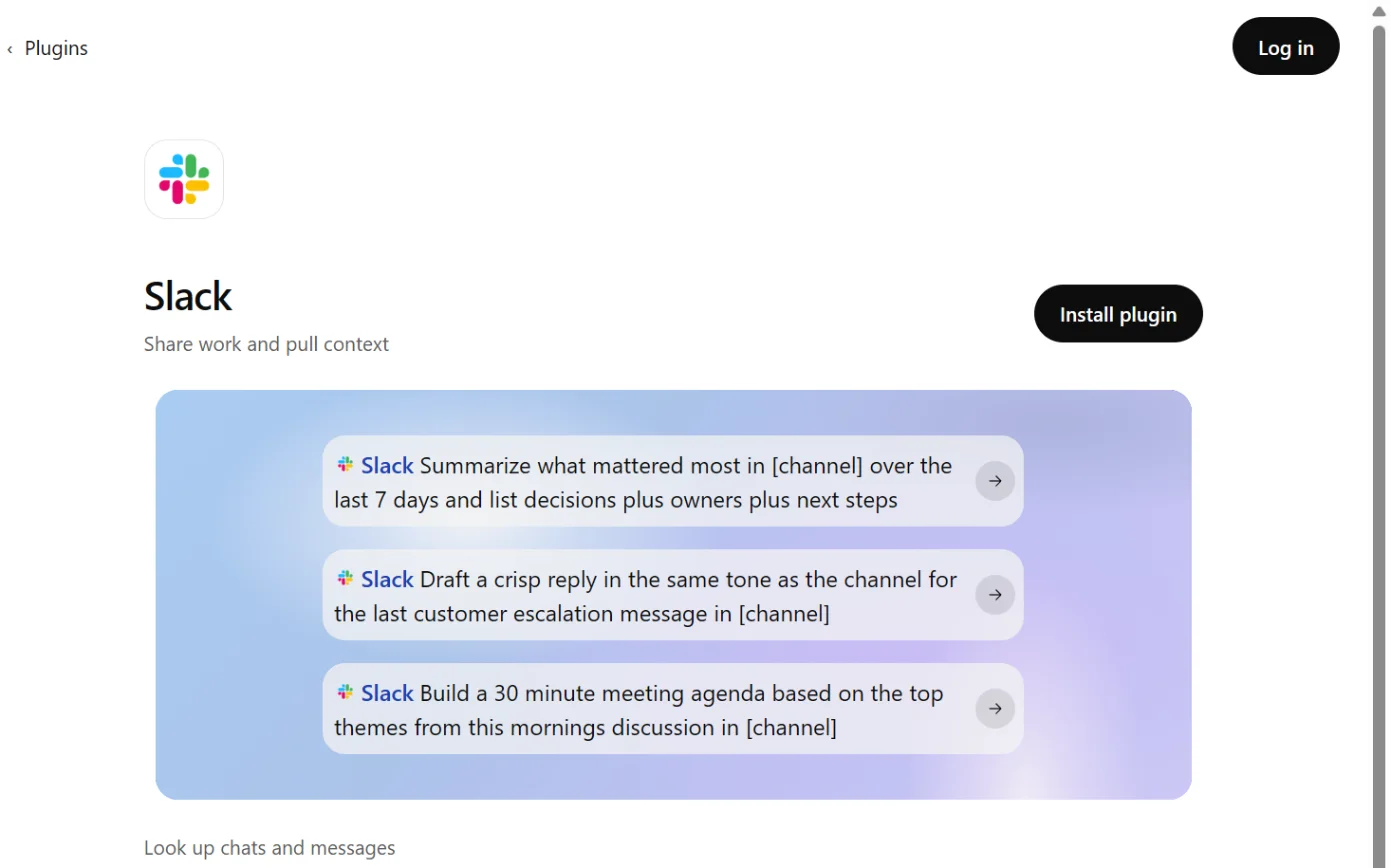
  1. Then: The Slack app or plugin page. Source 46

    The Slack page in ChatGPT’s plugin directory, with the Install plugin button ringed.
    Screenshot: ChatGPT’s plugin directory, the Slack page, signed out, 18 October 2026.
  2. Then: You’re sent to Slack to authorise. Source 46

    A drawing from the step’s own words. The real screen may look a little different.
  3. Then: ChatGPT connects to that one workspace. To switch workspaces later, disconnect and connect again. Source 46

    A drawing from the step’s own words. The real screen may look a little different.
  4. Then: ChatGPT searches channels, threads and DMs you can access. Whether it asks before taking an action depends on your app permission setting. Sources 5446

    A drawing from the step’s own words. The real screen may look a little different.

Pictures without a date are drawings from each step’s own words. The real screen may look a little different.

@ChatGPT setup, for admins (OpenAI’s help centre, updated 17 October 2026):

  1. Then: The workspace’s admin console. Source 49

    A drawing from the step’s own words. The real screen may look a little different.
  2. Then: You’re asked to connect a Slack workspace. Source 49

    A drawing from the step’s own words. The real screen may look a little different.
  3. Then: If the ChatGPT app was already installed, you may see a warning about missing scopes that a Slack admin must approve. Source 49

    A drawing from the step’s own words. The real screen may look a little different.
  4. Then: The @ChatGPT agent is saved with its own service account. Source 49

    A drawing from the step’s own words. The real screen may look a little different.
  5. Then: Channel restrictions apply to Slack channels only. They don’t restrict direct messages. Source 49

    A drawing from the step’s own words. The real screen may look a little different.
  6. Then: @ChatGPT replies in the thread, visible to everyone in the channel. It doesn’t respond to guests or in Slack Connect channels. Source 49

    A drawing from the step’s own words. The real screen may look a little different.

Pictures without a date are drawings from each step’s own words. The real screen may look a little different.

To disconnect Slack app: open Settings > Plugins, select the app, then Disconnect.
  • Slack app: open Settings > Plugins, select the app, then Disconnect.54
  • Disconnecting stops future access but doesn’t delete past chats, saved files or memories.54
  • @ChatGPT: in the agent’s Overview, turn off @ChatGPT to pause it, or select Delete. Deleting removes its settings and service account but leaves the Slack app installed.49
Limits When connected, ChatGPT may share relevant chats and memories with the Slack app. Slack’s terms and privacy policy then apply.
  • When connected, ChatGPT may share relevant chats and memories with the Slack app. Slack’s terms and privacy policy then apply.52
  • OpenAI says information sent to Slack follows Slack’s own storage, retention, privacy and data-residency terms.46
  • Channel restrictions for @ChatGPT don’t restrict DMs.49
  • @ChatGPT doesn’t respond to Slack guests and isn’t supported in Slack Connect channels.48
  • In Slack, Allow for a week remembers the access level you approved for seven days.48
  • Replies from @ChatGPT in shared conversations are visible to everyone in them.47
  • At launch, @ChatGPT doesn’t record or use memory.48
  • Heavy use with deep research or agent mode can use up your own Slack API quota.46
Claude and Slack

Reads and makes changes. Can send messages; tool approvals apply.

Claude and Slack

Official? Yes. The “Slack” connector in Claude’s directory is made by Slack, marked “Anthropic verified”, and was added in November 2025.
  • Yes. The “Slack” connector in Claude’s directory is made by Slack, marked “Anthropic verified”, and was added in November 2025.35
  • Claude Tag puts Claude inside your Slack channels for teams. It’s a beta, and the earlier Claude in Slack app switched over to it on 3 August 2026.3839
  • Slack lists Claude.ai and Claude Code among the partner apps for its MCP server.30
What it can see and do The Slack connector can search public and private channels, read channels and threads, look up people and read canvases.
  • The Slack connector can search public and private channels, read channels and threads, look up people and read canvases.35
  • It can also send messages and create or update canvases.35
  • Claude can ask for your approval before using a tool. You can set each tool to Always allow, Needs approval or Blocked.45
  • Anthropic says Claude only searches the Slack channels you have access to.37
  • With Claude Tag, anyone in a channel can tag @Claude and hand it work. It posts a checklist in the thread as it goes, and the whole exchange stays visible to the channel.39
  • By default, Claude Tag can read and post in channels it’s been added to and search public channels by keyword. It can’t reach your other systems until an Owner adds connectors.41
  • In channels, Claude Tag acts under its own service accounts. Whatever a connected account can read or write is available to everyone in those channels.41
  • Claude Tag can also run scheduled jobs and watch channels.39
What you need For the connector, a Claude account. Anthropic’s Slack page says Team and Enterprise, and its blog says Pro and Max were added on 26 January 2026.
  • For the connector, a Claude account. Anthropic’s Slack page says Team and Enterprise, and its blog says Pro and Max were added on 26 January 2026.3637
  • Slack’s developer docs say your Slack workspace admin must approve the MCP integration.31
  • On Team and Enterprise, an Owner adds the connector for the organisation first. Each person then signs in with their own account.44
  • Slack Enterprise+ organisations on Claude Team or Enterprise can manage access through Okta. Slack says Okta is currently the only identity provider supported for this.32
  • For Claude Tag, a Claude Team or Enterprise plan, an Owner to run setup and a Slack workspace admin to install the app and run the pairing command.40
  • Claude Tag isn’t available on Free, Pro or Max plans. It also isn’t available to organisations with Zero Data Retention.3940
  • Claude Tag adds no per-seat charge. Channel work draws on a usage balance, up to a monthly spend limit an Owner sets. On Team plans nothing runs until credits are loaded.3940

Steps to connect (Anthropic's docs, not dated)

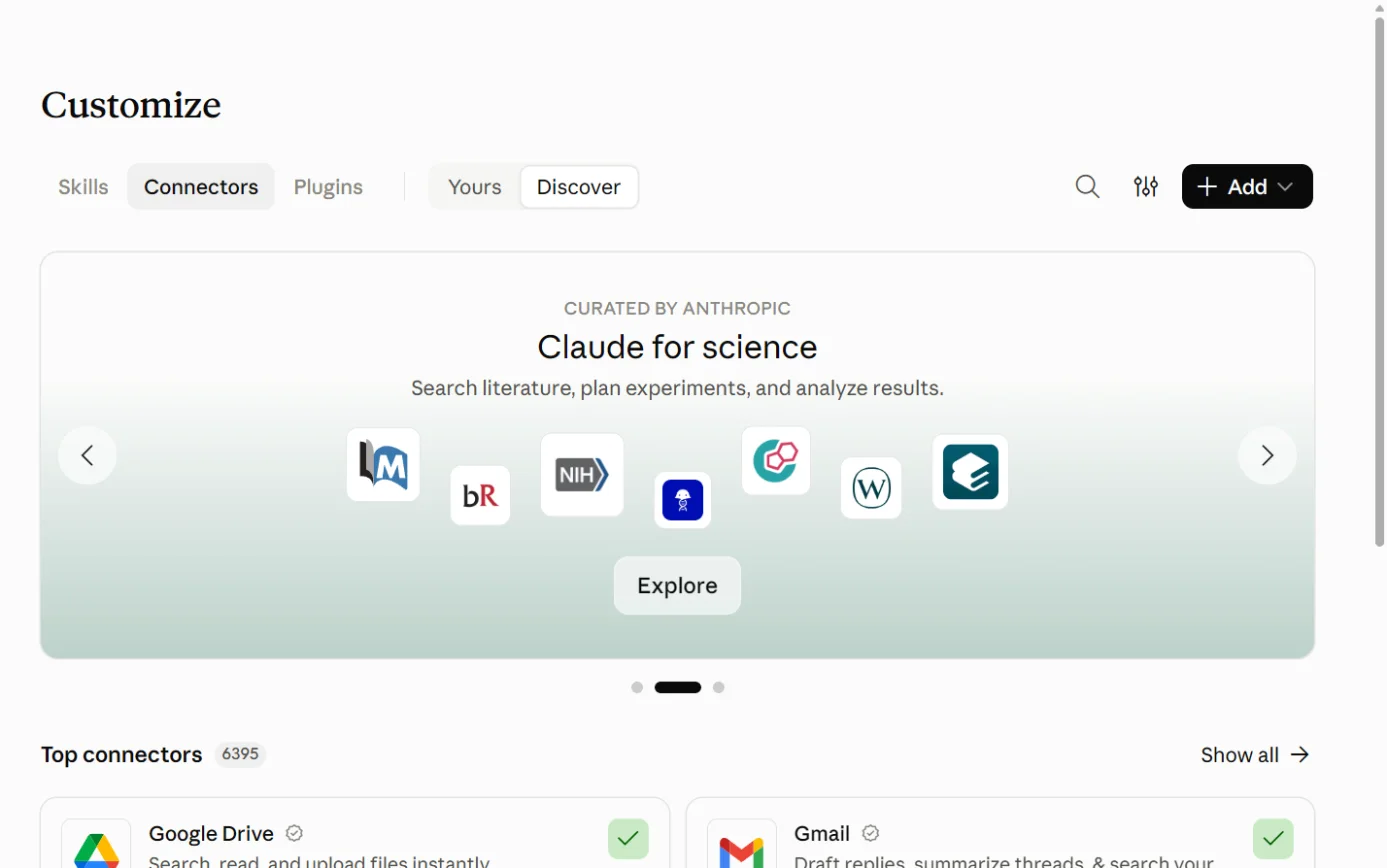
  1. Then: The Connectors directory opens. Source 45

    Claude’s Customize page on the Connectors tab, with Discover ringed.
    Screenshot: Claude, the Connectors page under Customize, 18 October 2026.
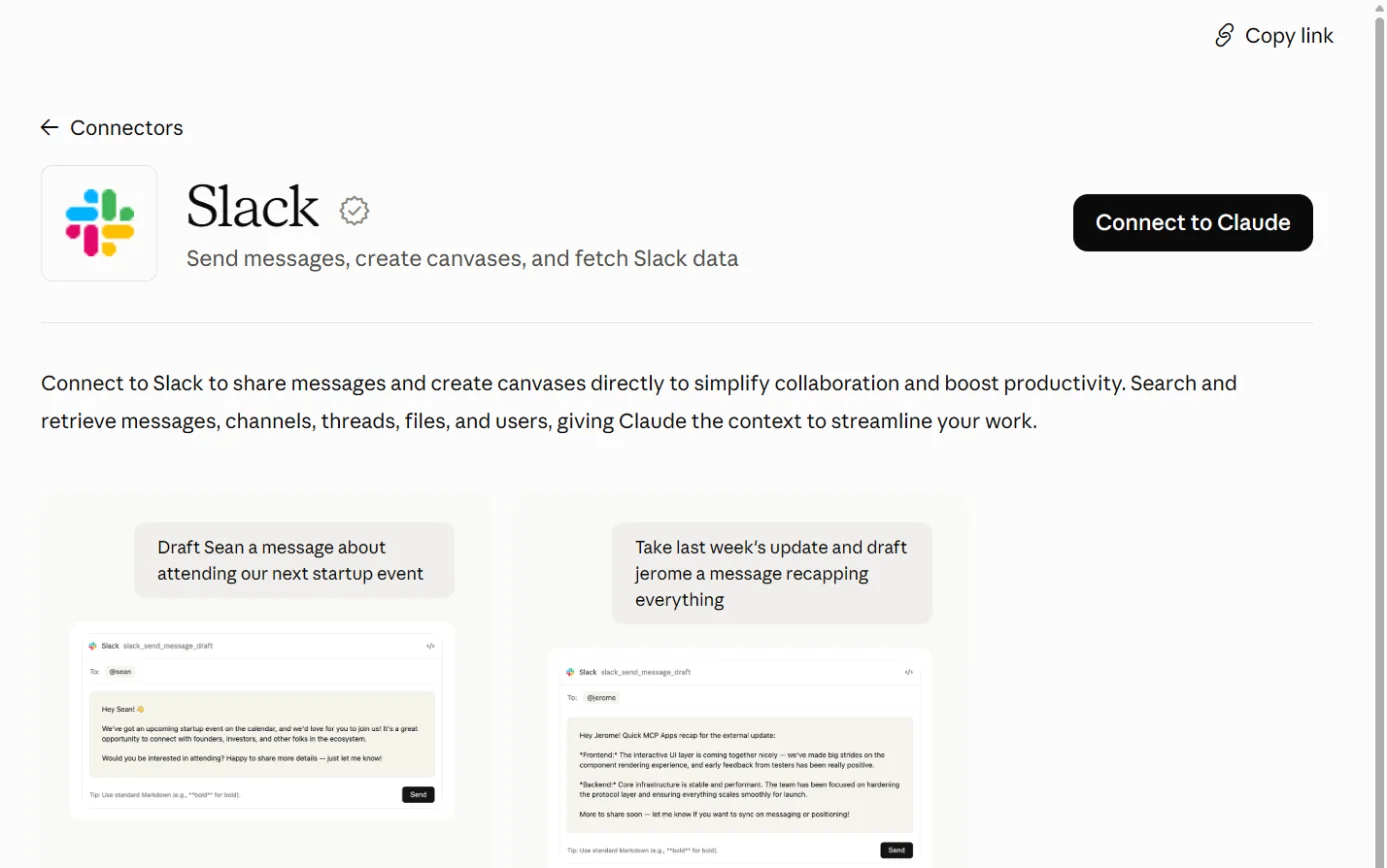
  2. Then: You’re sent to Slack to sign in. Source 45

    The Slack listing in Claude’s connector directory, with the Connect to Claude button ringed.
    Screenshot: Claude’s connector directory, the Slack listing, 18 October 2026.
  3. Then: The exact Slack approval screen isn’t described in the docs we read. Slack’s docs say the integration must be approved by your Slack workspace admin. Sources 4531

    A drawing from the step’s own words. The real screen may look a little different.
  4. Then: Slack shows under Your connectors with the status Connected. Source 45

    A drawing from the step’s own words. The real screen may look a little different.
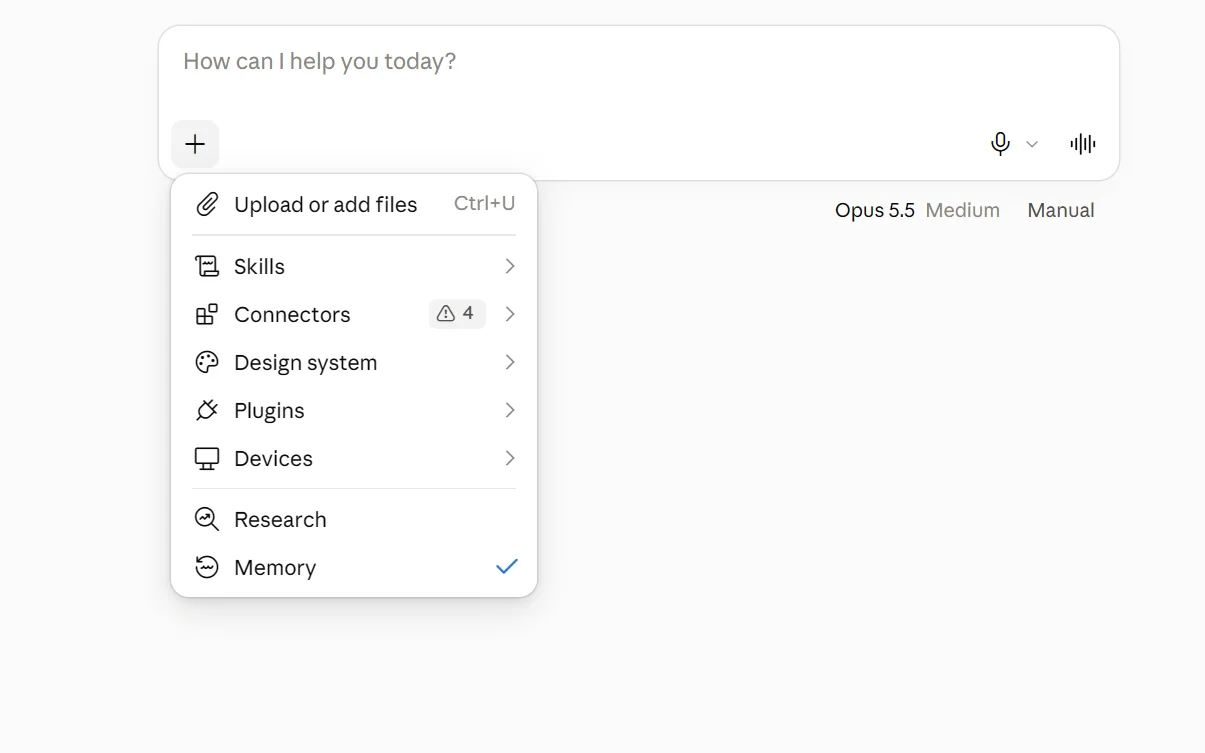
  5. Then: Claude can search channels you can access, read threads and canvases, and send messages. It can ask before using a tool, depending on your tool permissions. Source 45

    The + menu under Claude’s message box, with Connectors ringed.
    Screenshot: Claude, the + menu in a new chat, 18 October 2026.
  6. Then: Claude searches your channels, DMs and files and answers from what it finds. Source 36

    A drawing from the step’s own words. The real screen may look a little different.

Pictures without a date are drawings from each step’s own words. The real screen may look a little different.

Claude Tag setup, for a Claude Owner working with a Slack admin (Anthropic’s docs, not dated):

  1. Then: The setup page walks through pairing, optional GitHub and credits, then launch. Source 40

    A drawing from the step’s own words. The real screen may look a little different.
  2. Then: The Claude app is installed in the Slack workspace. Source 40

    A drawing from the step’s own words. The real screen may look a little different.
  3. Then: Claude replies with a message only that admin can see, containing a pairing code. The code works once and expires in 15 minutes. Source 40

    A drawing from the step’s own words. The real screen may look a little different.
  4. Then: Connected to followed by the workspace name appears under the field. Source 40

    A drawing from the step’s own words. The real screen may look a little different.
  5. Then: You’re set appears. Claude joins the chosen channels and answers mentions there. Source 40

    A drawing from the step’s own words. The real screen may look a little different.
  6. Then: Claude replies in a thread. The reply ends with a footer naming the model and a Configure link. Source 40

    A drawing from the step’s own words. The real screen may look a little different.

Pictures without a date are drawings from each step’s own words. The real screen may look a little different.

To disconnect Connector: go to Customize > Connectors, select Slack and select Disconnect.
  • Connector: go to Customize > Connectors, select Slack and select Disconnect.4536
  • Claude Tag: an Owner can switch off Enable Claude Tag in Slack. That keeps Claude’s data.4042
  • Disconnecting the workspace under Connected workspaces permanently deletes that workspace’s Claude data. A Slack admin uninstalling the Claude app does the same.4042
Limits Anthropic’s listing warns: “Only use connectors from developers you trust.”
  • Anthropic’s listing warns: “Only use connectors from developers you trust.”35
  • During the beta, Claude Tag has no automatic retention period. Transcripts and memory are kept until the workspace is disconnected or the app is uninstalled.42
  • Editing or deleting a message in Slack doesn’t remove it from a Claude Tag transcript that already includes it. Messages from guests become part of the transcript as well.42
  • Your organisation’s custom data retention setting doesn’t apply to Claude Tag transcripts or memory.42
  • In a channel shared with another company through Slack Connect, Claude Tag can use that channel’s connectors for the other company’s people too.41
  • Notes Claude Tag saves from a public channel are read by sessions in every channel of the workspace.41
  • With the earlier Claude in Slack app, conversations stayed out of your claude.ai history and were deleted within 30 days of disconnecting.36
  • Anthropic’s landing page says Claude gets “its own account in your systems, not a borrowed login”, and that every credential’s use is logged.43

Copilot and Slack

No official link. Partner-built connectors only.

Microsoft Copilot and Slack

Official? No connection built by Microsoft or Slack found. Microsoft’s own gallery of Copilot connectors has no Slack entry, and neither does its list of federated (live) connectors.
  • No connection built by Microsoft or Slack found. Microsoft’s own gallery of Copilot connectors has no Slack entry, and neither does its list of federated (live) connectors.5557
  • Microsoft’s partner gallery lists two Slack connectors built and supported by partners: one from RheinInsights and a “Slack external content connector” from ServiceNow.56
What it can see and do RheinInsights’ connector indexes public and private channels, messages, threads and attached files, following Slack’s permission model.
  • RheinInsights’ connector indexes public and private channels, messages, threads and attached files, following Slack’s permission model.56
  • ServiceNow’s connector indexes messages, threads and shared files from all public channels.56
  • Indexing connectors copy content into your Microsoft 365 search index so Copilot can use it. Copilot Chat can’t write back to the other app by default.60
  • For builders, Microsoft publishes a Slack connector for Copilot Studio and Power Automate. Its actions include posting a message and listing the messages in a conversation.58
  • A Copilot Studio agent can be placed in Slack through Azure Bot Service. Microsoft says this needs considerable developer expertise.59
What you need A Microsoft 365 admin sets up indexing connectors in the Microsoft 365 admin center.
  • A Microsoft 365 admin sets up indexing connectors in the Microsoft 365 admin center.60
  • Microsoft says partner connectors are supported by the partner, and support models vary.56
  • Microsoft’s Slack connector is a Standard connector in Copilot Studio and Power Automate.58
Steps to connect Not documented on the Microsoft pages we read. The partner gallery links to each partner’s own setup guide.
  • Not documented on the Microsoft pages we read. The partner gallery links to each partner’s own setup guide.56
To disconnect Not covered for these partner connectors. Microsoft says that when a user disconnects or an admin disables a self-serve synced connector, its indexed content is removed.
  • Not covered for these partner connectors. Microsoft says that when a user disconnects or an admin disables a self-serve synced connector, its indexed content is removed.60
Limits These are partner products. We didn’t review the partners’ own pages.
  • These are partner products. We didn’t review the partners’ own pages.56
  • Microsoft’s Slack connector limits each connection to 100 calls a minute.58

Gemini and Slack

No official link. Gemini Enterprise only.

Google Gemini and Slack

Official? Not in the everyday Gemini app. Google’s lists of connected apps for personal accounts and for work or school accounts don’t include Slack.
  • Not in the everyday Gemini app. Google’s lists of connected apps for personal accounts and for work or school accounts don’t include Slack.6162
  • Yes in Gemini Enterprise, Google’s separate business product. Its Slack data store became generally available on 27 May 2026.6566
  • Google also offers the Gemini Enterprise app for Slack, which answers questions inside Slack. It became generally available on 17 June 2026.6465
What it can see and do The connector lets Gemini Enterprise search and read Slack conversations, files and messages in plain language.
  • The connector lets Gemini Enterprise search and read Slack conversations, files and messages in plain language.63
  • It can send or schedule a Slack message, send a message draft and create a Slack canvas.6366
  • The Gemini Enterprise app for Slack answers in DMs and when it’s mentioned in a channel. Channel replies are shown privately to you first.6465
  • Google warns that with federated search, “your query string is sent to all enabled third-party search backends”.63
What you need A Gemini Enterprise subscription. Google’s Slack pages cover the Standard, Plus, Pay-as-you-go and Frontline editions, and point Business edition customers to a separate help centre.
  • A Gemini Enterprise subscription. Google’s Slack pages cover the Standard, Plus, Pay-as-you-go and Frontline editions, and point Business edition customers to a separate help centre.63
  • For the Slack app, Google lists “Access to the Slack AI add-on” as a prerequisite.64
  • A Google Cloud admin creates OAuth credentials, and each person grants one-time access.64

Steps to connect (Google Cloud docs, last updated 14 October 2026)

  1. Then: A client ID and client secret. Source 64

    A drawing from the step’s own words. The real screen may look a little different.
  2. Then: The integration is saved. Each Gemini Enterprise app can link to one Slack workspace. Source 64

    A drawing from the step’s own words. The real screen may look a little different.
  3. Then: A Slack workspace owner or admin can confirm it under Manage > Installed Apps. Source 64

    A drawing from the step’s own words. The real screen may look a little different.
  4. Then: People can message the app directly, or mention @Gemini Enterprise in a channel. Channel replies are shown only to the person who asked. Source 64

    A drawing from the step’s own words. The real screen may look a little different.

Pictures without a date are drawings from each step’s own words. The real screen may look a little different.

To disconnect Not described on the pages we read.
  • Not described on the pages we read.6364
Limits Slack data stores can only be placed in Google’s global, US or EU locations.
  • Slack data stores can only be placed in Google’s global, US or EU locations.63
  • Each Gemini Enterprise app links to one Slack workspace.64
  • Google says Slack allows about 10 requests a minute for the connector.63
  • Chat histories aren’t synced between Slack and Gemini Enterprise.64

Other routes

Developer tools, automation tools and app stores.

Slack’s MCP server (the route most AI assistants use)

Official? Yes. Slack’s MCP server and its Real-Time Search API became generally available on 17 February 2026.
  • Yes. Slack’s MCP server and its Real-Time Search API became generally available on 17 February 2026.33
  • Slack names Claude.ai, Claude Code, Perplexity and Cursor as partner apps that need no coding.30
  • Slack’s help centre also lists ChatGPT among the outside AI tools that use it.29
What it can see and do Search messages, files, people and channels, and read channels and threads.
  • Search messages, files, people and channels, and read channels and threads.30
  • Send, schedule or draft messages, and add reactions.30
  • Create, update and read canvases and lists, and upload files.3012
  • Slack says agents with access can “take actions in Slack on your behalf”. It doesn’t describe a confirmation step on Slack’s side.29
What you need An app that is published in Slack’s directory or built internally. Workspace admins approve and manage these integrations.
  • An app that is published in Slack’s directory or built internally. Workspace admins approve and manage these integrations.30
  • On Enterprise Grid and Enterprise+, admins can grant MCP access to specific people and groups.12
Steps to connect Through each AI’s own connector, such as Claude’s Slack connector above.
  • Through each AI’s own connector, such as Claude’s Slack connector above.31
To disconnect Not described on the developer pages we read. Slack says MCP activity can be checked in audit logs.
  • Not described on the developer pages we read. Slack says MCP activity can be checked in audit logs.30
Limits Each tool has its own rate limit, in tiers of 20, 50 or 100 or more calls a minute.
  • Each tool has its own rate limit, in tiers of 20, 50 or 100 or more calls a minute.30
  • Slack says the Real-Time Search API lets apps retrieve only what they need “without storing customer data on external servers”.33
  • Slack says the server “respects user permissions”.33

AI apps and automation inside Slack

Official? Yes. Slack lets you install apps with AI agents or assistants from its Marketplace, under the Agents & tools tab.
  • Yes. Slack lets you install apps with AI agents or assistants from its Marketplace, under the Agents & tools tab.24
What it can see and do An app can read your messages with it. Adding it to a channel or DM gives it access to that conversation too.
  • An app can read your messages with it. Adding it to a channel or DM gives it access to that conversation too.24
  • Slack says Marketplace apps must follow a “zero-copy and zero LLM training policy”, and that no customer data is used or retained to train third-party LLMs.24
  • Workflow Builder has connectors to other services, including Google, Microsoft and Zoom.34
What you need AI apps work on all plans, but guests can’t use them.
  • AI apps work on all plans, but guests can’t use them.24
  • By default members can install apps with agents. Owners and admins can turn on app approval so apps are reviewed first.24
  • Workflow Builder connectors need approval before they appear if your workspace requires app approval.34

Steps to connect

  1. Source 24

    A drawing from the step’s own words. The real screen may look a little different.
  2. Source 24

    A drawing from the step’s own words. The real screen may look a little different.

Pictures without a date are drawings from each step’s own words. The real screen may look a little different.

To disconnect Not covered in the article we read.
  • Not covered in the article we read.24
Limits Slack warns: “Because agents use AI, they can be wrong.”
  • Slack warns: “Because agents use AI, they can be wrong.”24

Jobs it’s good for

  • Catching up after leave. Summarise a busy channel for the last seven days, or set up daily recaps on Business+.4
  • Meeting notes without a note-taker. Turn on huddle notes and share the canvas afterwards. Tell people first.13
  • Finding a decision. Ask the question in search, then open the cited messages to check the answer.14
  • Preparing for a client meeting. Ask Slackbot to summarise recent discussions and draft an agenda.6
  • A weekly status update. ChatGPT team tasks can post a weekly project update to an approved Slack channel.50
  • Pulling Slack into a document. Claude or ChatGPT can search a channel and turn the discussion into a brief.3646
  • A shared helper in one channel. Claude Tag can turn a settled discussion into a decision document or tickets.39
  • Messages in another language. Business+ translations show a message in your language, and only you see it.4

What to watch for

Notes and transcripts are records

  • Huddle notes include a transcript, and anyone in the channel or DM can open it.13
  • Slack tells everyone in the huddle when notes start. People who join the channel later can still read old notes. That’s our reading of who can view them.13
  • Claude Tag keeps the original text of messages even after they’re edited or deleted in Slack.42

Shared accounts reach further than people

  • Slack’s own AI and Agentforce answer from what each person can already see.626
  • Claude Tag and @ChatGPT work through service accounts. Whatever those accounts can reach is open to everyone who can talk to them in a channel.4149

Actions as well as answers

  • Slack’s MCP server, Claude’s Slack connector and ChatGPT’s Slack app can all send messages.303546
  • Our suggestion: in Claude, set send tools to Needs approval. In ChatGPT, keep the permission on Always ask or Allow read actions.4553

Training and where data goes

  • Slack says customer data isn’t used to train LLMs and its models run inside its own cloud.191
  • Slack’s other machine learning analyses customer data unless you opt out by email.20
  • Salesforce’s sub-processor list names Google and Microsoft (Azure) as generative AI providers for Slack, located in the United States.23
  • Sydney data residency covers messages and files, but some data, like member profiles, can be stored elsewhere.22
  • When ChatGPT uses the Slack app, it may share relevant chats and memories with Slack, under Slack’s terms.52
  • Google warns that Gemini Enterprise’s federated search sends your query to every enabled third-party search backend.63

Costs

  • Slackbot on Business+ is capped at 15 messages a week per person.7
  • Claude Tag and @ChatGPT bill by usage. Set a spend limit before you launch.3949
  • Turning AI features off doesn’t reduce your Slack bill.3

Who switches things on

  • New AI features turn on automatically unless a primary owner unticks Always allow access to new AI features. New Slackbot features always roll out if Slackbot is on.5
  • Members can install AI apps unless app approval is on.24
  • Claude’s Team and Enterprise Owners add connectors and set tool permissions. Members can’t override them.44
  • In ChatGPT Business, the Slack app is on by default.46

Guests and other companies

  • Guests can’t use AI apps or huddle notes.2413
  • @ChatGPT doesn’t answer guests or work in Slack Connect channels. Claude Tag can work in Slack Connect channels if an admin turns it on there.4841

Beta labels

  • Claude Tag is a public beta, and Anthropic says its features may change before general release.3941

What’s changing

  • 1 October 2025: Anthropic launched Claude in Slack and the Slack connector for Claude.37
  • 13 January 2026: Slackbot became generally available for Business+ and Enterprise+, rolling out through January and February.10
  • 26 January 2026: Anthropic made the Slack connector available to Claude Pro and Max subscribers.37
  • 17 February 2026: Slack’s MCP server and Real-Time Search API became generally available.33
  • April to August 2026: Slackbot gained skills, scheduled tasks, web search, Salesforce record updates, memory, an MCP client, deep research and a full-screen “big mode”.12
  • May 2026: Slack’s “Today” landing page opened as an open beta.12
  • 27 May 2026: Google’s Slack data store for Gemini Enterprise became generally available.65
  • 17 June 2026: The Gemini Enterprise app for Slack became generally available. Channel mentions followed on 10 September 2026.65
  • 3 August 2026: Claude in Slack switched over to Claude Tag.38
  • 15 September 2026 (Dreamforce): Slack said Slackbot in channels is in early pilot, with two-way voice and video generation “coming later this year”.11
  • October 2026: Workflows can start a conversation with Slackbot or an agent.12
  • Coming soon, no date: Slack’s pricing FAQ says Salesforce CRM customers who connect to Slack will get ongoing Slackbot access.1
  • After June 2026: Slack says advanced Slackbot features may get usage limits or usage-based pricing, with 30 days’ notice.7
  • Microsoft: write actions through Copilot connectors start “early October 2026”.60
  • OpenAI: @ChatGPT replaces the older ChatGPT app in Slack. Existing installations don’t stop immediately.47

What we couldn’t establish

  • Australian prices. Slack’s Australian page shows US dollars, and Slack’s billing currencies don’t include AUD. No page we read said whether GST is included.12
  • Free and Pro AI on the pricing cards. The plan cards list AI items under Free and Pro without saying which are included. We relied on the help centre’s table, which puts search answers, recaps and file summaries on Business+ and up.15
  • Which Claude plans get the Slack connector. Anthropic’s Slack page says Team and Enterprise and that the Claude in Slack app must be installed first. Its blog says Pro and Max were added in January 2026. Neither mentions Free.3637
  • Who built ChatGPT’s Slack plugin. OpenAI’s business page says OpenAI and the ChatGPT directory says Slack.5152
  • Which models Slack uses. Slack says Slackbot is powered by Claude and that its models run in its own AWS cloud. Salesforce’s sub-processor list names Google and Microsoft Azure for generative AI and doesn’t name Anthropic. We couldn’t match features to providers.11123
  • Where Slack’s AI runs for Australian workspaces. The data residency article doesn’t mention AI features, and we found no page saying AI processing stays in Australia.2218
  • How long huddle transcripts are kept. The huddle notes article doesn’t say. Canvases follow workspace retention, but no page we read says the embedded transcript does too.1367
  • Whether “Restrict AI use” covers outside AI. The article doesn’t say whether it applies to third-party AI apps or the MCP server.16
  • Agentforce in Australia. No page we read gave regions, languages or prices for Agentforce in Slack. Salesforce’s help pages need JavaScript and wouldn’t load for us.2527
  • Which Slack plans can use the MCP server. Slack’s developer page doesn’t say.30
  • Gemini Enterprise Business edition. Google’s Slack pages cover the other editions and send Business customers elsewhere. We didn’t read that help centre.63
  • Microsoft’s partner connectors. We didn’t read RheinInsights’ or ServiceNow’s own pages, because they’re third parties.56
  • Dates on Slack’s help centre. Slack’s help articles show no published or updated dates.4

Sources

Every line above was read at one of these pages, on the date shown. Vendors change their products and their pages often, so check the page before you rely on a detail.

  1. 1 Slack pricing for subscriptions (Australia) Slack Read 17 Oct 2026
  2. 2 Supported billing currencies Slack Help Centre Read 17 Oct 2026
  3. 3 Updates to feature availability and pricing for Slack plans Slack Help Centre Read 17 Oct 2026
  4. 4 Guide to AI features in Slack Slack Help Centre Read 17 Oct 2026
  5. 5 Manage access to AI features in Slack Slack Help Centre Read 17 Oct 2026
  6. 6 How to work with Slackbot Slack Help Centre Read 17 Oct 2026
  7. 7 Slackbot limits and credit usage Slack Help Centre Read 17 Oct 2026
  8. 8 Build your Slackbot memory Slack Help Centre Read 17 Oct 2026
  9. 9 Introducing Slackbot, your context-aware AI agent for work Slack blog Updated 13 Mar 2026 (the text describes a January and February rollout) Read 17 Oct 2026
  10. 10 Salesforce Announces the General Availability of Slackbot Salesforce (press release) Updated 13 Jan 2026 Read 17 Oct 2026
  11. 11 Slack’s newest innovations turn AI into a true teammate (Dreamforce 2026) Slack blog Updated 15 Sep 2026 Read 17 Oct 2026
  12. 12 Slack updates and changes Slack Help Centre Updated Monthly entries, latest October 2026 Read 17 Oct 2026
  13. 13 Use AI to take huddle notes in Slack Slack Help Centre Read 17 Oct 2026
  14. 14 Search with AI in Slack Slack Help Centre Read 17 Oct 2026
  15. 15 Set up and manage Slack enterprise search Slack Help Centre Read 17 Oct 2026
  16. 16 Restrict AI access to certain channels, canvases and lists Slack Help Centre Read 17 Oct 2026
  17. 17 Guide to the Slack AI Guardrails Slack Help Centre Read 17 Oct 2026
  18. 18 Security for AI features in Slack Slack Help Centre Read 17 Oct 2026
  19. 19 AI Principles Slack Read 17 Oct 2026
  20. 20 Privacy Principles: Search, Learning and Artificial Intelligence Slack Read 17 Oct 2026
  21. 21 How we built Slack AI to be secure and private Slack blog Updated 16 Jul 2025 Read 17 Oct 2026
  22. 22 Data residency for Slack Slack Help Centre Read 17 Oct 2026
  23. 23 Salesforce Infrastructure and Sub-processors (Slack section) Salesforce Updated Published 2 Oct 2026 (the link opens a Salesforce PDF) Read 17 Oct 2026
  24. 24 Work with AI agents in Slack Slack Help Centre Read 17 Oct 2026
  25. 25 Set up and manage Agentforce in Slack Slack Help Centre Read 17 Oct 2026
  26. 26 Use Agentforce in Slack Slack Help Centre Read 17 Oct 2026
  27. 27 Agentforce for Slack (Australia) Salesforce Read 17 Oct 2026
  28. 28 Connect Slackbot to other apps with MCP Slack Help Centre Read 17 Oct 2026
  29. 29 Guide to Model Context Protocol in Slack Slack Help Centre Read 17 Oct 2026
  30. 30 Slack MCP server overview Slack Developer Docs Read 17 Oct 2026
  31. 31 Connect to Claude (Slack MCP server) Slack Developer Docs Read 17 Oct 2026
  32. 32 Manage access to the Slack MCP server through your identity provider Slack Help Centre Read 17 Oct 2026
  33. 33 Slack Securely Powers Your Third-Party Agents With Your Business Context (MCP server and Real-Time Search API now generally available) Slack blog Updated 17 Feb 2026 Read 17 Oct 2026
  34. 34 Slack connectors for Workflow Builder Slack Help Centre Read 17 Oct 2026
  35. 35 Slack connector (Claude directory listing) Anthropic Updated "Added November 2025" Read 17 Oct 2026
  36. 36 Slack integration (earlier Claude in Slack app and Slack connector) Anthropic (Claude docs) Read 17 Oct 2026
  37. 37 Claude and Slack Anthropic Updated 1 Oct 2025; update note dated 26 Jan 2026 Read 17 Oct 2026
  38. 38 What is Claude Tag? Anthropic Help Center Updated "Updated over 3 weeks ago" (no date) Read 17 Oct 2026
  39. 39 Work with Claude Tag Anthropic (Claude docs) Read 17 Oct 2026
  40. 40 Set up Claude Tag Anthropic (Claude docs) Read 17 Oct 2026
  41. 41 Security and data handling (Claude Tag) Anthropic (Claude docs) Read 17 Oct 2026
  42. 42 Data lifecycle and deletion (Claude Tag) Anthropic (Claude docs) Read 17 Oct 2026
  43. 43 Claude in Slack Anthropic Read 17 Oct 2026
  44. 44 Use connectors to extend Claude’s capabilities Anthropic Help Center Updated "Updated today" (17 Oct 2026) Read 17 Oct 2026
  45. 45 Get started with connectors Anthropic (Claude docs) Read 17 Oct 2026
  46. 46 Using Slack in ChatGPT OpenAI Help Center Updated "Updated: 6 days ago" (timestamp 11 Oct 2026, UTC) Read 17 Oct 2026
  47. 47 ChatGPT with Slack and Microsoft Teams OpenAI Help Center Updated "Updated: 10 hours ago" (timestamp 17 Oct 2026, UTC) Read 17 Oct 2026
  48. 48 Using @ChatGPT in Slack and Microsoft Teams OpenAI Help Center Updated "Updated: 11 hours ago" (timestamp 17 Oct 2026, UTC) Read 17 Oct 2026
  49. 49 Setting up and managing @ChatGPT in Slack and Microsoft Teams OpenAI Help Center Updated "Updated: 11 hours ago" (timestamp 17 Oct 2026, UTC) Read 17 Oct 2026
  50. 50 Creating and managing team tasks in ChatGPT OpenAI Help Center Updated "Updated: 13 days ago" (timestamp 4 Oct 2026, UTC) Read 17 Oct 2026
  51. 51 Slack plugin for ChatGPT OpenAI Read 17 Oct 2026
  52. 52 ChatGPT plugin listing: Slack OpenAI Read 17 Oct 2026
  53. 53 Managing app permissions in ChatGPT OpenAI Help Center Updated "Updated: 15 days ago" (timestamp 2 Oct 2026, UTC) Read 17 Oct 2026
  54. 54 Connecting and managing app accounts in ChatGPT OpenAI Help Center Updated "Updated: 8 hours ago" (timestamp 17 Oct 2026, UTC) Read 17 Oct 2026
  55. 55 Microsoft-built connectors gallery Microsoft Learn Updated 30 Sep 2026 (page metadata) Read 17 Oct 2026
  56. 56 Partner-built connectors gallery Microsoft Learn Updated Updated 25 Sep 2026 (page metadata) Read 17 Oct 2026
  57. 57 Federated connectors overview Microsoft Learn Updated Updated 16 Oct 2026 (page metadata) Read 17 Oct 2026
  58. 58 Slack (connector reference for Copilot Studio, Power Automate, Logic Apps and Power Apps) Microsoft Learn Updated Updated 2 Oct 2026 (page metadata) Read 17 Oct 2026
  59. 59 Publish an agent to Azure Bot Service channels (Copilot Studio) Microsoft Learn Updated Updated 3 Aug 2026 (page metadata) Read 17 Oct 2026
  60. 60 Microsoft 365 Copilot connectors overview Microsoft Learn Updated Updated 12 Oct 2026 (page metadata) Read 17 Oct 2026
  61. 61 Use & manage Connected Apps in Gemini (computer) Google Gemini Apps Help Read 17 Oct 2026
  62. 62 Use apps connected to Gemini with a work or school Google Account Google Gemini Apps Help Read 17 Oct 2026
  63. 63 Slack connector overview (Gemini Enterprise) Google Cloud Updated "Last updated 2026-10-14 UTC" Read 17 Oct 2026
  64. 64 Configure the Gemini Enterprise app for Slack Google Cloud Updated "Last updated 2026-10-14 UTC" Read 17 Oct 2026
  65. 65 Gemini Enterprise release notes Google Cloud Updated "Last updated 2026-10-14 UTC" Read 17 Oct 2026
  66. 66 Connect a third-party data source (Gemini Enterprise) Google Cloud Updated "Last updated 2026-10-15 UTC" Read 17 Oct 2026
  67. 67 Customise data retention in Slack Slack Help Centre Read 17 Oct 2026

Want your team shown this on its own Slack?

We teach on the tools your workplace already uses, with the checks that go with them.