Skip to content

Canva and AI.

Its own AI is Canva AI, on every plan. ChatGPT, Claude, Copilot and Gemini can all create and edit designs through Canva’s AI Connector, even on the free plan.

Checked 15 October 2026 against 113 sources, each the vendor’s own page. See them all, or what’s changed since.

The short version

Canva’s AI is on every plan, including Free, but the free plan gets about 20 AI uses a month.12 Paid plans get more, and the newest tools, like chatting with Canva AI to change a design or making video clips, use the allowance fastest.2 Canva says it doesn’t use content from Business, Teams, Enterprise or Education accounts to improve its AI, and Free and Pro users control this in their Privacy Settings.4042 On team and school plans, admins choose who gets each AI feature, but Canva AI itself can’t be fully switched off.368 Outside assistants can work inside your Canva account through Canva’s “AI Connector”, and Canva gives setup guides for ChatGPT, Claude, Gemini and Microsoft Copilot.56 A connected assistant can read your designs, and it can also create and edit designs and export files.5657 The connector works on every Canva plan, but some actions need a paid or Enterprise plan, and Canva’s own pages disagree about which.565777 A team admin can switch the connector off for the whole team, and in Canva Education “AI connectors” are blocked by default.5638 Canva warns that its AI can make mistakes, and that AI charts start with sample data you have to replace.1028 Canva also says it can’t give you permission to use recognisable people or brands in AI images, so getting that permission is up to you.15

The plans

Canva is an online design tool. Its AI sits on the homepage and inside the editor, including in Canva’s Docs, Sheets and Code tools.34 If you’re billed outside the US and UK, your contract is with Canva Pty Ltd, an Australian company.42

Words used in this guide

  • Canva AI is Canva’s built-in assistant. You chat with it to create or change designs.3
  • Magic Studio was Canva’s 2023 name for its set of AI tools.47 Many help pages still say a tool “is part of Magic Studio”, but Canva’s current AI page doesn’t use the name.2210
  • The AI allowance is your monthly budget of AI use. Canva sorts its AI tools into Standard, Premium and Ultra tiers, which use the allowance at different rates.12
  • An API is a doorway that other software uses to read or change things in your Canva account. Canva now calls its APIs the Canva REST APIs. They used to be the Connect APIs.83
  • MCP (Model Context Protocol) is a shared standard that lets AI assistants use other software. Canva’s AI Connector is “powered by the Canva MCP Server”.5981
  • Canva uses the word “connectors” for two different things. The AI Connector lets outside assistants like ChatGPT into your Canva account.56 Connectors in Canva AI go the other way, letting Canva’s own AI read from apps like Gmail or Slack.6581
  • A Brand Kit stores your brand’s colours and fonts, among other things.67 A Brand Template is a reusable team layout, and Autofill fills one with your own data.5785

What each plan gets (Australian pricing page and Canva’s AI usage page, read 15 October 2026)

PlanWho it’s forPrice shown in AUDMonthly AI allowance
FreeOne person1A$01Up to 20 uses of Standard or Premium tools. No Ultra tools.12
ProOne person1A$165 a year1Standard tools don’t count (fair use applies). Up to 200 Premium uses, or up to 20 Ultra uses.2
BusinessIndividuals and small teams55A$280 a year per person1Standard tools unlimited (fair use). Up to 400 Premium uses, or up to 40 Ultra uses.2
EnterpriseOrganisations1No price shown (“Let’s talk”)1Same as Business.2
Canva EducationK–12 schools and teachers139Free for eligible teachers and schools39Standard tools unlimited (fair use). Up to 200 Premium uses, or up to 20 Ultra uses.2
Canva for NonprofitsEligible non-profits1Free for one team of up to 50 people. Extra seats are 50% off Enterprise pricing.1Same as Pro.2
Canva TeamsExisting subscribers only54Closed to new sign-ups and upgrades54Same as Pro.2
Canva CampusHigher education1No price shown1Not stated
Pro LiteCanva says it’s “currently available in India and Indonesia”105Not on the Australian pricing page1Same as Free.105
  • The pricing page has a monthly and yearly switch (“Save from 16%”), but we could only read the yearly figures.1
  • Canva’s allowance figures are “up to” estimates that assume simple prompts and one type of tool. Real use with advanced tools is usually lower.2
  • On Teams, Business, Nonprofits, Education and Enterprise, each member has their own allowance. Allowances aren’t shared or pooled across the team.2
  • Paid and Nonprofit allowances reset monthly on your billing date, including on yearly plans.2
  • Free resets at 12:00 a.m. UTC on the first of each month.2 That’s 8 am on the 1st in Perth (our conversion).
  • Pro and Business free trials get the Free allowance: up to 20 Standard or Premium uses, and no Ultra.2
  • To see what’s left: profile icon > Settings > Billing, then look under AI usage.2

What the tiers cover (Canva’s AI usage page)

TierTools Canva listsHow it’s counted
Doesn’t count on paid plansTranslate, Magic Write, Canva AI text answers, Photo and Video Animations, AI Voice2No allowance used on paid plans. On Free these still draw on the allowance.2
StandardImage Upscaler, image generation with Canva AI, Magic Formulas2Cheapest. Doesn’t count on paid plans, subject to fair use.2
PremiumMagic Layers, generating a design or elements with Canva AI, Canva Code interactives, Music and Sound Effect Generator, Form generator, Affinity’s premium AI features2Draws on the allowance.2
UltraConversational design with Canva AI 2.0, creating a video clip, creating an image with Canva AI2Uses the most. Not available on Free.2
  • The usage page lists “Create an image with Canva AI” under more than one tier.2 Dream Lab’s page says you can pick a quality tier, and higher tiers use more allowance.16 It appears the tier depends on the quality you choose (our inference).
  • Canva AI 2.0 uses more of the allowance when a task includes larger design files or needs more steps.2
  • Tasks that call on several AI tools cost more, and harder tasks may use more advanced models.2

When you run out

  • On Free, Standard and Premium tools keep working with short pauses between generations. Ultra tools stop until the reset.2
  • On Pro and Teams you can keep using AI tools, with short pauses between tasks.2
  • Enterprise, Education and Nonprofits can keep using Premium features with short pauses.2
  • Canva notifies you as you get close to the limit.2

Buying more AI

  • AI Pass is a monthly add-on for Pro, Teams, Business and Nonprofits plans managed on the web.52
  • It isn’t available on Free, Education or Enterprise, on free trials, on prepaid plans, or on plans billed through the Apple App Store or Google Play.52
  • Canva’s AI Pass page says it gives Pro, Teams and Nonprofits 40 times more AI, and Business 20 times more.52 The pricing page describes AI Pass as “40x” for Pro and Business.1
  • AI Pass is charged per person. On Teams and Business, only owners and admins can buy it.52
  • To buy it: profile icon > Settings > Billing > under AI usage, Get more > Purchase AI Pass.52
  • To cancel it: Settings > Billing > next to AI Pass, Remove > Remove AI Pass. It stays until the end of the billing cycle.52
  • AI top-ups are for Business only. Each adds one month’s Business allowance and lasts 30 days. Unused allowance doesn’t roll over, and only one top-up can be active at a time.53
  • A manual top-up “can’t be cancelled once purchased”.53 Automatic top-ups need a web subscription and have a spend cap.53
  • The Australian pricing page shows no price for either add-on.1 See “What we couldn’t establish”.

Where your data lives

  • Canva’s Trust Center says “Canva stores your data in the United States”.40
  • The same page says Canva group companies process data in Australia, New Zealand, the Philippines, the United Kingdom and Singapore, as well as Europe and the US.40
  • Canva’s Privacy Policy (25 August 2026) says your information “will be stored and processed in” the United States, Australia, Singapore, the EU, the UK, the Philippines and New Zealand.41
  • Canva’s sub-processor list (17 April 2026) names the outside companies used for “Canva AI Services”: Amazon Web Services (US and EU), and Anthropic, ElevenLabs, Features & Labels, Google, Nanonoble and OpenAI (all US).49
  • Leonardo.AI, a Canva group company, is listed for “Canva & Affinity AI Services” in Australia and the United States.49
  • Canva Austria GmbH, another group company, is listed for “Canva and Affinity Photo and Video AI Services” in the EU and US.49
  • The list says Nanonoble doesn’t process customer personal data for Canva Education, Canva Enterprise, or customers with a signed Order Form.49
  • We didn’t find an option to keep Canva data in Australia only. See “What we couldn’t establish”.

What’s built in

Three things apply to most features in this section.

Who controls it

On Teams and Business, Magic and AI features are on for every member by default.36 Admins change this at profile icon > Settings > under Controls and permissions, Permissions > Magic and AI, then choose who can use each feature.36 The same controls are available to Enterprise and Education owners and admins.36 The Magic and AI list, in Canva’s words: Magic Write, Magic Design, Magic Activities, Magic Edit, Magic Media, Transform into Doc, Dream Lab, Help Assistant for AI-generated design advice, Canva AI, Magic Insights, Canva Code, AI Shapes, AI Charts, Use team content to generate AI responses, Canva AI Music and Sound Effects, and Image to Video.36 Changes apply to new designs. Magic features already used in existing designs stay available.36 Some people may not get a feature even when it’s switched on, because availability depends on the language set in Canva.36 Canva’s FAQ says Canva AI “is a core feature and can’t be fully turned off”, though team and school admins can control access to it.8

Schools are set up differently

“Only administrators and teachers have access by default.”36 See “Schools and students” under What to watch for.

The data rules are shared

Canva says it “won’t use your user content to improve AI-powered features” unless your Privacy Settings allow it.40 Content from Teams, Business, Enterprise and Education accounts isn’t used to improve AI features.404246 Inputs may go to Canva’s outside “Technology Partners” so they can run the feature.43 The feature blocks below only add what’s specific to each one. “What to watch for” has the detail.

Canva AI (the assistant) A chat assistant for creating and editing designs, images, videos and code, and for brainstorming.
What it does

A chat assistant for creating and editing designs, images, videos and code, and for brainstorming.3 Canva calls the original single-prompt version “Canva AI 1.0”. “Canva AI 2.0” lets you create and edit by chatting inside the editor.3 In the editor it reads your design and changes it on the canvas, for example “Make all headlines blue”.5 It can search the web for current information and apply your Brand Kit.34 It can also run tasks on a daily, weekly or monthly schedule, up to 10 at a time. Each run starts a new chat and you get a notification when it’s done.3 Canva announced Canva AI 2.0 on 16 April 2026 as a research preview, saying general availability would roll out “over the coming weeks”.11 Its help pages still say 2.0 features are rolling out gradually.9

Where to find it

From the homepage, select Canva AI in the side navigation.3 Type or speak your prompt, then press Enter or select Submit. The plus icon adds context: Upload, Add from Canva, Apply brand or Connect.7 In the editor, select the Canva AI tab in the sidebar and describe the change. The Stop button interrupts it.5 Or select an element and choose Ask Canva in the editor toolbar, which opens Canva AI in the side panel.6 Chat history is under the icon in the top corner. Scheduled tasks are under the panel icon > Tasks.3

Plans and cost

Canva AI itself is on every plan, including Free.10 Canva’s help pages say the 2.0 features, including Memory Library and Connectors, come with Pro, Teams, Business and Nonprofit.34 Free and Education users get “Canva AI 1.0” features, plus tools like Magic Write and Background Remover with limited monthly use.3 The page on editing by conversation lists Pro, Business and Enterprise instead, and says it “isn’t available for everyone just yet”.5 The Australian pricing page marks Canva AI 2.0 as “Soon” for Enterprise.1 Conversational design is an Ultra tool, the most expensive tier, and Free can’t use Ultra tools.2

Ask Canva

only uses your allowance when a request uses a premium AI feature. It doesn’t appear in the toolbar on Free or Education.6

On by default, and who controls it

On by default for Teams and Business members. Admins use the Canva AI control under Magic and AI.36 Education users need their school’s Canva admin to turn Canva AI on.4 The admin list also has Use team content to generate AI responses.36 Going by its name, it appears to control whether Canva AI can draw on your team’s content. The page doesn’t explain it.

Your data

Canva’s FAQ says “Some features may use your inputs to improve performance”.8 It says Google Workspace data is handled under Google’s API Services User Data Policy, including its Limited Use rules.8 The pages we read don’t say how long Canva keeps Canva AI conversations.841

In Australia

Canva doesn’t name Australia as restricted, and English is supported.3 Canva does say Canva AI “may not yet be available in your country or region”, and isn’t available in every language yet.4

Memory Library Learns your style preferences, such as colours and tone, from your work in Canva and your Canva AI prompts. It keeps them in an “About Me” page, which is a Canva Doc.
What it does

Learns your style preferences, such as colours and tone, from your work in Canva and your Canva AI prompts. It keeps them in an “About Me” page, which is a Canva Doc.12 It doesn’t keep chat details or the context of ongoing projects.12 Canva’s FAQ says it is rolling out gradually.8

Where to find it

Home > Canva AI > Memory. If there’s no About Me page yet, select Create About Me.12

Plans and cost

Pro, Teams, Business and Nonprofit. Education isn’t listed.12

On by default, and who controls it

The page doesn’t say whether it starts on or off.12 To turn it off (desktop only): account icon > Your account > AI personalization, then under Memory, turn off the About Me toggle.12 The page doesn’t describe an admin control for it.12

Your data

You can edit the About Me page, or delete it with File > Organize > Move to trash. No retention period is stated.12 Canva’s Privacy Policy says you manage your Memories in your AI personalisation settings.41

In Australia

The page says it may be unavailable in some regions, without naming them.12

Connectors in Canva AI (Canva reading your other apps) Lets Canva AI use information from apps you connect as context for designs and content.
What it does

Lets Canva AI use information from apps you connect as context for designs and content.65 Canva’s help names Slack, Gmail, Zoom, Notion, Asana, Google Drive, HubSpot and Gong.65 Canva’s 2.0 announcement also listed Google Calendar, Microsoft, Atlassian and Linear.11

Can it act?

No. The connections are read-only. Canva AI can’t edit, delete or create anything in those apps.65 Canva’s developer docs add that they bring in text only, with no images or video.81 You can be limited to five active apps at a time. Canva AI may miss an app unless your prompt names it or the information you need.65 Canva builds all these connectors itself and isn’t taking submissions from other companies.81 You can also import files from Google, Dropbox and OneDrive into Canva AI. It takes CSV, DOC, DOCX, XLS, XLSX, TXT, MD, PDF, JPG and PNG files, up to 10 MB each and three at a time.66

Where to find it

See the steps below. The editor route works on desktop and the web. It isn’t available in the mobile app.65

Steps to connect (Canva Help Centre, no date shown; read 15 October 2026)
  1. On the homepage, go to Canva AI, select the plus icon and choose Connect apps.65
  2. Pick an app. If your account isn’t linked yet, select Connect and follow the prompts.65
  3. Turn the app on with its toggle, type a prompt that names the app or the information you need, and select Submit.65
Plans and cost

Part of the 2.0 features for Pro, Teams, Business and Nonprofit.3 The pricing page lists “Canva AI connectors” as new for Pro and Business, and “Soon” for Enterprise.1 It doesn’t say which kind of connector it means, though it sits next to Canva AI 2.0 (our reading).

On by default, and who controls it

Each person connects their own apps. Some apps may need organisation or admin approval.65 In Canva Education, “AI connectors are blocked for all Education users” by default.38 That page doesn’t say whether it means these connectors, the AI Connector for outside assistants, or both.

Your data

Canva AI only sees what your connected account is allowed to see in that app.65 Imported files are added to your Uploads folder.66 To disconnect: plus icon > Connect apps > Manage apps > the app > Disconnect. That disconnects it everywhere in Canva. Toggling an app off only stops Canva AI using it.65

In Australia

No country limits stated. Some apps are still rolling out.65

Generate a design from a description (Magic Design) Canva AI drafts designs from a written description.
What it does

Canva AI drafts designs from a written description.7 It covers presentations, posters, cards, flyers, invitations, business cards, postcards, documents, social media graphics and short social videos.7 It shows up to eight templates. Web Research pulls in current information, and Brand Hub applies your brand styles.7 The admin control for it is still called Magic Design. Designs that follow your brand need both Magic Design and Canva AI switched on.36

Where to find it

Homepage > Canva AI > describe the design (optionally pick a design type or use the microphone) > Submit. Then select Edit to open it, or Download.7

Plans and cost

It counts toward your AI usage.7 “Generating a design or elements with Canva AI” is a Premium tool.2

On by default, and who controls it

On by default for Teams and Business.36 Owners and admins decide who gets it, and students should ask their teacher.7 If an admin turns off Magic Design, a connected assistant like ChatGPT can’t generate designs for anyone on that team either.57

Your data

Uploads must be a supported format within Canva’s size limit.7 The shared data rules at the start of this section apply.

In Australia

No country limits stated. Some people may not have access depending on their Canva language.7

Magic Write Writes copy from a prompt, or reworks text already in your design.
What it does

Writes copy from a prompt, or reworks text already in your design.13 Options for existing text include Rewrite, Shorten, More formal, Change voice and Generate quiz.13 It can also draft presenter notes from your slides or from a custom prompt.13

Where to find it

In a design, select the Quick actions icon (or type /) > Magic Write.13 For existing text, right-click it or select it, then choose Magic Write from the toolbar.13 For presentations: Notes > Generate notes. From the homepage: Canva AI > Draft a doc.13

Plans and cost

On paid plans it doesn’t count toward the monthly allowance. On Free it does.2

On by default, and who controls it

Team admins and brand designers decide who on a team can use it, and teachers decide for their class. Canva Education admins and teachers can turn it on for students.14

Your data

Canva’s “Learn about Magic Write” page says Canva built it in partnership with OpenAI.14 The same page says it “only uses data and information up to mid-2021”, with a 1,500-word input limit and about 2,000 words of output.14 That page may not have been updated for newer models. We couldn’t confirm either way (our inference). It warns the output may be inaccurate or unoriginal, and that its filters may occasionally miss offensive or harmful content.14

In Australia

It supports 103 languages, matching the Canva interface. No country limits stated.14

Translate and Magic Switch Translates whole pages or selected text into “100+ languages”.
What it does

Translates whole pages or selected text into “100+ languages”.27 A Tone of voice setting (Original, Conversational, Informative, Professional, Friendly or Inspirational) works in 19 of them.27 Each run is limited to 2,000 characters and one language.27 By default it duplicates the page so your original is kept, and shrinks text to fit.27 Magic Switch sits under Resize and includes a Translate option.27

Where to find it

Right-click a text box > Translate text > choose Translate to > Translate.27 Or Resize > under Magic Switch, Translate > set Translate to and Apply to page > Translate > Open.27 Or select the page > Edit > Translate. The settings there include Reduce font size to fit and Duplicate page when translating.27

Plans and cost

On paid plans Translate doesn’t count toward the allowance. On Free it does.2

On by default, and who controls it

Translate isn’t in the Magic and AI admin list.36 The pages we read don’t describe a separate admin switch for it.

Your data

The page doesn’t name the translation provider.27 It gives no accuracy warning, but notes “Translate doesn’t work with all fonts”.27

In Australia

No country limits stated.27

Images: Magic Media, Dream Lab and AI image apps Magic Media makes images, graphics and 4-second videos from a text prompt.
What it does

Magic Media makes images, graphics and 4-second videos from a text prompt.15 Dream Lab makes four images per prompt. You can add a reference image to guide the style or layout, and refine results with follow-up instructions. Boost resolution adds detail.16 Canva AI can also create images from a prompt.2 Paid plans also offer DALL·E (by OpenAI) and Imagen (by Google Cloud) as AI image generation apps.20

Where to find it

Magic Media: in the editor side panel select Magic Media, or search for it under Apps. Choose the Images, Graphics or Videos tab, describe what you want, then generate.15 Dream Lab: homepage > More > Dream Lab > type a prompt > Generate. It isn’t inside the editor.16

Plans and cost

These all count toward your AI usage.1516 Reference images and Boost resolution in Dream Lab also use allowance.16 DALL·E and Imagen need a paid Canva plan.20

On by default, and who controls it

Admins control Magic Media and Dream Lab separately.36 Enterprise organisation admins have a setting to “Set permissions for team members to access Dream Lab”.37 If Dream Lab is missing, your admin or school may have turned it off.17 Canva’s student app rules block “generative AI” apps for students by default and allow them for teachers.38 It appears DALL·E and Imagen fall in that group (our inference).

Your data

Dream Lab’s page doesn’t name its model.16 Leonardo.AI, a Canva group company, is listed for Canva AI services in Australia and the US.49 Dream Lab puts a visible label on generated images showing AI made them.16 Canva’s AI terms say you must not remove or change provenance tags or metadata, including C2PA data, on AI content.43 Canva says you own images you make if you follow its terms, but whether AI images can be copyrighted depends on where you are.1651

Canva’s warnings

Canva can’t give you permission to use recognisable people, characters or brands. You need permission from whoever holds the rights.151620 Prompts are checked automatically, and you can report an image with the Report button.1516 Canva’s own advice: “Always use your best judgement and be a good human when sharing AI-generated content.”15

In Australia

No country limits stated. Dream Lab isn’t available on canva.cn, and Magic Media may not appear for some language settings.1615

Video: Create a video clip and Image to Video “Create a video clip” makes 8-second clips with sound, or 6-second clips without, from a text prompt.
What it does

“Create a video clip” makes 8-second clips with sound, or 6-second clips without, from a text prompt.18 When it launched in June 2025, Canva said it was built with Google’s Veo 3 model.107 The current help page doesn’t name a model.18 Image to Video adds movement to a still image, making a silent 5-second clip. Some come out at 3 seconds.19 Magic Media’s Videos tab makes 4-second clips.15

Where to find it

Video clip: homepage > Canva AI > Video clip > describe it > optionally Attach a reference image. Then download it or select Use Canva Editor.18 Image to Video: select an image > Edit > under Tools, Image to Video > Smart or Custom > Generate 5 second video.19

Plans and cost

Creating a video clip is an Ultra tool, so Free can’t use it.2 At launch it was for paid plans and Nonprofits, with 5 a month to start.107 Image to Video is a premium feature that counts toward your allowance. Free users can use it until their allowance runs out.19

On by default, and who controls it

Image to Video is off by default for Education students, and school admins can turn it on.19 Admins have an Image to Video control.36

Your data

Video clip prompts must be in English, and you can’t change the audio in clips with sound.18 Image to Video doesn’t fully support animating faces. It won’t take premium stock media or images with transparent backgrounds.19 Neither page mentions labels or watermarks.1819

In Australia

No Australian restriction stated. Image to Video isn’t available in China.19

Photo editing: Magic Edit, Magic Grab, Magic Eraser, Magic Expand Magic Edit adds, replaces or changes objects in a photo. You brush or click an area and describe the change. On our reading, the result contains content the camera didn’t capture.
What it does.
  • Magic Edit adds, replaces or changes objects in a photo. You brush or click an area and describe the change.21 On our reading, the result contains content the camera didn’t capture.
  • Magic Grab lifts an object out of a photo so you can move or resize it, keeping the background.22
  • Magic Eraser removes unwanted objects.23
  • Magic Expand extends a photo past its edges.24
Where to find it

Select the photo > Edit in the editor toolbar, then under Tools:

  • Magic Edit: choose All, Brush or Click, describe the change, then Generate.21
  • Magic Grab: See all > Magic Grab > Click or Brush > Grab.22
  • Magic Eraser: Brush, Click, Foreground or Text > Erase.23
  • Magic Expand: See All > Magic Expand > pick a size or drag a crop handle > Expand.24
Plans and cost

None of these four pages says which plans include the tool. Each points to Canva’s AI usage page.21222324 The usage page doesn’t list them by name.2

On by default, and who controls it

Admins control Magic Edit under Magic and AI, and Education admins and owners can turn it on for students.2136 The admin list doesn’t name Magic Grab, Magic Eraser or Magic Expand.36

Your data

The shared data rules apply.

Canva’s warnings

Magic Edit: avoid prompts for flags, text, faces or hands, which may not look right. Celebrities and popular brands may be blocked. Results may not match the lighting, or may look pixelated.21 Magic Expand may not work well on faces or hands, or on images with transparent backgrounds.24 Magic Grab doesn’t work on images in frames or grids.22

In Australia

No country limits stated.21222324

Magic Layers Splits a flat image into separate layers you can edit. Text becomes editable text and objects become separate elements, with the background kept behind them.
What it does

Splits a flat image into separate layers you can edit. Text becomes editable text and objects become separate elements, with the background kept behind them.2526 It works best on graphics and illustrations. Photo-realistic images may separate poorly.25 It takes single-page PNG or JPG files up to 5000 pixels on the longest edge. It won’t process vector graphics or PDFs, or images of licensed characters or brands.25

Where to find it

Home > Magic Layers > Select Media. Or in the editor, select an image > Edit > Magic Layers.25

Plans and cost

A Premium tool that uses your monthly allowance.225 The pricing page lists it on Free and Pro.1

On by default, and who controls it

The admin list has no separate Magic Layers control.36

Your data

The shared data rules apply.

In Australia

Canva launched it in public beta in the US, the UK, Canada and Australia on 11 March 2026.26 Since 8 June 2026 it also works inside ChatGPT and Gemini, turning images made there into editable Canva designs.69

AI charts Makes an editable chart from a description, from sample data, from your own CSV file, or from a connected source such as HubSpot, Google Analytics, World Bank, Statista or Canva Sheets.
What it does

Makes an editable chart from a description, from sample data, from your own CSV file, or from a connected source such as HubSpot, Google Analytics, World Bank, Statista or Canva Sheets.28 Charts made from a description are filled with sample data that matches the description.28 Data doesn’t update by itself. You have to refresh or re-upload it, and uploads are CSV only.28

Where to find it

In a design, go to Elements, type a chart description, open the dropdown next to Generate images and select Generate a chart.28 For your own data: Elements > plus icon > Upload a CSV, or Import from a source and select Add to Canva AI.28

Plans and cost

The page doesn’t say.28 Canva’s 2 September 2026 update said Sheets data can become a chart “with a prompt”.74

On by default, and who controls it

Admins have an AI Charts control.36

Your data

Canva’s warning: “Always verify and update the data with your own information before sharing.”28 The page says the feature may still be rolling out.28

In Australia

Not available in China. No other country limits stated.28

Canva Code Builds interactive designs and websites from a description.
What it does

Builds interactive designs and websites from a description.29 You can make whole pages, such as landing pages or dashboards, or small elements like quizzes and calculators to put in other designs.29 Canva Code 2.0 added templates, HTML import, visual editing and buying a custom domain.31

Show code

then Copy code lets you reuse the code outside Canva.29

Where to find it

Homepage > Code opens the editor. Describe your design on the Canva AI tab.29 For an element: Canva AI > describe it > </> Code > Use in a design, then choose a design type under Add as an element to.29 Select Preview to test it, then publish it as a website.29

Plans and cost

Since 14 July 2026, Canva says Canva Code 2.0 “is now available to free, pro, business, enterprise, and education users.”31 It counts toward your AI usage.29 Canva Code interactives are a Premium tool.2

On by default, and who controls it

Admins and brand designers decide who on a team can use it, and teachers decide for their class.29 It may be switched off in your team’s or class’s settings.30 The admin control is Canva Code.36

Your data

“Only you can see your Canva Code conversations.”29 Who can see a published site depends on the settings you choose when you publish.29 Canva says you own your inputs and outputs under its AI Product Terms.29 The help page doesn’t say how to check what it builds for security or accessibility. It also doesn’t cover how forms collect data.29

In Australia

Available in every language Canva supports, except for users on canva.cn.29

AI in Canva Sheets Canva AI for Sheets edits a sheet from plain-language prompts. It can add and format data, sort, chart, summarise, translate and write formulas.
What it does.
  • Canva AI for Sheets edits a sheet from plain-language prompts. It can add and format data, sort, chart, summarise, translate and write formulas.32
  • Magic Formulas writes a formula for one cell from a description.33
  • Magic Insights turns selected data into charts and a written summary. It can also suggest formulas.34
Where to find it

Canva AI for Sheets: open a sheet, select Canva AI in the editor and type a prompt.32 Magic Formulas: select a cell, type =, choose Magic Formulas, describe the calculation, then Insert.33 Magic Insights: select the cells > Actions > Magic Insights > type a question or leave it blank > Generate insights.34

Plans and cost

The Canva AI for Sheets page contradicts itself. One section calls it premium and another calls it standard.32 The Magic Formulas page calls it “a premium AI tool”, but the usage page lists it as Standard.332 Magic Insights counts toward your AI usage.34

On by default, and who controls it

Admins have a Magic Insights control.36 Canva lists Magic Insights among “the only features enabled for students” in Education.36

Your data

Canva’s warnings:

  • Magic Formulas: “AI can make mistakes, so double-check results for accuracy.”33
  • Canva AI for Sheets supports only some formulas, and complex ones “may not behave as expected”. Number formats such as currency and dates vary by region, so check them.32
  • Magic Insights charts use a copy of your data, which may be regrouped or filtered. They don’t update when the sheet changes.34
In Australia

Canva AI for Sheets works in English locales only.32

Help Assistant A chat tool that answers questions about using Canva, including billing, and points you to support.
What it does

A chat tool that answers questions about using Canva, including billing, and points you to support.35 Canva says “It’s always best to double-check the responses for accuracy.”35

Where to find it

Select Help Assistant on the homepage or in the editor. It’s also in Settings.35

Plans and cost

The page doesn’t mention the allowance.35

On by default, and who controls it

Admins can limit it to Canva help, or allow design advice too. Students get Canva-related help by default.3536

Your data

The page has no notes on data.35

In Australia

No country limits stated.35

Audio and other built-in tools Canva’s usage page lists more AI tools than we could research one by one.

Canva’s usage page lists more AI tools than we could research one by one.2

  • AI Voice and Photo and Video Animations don’t count toward the allowance on paid plans.2
  • The Music and Sound Effect Generator and the Form generator are Premium tools. Image Upscaler is a Standard tool.2
  • Admins have separate controls for Canva AI Music and Sound Effects, AI Shapes, Transform into Doc and Magic Activities.36
  • Canva’s AI page also lists a Shape Generator, Magic Background, Style Match and a 3D Content Generator.10
  • Canva’s 2 September 2026 update added AI-generated presenter notes for presentations.74

We haven’t checked these tools’ own help pages.

Canva AI inside Affinity Canva says the core Affinity and Cavalry apps “remain free to use”.

Canva says the core Affinity and Cavalry apps “remain free to use”.72 Its ProSuite announcement (16 September 2026) says the Canva AI Studio in Affinity “unlocks with a Canva premium plan”.72 About those features it says: “Your work isn’t used to train these features.”72 Affinity’s premium AI features count toward your Canva allowance and aren’t available on Free.2 In Education, only admins and teachers can use Canva AI tools inside Affinity for now.36 Teachers get Affinity with Canva Education, and schools can opt out.39

Canva Shield (Canva’s name for its AI safety and privacy layer) Canva calls it a “collection of robust trust, safety and privacy tools”.
What it is

Canva calls it a “collection of robust trust, safety and privacy tools”.45 It covers privacy controls, automatic review of prompts and outputs, reporting, and indemnity for some Enterprise customers.45

Indemnity

Canva says “Eligible enterprise customers are indemnified for AI output, at no extra cost” when they use its Magic Studio products.45 Its AI page says this is for “enterprise customers with over 100 seats”.10 The pricing page shows AI output indemnity isn’t included on Free or Pro.1 We couldn’t find indemnity wording specific to AI output in Canva’s Master Services Agreement.48

Moderation

Canva automatically checks certain prompts and reviews outputs.44 It aims to block medical advice, self-harm topics, sexually explicit content, and political topics “including content about politicians and elections”.44


Connect another AI

Every official connection below uses Canva’s AI Connector, which Canva says is “powered by the Canva MCP Server”.59 Each person signs in with their own Canva account, and the assistant can only do what that person could do in Canva.78 Canva gives setup guides for ChatGPT, Claude, Gemini and Microsoft Copilot.56 Its list of assistants and tools that can connect is longer (see “Other assistants Canva lists”).58

ChatGPT and Canva

Reads and makes changes.

ChatGPT and Canva

Official? Yes. Canva calls it the “Canva plugin” in ChatGPT, running on its AI Connector.

Yes. Canva calls it the “Canva plugin” in ChatGPT, running on its AI Connector.60 On 8 June 2026 Canva said the Canva app in ChatGPT was “available to all users globally”.69 OpenAI’s plugin directory lists it as Canva, made by Canva Pty Ltd., version 17.0.1.109

What it can see and do It creates designs from your description and shows options in the chat. You pick one to keep editing in Canva.

It creates designs from your description and shows options in the chat. You pick one to keep editing in Canva.60 You can also ask it to find your existing designs, resize or copy a design, import a design from a link, or turn an image into an editable design.60 Magic Layers works inside ChatGPT for images made there.69 Only designs you select are saved to your Canva account. To keep one, choose Save or Open in Canva.60 Searching Brand Templates needs a paid Canva plan, and autofill needs Enterprise.60 OpenAI’s listing also mentions removing backgrounds and checking designs against your Brand Kit. Bulk Create needs a Canva Enterprise plan, and making designs or images uses Canva AI credits.109

What you need A ChatGPT account and any Canva account, including Free and Education.

A ChatGPT account and any Canva account, including Free and Education.60 Canva says a ChatGPT Business or Enterprise admin must turn on Apps & Connectors first.60 OpenAI’s own pages say apps start switched on in Business. In Enterprise and Edu, new plugins and apps generally stay off until an admin reviews them under Admin console > Plugins.112 On a Canva team, your admin may need to allow the AI Connector.60 OpenAI says its plugin directory is open on every ChatGPT plan, while using a particular plugin depends on your plan, workspace, role and region.110 Its Canva page doesn’t list plans or countries.108

Steps to connect (Canva Help Centre, no date shown; read 15 October 2026)

  1. Then: ChatGPT settings open Source 60

    A drawing from the step’s own words. The real screen may look a little different.
  2. Then: The plugins list Source 60

    A drawing from the step’s own words. The real screen may look a little different.
  3. Then: Canva’s sign-in and permission screens, then you’re back in ChatGPT Source 60

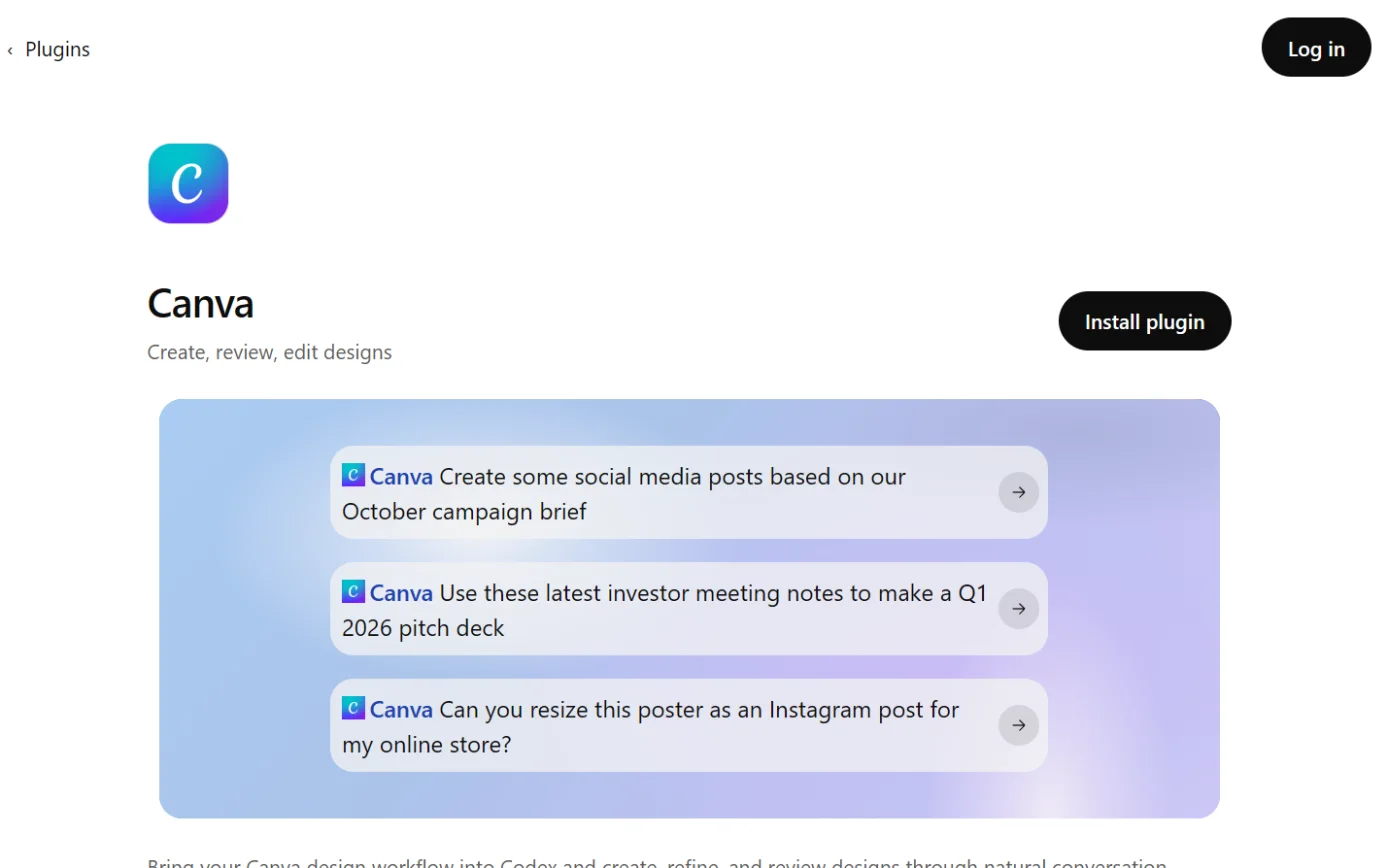
    The Canva page in ChatGPT’s plugin directory, with the Install plugin button ringed.
    Screenshot: ChatGPT’s plugin directory, the Canva page, signed out, 18 October 2026.
  4. Then: Canva shows as connected/enabled Source 60

    A drawing from the step’s own words. The real screen may look a little different.
  5. Then: ChatGPT shows design options as previews Source 60

    A drawing from the step’s own words. The real screen may look a little different.
  6. Then: The design opens in Canva and is saved to your account. Only designs you select are saved Source 60

    A drawing from the step’s own words. The real screen may look a little different.

Pictures without a date are drawings from each step’s own words. The real screen may look a little different.

OpenAI’s help centre labels the same route Settings > Plugins, then Install plugin if it’s shown and Connect.111

To disconnect (Canva Help Centre) For now: @ Plugins > find Canva > more icon > Manage > more icon > Disconnect.
  • For now: @ Plugins > find Canva > more icon > Manage > more icon > Disconnect.60
  • For good: @ Plugins > find Canva > more icon > Uninstall.60
  • OpenAI’s help centre gives Settings > Plugins > Canva > the account’s ••• menu (or Connection) > Disconnect. It warns that uninstalling a plugin can disconnect every account connected through it.111
  • Or from Canva’s side, as above.59
Limits. Canva warns that ChatGPT sometimes makes links that “look like Canva links but don’t point to a real design”. Open the design from ChatGPT’s preview, or find it in your Canva projects.
  • Canva warns that ChatGPT sometimes makes links that “look like Canva links but don’t point to a real design”. Open the design from ChatGPT’s preview, or find it in your Canva projects.60
  • If you see “Access Restricted by Team Admin”, your Canva admin needs to allow the AI Connector.60
  • Canva’s terms say third-party services run under their own terms.42 OpenAI’s listing says ChatGPT may share relevant chats and memories with Canva, under Canva’s terms and privacy policy. It also says ChatGPT follows your training settings for data from connected apps.109
  • On Free, Go, Plus and Pro, OpenAI may use information from apps to train its models if Improve the model for everyone is on. Business, Enterprise and Edu aren’t used for training by default.104

Claude and Canva

Reads and makes changes.

Claude and Canva

Official? Yes. Canva is in Claude’s connector directory, “Made by Canva” and marked “Anthropic verified”. The listing says it was added in November 2025.

Yes. Canva is in Claude’s connector directory, “Made by Canva” and marked “Anthropic verified”. The listing says it was added in November 2025.91 The connector’s address is https://mcp.canva.com/mcp.91 Claude’s help lists Canva as an interactive connector that can “Create and edit designs” inside the chat.93 Since 25 January 2026 you can apply your Brand Kit when making designs with Claude, and Canva said Claude was “the first AI assistant” to support this.67

What it can see and do Claude’s listing sums it up as “Search, create, autofill, and export Canva designs”.

Claude’s listing sums it up as “Search, create, autofill, and export Canva designs”.91 The listing shows 17 tools, including search-designs, get-design-content, generate-design, export-design, create-folder, move-item-to-folder and add-comment-thread-to-design.91 Canva says that in Claude its design tools are grouped into two, read_design and edit_design, and some tools only appear in “Agent mode”.57

What you need Claude’s directory connectors work for all users on Claude, Cowork, Claude Desktop and the Claude mobile apps. Installing them on mobile is in beta.

Claude’s directory connectors work for all users on Claude, Cowork, Claude Desktop and the Claude mobile apps. Installing them on mobile is in beta.92 Any Canva plan, including Free.56 On Claude Team or Enterprise, an Owner or Primary Owner has to add the connector for the organisation first. Each person then signs in to Canva themselves.92 Claude is offered in Australia.95

Steps to connect (Claude Help Center, "Updated over 2 weeks ago" when read on 15 October 2026)

  1. Then: The connectors directory Source 92

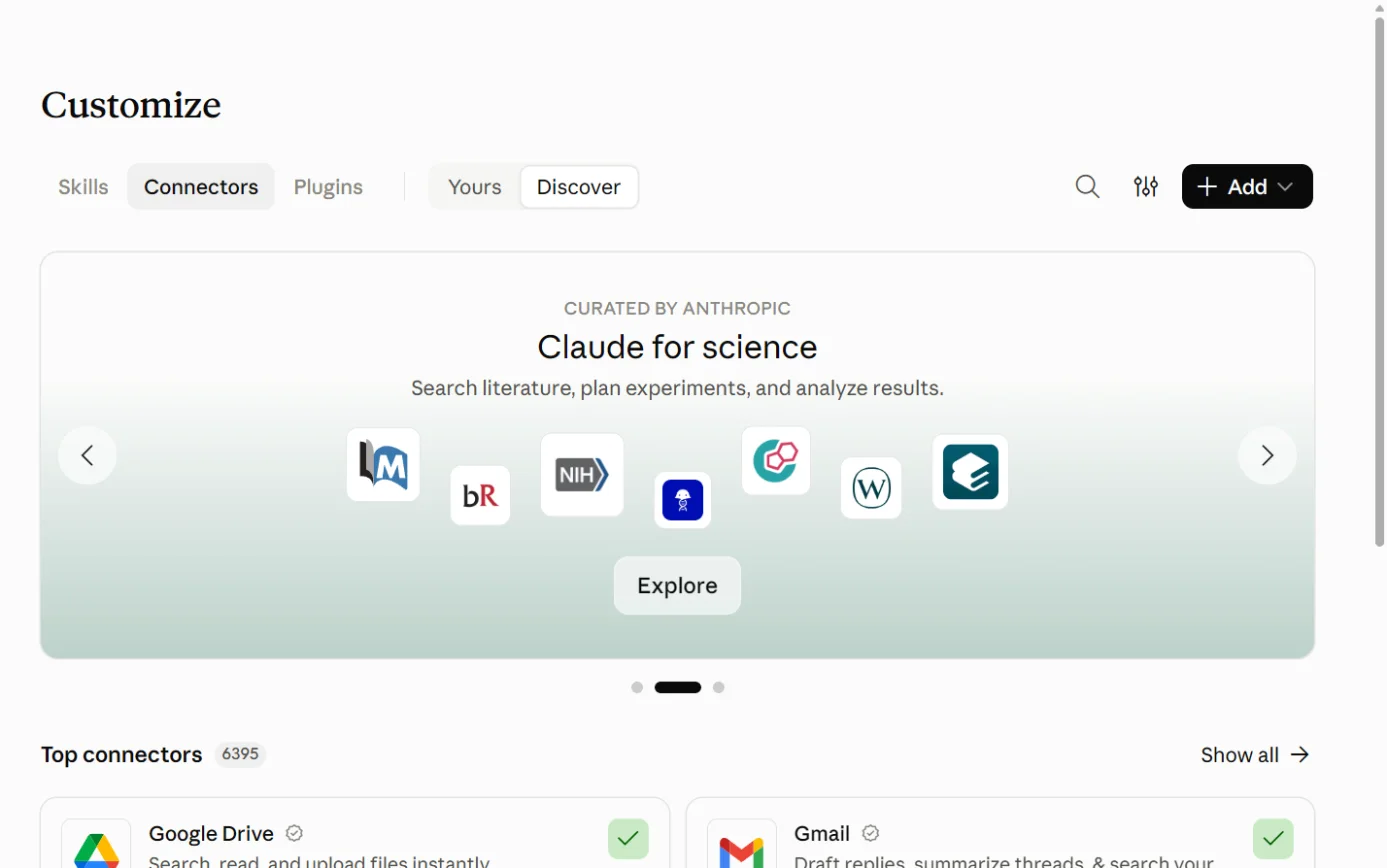
    Claude’s Customize page on the Connectors tab, with the + Add button ringed.
    Screenshot: Claude, the Connectors page under Customize, 18 October 2026.
  2. Then: The Canva connector page: Made by Canva, Anthropic verified Source 92

    A drawing from the step’s own words. The real screen may look a little different.
  3. Then: Canva’s sign-in and authorisation prompts, then Canva shows as connected Source 92

    A drawing from the step’s own words. The real screen may look a little different.
  4. Then: Canva’s tools are available in that conversation Source 92

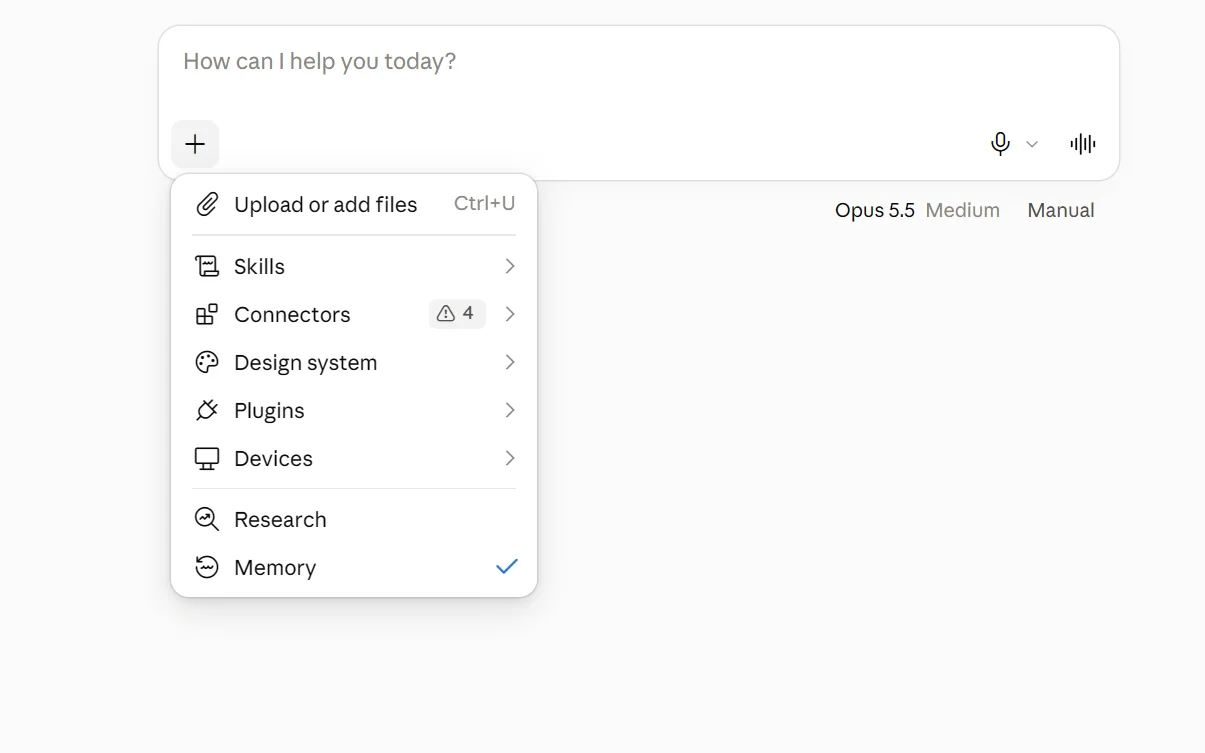
    The + menu under Claude’s message box, with Connectors ringed.
    Screenshot: Claude, the + menu in a new chat, 18 October 2026.

Pictures without a date are drawings from each step’s own words. The real screen may look a little different.

Canva’s own help page describes this as Settings > Connectors > Canva, then turning Canva on under Connectors in a new chat.61

For Team and Enterprise owners (Claude Help Center)

  1. Then: The organisation’s connectors Source 92

    A drawing from the step’s own words. The real screen may look a little different.
  2. Then: Canva becomes available for members to connect Source 92

    A drawing from the step’s own words. The real screen may look a little different.
  3. Then: The settings apply to everyone, and members can’t override them Source 92

    A drawing from the step’s own words. The real screen may look a little different.

Pictures without a date are drawings from each step’s own words. The real screen may look a little different.

Owners can also turn off just the interactive parts of a connector under Organization settings > Connectors. Its text-based functions keep working.93

For Canva Enterprise: Cross app access (beta)

Canva Enterprise organisations that use Okta for single sign-on can give everyone the connector in Claude Team or Enterprise through their existing sign-on.64 Steps (Canva Help Centre, no date shown; read 15 October 2026):

  1. Source 64

    A drawing from the step’s own words. The real screen may look a little different.
  2. Source 64

    A drawing from the step’s own words. The real screen may look a little different.
  3. Source 64

    A drawing from the step’s own words. The real screen may look a little different.
  4. Source 64

    A drawing from the step’s own words. The real screen may look a little different.

Pictures without a date are drawings from each step’s own words. The real screen may look a little different.

Members then don’t need to set up the connector themselves.64

To disconnect. In Claude: Customize > Connectors > select Canva and disconnect it.
  • In Claude: Customize > Connectors > select Canva and disconnect it.92
  • Canva’s page: Settings > Connectors > more icon next to Canva > Disconnect, then confirm. To pause it for one chat, turn Canva off under Connectors in that chat.61
  • Cross app access: at Settings > Security > Cross app access, delete the issuer or turn off Enable Cross app access.64
  • Or from Canva’s side, as above.59
Limits. Anthropic says raw content from connectors, including remote MCP servers, isn’t used to train its models on Free, Pro and Max plans, even with Model Improvement turned on (16 March 2026).
  • Anthropic says raw content from connectors, including remote MCP servers, isn’t used to train its models on Free, Pro and Max plans, even with Model Improvement turned on (16 March 2026).94
  • That page covers consumer plans only. It doesn’t cover Team or Enterprise.94
  • Claude’s directory carries the warning “Only use connectors from developers you trust”.91
Claude Design On 17 April 2026 Canva announced that drafts made in Claude Design, from Anthropic Labs, can be turned into editable Canva designs. Canva gave no plans or setup steps.

On 17 April 2026 Canva announced that drafts made in Claude Design, from Anthropic Labs, can be turned into editable Canva designs.71 Canva gave no plans or setup steps.71

For developers Canva publishes “skills” for Claude Code, Cursor and Codex that use the same connector. They cover jobs like resizing for social media and checking a design against a brand kit.

Canva publishes “skills” for Claude Code, Cursor and Codex that use the same connector. They cover jobs like resizing for social media and checking a design against a brand kit.90

Copilot and Canva

Reads and makes changes.

Microsoft Copilot and Canva

Official? Yes. It’s the Canva agent, installed from Copilot’s Agent store.

Yes. It’s the Canva agent, installed from Copilot’s Agent store.63 Microsoft lists Canva as a ready-to-deploy partner agent in Agent 365, which IT can deploy from the Microsoft 365 admin center (Microsoft Learn, 1 October 2026).100

What it can see and do Canva’s page only says to use the agent’s suggested prompts or type your own. In Cowork you use / commands.

Canva’s page only says to use the agent’s suggested prompts or type your own. In Cowork you use / commands.63 Microsoft says the Agent 365 version lets people create and share Canva designs from Teams and Outlook.100 It adds design collaboration requests and feedback notifications in Teams, and lets admins track all Canva agent activity in the admin center.100

What you need. A Microsoft 365 work or school account. Microsoft says Copilot Chat users can use no-cost agents from the Agent Store once an admin enables them. Microsoft’s page doesn’t say whether the Canva agent is one of those.
  • A Microsoft 365 work or school account. Microsoft says Copilot Chat users can use no-cost agents from the Agent Store once an admin enables them.102 Microsoft’s page doesn’t say whether the Canva agent is one of those.
  • The Cowork route needs a Microsoft 365 Copilot licence. Cowork and usage-based billing must also be switched on.103
  • Some agents need IT approval first. You’ll see Request approval instead of Add.101
  • On a Canva team, your admin may need to allow third-party integrations and the AI Connector.63

Steps to connect: Copilot Chat (Canva Help Centre, no date shown; read 15 October 2026)

  1. Then: The agents marketplace Source 63

    A drawing from the step’s own words. The real screen may look a little different.
  2. Then: The Canva agent is installed (or a Request approval option if your organisation needs IT approval) Source 63

    A drawing from the step’s own words. The real screen may look a little different.
  3. Then: A search for installed agents Source 63

    A drawing from the step’s own words. The real screen may look a little different.
  4. Then: A chat with the Canva agent and its suggested prompts Source 63

    A drawing from the step’s own words. The real screen may look a little different.
  5. Then: You may be asked to sign in to Canva and authorise it, then the agent responds Sources 6356

    A drawing from the step’s own words. The real screen may look a little different.

Pictures without a date are drawings from each step’s own words. The real screen may look a little different.

Steps to connect: Cowork (Canva Help Centre, no date shown; read 15 October 2026)

  1. Then: The plugins list Source 63

    A drawing from the step’s own words. The real screen may look a little different.
  2. Then: Canva agent appears in your plugins Source 63

    A drawing from the step’s own words. The real screen may look a little different.
  3. Then: The Canva agent is enabled for Cowork Source 63

    A drawing from the step’s own words. The real screen may look a little different.
  4. Then: Cowork runs the Canva agent skill Source 63

    A drawing from the step’s own words. The real screen may look a little different.

Pictures without a date are drawings from each step’s own words. The real screen may look a little different.

To disconnect Chat: Agent store > Canva agent > Uninstall or Remove, then confirm.

Chat: Agent store > Canva agent > Uninstall or Remove, then confirm.63 Cowork: manage plugins > Canva agent > turn it off, or select Remove.63 If your admin installed the agent for everyone, you may not be able to remove it yourself.63

Limits Your organisation may restrict the Agent store.

Your organisation may restrict the Agent store.63 The pages we read don’t cover how Microsoft handles Canva content, or whether the agent is offered in Australia. See “What we couldn’t establish”.

Gemini and Canva

Reads and makes changes. Personal Google accounts only.

Gemini and Canva

Official? Yes. Canva gives setup steps, and Google documents Canva as a Gemini connected app.

Yes. Canva gives setup steps, and Google documents Canva as a Gemini connected app.6296

What it can see and do Google’s help lists three areas.

Google’s help lists three areas.96

  • Create designs from a prompt or a Gemini image, then edit things like text and background colours.96
  • Search and manage assets: find designs, list folders and pages, create folders and move things between them.96
  • Comments: list comments and replies, add comments and reply to them.96

Canva adds that Gemini can use your Brand Kit and summarise existing designs.68 It can also turn Gemini images into editable layouts with Magic Layers.69

What it can’t do Manage Brand Kit assets, export designs to other formats, see reviews, or see your billing.

Manage Brand Kit assets, export designs to other formats, see reviews, or see your billing.96 These need a Canva Enterprise team: resizing, searching Brand Templates, autofilling them, and reading their data fields.96

What you need A personal Google Account. Google says it “isn’t available if you sign in to a work or school Google Account”.

A personal Google Account. Google says it “isn’t available if you sign in to a work or school Google Account”.96

Keep Activity must be on.

must be on.96 The Gemini web or mobile app, in English. It doesn’t work in Gems or Live chats.96 A Canva account linked to your Google Account.96

Steps to connect (Gemini Apps Help, no date shown; read 15 October 2026)

  1. Then: A new chat Source 96

    A drawing from the step’s own words. The real screen may look a little different.
  2. Then: If Canva isn’t connected, Gemini offers to connect it Source 96

    A drawing from the step’s own words. The real screen may look a little different.
  3. Then: Canva’s sign-in and linking screens Source 96

    A drawing from the step’s own words. The real screen may look a little different.
  4. Then: Canva is connected and Gemini carries out the request Source 96

    A drawing from the step’s own words. The real screen may look a little different.

Pictures without a date are drawings from each step’s own words. The real screen may look a little different.

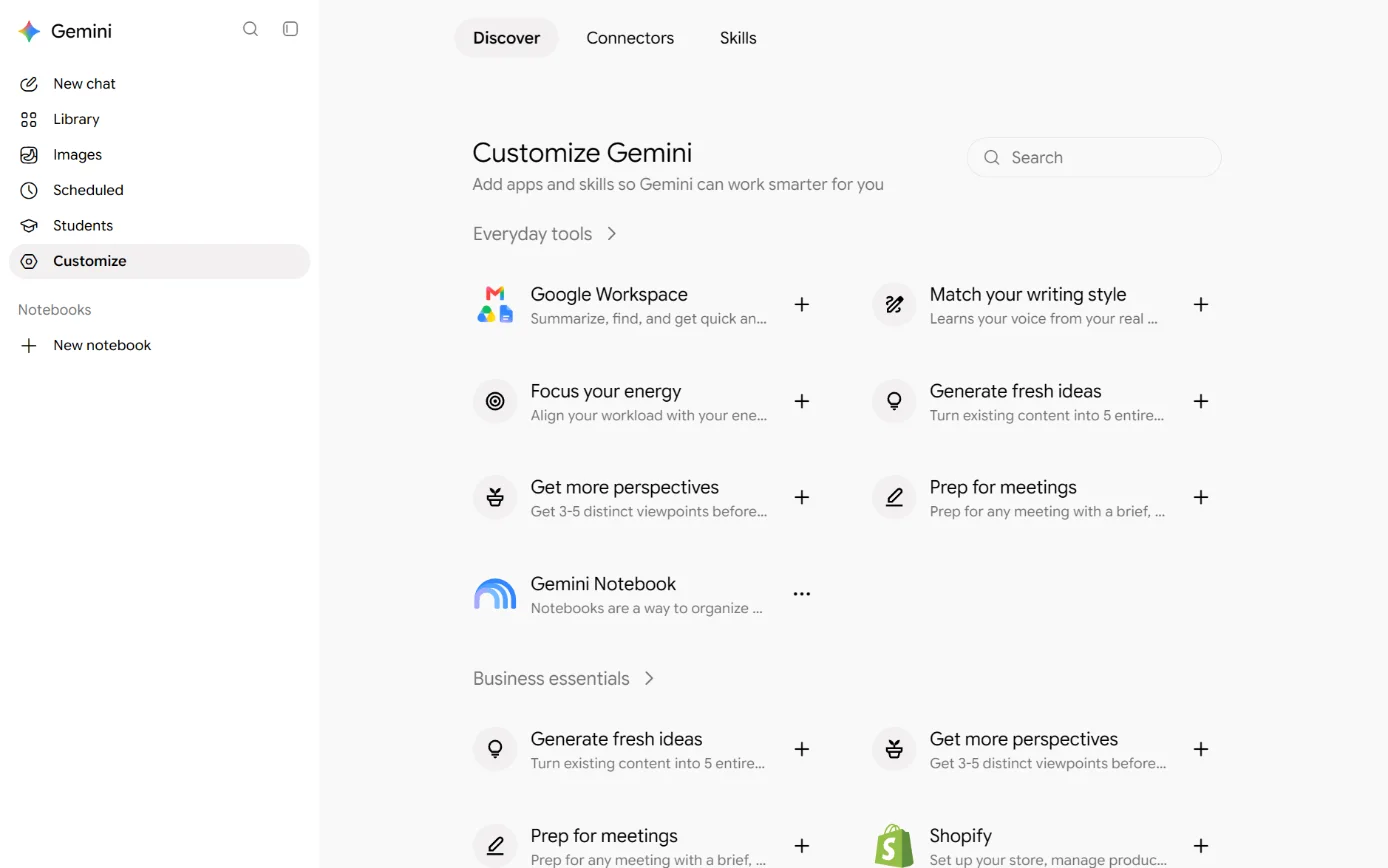
Or from Gemini’s settings on a computer (Gemini Apps Help, no date shown):

  1. Then: Gemini’s customisation options Source 97

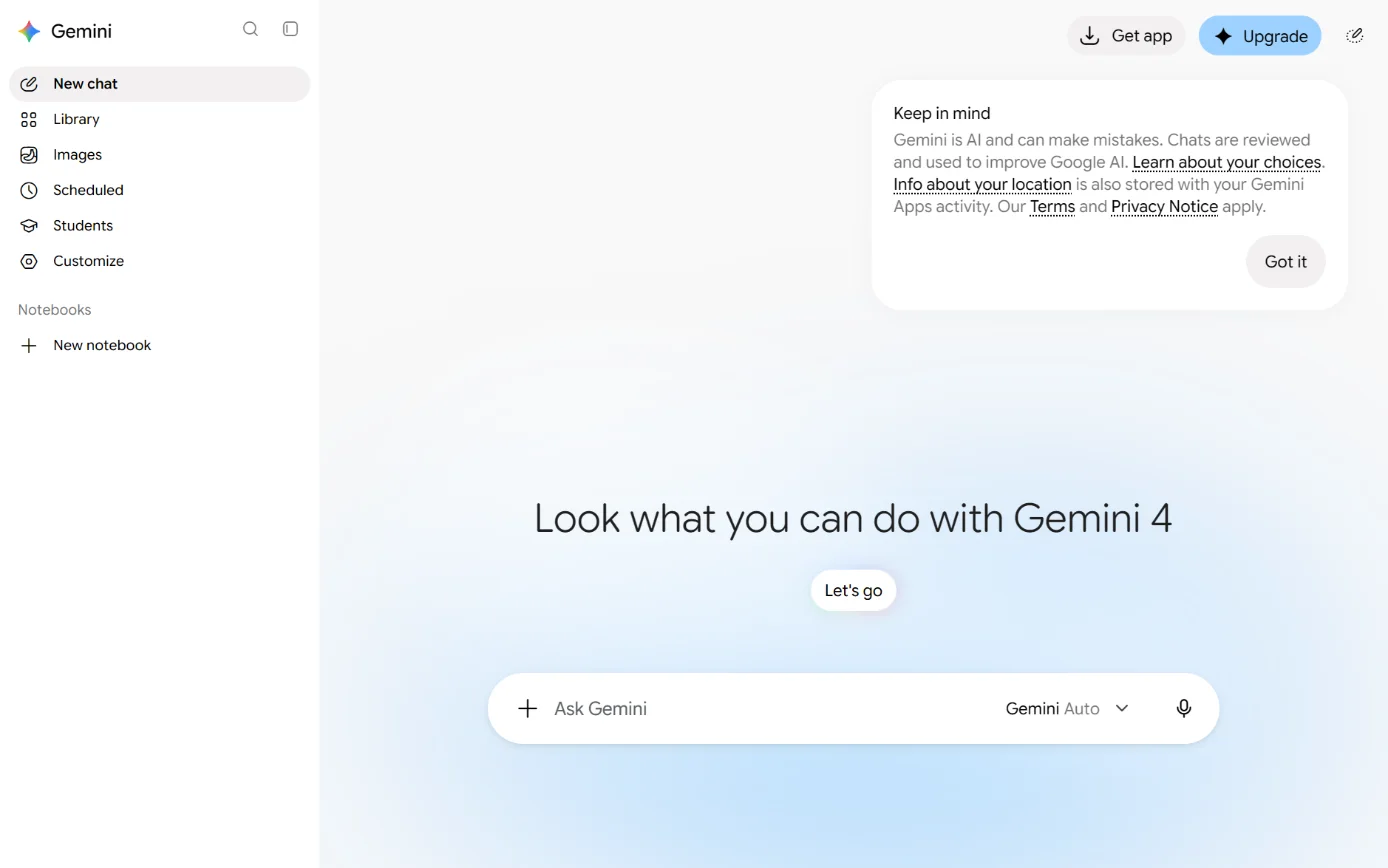
    Gemini’s home page and sidebar, with Customize in the sidebar ringed.
    Screenshot: Gemini’s home page, 18 October 2026.
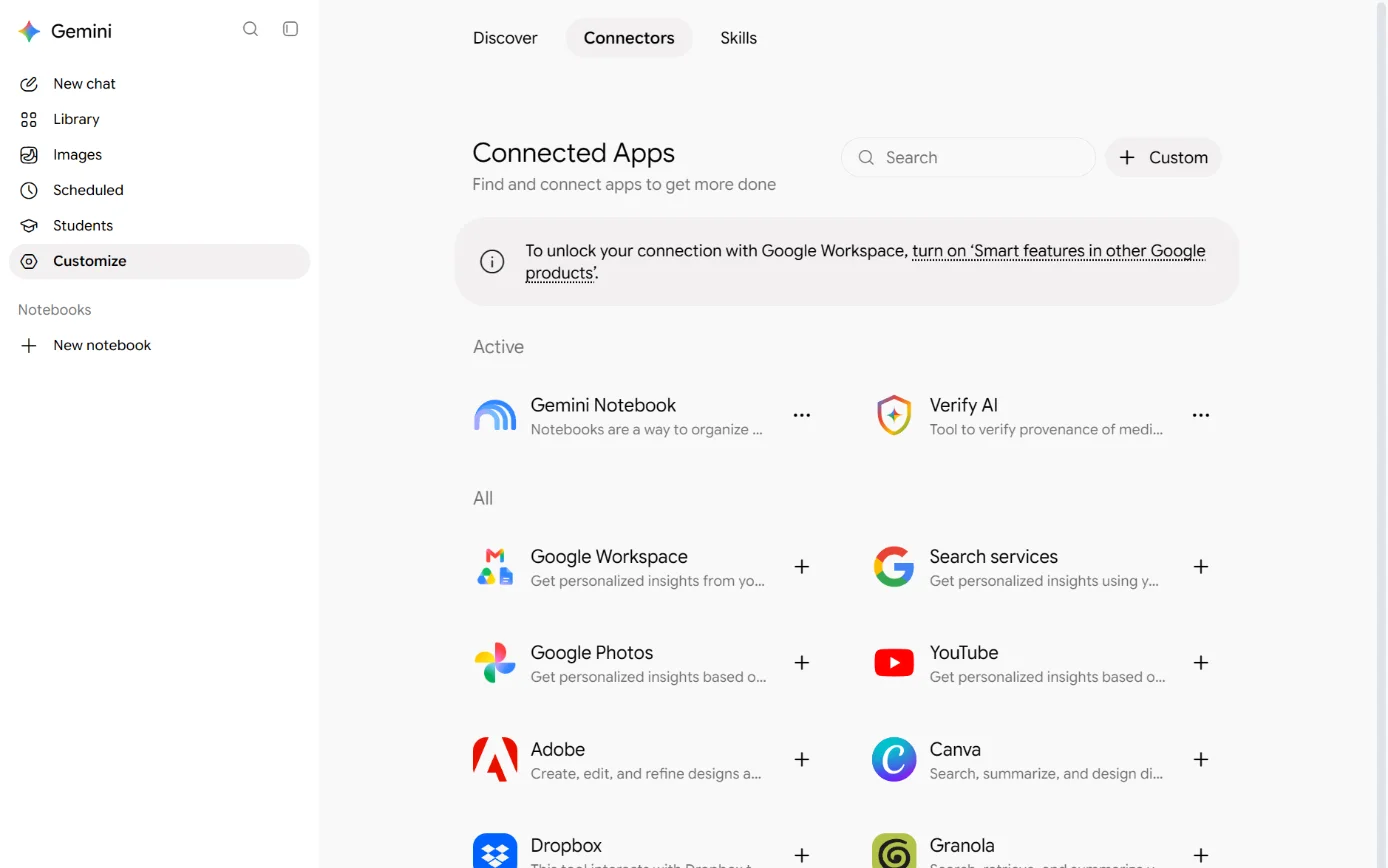
  2. Then: The list of connected apps Source 97

    Gemini’s Customize page, with the Connectors tab ringed.
    Screenshot: Gemini, the Customize page, 18 October 2026.
  3. Then: Canva’s sign-in and linking screens, then Canva is connected Source 97

    Gemini’s Connected Apps list, with the add button beside Canva ringed.
    Screenshot: Gemini, the Connectors tab under Customize, 18 October 2026.

Canva’s own page gives a different path: Settings > Personal Intelligence > Connected Apps > Other > Canva, then turn on the toggle.62 Menus may differ between accounts (our inference).

To disconnect In Gemini: Customize > Connectors > Canva > More options > Disconnect.

In Gemini: Customize > Connectors > Canva > More options > Disconnect.97 Canva’s page: under Connected Apps > Other, turn Canva off, or select Learn more > Unlink to disconnect fully.62 Disconnecting doesn’t delete anything already in your Gemini Apps Activity.98

Limits and data. Google says Gemini “saves and uses info from Connected Apps”, including to provide and improve Gemini (Gemini Apps Privacy Hub, 13 October 2026).
  • Google says Gemini “saves and uses info from Connected Apps”, including to provide and improve Gemini (Gemini Apps Privacy Hub, 13 October 2026).98
  • Chats seen by Google’s human reviewers are kept for up to 3 years. Gemini Apps Activity auto-deletes after 18 months by default.98
  • Canva said on 8 June 2026 that its Gemini connected app was “available to all users globally”.69 Google’s page lists English only and names no countries.96
  • Gemini Spark is a Gemini feature that runs scheduled tasks and skills. Google began rolling out Canva support for it on 1 July 2026.99
  • Google’s 17 June 2026 rollout of Spark excluded Australia. Its 14 July rollout to Google AI Ultra subscribers didn’t list Australia as excluded.99
  • AI Mode in Google Search can suggest Canva templates and send generated visuals to Canva (Canva, 16 July 2026).68 We couldn’t confirm it’s offered in Australia.

Other routes

Developer tools, automation tools and app stores.

Canva’s AI Connector (what every connection shares)

Official? Yes, built by Canva.

Yes, built by Canva.59

What it can see and do Canva says a connected assistant “can read design details and folders, and create and edit designs”.

Canva says a connected assistant “can read design details and folders, and create and edit designs”.56 It can reach projects you have permission to view, including folders shared with you.59 Canva’s list of actions includes generating a design, creating a blank design, searching designs, and reading a design’s details, pages, text and presenter notes.57 It also includes resizing, importing PDF, PowerPoint, Word and Google Slides files from a link, exporting, merging and copying designs, making folders and moving items, viewing comments, and searching and autofilling Brand Templates.57 Exports can be PDF, PNG, MP4, PowerPoint, JPG and other formats.57 Canva’s developer list adds uploading assets, adding comments and replies, generating images, removing backgrounds, and step-by-step design editing.77

Can it delete? Neither list includes a tool for deleting designs.

Neither list includes a tool for deleting designs.5777 Which actions you actually get depends on the assistant.57

What you need. Any Canva plan can connect, including Free and Education.
  • Any Canva plan can connect, including Free and Education.5659
  • Your assistant may need its own paid plan.59
  • On Teams, Business, Nonprofit, Education or Enterprise, your admin decides whether people can connect.56
  • Some actions need more than a free plan, and Canva’s pages disagree about which:
ActionCanva Help CentreCanva’s AI Connector pageCanva developer docsGoogle’s Gemini help
Search Brand TemplatesPaid plans, including Education5657Enterprise only59Pro and above77Enterprise only96
Autofill a Brand TemplateEnterprise5760, but another page says “all Canva plans except Pro Lite and Canva Free”56Enterprise only59Pro and above77Enterprise only96
Resize a designNot statedPaid plans59Pro and above. Free gets a limited trial.77Enterprise only96
  • Exports from Free accounts are standard quality. Pro and above get higher quality, lossless PNG and transparent backgrounds.77

Before anyone connects: the admin switch (Canva Help Centre, no date shown; read 15 October 2026)

  1. Then: Canva’s admin area Source 56

    A drawing from the step’s own words. The real screen may look a little different.
  2. Then: The third-party integrations settings, including Canva’s AI Connector Source 56

    A drawing from the step’s own words. The real screen may look a little different.
  3. Then: When it’s off, nobody on the team can connect an assistant and existing connections stop working Source 56

    A drawing from the step’s own words. The real screen may look a little different.

Pictures without a date are drawings from each step’s own words. The real screen may look a little different.

“When it’s off, nobody on the team can connect an assistant.” Existing connections stop working.56 The connector “counts as a third-party integration” and “uses the same permissions as the Canva Connect API”.56 Team admins can currently only switch it on or off for the whole team.58 Canva’s advice: “If your organisation isn’t comfortable granting these permissions, leave it off.”56

To disconnect from Canva’s side In your Canva settings, go to Your profile > Integrations connected to Canva and select Disconnect next to Canva AI Connector.

In your Canva settings, go to Your profile > Integrations connected to Canva and select Disconnect next to Canva AI Connector.59 “The AI assistant loses access immediately, but your designs stay in Canva.”59 You can also remove it in the assistant’s own settings, as each block below shows.59

Limits. AI actions like generating designs “may use your monthly Canva AI credits”. Canva’s usage page confirms your allowance can be spent generating designs inside connected assistants.
  • AI actions like generating designs “may use your monthly Canva AI credits”.56 Canva’s usage page confirms your allowance can be spent generating designs inside connected assistants.2
  • Canva says “We’ll introduce usage limits in the future.”56
  • Each person can make up to 300 requests a minute across all their AI tools. Some actions have lower caps, such as 10 image generations a minute.77
  • Your assistant may have its own message or token limits.56
  • You only see Brand Templates that have been shared with you.56
  • In Education, Canva says only “teachers and students in higher education levels” can use what the connector unlocks.59 It doesn’t make clear whether school (K–12) teachers are included.

Other assistants Canva lists

  • Canva’s list of assistants and tools that can connect: AWS, Atlassian Rovo, ChatGPT, Claude, Codex, Copilot, Cursor, Dust, Fireflies AI, Gemini, Glean, Kimi, Langdock, Lovable, Make, Manus, Perplexity Computer, Poke, Snowflake Intelligence, Superhuman Go and xAI (Grok).58
  • Canva’s AI Connector page also names Amazon Quick Suite.59
  • Meta’s Muse: Canva announced a connector on 29 September 2026, and says “Canva is available in Muse to users in the US and Canada.”70 Going by that, it isn’t offered in Australia yet.
  • We haven’t researched these other connections.

AI apps inside Canva’s Apps Marketplace

  • Canva offers DALL·E (OpenAI) and Imagen (Google Cloud) as image generation apps on paid plans. Canva’s text-to-image terms and Acceptable Use Policy apply.20
  • Canva’s usage page says “Generations made through third-party AI apps in the Marketplace aren’t included” in your Canva allowance, and outside subscriptions or limits may apply.2
  • The DALL·E and Imagen page instead calls them a premium AI tool with limited use on paid plans.20
  • Leonardo.Ai is a paid add-on for Business and Enterprise. Canva says Leonardo.Ai Essential is no longer a built-in benefit of either plan.73
  • Admins on Enterprise and Teams can set who uses any app: Settings > Apps > Manage tab > search for the app > more menu > Override access.106
  • The choices are Everyone, Team admins and Team brand designers, Team admins only or No one.106
  • In Education, students under 18 need administrator approval to use third-party apps.38

Building your own: Canva’s developer routes

These are for developers. Canva now groups them as one “Canva Developers SDK”, and its developer site presents them as routes for AI agents.8389

  • Canva REST APIs (formerly the Connect APIs) let your own software create and sync designs and other content, and export finished designs.84
  • They sign people in with OAuth 2.0 and PKCE.88
  • The autofill API needs a Canva Pro (including Education and Nonprofits), Teams or Enterprise account with multi-factor authentication turned on.85
  • Apps inside Canva (formerly the Apps SDK) run inside the Canva editor. Public apps must pass Canva’s review before they appear in the Apps Marketplace.87
  • Private apps for your own team are only available on Enterprise. Your own admins approve them, without Canva’s review.86
  • Canva MCP for developers lets your own AI app use the same server as the AI Connector, with OAuth sign-in.78
  • Apps that identify themselves with a Client ID Metadata Document join a waitlist. Apps made in Canva’s Developer Portal don’t need to.78
  • Canva’s usage policy says Canva data, prompts and outputs “must not be used to train, fine-tune, evaluate, or improve external AI models”.79
  • The same policy requires each user to sign in with their own Canva account, and says background or bulk access must be opt-in and off by default.79
  • Canva bans bulk extraction of designs, reverse engineering, building a competing product, and AI training through its MCP.80
  • The Canva Dev MCP server is a separate local tool that helps coding assistants build Canva apps. It runs on your computer and doesn’t send your code or prompts anywhere except your AI tool.82
  • In Claude Code it’s added with claude mcp add canva-dev -- npx -y @canva/cli@latest mcp.82

Jobs it’s good for

Each job below uses only what Canva’s documentation says the tools can do. Check the output every time.

Small workplaces

  • Draft a flyer or social post from a description, then edit it by hand.7 Canva AI can apply your Brand Kit if your admin allows it.336
  • Rewrite copy you’ve already written, or change its tone.13
  • Draft presenter notes from your slides.13
  • Translate a notice into another language while keeping the original page.27 Canva gives no accuracy warning, so have a fluent speaker check it (our advice).27
  • Remove a distracting object from a product photo, or move the product within the frame.2322
  • Turn your own CSV of figures into a chart, replacing any sample data first.28
  • Write a spreadsheet formula from a plain description, then test it on numbers you already know (our advice).33
  • Build a simple quiz or landing page and publish it as a website.2931
  • Ask ChatGPT, Claude or Gemini to find designs, using a prompt like Canva’s own example, “Find all presentations that mention Q2 marketing strategy”.576096
  • Bring meeting notes or email threads into Canva AI as background for a design brief. The connection only reads.65
  • Turn one design into versions for different platforms through a connected assistant (paid plans).5977
  • Fill a Brand Template from a spreadsheet to make many designs at once. Most of Canva’s pages say this needs Enterprise.5790

Schools

  • Teachers draft handouts and quizzes with Magic Write’s Generate quiz.13
  • Teachers build interactive study tools with Canva Code. Students can build their own only if an admin turns Canva Code on.293036
  • Translate letters home into community languages, then have them checked (our advice).27
  • Summarise class data in Canva Sheets with Magic Insights.34
  • Students can ask Help Assistant how to do things in Canva. Design advice for students stays off unless an admin allows it.35

What to watch for

Your allowance and costs

  • The free plan’s 20 uses go quickly, and Ultra tools aren’t on Free at all.2
  • Each person has their own allowance on team plans. Nothing is pooled.2
  • Conversational design and video clips are Ultra tools and use the most.2
  • Bigger files and multi-step Canva AI 2.0 tasks use more.2
  • Designs generated inside ChatGPT, Claude, Copilot and other connected assistants can come out of your Canva allowance.2
  • Third-party AI apps in the Marketplace have their own limits and subscriptions.2
  • Free trials of Pro and Business only get the Free allowance.2
  • A manual AI top-up can’t be cancelled once bought.53
  • AI Pass is charged per person, per month.52
  • “Fair use limits apply”, even where Canva says unlimited.12
  • Check your balance at profile icon > Settings > Billing > AI usage.2

Your data and AI training

  • Free and Pro. Canva’s Privacy Settings let you control whether your data can improve its AI features.40
  • Canva’s Terms of Use (19 August 2026) say the setting covers your general usage data and your own content.42
  • We couldn’t find a current Canva page saying whether this setting starts on or off. When Canva launched Magic Studio on 4 October 2023, it said “By default, Canva doesn’t use your content” to train its AI.47
  • Canva’s AI page links to a privacy settings page where you can check yours.10
  • Business, Teams and Enterprise. Canva’s Trust Center says it doesn’t use “business, team or enterprise content” to improve AI, and the setting is greyed out for these accounts.40
  • It says the option for admins to opt in is “coming soon”.40
  • Canva’s Master Services Agreement (21 May 2026), for customers who sign an Order Form, says Canva won’t train its AI on customer material unless a customer administrator opts in “via the admin settings”.48
  • Education. “We will not use User Content of Canva Education for AI training.”4142 Education users can’t change this setting.40
  • Creators who publish templates on Canva control whether their content is used to improve AI features.40
  • The Canva AI beta. If you’ve accepted an invitation to Canva’s AI beta, your “AI consent settings in your Account Settings do not apply” to beta data (terms updated 15 April 2026).50
  • Beta inputs and outputs can be used to train Canva’s models, and Canva staff can view them.50
  • To leave the beta, turn off the CanvaAI Beta toggle on your Canva privacy settings page.50
  • Who else handles it. Canva may pass inputs to outside “Technology Partners” to run a feature.43 Its sub-processor list names Anthropic, OpenAI, Google, ElevenLabs and others for AI services, mostly in the United States.49
  • For schools, Canva’s Privacy Policy lists OpenAI among providers that process student data “for the sole purpose of delivering” Canva AI products.41
  • Memory Library builds a profile from your designs and prompts. Turn it off under AI personalization if you don’t want that.12
  • Connected assistants. Content an assistant reads from Canva is handled under that company’s terms as well as Canva’s.42 Canva “makes no representations or warranties” about third-party services.42
  • We found no statement of how long Canva keeps AI prompts and outputs.4143

Admin controls

  • Canva AI can’t be fully switched off, but admins can control who uses each feature.836
  • Enterprise organisation admins set defaults for every team and choose whether team admins can override them, under Permissions > Team management > Team Overrides.37
  • Enterprise organisation defaults can be Everyone, Team admins and team brand designers, Team admins only or No one.37
  • Turning the AI Connector off stops everyone on the team and breaks existing connections.56
  • If an app category is blocked for the admin role, it’s hidden from admins too.106
  • A language setting can hide features even when admins have switched them on.36

Schools and students

  • Canva Education is free for eligible K–12 teachers and schools anywhere in the world.39
  • “Teachers need to get parental consent for children below 13.”39
  • Canva’s AI Safety page says its AI products are for people 13 and over “unless used as part of Canva Education” under teacher supervision.44
  • In July 2025 Canva said its “AI for All Ages” policy lets students under 13 explore its AI tools in teacher- and admin-controlled settings.76
  • Default access: “Only administrators and teachers have access by default.”36
  • The same page says “Magic Media, Dream Lab, and Magic Insights are the only features enabled for students.”36 It doesn’t say whether that means they’re on by default, or that they’re the only ones that can be turned on.
  • Other Canva pages say admins and teachers can turn on Magic Write and Magic Edit for students.1421
  • Image to Video is off for students by default.19
  • “AI connectors are blocked for all Education users” by default.38
  • Generative AI apps and social media apps are blocked for students and allowed for teachers by default. Admins can change this.38
  • Students under 18 need administrator approval for third-party apps.38
  • Canva in Gemini doesn’t work with school Google accounts.96
  • Canva AI tools inside Affinity are for admins and teachers only, for now.36
  • Student accounts inactive for more than 12 months get a deletion notice, and are deleted if nobody logs in within 3 months.41
  • Canva’s World Teachers’ Day post (5 October 2026) says student accounts that don’t need an email address are expanding worldwide from October.75

Accuracy and checking

  • Canva’s AI page says to review outputs “especially where accuracy is important because AI can make mistakes”.10
  • Canva’s AI terms say it “has not verified the accuracy of the Output”, and recommend independent professional advice before you act on it.43
  • The same terms ban using its AI to give “tailored advice that requires a license”, such as legal or medical advice.43
  • AI charts start with sample data.28
  • Magic Formulas results need double-checking.33
  • Magic Write’s help page says its data stops at mid-2021.14
  • Help Assistant’s answers need double-checking.35
  • ChatGPT can make links that look like Canva links but go nowhere.60
  • Translate gives no accuracy warning.27
  • Canva Code’s help page says nothing about checking security or accessibility.29
  • Canva’s Master Services Agreement says output “may not be accurate, reliable, complete, unique, or exclusive”, and customers must provide human oversight.48

These points come from Canva’s “How to use Magic Studio safely and legally” page unless another source is shown.

  • You can use AI-created work for personal and commercial purposes if you follow the AI Product Terms.51
  • “As between you and Canva”, you own what the AI creates. But many places, including the US, don’t give AI-made works copyright protection.51
  • Others may get similar results from similar prompts, so Canva can’t guarantee your work is unique.5143
  • Don’t prompt for existing brands, characters or people without permission. Get permission before using a recognisable person’s image.51
  • Canva says it’s “best practice” to tell your audience when content was made with AI help.51
  • Don’t remove provenance tags or metadata, such as C2PA data, from AI content.43
  • Canva “does not guarantee” that AI images, designs or text are “cleared for use”, especially if they resemble existing work.10
  • Canva says it “makes no copyright claim” over content you generate with Canva AI.10

Connections to outside assistants

  • A connected assistant can create and edit designs as well as read them.56
  • It can reach anything you can view, including folders shared with you.59
  • Where the assistant allows it, turn the connector on only in the chats that need it. Claude lets you do this per chat.6192
  • Only the designs you pick in ChatGPT are saved, so check your Canva projects.60
  • When someone leaves, disconnect from both sides (our advice).59

What’s changing

Newsroom dates come from each page’s publishing data, in UTC.

DateWhat changedSource
4 Oct 2023Magic Studio launched. Canva said it doesn’t use your content to train its AI by default.47
18 Jun 2025“Create a Video Clip” launched, built with Google’s Veo 3, for paid plans and Nonprofits, starting at 5 a month.107
22 Jul 2025“AI for All Ages” policy for students under 13 in teacher- and admin-controlled settings.76
30 Oct 2025Canva Business launched. Canva Teams closed to new sign-ups and upgrades.5554
Nov 2025Canva connector added to Claude’s directory.91
25 Jan 2026Brand Kits work in the Claude connector.67
11 Mar 2026Magic Layers in public beta in the US, the UK, Canada and Australia.26
15 Apr 2026Canva AI Beta Program Terms updated.50
16 Apr 2026Canva AI 2.0 announced as a research preview, with general availability “over the coming weeks”.11
17 Apr 2026Canva in Claude Design announced. Canva’s sub-processor list updated.7149
21 May 2026Master Services Agreement updated.48
8 Jun 2026Magic Layers inside ChatGPT and Gemini. Canva says both connections are available to all users globally.69
26 Jun 2026AI Product Terms take effect.43
1 Jul 2026Google starts rolling out Canva support in Gemini Spark.99
9 Jul 2026OpenAI replaces ChatGPT’s App Directory with a Plugin Directory. Existing app connections carry on.113
14 Jul 2026Canva Code 2.0 available to Free, Pro, Business, Enterprise and Education users.31
16 Jul 2026Canva in Gemini expanded, and Canva added to AI Mode in Google Search.68
19 Aug 2026Terms of Use take effect.42
25 Aug 2026Privacy Policy updated.41
2 Sep 2026Visual Suite updates, including charts from Sheets data and AI presenter notes, “rolling out now to all Canva users globally”.74
16 Sep 2026Canva ProSuite announced (Affinity, Cavalry, Flourish and Leonardo.Ai). Canva AI Studio in Affinity needs a premium plan. Cavalry AI tools “coming soon”.72
No date shownLeonardo.Ai Essential is no longer a built-in benefit of Business or Enterprise.73
29 Sep 2026Canva connector for Meta’s Muse, US and Canada only.70
1 Oct 2026Microsoft lists Canva as a ready-to-deploy Agent 365 partner agent.100
5 Oct 2026Student accounts without email addresses expanding worldwide from October.75

Announced with no date

  • Admin opt-in to AI training for Business, Teams and Enterprise is “coming soon”.40
  • Usage limits for the AI Connector: “We’ll introduce usage limits in the future.”56
  • Canva AI 2.0 and Canva AI connectors are marked “Soon” for Enterprise on the pricing page.1
  • More admin controls over student AI access in Affinity.36
  • Memory Library and Canva AI 2.0 features are rolling out gradually.89
  • Canva isn’t accepting third-party connectors for Canva AI yet, and gives no timeline.81
  • Usage limits for the autofill API will be introduced later.85
  • New Cavalry AI tools (Remove Background, Generate Vector and Image to Layers) are “coming soon”.72

What we couldn’t establish

  • Which ChatGPT plans can use the Canva plugin. OpenAI’s pages say it depends on plan, workspace, role and region, and its Canva page lists no plans.110108 A search-engine snippet said Free and Go plans can’t use plugin extensions. OpenAI’s release note introducing extensions names no plans, so we couldn’t confirm it.113
  • Today’s default for Canva’s AI-training setting on Free and Pro, and the setting’s exact label. Canva’s current pages don’t state the default, and the setting sits behind a sign-in. The only “off by default” statement we found is from October 2023.4047
  • Admin opt-in for AI training. The Trust Center says it’s “coming soon” for Business, Teams and Enterprise, while the Master Services Agreement already refers to opting in “via the admin settings”. We couldn’t find that setting in Canva’s admin help.404836
  • Plan rules for connector actions. Canva’s pages disagree on Brand Template search, autofill and resize. See the table under “Canva’s AI Connector”.5657597796
  • Who gets conversational design. Help pages list either Pro, Teams, Business and Nonprofit, or Pro, Business and Enterprise. The pricing page marks Enterprise “Soon”.351
  • AI Pass for Business. The help page says 20 times more AI and the pricing page says 40 times.521
  • Which tier some tools sit in. Magic Formulas is Standard on the usage page and premium on its own page. “Create an image with Canva AI” appears under more than one tier, and Canva AI for Sheets contradicts itself.23233
  • Whether DALL·E and Imagen use your Canva allowance. The usage page says Marketplace AI apps don’t, while the DALL·E and Imagen page calls them a limited premium AI tool.220
  • Student defaults in Canva Education. One sentence calls Magic Media, Dream Lab and Magic Insights “the only features enabled for students” without saying whether they’re on by default.36
  • What “AI connectors are blocked” covers in Education, and whether K–12 teachers can use the AI Connector.3859
  • AUD prices for monthly plans, AI Pass and AI top-ups. The Australian pricing page shows yearly prices and no add-on prices.1 Canva’s AI Pass help page gives a price in US dollars only, so we haven’t quoted it.52
  • How long Canva keeps AI prompts, outputs and Canva AI chats. Not stated in the pages we read.84143
  • An Australia-only hosting option. We didn’t find one. The Trust Center says data is stored in the US, while the Privacy Policy lists Australia among several storage and processing countries.4041
  • Which model powers each feature. Canva names OpenAI for Magic Write, on a page that may be out of date, and named Google’s Veo 3 for video clips at launch. The sub-processor list names the AI companies but not which feature each one serves.1410749
  • The AI indemnity’s contract terms. The 100-seat threshold comes from Canva’s AI marketing page, and we couldn’t find indemnity wording for AI output in the Master Services Agreement.1048
  • Microsoft’s side. Which licence the Canva agent needs, whether it counts as a no-cost agent for Copilot Chat, what it can read and change, whether it’s offered in Australia, and how Microsoft handles the content. A Microsoft Tech Community post about partner apps in Copilot wouldn’t load for us.63100102
  • Claude Team and Enterprise data terms for connector content. Anthropic’s training page covers consumer plans only.94
  • Whether every action in a connected assistant uses your Canva allowance. Canva says AI actions “may”, and that limits are coming.562
  • AI Mode in Google Search in Australia. Not stated.68
  • Tools we didn’t research one by one: AI Voice, the Music and Sound Effect Generator, Magic Animate, alt text suggestions, Magic Activities, Transform into Doc, AI Shapes, Background Remover, Image Upscaler, Canva Grow, and signing in to Leonardo.Ai with a Canva account.
  • The other assistants on Canva’s list, including Amazon Quick Suite and Perplexity Computer. Not researched.5859
  • Our web search allowance ran out partway through. After that we checked leads only by opening vendor pages we already had addresses for.

Sources

Every line above was read at one of these pages, on the date shown. Vendors change their products and their pages often, so check the page before you rely on a detail.

  1. 1 Canva pricing (English, Australia) Canva Read 15 Oct 2026
  2. 2 Understanding your AI usage Canva Help Center Read 15 Oct 2026
  3. 3 Get started with Canva AI Canva Help Centre Read 15 Oct 2026
  4. 4 What’s new in Canva AI Canva Help Centre Read 15 Oct 2026
  5. 5 Use Canva AI to refine designs through conversation Canva Help Center Read 15 Oct 2026
  6. 6 Use Ask Canva for AI-powered design edits Canva Help Center Read 15 Oct 2026
  7. 7 Generate unique designs instantly with AI Canva Help Centre Read 15 Oct 2026
  8. 8 Canva AI Frequently Asked Questions Canva Help Center Read 15 Oct 2026
  9. 9 Fix issues and improve results with Canva AI Canva Help Center Read 15 Oct 2026
  10. 10 Canva AI 2.0 (product page) Canva Read 15 Oct 2026
  11. 11 Introducing Canva AI 2.0: Reimagining how the world creates Canva Newsroom Read 15 Oct 2026
  12. 12 Use Memory Library to personalize Canva AI Canva Help Center Read 15 Oct 2026
  13. 13 Use Magic Write to generate text Canva Help Centre Read 15 Oct 2026
  14. 14 Learn about Magic Write Canva Help Centre Read 15 Oct 2026
  15. 15 Use Magic Media to create photos, graphics, and videos Canva Help Centre Read 15 Oct 2026
  16. 16 Generate images with Dream Lab Canva Help Centre Read 15 Oct 2026
  17. 17 Dream Lab access restrictions Canva Help Centre Read 15 Oct 2026
  18. 18 Create a video clip in Canva AI 1.0 Canva Help Centre Read 15 Oct 2026
  19. 19 Transform your image into a video Canva Help Centre Read 15 Oct 2026
  20. 20 Use AI image generation apps Canva Help Centre Read 15 Oct 2026
  21. 21 Use Magic Edit to add, replace, and modify photos Canva Help Centre Read 15 Oct 2026
  22. 22 Make your photo selectable and customisable with Magic Grab Canva Help Centre Read 15 Oct 2026
  23. 23 Erase or retouch photos Canva Help Centre Read 15 Oct 2026
  24. 24 Expanding images Canva Help Centre Read 15 Oct 2026
  25. 25 Turn images into editable layers with Magic Layers Canva Help Centre Read 15 Oct 2026
  26. 26 Introducing Magic Layers, bringing creative control to AI content Canva Newsroom Read 15 Oct 2026
  27. 27 Translate your Canva designs Canva Help Centre Read 15 Oct 2026
  28. 28 Generate charts with AI Canva Help Centre Read 15 Oct 2026
  29. 29 Create interactive designs with Canva Code Canva Help Centre Read 15 Oct 2026
  30. 30 Canva Code access restrictions Canva Help Center Read 15 Oct 2026
  31. 31 Vibe coding that matches your vision: Canva Code 2.0 is now available to all Canva Newsroom Read 15 Oct 2026
  32. 32 Use Canva AI 2.0 for Sheets Canva Help Center Read 15 Oct 2026
  33. 33 Use AI to write functions and formulas for Canva Sheets Canva Help Center Read 15 Oct 2026
  34. 34 Analyse and summarise Canva Sheets data with Magic Insights Canva Help Centre Read 15 Oct 2026
  35. 35 Get quick help with Help Assistant Canva Help Centre Read 15 Oct 2026
  36. 36 Change access to Magic and AI features Canva Help Centre Read 15 Oct 2026
  37. 37 Manage access and feature controls for your organisation Canva Help Centre Read 15 Oct 2026
  38. 38 App Restrictions for Students Canva Help Centre Read 15 Oct 2026
  39. 39 About Canva Education Canva Help Centre Read 15 Oct 2026
  40. 40 Trust Center: Privacy Canva Read 15 Oct 2026
  41. 41 Privacy Policy Canva Updated Last updated 25 Aug 2026 Read 15 Oct 2026
  42. 42 Terms of Use Canva Updated Effective 19 Aug 2026 Read 15 Oct 2026
  43. 43 AI Product Terms Canva Updated Effective 26 Jun 2026 Read 15 Oct 2026
  44. 44 AI Safety at Canva Canva Read 15 Oct 2026
  45. 45 Canva Shield (Safe AI) Canva Read 15 Oct 2026
  46. 46 Canva Shield: Safe, fair and secure AI Canva Newsroom Read 15 Oct 2026
  47. 47 Introducing Magic Studio: the power of AI, all in one place Canva Newsroom Read 15 Oct 2026
  48. 48 Canva Master Services Agreement Canva Updated Last updated 21 May 2026 Read 15 Oct 2026
  49. 49 Canva List of Subprocessors (PDF, linked from https://www.canva.com/policies/subprocessors/) Canva Updated Last updated 17 Apr 2026 Read 15 Oct 2026
  50. 50 Canva AI Beta Program Terms Canva Updated Last updated 15 Apr 2026 Read 15 Oct 2026
  51. 51 How to use Magic Studio safely and legally Canva Help Centre Read 15 Oct 2026
  52. 52 Understanding AI Pass Canva Help Centre Read 15 Oct 2026
  53. 53 Understanding AI top-ups Canva Help Center Read 15 Oct 2026
  54. 54 About Canva Teams Canva Help Centre Read 15 Oct 2026
  55. 55 Meet Canva Business: A powerful new plan for small businesses with big ambitions Canva Newsroom Read 15 Oct 2026
  56. 56 Connect Canva to an AI assistant (also read at /help/mcp-agent-setup/) Canva Help Centre Read 15 Oct 2026
  57. 57 Actions you can take in AI assistants connected to Canva MCP Canva Help Center Read 15 Oct 2026
  58. 58 Connect AI assistants and tools to Canva Canva Help Center Read 15 Oct 2026
  59. 59 Design smarter than ever with Canva’s AI Connector Canva Read 15 Oct 2026
  60. 60 Connect your Canva account to ChatGPT (also read at /help/connect-chatgpt-to-canva/) Canva Help Centre Read 15 Oct 2026
  61. 61 Connect your Canva account to Claude Canva Help Center Read 15 Oct 2026
  62. 62 Connect your Canva account to Gemini Canva Help Center Read 15 Oct 2026
  63. 63 Connect your Canva account to Microsoft Copilot (also read at /help/connect-copilot-to-canva/) Canva Help Centre Read 15 Oct 2026
  64. 64 Manage Cross app access for Enterprise Canva Help Center Read 15 Oct 2026
  65. 65 Connect third-party apps to Canva AI Canva Help Center Read 15 Oct 2026
  66. 66 Import files from third-party apps to Canva AI Canva Help Center Read 15 Oct 2026
  67. 67 Create on-brand Canva designs directly inside Claude Canva Newsroom Read 15 Oct 2026
  68. 68 Canva expands design creation inside Google Gemini and AI Search Canva Newsroom Read 15 Oct 2026
  69. 69 Make AI images your own: Magic Layers is now inside the world’s biggest AI assistants Canva Newsroom Read 15 Oct 2026
  70. 70 Canva expands design with Muse, from Meta Canva Newsroom Read 15 Oct 2026
  71. 71 Introducing Canva in Claude Design by Anthropic Labs Canva Newsroom Read 15 Oct 2026
  72. 72 Craft, upgraded: introducing the Canva ProSuite Canva Newsroom Read 15 Oct 2026
  73. 73 Canva ProSuite for Business and Enterprise Canva Read 15 Oct 2026
  74. 74 Big updates just landed in the Visual Suite Canva Newsroom Read 15 Oct 2026
  75. 75 This World Teachers’ Day: celebrating what teachers make possible Canva Newsroom Read 15 Oct 2026
  76. 76 Bringing free education tools to 100 million people Canva Newsroom Read 15 Oct 2026
  77. 77 MCP tools and rate limits Canva Developers Read 15 Oct 2026
  78. 78 Access and permissions (Canva MCP) Canva Developers Read 15 Oct 2026
  79. 79 Usage Policy (Canva MCP server) Canva Developers Read 15 Oct 2026
  80. 80 Prohibited use (Canva MCP) Canva Developers Read 15 Oct 2026
  81. 81 Connectors in Canva AI Canva Developers Read 15 Oct 2026
  82. 82 Dev MCP server Canva Developers Read 15 Oct 2026
  83. 83 Canva Developers SDK documentation Canva Developers Read 15 Oct 2026
  84. 84 About Canva’s REST APIs Canva Developers Read 15 Oct 2026
  85. 85 Autofill guide (REST APIs) Canva Developers Read 15 Oct 2026
  86. 86 Managing team apps Canva Developers Read 15 Oct 2026
  87. 87 App review process Canva Developers Read 15 Oct 2026
  88. 88 Authentication (REST APIs) Canva Developers Read 15 Oct 2026
  89. 89 Canva for AI agents Canva Developers Read 15 Oct 2026
  90. 90 canva-sdks/canva-skills Canva (GitHub) Read 15 Oct 2026
  91. 91 Canva connector listing Anthropic (claude.com) Updated "Added November 2025" Read 15 Oct 2026
  92. 92 Use connectors to extend Claude’s capabilities Claude Help Center (Anthropic) Updated "Updated over 2 weeks ago" (no calendar date) Read 15 Oct 2026
  93. 93 Use interactive connectors in Claude Claude Help Center (Anthropic) Updated 11 Aug 2026 Read 15 Oct 2026
  94. 94 Is my data used for model training? Anthropic Privacy Center Updated 16 Mar 2026 Read 15 Oct 2026
  95. 95 Supported countries and regions Anthropic Updated Effective 12 May 2026 Read 15 Oct 2026
  96. 96 Create designs & build websites with your creative apps in Gemini Apps Gemini Apps Help (Google) Read 15 Oct 2026
  97. 97 Use & manage Connected Apps in Gemini Gemini Apps Help (Google) Read 15 Oct 2026
  98. 98 Gemini Apps Privacy Hub Gemini Apps Help (Google) Updated Last updated 13 Oct 2026 Read 15 Oct 2026
  99. 99 What’s new for Gemini Spark Gemini Apps Help (Google) Updated Dated entries; Canva entry 1 Jul 2026 Read 15 Oct 2026
  100. 100 Ecosystem partner agents available in Agent 365 Microsoft Learn Updated 1 Oct 2026 (updated 2 Oct 2026) Read 15 Oct 2026
  101. 101 Get more agents in the Microsoft Copilot app Microsoft Support Read 15 Oct 2026
  102. 102 Prerequisites: Microsoft Copilot agent governance Microsoft Learn Updated 17 Jun 2026 (updated 18 Aug 2026) Read 15 Oct 2026
  103. 103 Get started with Copilot Cowork Microsoft Learn Updated 14 Sep 2026 (updated 21 Sep 2026) Read 15 Oct 2026
  104. 104 Connected apps in ChatGPT OpenAI Help Center Updated "Updated: 4 days ago" (11 Oct 2026, UTC) Read 15 Oct 2026
  105. 105 About Canva Pro Lite Canva Help Centre Read 15 Oct 2026
  106. 106 Manage third-party app integrations (admin controls) Canva Help Center Read 15 Oct 2026
  107. 107 Google’s Veo 3 comes to Canva: Introducing Create a Video Clip Canva Newsroom Read 15 Oct 2026
  108. 108 Canva plugin for ChatGPT OpenAI Read 15 Oct 2026
  109. 109 Canva (ChatGPT plugin listing) OpenAI Read 15 Oct 2026
  110. 110 Plugins in ChatGPT OpenAI Help Center Updated "Updated: 17 hours ago" (14 Oct 2026, UTC) Read 15 Oct 2026
  111. 111 Connecting and managing app accounts in ChatGPT OpenAI Help Center Updated "Updated: 13 days ago" (2 Oct 2026, UTC) Read 15 Oct 2026
  112. 112 Admin controls, security, and compliance for plugins and apps OpenAI Help Center Updated "Updated: 17 hours ago" (14 Oct 2026, UTC) Read 15 Oct 2026
  113. 113 ChatGPT release notes OpenAI Help Center Updated "Updated: 6 days ago" (9 Oct 2026, UTC) Read 15 Oct 2026

Want your team shown this on its own Canva?

We teach on the tools your workplace already uses, with the checks that go with them.