Skip to content

Notion and AI.

Its own AI is Notion AI, included in the Business and Enterprise plans. ChatGPT and Claude can read and update your pages, while Copilot can only search them.

Checked 17 October 2026 against 58 sources, each the vendor’s own page. See them all, or what’s changed since.

The short version

  • Notion’s AI is called Notion AI. Its main parts are Notion Agent, a chat assistant that can create and edit pages, and Custom Agents, which run on a schedule or a trigger.35
  • Notion AI comes with the Business and Enterprise plans. Free and Plus get a limited trial.13
  • Notion’s pricing page shows US dollars to visitors in Australia. Business is US$20 a member a month billed yearly, or US$24 billed monthly.1
  • Custom Agents and premium AI models run on Notion credits, which cost $10 per 1,000 a month or $13 per 1,000 as annual credits.6
  • Notion says your data isn’t used to train AI models by default. Its AI providers keep data for 30 days or less on Free, Plus and Business, and most models keep nothing on Enterprise.15
  • Notion has no Australian data region. It offers the US, Europe, Japan and Korea, and AI providers process data outside the chosen region.17
  • ChatGPT and Claude connect through Notion’s own MCP server. They can read your pages and, within your Notion permissions and approvals, create and update them.433822
  • Claude can also work inside Notion as a teammate (“Claude agents”, in beta), paid for in Notion credits.20
  • Microsoft Copilot can search Notion through a connector Microsoft built. Each user needs a Microsoft 365 Copilot licence.4849
  • We found no Notion connection for the everyday Gemini app. Google’s separate business product, Gemini Enterprise, has one.5254

The plans

Notion is a workspace where teams keep pages, wikis and databases, such as project plans and task lists. Notion AI works inside it.3

These are the prices on Notion’s pricing page as shown to a visitor in Australia on 17 October 2026. The page says “Price in USD” and offers no other currency.1

PlanMonthly (US$ a member)Yearly (US$ a member a month)Notion AIWorth knowing
FreeUS$0US$0Limited trial7-day page history, 10 guests
PlusUS$12US$10Limited trial30-day page history, “Basic connections”
BusinessUS$24US$20Notion Agent, AI Meeting Notes, Enterprise Search (beta), research mode (beta)SAML single sign-on, private teamspaces, 90-day page history
Enterprise“Custom pricing”“Custom pricing”As Business, plus “Zero data retention with LLM providers”Audit log, user provisioning (SCIM), unlimited page history

Sources for the table:1

  • The pricing page lists AI data retention as “30 day retention” on Free, Plus and Business, and “Zero data retention” on Enterprise.1
  • Custom Agents are listed as “Requires Notion credits” on Business and Enterprise.1
  • The page notes: “Plans may not be available for every workspace.”1
  • The page doesn’t say whether prices include GST or other tax.1
  • The Plus plan, limited to one member, is free for students and educators who sign up with a school email address. It includes only the AI trial.1

Words used in this guide

  • Notion Agent is the chat assistant inside Notion. It “has the same permissions you do.”4
  • Custom Agents are agents a team sets up to run “automatically in the background based on triggers and schedules”.5
  • Notion credits are a paid add-on for Business and Enterprise. They pay for Custom Agents, Workers, premium AI models and extra AI use beyond your plan’s allowance.6
  • Notion AI Connectors let Notion AI search other apps, such as Slack and Google Drive.12
  • Notion MCP is Notion’s own server that lets outside assistants, such as Claude and ChatGPT, read and write in your workspace. MCP is a standard plug for connecting AI assistants to other software.22

Notion credits and allowances

  • Monthly credits cost $10 per 1,000 and reset each month. Unused credits don’t carry over.6
  • Annual credits cost $13 per 1,000, are paid upfront and expire when your subscription renews.6
  • The credits help page shows “$” without naming the currency. The pricing page prices everything in US dollars.61
  • Credits are shared across the workspace. If they run out, Custom Agents and premium models pause until credits reset or an admin adds more.67
  • Admins get in-app and email alerts at 80% and 100% of credit use.7
  • Notion AI on Business and Enterprise has a usage allowance measured over a six-hour window and a monthly window.9
  • If you reach it, some AI features pause until it resets, unless an owner turns on Allow workspace to use Notion credits after AI limit is reached.9
  • If your Notion subscription is billed through the Apple App Store or Google Play, you can’t buy credits inside Notion.7

What’s built in

Three things apply to every feature in this section.

Permissions

Notion says “Notion AI can only ever use content you give it access to”, and that it “never widens your access”.15 Custom Agents are the exception: they have their own permissions (see below).56

Training and retention

“By default, neither Notion nor our AI providers use your Customer Data to train any models.” Notion’s contracts with AI providers forbid it.15 On Free, Plus and Business, the “AI provider retains your data for 30 days or fewer, then deletes it.”15 On Enterprise, most models keep nothing. A few don’t offer zero data retention; they’re off by default and a workspace owner must opt in.15 Notion’s thumbs up and thumbs down feedback “isn’t used to train Notion AI”.3 Workspace owners can turn on Share data to improve Notion AI under Settings > Notion AI.3

Who runs it

Notion AI “runs on a mix of large language models”. Notion keeps the current list of AI providers on its sub-processor page.15 That list names Anthropic, OpenAI, Google, Fireworks, Baseten, Cerebras, Modal and X.AI for hosting AI models. Most are listed as “Global” and the rest as the USA (X.AI also lists the UK).16 Exa and Parallel Web Systems provide web search, and AssemblyAI provides transcription.16

Notion Agent (the chat assistant) Creates and edits pages and databases, using context from your workspace and connected apps.
What it does
  • Creates and edits pages and databases, using context from your workspace and connected apps.4
  • Answers questions about your workspace and connected apps such as Slack. It can query databases, read comments and search version history.4
  • Reads files you upload, including PDF, CSV, Excel, Word, PowerPoint and ZIP files, and can produce new files such as spreadsheets and slide decks.4
  • Once you connect your own Slack account, it can post messages, reply in threads and add reactions as you.4
  • With Gmail connected, it can search, draft and send email. Write actions such as sending ask you to confirm first.4
  • It can schedule meetings once you connect a calendar.4
  • On Business and Enterprise it can also use other apps’ MCP servers. Each person connects their own, from All sources > MCP servers > Add MCP server or Settings > Connections > Discover.27
  • Admins can limit members to an approved list of MCP servers, and choose whether members can add their own.27
  • It can’t share pages or change page permissions, create comments, start AI Meeting Notes or change workspace settings.4
  • Notion AI can also translate pages, fill in database fields (Autofill), write in AI blocks and run deeper Research Mode reports.3
  • Image generation is in beta, with limits of 10 images or edits per 24 hours and 30 per 30 days for each person.3
Where to find it
  • Click the face at the bottom of Notion to open a chat.4
  • Or use Notion AI in the sidebar, or the shortcut shift + cmd/ctrl + J.3
  • Select Auto to switch AI models. Notion lists “Claude Fable 5.1 (Business and Enterprise plans only), Claude Sonnet 5, the newest GPT models, Gemini, and Grok”.4
Which plans have it
  • “Notion AI is available on Business and Enterprise Plans.” Free and Plus get “a limited number of complimentary AI responses”.3
  • Premium models cost Notion credits. They stay off “until a workspace owner or admin turns them on”.8
  • Notion charges premium model use at each provider’s published rates, “with no markup”.8
  • If your workspace is on Business or Enterprise, you can pay for GPT models in Notion Agent with your own ChatGPT Plus, Pro or Go plan (see “ChatGPT and Notion”).28
What happens to your data
  • The shared rules at the start of this section apply.15
  • Owners can set limits on how many credits each member can spend.8
  • Owners can turn web search off for the whole workspace under Settings > Notion AI > AI Web Search > Enable web search for workspace. Require confirmation for web requests makes the AI ask before visiting websites.3
  • Notion warns that, depending on the model you choose, the Agent “may look only at info from the web” and may not see your workspace or connected apps.4
In Australia
  • The Notion AI pages we read don’t mention any country limits.34
  • Data residency doesn’t keep AI processing in one region; see “What to watch for”.17
Custom Agents (agents that run on their own) Reads from Notion pages, databases and some connected apps.
What it does
  • Reads from Notion pages, databases and some connected apps.5
  • Runs on a schedule (daily, weekly, monthly and more) or when something happens, such as a database change, a new comment or a Slack message.5
  • Takes actions “such as posting reports, filing bugs, updating records, or sending messages”.5
  • Hands parts of a job to other Custom Agents.5
  • Can use outside apps through MCP connections, such as Linear, Ramp and Figma. Write tools ask for confirmation by default.57
  • Can browse the web if you turn on its Web access toggle.5
Where to find it
  • Go to Agents in the sidebar and select +, then create with AI chat, from a template or from scratch.5
  • Each agent has Chat, Activity and Settings tabs. Activity logs every run.5
  • Version history lets you restore an earlier set-up.5
Which plans have it
  • Business and Enterprise only, on desktop or web.5
  • Custom Agents were free until 3 May 2026. Since 4 May 2026 they use Notion credits.342
  • Downgrading to Free or Plus switches existing Custom Agents off without deleting them.7
What happens to your data
  • A Custom Agent has its own access. Notion says: “When you share a Custom Agent, you’re giving your team access to everything the agent can see.”56
  • People using a shared agent “can retrieve information from resources they lack access to”.56
  • New agents don’t get access to all pages by default. A creator has to turn that on and accept a warning.56
  • Owners can choose who can create agents under Settings > Notion AI > Agents > Control who can create agents. The choices are All workspace members (the default), Workspace owners only and Workspace owners + added groups only.56
  • The Agent Directory in the same place lets admins see every agent and switch off editing, chatting and triggers.56
  • On Enterprise, the audit log records agent changes, and admins can change permissions on any agent.556
  • Notion says that when an agent uses Claude Fable 5, “Anthropic may store your prompts and responses for a period of time”. An admin has to turn that model on.5
In Australia
  • The pages we read don’t mention country limits.5
AI Meeting Notes Transcribes a meeting and writes a summary with key points and action items.
What it does
  • Transcribes a meeting and writes a summary with key points and action items.10
  • You can upload an audio recording (AAC, M4A, MP3 or WAV) to be transcribed.10
  • It can label speakers, which works best in one-on-one video calls in the desktop app. Speaker labels are English only.10
  • Since 31 July 2026, a finished meeting note can trigger a Custom Agent.29
Where to find it
  • Type /meet in a page in the desktop app, then select Start transcribing.10
  • Notion says that by selecting Start transcribing “you’re confirming that everyone in the meeting has given their consent”.10
  • A consent message can be played aloud or pasted into the meeting chat. Owners can switch on Enforce consent for all workspace members.10
Which plans have it
  • Business and Enterprise, and eligible mobile subscriptions that include Notion AI.10
  • It’s limited to 10 hours a day per person.10
What happens to your data
  • Notion names OpenAI, Anthropic, Fireworks, Baseten, X.AI and AssemblyAI as the sub-processors for meeting notes.10
  • Notion says its sub-processors don’t store audio. If live transcription fails, Notion keeps uploaded audio for up to 3 days to retry.10
  • Saving audio on the recorder’s computer is off by default.10
  • Meeting notes take on the permissions of the page they’re saved on.10
  • Enterprise owners can set an automatic deletion schedule for transcripts.10
  • Owners can switch the feature off under Settings > Notion AI by turning off Workspace availability.10
In Australia
  • Notion lists English among 16 supported languages.10
  • Notion’s consent advice discusses US and EU laws and recommends following “the strictest consent laws”. It doesn’t mention Australia.10 Check the rules where you and the other people in the meeting are before recording. That’s our advice, and it isn’t legal advice.
Enterprise Search and Notion AI Connectors Searches your workspace, connected apps and the web in one go, and always cites its sources.
What it does
  • Searches your workspace, connected apps and the web in one go, and always cites its sources.11
  • Connectors cover Slack, Microsoft Teams, Google Drive, Microsoft SharePoint and OneDrive, Jira (beta), GitHub, Linear, Gmail, Microsoft Outlook and Google Calendar.12
  • You can pick GPT, Claude or Gemini models for a search.11
Where to find it
  • Open the Home tab and type your question in the search window.11
  • Use All sources to turn web search or connected apps on or off for a search.11
  • Owners set up connectors under Settings > Notion AI.12
Which plans have it
  • Enterprise Search and AI connectors need Business or Enterprise. The pricing page labels Enterprise Search as beta.11121
  • The personal Gmail connector is free to connect on all plans.12
  • Setting one up needs a Notion workspace owner who is also an admin in the other app.12
  • The Outlook connector needs someone who is both a Microsoft 365 admin and a Notion workspace owner.13
What happens to your data
  • Notion only brings in content according to each app’s permissions.12
  • Connectors generally reach content from one year before set-up, and new content can take up to 3 hours to appear.12
  • If you disconnect, the content becomes unsearchable and Notion deletes it within a day.12
  • The Outlook connector “can read all Microsoft Outlook emails associated with the connected account”, but not attachments.13
In Australia
  • No country limits are stated.12
Connect another AI

Most outside assistants reach Notion through Notion MCP, Notion’s hosted server at https://mcp.notion.com/mcp.24 Notion’s help names Claude, ChatGPT and Cursor among the apps that use it.22

Notion’s warning: “MCP tools act with your full Notion permissions—they can access everything you can access.”22

ChatGPT and Notion

Reads and makes changes. Changes depend on your approvals.

ChatGPT and Notion

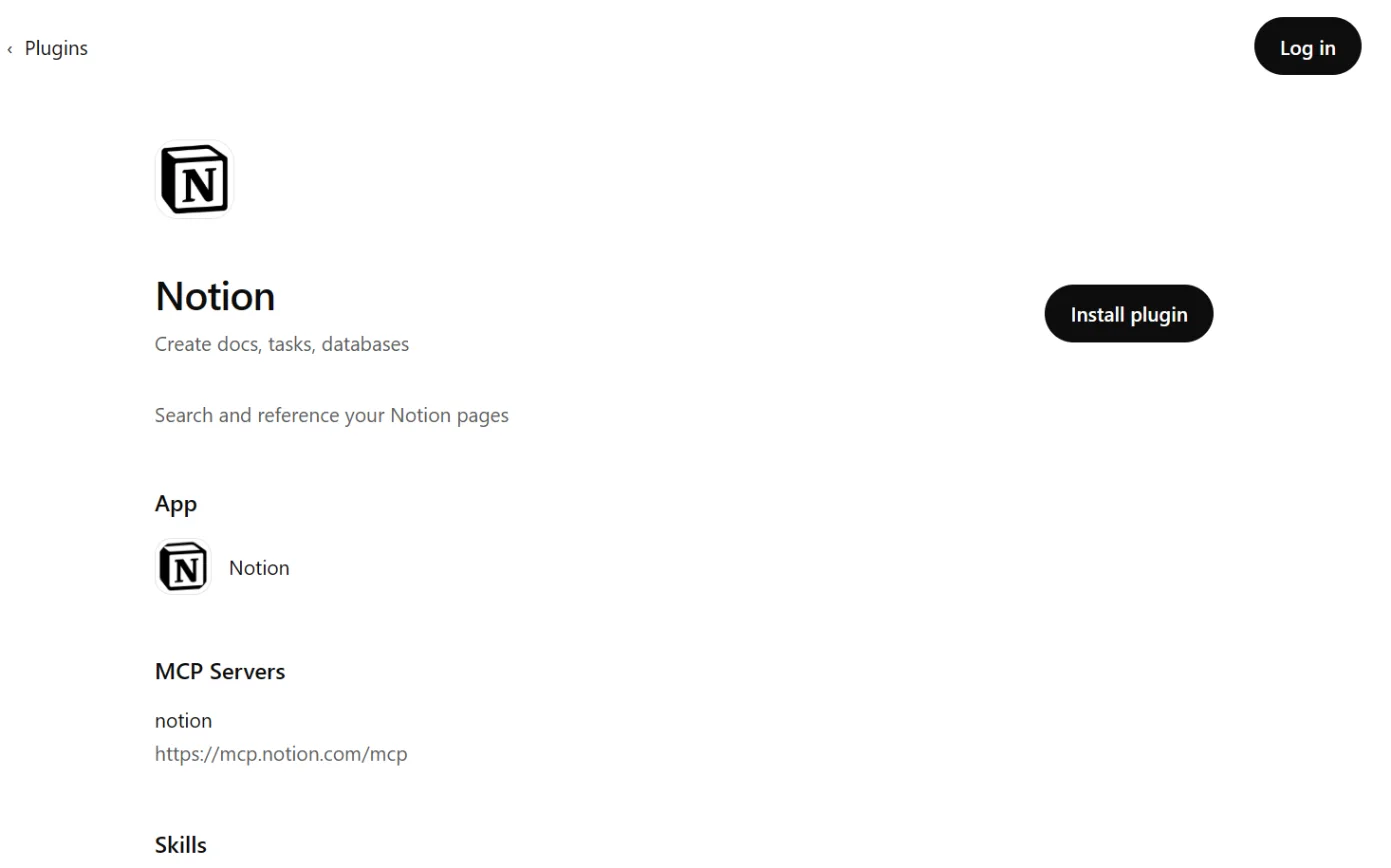
Official? Yes. OpenAI’s plugin directory lists Notion (version 3.0.1), described as “Create docs, tasks, databases”, and it uses Notion’s MCP server at https://mcp.notion.com/mcp.
  • Yes. OpenAI’s plugin directory lists Notion (version 3.0.1), described as “Create docs, tasks, databases”, and it uses Notion’s MCP server at https://mcp.notion.com/mcp.47
  • OpenAI’s business page names Notion as the developer and lists five Notion skills, such as notion-meeting-intelligence and notion-weekly-project-digest.46
What it can see and do “The Notion app lets ChatGPT search and read content from Notion pages that your connected account is allowed to access.”
  • “The Notion app lets ChatGPT search and read content from Notion pages that your connected account is allowed to access.”43
  • OpenAI says ChatGPT “may be able to create or update Notion pages”, depending on the plugin, your Notion permissions, workspace settings and approvals.43
  • OpenAI’s examples include creating a roadmap database and filling it in from a list.46
  • Notion no longer supports “individual sync”. ChatGPT searches Notion directly, with no first sync to wait for.43
  • A ChatGPT workspace admin “cannot grant access to a Notion page that your Notion account is not allowed to view.”43
What you need OpenAI says availability depends on your ChatGPT plan, workspace settings and Notion permissions.
  • OpenAI says availability depends on your ChatGPT plan, workspace settings and Notion permissions.43
  • In ChatGPT Business, many apps are on by default. Enterprise and Edu workspaces start with a selected set, and admins can change access.44
  • Notion guests can’t connect through Notion MCP.24

Steps to connect (OpenAI Help Center, "Updated: 21 days ago" when read; timestamp 26 September 2026, UTC)

  1. Source 43

    A drawing from the step’s own words. The real screen may look a little different.
  2. Source 43

    A drawing from the step’s own words. The real screen may look a little different.
  3. Source 43

    The Notion page in ChatGPT’s plugin directory, with the Install plugin button ringed.
    Screenshot: ChatGPT’s plugin directory, the Notion page, signed out, 18 October 2026.
  4. Source 43

    A drawing from the step’s own words. The real screen may look a little different.
  5. Source 43

    A drawing from the step’s own words. The real screen may look a little different.

Pictures without a date are drawings from each step’s own words. The real screen may look a little different.

To disconnect Open Settings > Plugins, select Notion and use the disconnect option.
  • Open Settings > Plugins, select Notion and use the disconnect option.43
The other way round: your ChatGPT plan inside Notion If your Notion workspace is on Business or Enterprise and you have ChatGPT Plus, Pro or Go, you can connect your ChatGPT account so GPT models in Notion Agent use your ChatGPT plan.
  • If your Notion workspace is on Business or Enterprise and you have ChatGPT Plus, Pro or Go, you can connect your ChatGPT account so GPT models in Notion Agent use your ChatGPT plan.28
  • It only applies when you pick a specific GPT model, and it doesn’t work with Custom Agents.28
  • Notion says its own agreements with its AI sub-processors still apply, including no training. The conversations aren’t saved to ChatGPT’s history or memory.28
  • To connect: Settings > Notion AI > Usage, then Connect next to ChatGPT under Connected subscriptions.28
  • To stop, turn off Use your ChatGPT plan there, or select Disconnect.28
  • Notion announced this in Notion 3.8 on 13 October 2026.30
Limits OpenAI says that on Free, Plus, Go and Pro, information from apps may be used for training if “Improve the model for everyone” is on. Business, Enterprise and Edu aren’t used for training by default.
  • OpenAI says that on Free, Plus, Go and Pro, information from apps may be used for training if “Improve the model for everyone” is on. Business, Enterprise and Edu aren’t used for training by default.44
  • OpenAI’s listing says ChatGPT may share relevant chats and memories with the Notion app, and “Use of apps may come with elevated risk.”47

Claude and Notion

Reads and makes changes. Claude agents can also work in Notion.

Claude and Notion

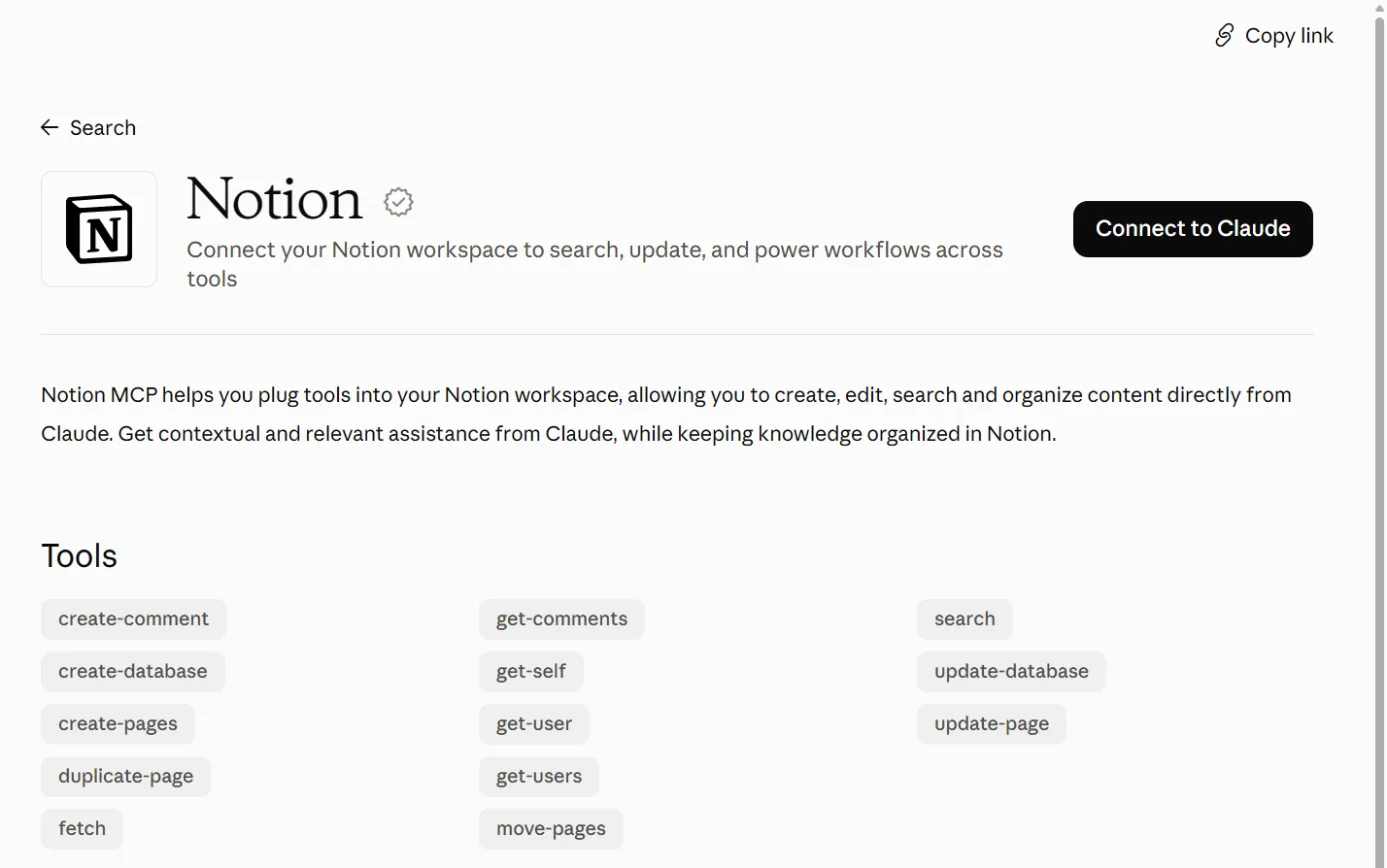
Official? Yes. The Notion connector in Claude’s directory is made by Notion, marked “Anthropic verified”, and was added in November 2025. Its address is https://mcp.notion.com/mcp.
  • Yes. The Notion connector in Claude’s directory is made by Notion, marked “Anthropic verified”, and was added in November 2025. Its address is https://mcp.notion.com/mcp.38
  • Notion also runs Claude agents in Notion, where you work with Claude inside Notion. Notion added it as one of its first “External Agents” on 1 July 2026.2031
  • Notion’s Claude page says Claude agents are “Now available in public beta.”21
  • Notion publishes a Notion plugin for Claude Code. Claude’s marketplace lists it as made by Notion Labs, without the verified badge.39
What it can see and do: the Notion connector Claude’s listing shows 13 tools: search, fetch, create-pages, update-page, move-pages, duplicate-page, create-database, update-database, create-comment, get-comments, get-users, get-self and get-user.
  • Claude’s listing shows 13 tools: search, fetch, create-pages, update-page, move-pages, duplicate-page, create-database, update-database, create-comment, get-comments, get-users, get-self and get-user.38
  • Notion’s own list of MCP tools also includes tools that move pages and databases to Trash, up to 20 at a time. Claude’s listing doesn’t show those.2538
  • Notion says the connector works with your full Notion permissions.22
What it can see and do: Claude agents in Notion (beta) Claude agents chat with you and your team in Notion, work from shared docs and task boards, and create or update content if they have edit access.
  • Claude agents chat with you and your team in Notion, work from shared docs and task boards, and create or update content if they have edit access.20
  • They “see only what you share with them”. Their permissions are set per agent.20
  • They can’t browse the web or call other agents.20
  • They’re “hosted by Notion via Anthropic’s infrastructure”. You don’t need an Anthropic account, and you can’t use your own.20
What you need Anthropic says directory connectors are available on Claude, Cowork, Claude Desktop and Claude mobile. On Team and Enterprise an owner turns a connector on first.
  • Anthropic says directory connectors are available on Claude, Cowork, Claude Desktop and Claude mobile. On Team and Enterprise an owner turns a connector on first.40
  • Notion MCP “works on every plan”, though some features vary. Workspace guests can’t connect.24
  • Claude agents in Notion need a Notion Business or Enterprise plan and run on Notion credits.20
  • Claude agents are off by default for Enterprise and HIPAA workspaces. Notion says it’s “rolling this out gradually”.20
  • Plugins in Claude need a paid Claude plan.58

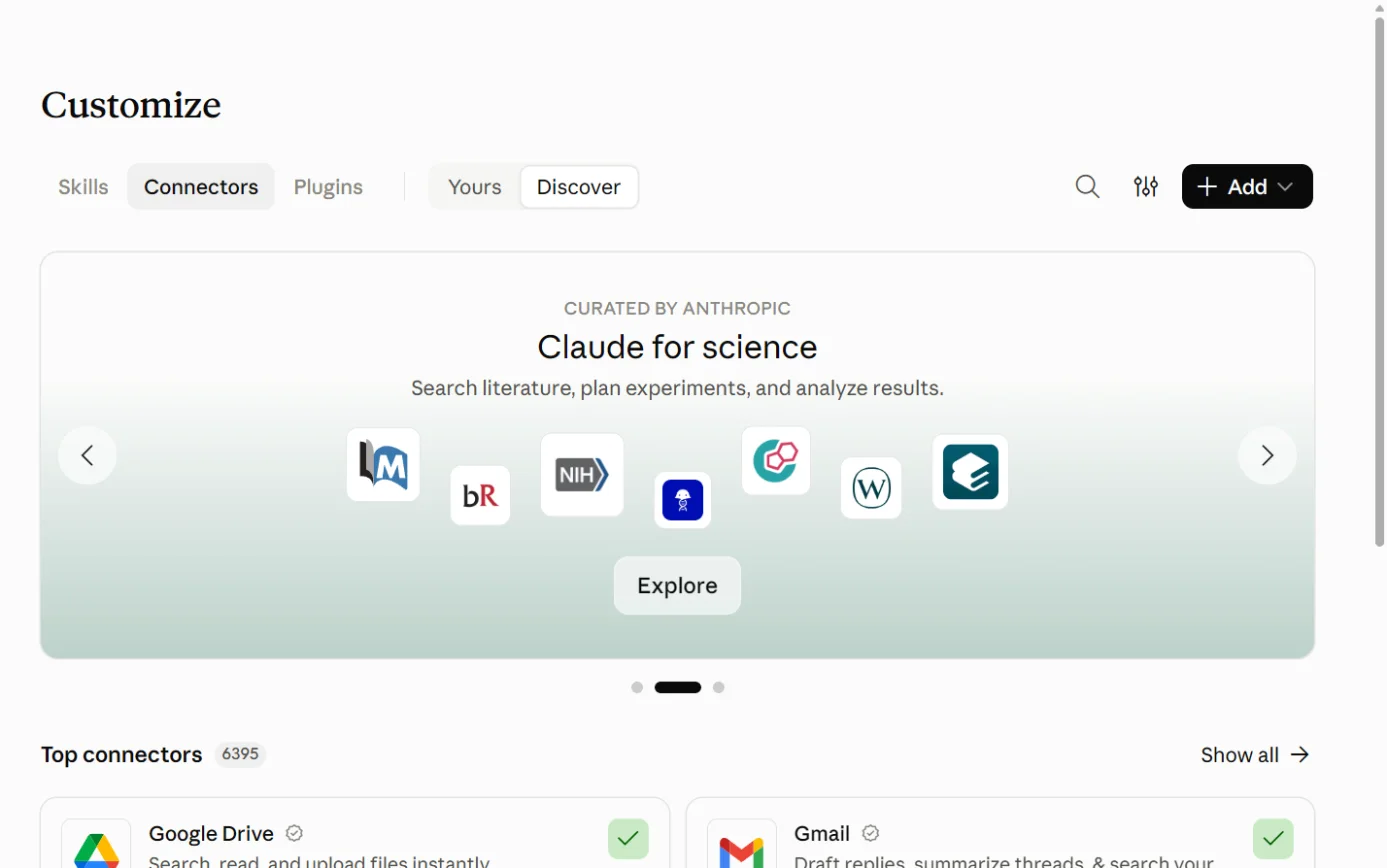
Steps to connect: the Notion connector (Anthropic Help Center, "Updated today" when read on 17 October 2026)

  1. Then: The connectors directory. Source 40

    Claude’s Customize page on the Connectors tab, with the + Add button ringed.
    Screenshot: Claude, the Connectors page under Customize, 18 October 2026.
  2. Then: You’re sent to Notion to sign in. Source 40

    The Notion listing in Claude’s connector directory, with the Connect to Claude button ringed.
    Screenshot: Claude’s connector directory, the Notion listing, 18 October 2026.
  3. Then: You’re returned to Claude with Notion connected. The exact Notion approval screen wasn’t in the docs we read. Source 40

    A drawing from the step’s own words. The real screen may look a little different.
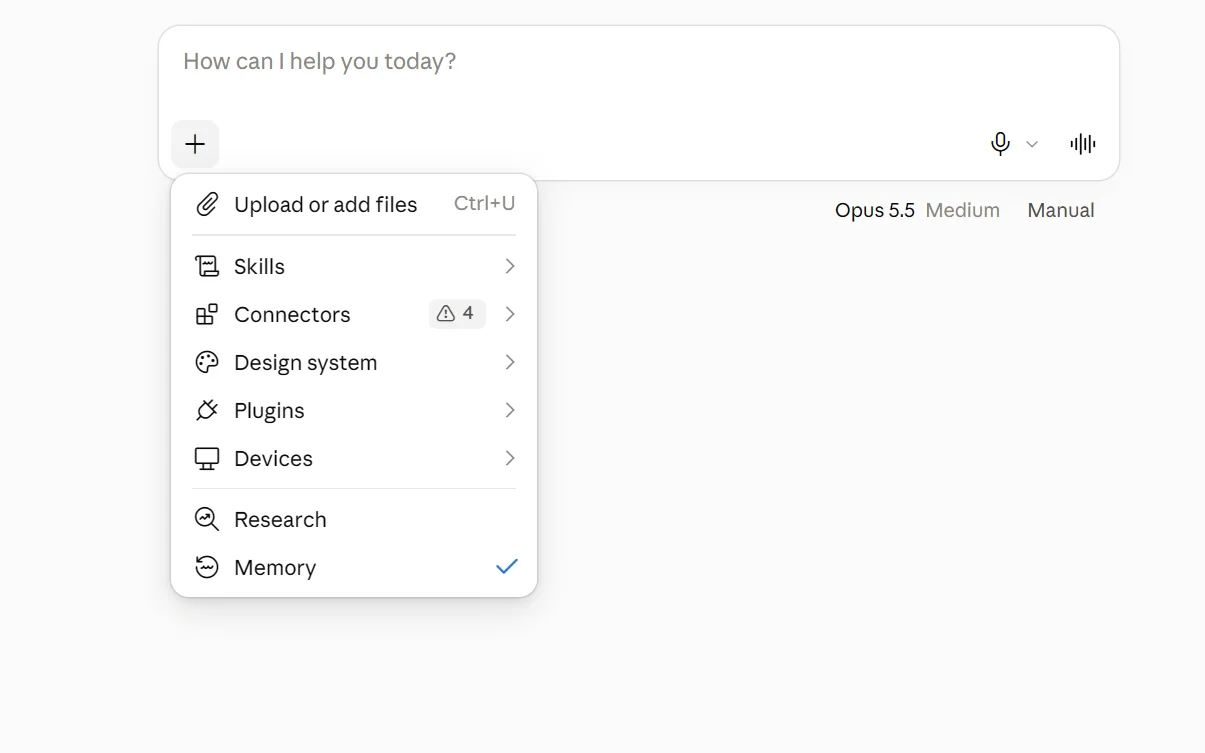
  4. Then: Claude can search, read, create and update Notion pages and databases, with your full Notion permissions. Source 40

    The + menu under Claude’s message box, with Connectors ringed.
    Screenshot: Claude, the + menu in a new chat, 18 October 2026.

Pictures without a date are drawings from each step’s own words. The real screen may look a little different.

Steps: Claude agents in Notion (Notion Help Center)

  1. Source 20

    A drawing from the step’s own words. The real screen may look a little different.
  2. Source 20

    A drawing from the step’s own words. The real screen may look a little different.
  3. Source 20

    A drawing from the step’s own words. The real screen may look a little different.

Pictures without a date are drawings from each step’s own words. The real screen may look a little different.

On Enterprise, a workspace owner first turns Claude agents on under Settings > Notion AI > Agent > Manage external agents.20

For larger organisations Notion Enterprise customers that sign in with Okta can set up an “enterprise-managed connection” for Claude, so “Members won’t see a Notion approval screen.”
  • Notion Enterprise customers that sign in with Okta can set up an “enterprise-managed connection” for Claude, so “Members won’t see a Notion approval screen.”26
  • The Claude admin adds the Notion connector at https://mcp.notion.com/mcp and turns on “Enterprise managed authentication”.26
  • Removing someone in Okta blocks new connections, but an active connection can last up to eight hours unless it’s disconnected in Notion.26
To disconnect In Claude, go to Customize > Connectors, select Notion and disconnect it.
  • In Claude, go to Customize > Connectors, select Notion and disconnect it.40
  • Workspace admins can switch Claude agents off under Settings > Notion AI > Agents > Manage external agents.20
Limits Notion says its zero data retention commitments “don’t extend to Claude agents in Notion”. Anthropic stores session data between requests.
  • Notion says its zero data retention commitments “don’t extend to Claude agents in Notion”. Anthropic stores session data between requests.20
  • Anthropic’s listing says Anthropic “cannot verify that they will work as intended” for the tools developers provide.38
  • On Claude’s Free, Pro and Max plans, raw content from connectors isn’t used for training unless you copy it into the chat.41
  • On Claude’s work plans, Anthropic doesn’t train on your inputs or outputs by default.42

Copilot and Notion

Reads only. Needs a Microsoft 365 Copilot licence.

Microsoft Copilot and Notion

Official? Yes, built by Microsoft. Microsoft’s gallery lists Notion, published by Microsoft, to “Search your docs, wikis, notes, tasks, and databases.”
  • Yes, built by Microsoft. Microsoft’s gallery lists Notion, published by Microsoft, to “Search your docs, wikis, notes, tasks, and databases.”49
  • It’s a “federated” connector, which means Copilot fetches Notion content live through MCP and doesn’t copy it into Microsoft 365.48
What it can see and do Copilot uses your own Notion sign-in and permissions, so you only see what your Notion account can see.
  • Copilot uses your own Notion sign-in and permissions, so you only see what your Notion account can see.48
  • It works in Microsoft 365 Copilot Chat, agents, Cowork, Copilot in Word, Excel, PowerPoint and Outlook, and the Researcher agent.48
  • Microsoft says write, update and delete actions through federated connectors “begin rolling out in early October 2026”, where a connector provides those tools.48
  • Those actions need your approval, with the choices Allow once, Allow for conversation, Always allow and Cancel.48
  • Microsoft’s pages don’t say whether the Notion connector has write tools. Its gallery describes searching.4948
What you need A Microsoft 365 Copilot licence. Microsoft says a user only sees a federated connector if “The user has a Microsoft 365 Copilot license.”
  • A Microsoft 365 Copilot licence. Microsoft says a user only sees a federated connector if “The user has a Microsoft 365 Copilot license.”48
  • Microsoft-built connectors are available by default when an admin allows Allow agents and plugins built by Microsoft and includes the user.48

Steps to connect (Microsoft Learn, 30 September 2026)

  1. Source 48

    A drawing from the step’s own words. The real screen may look a little different.
  2. Source 48

    A drawing from the step’s own words. The real screen may look a little different.
  3. Source 48

    A drawing from the step’s own words. The real screen may look a little different.
  4. Source 48

    A drawing from the step’s own words. The real screen may look a little different.
  5. Source 48

    A drawing from the step’s own words. The real screen may look a little different.

Pictures without a date are drawings from each step’s own words. The real screen may look a little different.

For admins Manage the connector in the Microsoft 365 admin center under Copilot connectors > Your connections. You can switch it off or roll it out to chosen groups.
  • Manage the connector in the Microsoft 365 admin center under Copilot connectors > Your connections. You can switch it off or roll it out to chosen groups.48
  • Agents > Settings > Agent and plugin access allows or blocks connectors by who built them.48
To disconnect Turn the source off in Researcher, or manage it in Copilot Chat settings.
  • Turn the source off in Researcher, or manage it in Copilot Chat settings.48
Limits Microsoft says prompts, responses and Microsoft Graph data “aren’t used to train foundation LLMs”. It tells admins to check each agent’s privacy statement and terms.
  • Microsoft says prompts, responses and Microsoft Graph data “aren’t used to train foundation LLMs”. It tells admins to check each agent’s privacy statement and terms.50
  • Microsoft says customers outside the EU may have queries processed in the US, the EU or other regions.50
  • Microsoft’s connector catalogue for Power Automate also has a “Notion (Independent Publisher)” connector. Microsoft lists two individuals as its publishers, and it signs in with an API key. We found nothing from Notion about it.51

Gemini and Notion

No official link. Gemini Enterprise only.

Google Gemini and Notion

Official? No official connection found for the everyday Gemini app. Google’s table of Connected Apps has no Notion entry.
  • No official connection found for the everyday Gemini app. Google’s table of Connected Apps has no Notion entry.52
  • Google’s separate business product, Gemini Enterprise, has a Notion connector that Google documents.5453
  • Inside Notion, Notion AI can use Google’s Gemini models. That’s Notion choosing a model, which is different from the Gemini app connecting to Notion.411
What Gemini Enterprise’s connector can see and do Search Notion through “federated search”, where your query goes to Notion live. Google labels federated search as public preview.
  • Search Notion through “federated search”, where your query goes to Notion live. Google labels federated search as public preview.5455
  • Actions to create comments, create and update databases, and create and update pages, plus “Additional read-only actions”.54
  • Google warns that your query string is sent to the connected services, which “can link the query with your identity”.54
  • The Notion data store “is supported only in Global, US, and EU locations.”54
What you need Gemini Enterprise, a Notion OAuth integration with its client ID and secret, and the Discovery Engine Editor role in Google Cloud.
  • Gemini Enterprise, a Notion OAuth integration with its client ID and secret, and the Discovery Engine Editor role in Google Cloud.55

Steps to connect (Google Cloud, last updated 14 October 2026)

  1. Source 55

    A drawing from the step’s own words. The real screen may look a little different.
  2. Source 55

    A drawing from the step’s own words. The real screen may look a little different.
  3. Source 55

    A drawing from the step’s own words. The real screen may look a little different.
  4. Source 55

    A drawing from the step’s own words. The real screen may look a little different.
  5. Source 55

    A drawing from the step’s own words. The real screen may look a little different.
  6. Source 55

    A drawing from the step’s own words. The real screen may look a little different.

Pictures without a date are drawings from each step’s own words. The real screen may look a little different.

Limits Google’s preview terms apply to federated search, which “may have limited support”.
  • Google’s preview terms apply to federated search, which “may have limited support”.55

Other routes

Developer tools, automation tools and app stores.

Notion MCP (the developer route)

Official? Yes. Notion hosts its MCP server at https://mcp.notion.com/mcp, with https://mcp.notion.com/sse as a fallback.
  • Yes. Notion hosts its MCP server at https://mcp.notion.com/mcp, with https://mcp.notion.com/sse as a fallback.24
  • Notion moved to a hosted server in 2025, after starting with a downloadable package in April 2025.35
  • Its open-source local server “is no longer actively maintained”.24
What it can see and do Search, read, create and update pages and databases, and add comments.
  • Search, read, create and update pages and databases, and add comments.2325
  • Move up to 20 pages or databases to Trash at a time, and restore them.25
  • Start and message Custom Agent sessions, where your plan has Custom Agents.25
What you need Notion says MCP works on every plan, with some features varying by plan.
  • Notion says MCP works on every plan, with some features varying by plan.24
  • MCP tokens are for Business and Enterprise workspace owners. Enterprise-managed sign-in needs Enterprise with SAML single sign-on.24
  • AI search inside MCP needs Business or Enterprise with Notion AI. Otherwise it runs a keyword search.24

Steps to connect (Notion developer docs, no date shown)

  1. Source 24

    A drawing from the step’s own words. The real screen may look a little different.
  2. Source 24

    A drawing from the step’s own words. The real screen may look a little different.
  3. Source 24

    A drawing from the step’s own words. The real screen may look a little different.

Pictures without a date are drawings from each step’s own words. The real screen may look a little different.

For Enterprise admins Admins can limit which AI apps members connect: Settings > Connections > Permissions, then under AI apps set Restrict AI apps members can connect to to Only from approved list.
  • Admins can limit which AI apps members connect: Settings > Connections > Permissions, then under AI apps set Restrict AI apps members can connect to to Only from approved list.22
  • The Disconnect All Users button disconnects every AI app connected through Notion MCP. People then have to sign in again.22
Limits Notion suggests starting with “single-player use cases”.
  • Notion suggests starting with “single-player use cases”.22
  • OpenAI says full MCP in ChatGPT, including write actions, is for Business, Enterprise and Edu. Pro users can connect custom MCP servers that only read and fetch.45

Automation routes Notion documents

  • Notion’s webhook actions send data from buttons and database automations to tools like “Zapier, Make, and more”. They’re on paid plans.36
  • Enterprise owners can switch webhooks off under Settings > Connections with Allow webhooks in automations.36
  • Notion’s connection gallery includes many apps that Notion doesn’t make. Notion says: “Unless specifically designated as Made by Notion, connections are not supported or maintained by Notion.”37

Jobs it’s good for

  • Meeting notes that turn into tasks. Record with AI Meeting Notes after everyone agrees, then let a Custom Agent file the action items.1029
  • A weekly project update. Set a Custom Agent on a weekly schedule to pull from a project database and post a summary to a Slack channel.5
  • Questions across the wiki and Slack. Ask Enterprise Search, which cites the pages and messages it used.11
  • New-starter questions. Embed a Custom Agent in your onboarding page so people can ask it. Share only the pages it should use.556
  • Finding a decision. OpenAI’s example asks ChatGPT to find the latest pricing decision for a project and summarise it with page links.46
  • Keeping docs current. Ask ChatGPT for a list of outdated pages to fix first, another of OpenAI’s examples.46
  • Working from Word or Outlook. With the Notion connector switched on in Microsoft 365 Copilot, look up a Notion page without leaving the document.48

What to watch for

Custom Agents can share what people can’t otherwise see

  • A Custom Agent answers with its own access. Notion says people using it “can retrieve information from resources they lack access to”.56
  • Give each agent only the pages it needs, and check its Tools and access before sharing it.56
  • Database row permissions don’t protect you here: “if the agent can see more rows than the end user, the agent may expose information the end user can’t access directly.”56

Outside assistants act with your full access

  • Notion MCP works with everything the connected person can see and do in Notion.22
  • It can move pages to Trash. Deleted pages can be restored within 30 days.2515
  • Write tools in Custom Agent MCP connections ask first by default, but Always allow removes the prompts for a whole server.57
  • The Notion MCP admin controls in Notion’s help are for Enterprise.22 Notion’s 3.8 release says admins can now allow only Notion-verified or chosen tools, without naming plans.30

Hidden instructions

  • Notion warns about prompt injection, where hidden text in a file or web page tries to steer the AI.19
  • Notion says smaller models “may be more vulnerable to prompt injection”. It suggests a larger model for untrusted content.19
  • For agents connected to outside tools, Notion advises read-only access where possible, human confirmation for write tools and only trusted MCP servers.19

Training and who keeps what

  • Notion doesn’t train on your data by default, and its providers keep data for up to 30 days on Free, Plus and Business.15
  • Claude agents in Notion aren’t covered by zero data retention.20
  • When a Custom Agent uses Claude Fable 5, Anthropic may store prompts and responses for a time.5
  • Your chat history on the assistant’s side follows that company’s rules.444142

Where your data goes

  • Notion’s data regions are the US, Europe, Japan and Korea, for Enterprise only. Everyone else’s data is hosted in the United States.17
  • Even with data residency, Notion says customer data can be processed outside the region by “Notion subprocessors, including LLM providers”.17
  • Notion’s AI model providers are listed as “Global”, the USA or the UK.16
  • Microsoft says Copilot queries from outside the EU may be processed in the US, the EU or elsewhere.50

Costs

  • Premium models, Custom Agents and Claude agents all spend Notion credits.8520
  • When credits run out, agents pause automatically.7
  • Premium models are off until an admin turns them on, so nothing spends credits by accident.8

Who can switch things on and off

  • Most AI settings sit under Settings > Notion AI: web search, model controls, usage limits, AI Meeting Notes and AI connectors.3
  • Who can create Custom Agents: the Agents tab under the same settings.56
  • Which outside AI apps can connect: Settings > Connections (Enterprise).22
  • We found no single switch that turns all of Notion AI off.3

Beta and preview

  • Claude agents in Notion, Enterprise Search, Research Mode, image generation and Workers are labelled beta.2013
  • Notion says usage allowances may change, including “the size of the allowances”.9

What’s changing

  • 13 May 2025: Notion 2.51 brought AI Meeting Notes, Enterprise Search and Research Mode. Business and Enterprise plans “now include unlimited usage of Notion AI”.32
  • 15 July 2025: Notion described its new hosted MCP server, which replaced the downloadable package.35
  • 18 September 2025: Notion 3.0 introduced Notion Agent.33
  • 24 February 2026: Custom Agents launched, free until 3 May 2026.34
  • 4 May 2026: Custom Agents started using Notion credits.342
  • 1 July 2026: Notion 3.6 added Claude and Cursor as “External Agents”.31
  • 31 July 2026: AI Meeting Notes can trigger Custom Agents.29
  • 9 September 2026: Owners can choose which AI models Notion Agent and Custom Agents use.29
  • 15 September 2026: Notion 3.7 added shared skills for agents.29
  • 13 October 2026: Notion 3.8 added ChatGPT plan support, more than 150 MCP connections and seven new models. Notion says admins can now see who connected each AI tool and revoke one person’s access.30
  • Early October 2026 onwards: Microsoft says write actions through federated connectors are rolling out.48
  • 31 October 2026: Notion’s legacy SharePoint and OneDrive connector stops working. From 1 November 2026 each person must connect their own Microsoft account.14

What we couldn’t establish

  • Prices in AUD and GST. The pricing page shows US dollars only and doesn’t mention tax.1
  • The currency of Notion credits. The credits page shows “$” without a currency.6
  • A switch to turn off all of Notion AI. We found switches for individual features only.3
  • Whether Microsoft’s Notion connector can make changes. Microsoft’s pages describe write actions for federated connectors in general but not for Notion.4849
  • Which Notion MCP tools Claude’s connector exposes. Claude’s listing shows 13 tools without the Trash tools in Notion’s own list.3825
  • Revoking one person’s AI app access. Notion’s MCP help says admins can’t disconnect everyone from one app, while its 3.8 release says admins can revoke one person’s access.2230
  • Model names. Notion’s pages variously say “Claude Fable 5.1” and “Claude Fable 5”.458
  • Claude agents in Australia. Notion says it’s rolling them out gradually and doesn’t name countries.20
  • A Notion app for the everyday Gemini app. None found on Google’s list.52
  • Notion Mail’s AI. We didn’t research Notion Mail or Notion Calendar’s AI features in depth.
  • Dates on Notion’s pages. Notion’s help pages and sub-processor list show no update dates.16
  • Enterprise Search security. Notion’s “Enterprise Search security & privacy practices” address now opens its general security page.18
  • Australian recording law. Notion’s AI Meeting Notes guidance doesn’t cover Australian consent rules.10

Sources

Every line above was read at one of these pages, on the date shown. Vendors change their products and their pages often, so check the page before you rely on a detail.

  1. 1 Notion Pricing Plans: Free, Plus, Business and Enterprise (as shown in Australia) Notion Read 17 Oct 2026
  2. 2 Meet your 24/7 AI team (Notion AI) Notion Read 17 Oct 2026
  3. 3 What is Notion AI? FAQs Notion Help Center Read 17 Oct 2026
  4. 4 Notion Agent Notion Help Center Read 17 Oct 2026
  5. 5 What are Custom Agents? Notion Help Center Read 17 Oct 2026
  6. 6 What are Notion credits? Notion Help Center Read 17 Oct 2026
  7. 7 Notion credits (help category and FAQs) Notion Help Center Read 17 Oct 2026
  8. 8 Manage AI models & member credit spend Notion Help Center Read 17 Oct 2026
  9. 9 Manage your usage allowance for Notion AI Notion Help Center Read 17 Oct 2026
  10. 10 Take AI Meeting Notes in Notion Notion Help Center Read 17 Oct 2026
  11. 11 Enterprise Search Notion Help Center Read 17 Oct 2026
  12. 12 Notion AI Connectors overview Notion Help Center Read 17 Oct 2026
  13. 13 Notion AI connector for Microsoft Outlook Notion Help Center Read 17 Oct 2026
  14. 14 Microsoft SharePoint & OneDrive AI Connector (legacy) Notion Help Center Read 17 Oct 2026
  15. 15 Notion AI security & privacy practices Notion Help Center Read 17 Oct 2026
  16. 16 Notion’s List of Subprocessors Notion Read 17 Oct 2026
  17. 17 Data residency for Notion Notion Help Center Read 17 Oct 2026
  18. 18 Security @ Notion Notion Read 17 Oct 2026
  19. 19 How Notion 3.0 protects against prompt injection risks Notion Help Center Read 17 Oct 2026
  20. 20 Use Claude agents in Notion (beta) Notion Help Center Read 17 Oct 2026
  21. 21 Notion + Claude Notion Read 17 Oct 2026
  22. 22 Connect AI tools with Notion MCP Notion Help Center Read 17 Oct 2026
  23. 23 Notion MCP Notion Docs (developers) Read 17 Oct 2026
  24. 24 Connect to Notion MCP Notion Docs (developers) Read 17 Oct 2026
  25. 25 Supported tools (Notion MCP) Notion Docs (developers) Read 17 Oct 2026
  26. 26 Set up enterprise-managed connections for Notion MCP Notion Help Center Read 17 Oct 2026
  27. 27 Connect MCP servers to your Notion Agent Notion Help Center Read 17 Oct 2026
  28. 28 Use your ChatGPT plan with Notion Agent Notion Help Center Read 17 Oct 2026
  29. 29 What’s New (release notes) Notion Updated Entries dated 24 Jul to 13 Oct 2026 Read 17 Oct 2026
  30. 30 Notion 3.8: Context for your agents Notion Updated Oct 13, 2026 Read 17 Oct 2026
  31. 31 Notion 3.6: External Agents, HTML blocks, and more Notion Updated Jul 1, 2026 Read 17 Oct 2026
  32. 32 Notion 2.51: AI Meeting Notes, Enterprise Search & more Notion Updated May 13, 2025 Read 17 Oct 2026
  33. 33 Introducing Notion 3.0 Notion Blog Updated Sep 18, 2025 Read 17 Oct 2026
  34. 34 Introducing Custom Agents Notion Blog Updated Feb 24, 2026 Read 17 Oct 2026
  35. 35 Notion’s hosted MCP server: an inside look Notion Blog Updated Jul 15, 2025 Read 17 Oct 2026
  36. 36 Webhook actions in Notion automations Notion Help Center Read 17 Oct 2026
  37. 37 Context Link (Notion connection gallery listing) Notion Read 17 Oct 2026
  38. 38 Notion connector Anthropic Updated "Added November 2025" Read 17 Oct 2026
  39. 39 Notion (plugin) Anthropic Read 17 Oct 2026
  40. 40 Use connectors to extend Claude’s capabilities Anthropic Help Center Updated "Updated today" (17 Oct 2026) Read 17 Oct 2026
  41. 41 Is my data used for model training? (consumer products) Anthropic Privacy Center Updated Mar 16, 2026 Read 17 Oct 2026
  42. 42 Is my data used for model training? (commercial products) Anthropic Privacy Center Updated Aug 18, 2026 Read 17 Oct 2026
  43. 43 Notion app and setup in ChatGPT OpenAI Help Center Updated "Updated: 21 days ago" (timestamp 26 Sep 2026, UTC) Read 17 Oct 2026
  44. 44 Connected apps in ChatGPT OpenAI Help Center Updated "Updated: 8 hours ago" (timestamp 17 Oct 2026, UTC) Read 17 Oct 2026
  45. 45 Connecting custom MCP servers in ChatGPT OpenAI Help Center Updated "Updated: 12 hours ago" (timestamp 16 Oct 2026, UTC) Read 17 Oct 2026
  46. 46 Notion plugin for ChatGPT OpenAI Read 17 Oct 2026
  47. 47 ChatGPT plugin listing: Notion OpenAI Updated Version 3.0.1; no date shown Read 17 Oct 2026
  48. 48 Federated connectors overview Microsoft Learn Updated 30 Sep 2026 (page metadata; updated 16 Oct 2026) Read 17 Oct 2026
  49. 49 Microsoft-built connectors gallery Microsoft Learn Updated 30 Sep 2026 (page metadata) Read 17 Oct 2026
  50. 50 Data, Privacy, and Security for Microsoft Copilot Microsoft Learn Updated 9 Jul 2026 (page metadata; updated 8 Oct 2026) Read 17 Oct 2026
  51. 51 Notion (Independent Publisher) Microsoft Learn Updated 1 Mar 2024 (page metadata) Read 17 Oct 2026
  52. 52 Check the availability & requirements of Connected Apps in Gemini Apps Google Gemini Apps Help Read 17 Oct 2026
  53. 53 Connect your Google apps and third-party data (Gemini Enterprise, Business edition) Google Updated Last updated Oct 15, 2026 Read 17 Oct 2026
  54. 54 Notion data store (Gemini Enterprise) Google Cloud Updated Last updated 2026-10-14 UTC Read 17 Oct 2026
  55. 55 Set up a Notion data store (Gemini Enterprise) Google Cloud Updated Last updated 2026-10-14 UTC Read 17 Oct 2026
  56. 56 Custom Agents sharing & permissions Notion Help Center Read 17 Oct 2026
  57. 57 MCP connections for Custom Agents Notion Help Center Read 17 Oct 2026
  58. 58 Use plugins in Claude Anthropic Help Center Updated "Updated over a week ago" Read 17 Oct 2026

Want your team shown this on its own Notion?

We teach on the tools your workplace already uses, with the checks that go with them.