



Skip to content

Dropbox and AI.

Its own AI is Dash, a paid add-on for teams. ChatGPT, Claude and Copilot can find your files and save new ones through Dropbox’s own connections, and Gemini can too in the US.

Checked 17 October 2026 against 79 sources, each the vendor’s own page. See them all, or what’s changed since.

The short version

  • Dropbox’s own AI is called Dash. It searches your files and your other work apps and answers questions about them. You open it from a side panel in Dropbox or at dash.ai.35
  • Dash is a paid plan on top of Dropbox. Dash for Teams is $15 per user a month billed yearly, or $19 billed monthly. The page doesn’t say which currency.2
  • Teams in Australia can start a free Dash for Teams trial. Dropbox’s security paper says Dash can’t yet store data outside the United States.311
  • Dropbox says it won’t build generative AI models from customer content without consent. It lists “No customer data used for third party model training” and a 90-day retention period for the AI models behind its features.1412
  • ChatGPT, Claude and Microsoft Copilot each have an official Dropbox connection that Dropbox built. They can find your files and save new ones to Dropbox, all within what your own Dropbox login allows.303132
  • Gemini has one too, but Google lists it for personal Google accounts in the US only.7374
  • Dropbox says ChatGPT asks before it changes your files. Its ChatGPT page also says conversations and Dropbox data in ChatGPT “may be used for model training according to OpenAI’s policies”.30
  • Microsoft also makes a Dropbox connector that copies (indexes) a team’s files into Copilot search. Its default setting makes every file anyone can open in Dropbox visible to everyone in your Microsoft 365 organisation.6364
  • Team admins can block AI apps in the Dropbox admin console. Blocking doesn’t disconnect people who’ve already connected.28

The plans

Dropbox is online file storage and sharing, with e-signatures and other products alongside. Its plans page sums it up as “Store and share files. Sign and send documents.”1

These are the prices on Dropbox’s plans page as shown to a visitor in Australia on 17 October 2026.1

PlanWho it’s forMonthly (AUD)Yearly (AUD)Storage and deleted-file recovery
BasicAnyoneFreeFree2 GB
Plus1 personAU$18.69AU$184.672 TB. Restore deleted files for 30 days
Standard1 person or moreAU$27.50 a userAU$277.20 a userStarts at 3 TB for the team. 180 days to restore
Advanced3 people or moreAU$43.45 a userAU$435.60 a userStarts at 15 TB for the team. 1 year to restore
EnterpriseCompanies“Contact us for pricing”“Contact us for pricing”Not shown

Sources for the table:1

  • Plus, Standard and Advanced each list “Integrate with leading AI tools” as a feature.1
  • The page doesn’t say whether these prices include GST.1
  • Dash is sold separately. Dropbox’s Dash plans page lists Dash for Teams (up to 100 users) and Dash for Business (over 100 users).2
  • Dropbox’s help centre also names Business and Business Plus plans, which the Australian plans page doesn’t show.31

Words used in this guide

  • Dash is Dropbox’s AI tool. Dropbox says “Dropbox Dash and Dash for Business are now referred to as Dash.”11
  • Dash in Dropbox is Dash opened from the side panel of the Dropbox website. Dropbox calls it “AI in Dropbox, powered by Dash”.346
  • Dropbox AI was Dropbox’s 2023 name for summaries and questions inside file previews. It started as an alpha for US customers.48 Dropbox’s old “Dropbox AI” help address now opens a Dash article, so it appears the feature was folded into Dash. That’s our reading.6
  • An MCP server is a standard plug that lets an AI assistant use another service. Dropbox runs its own.3511

Where your files live

  • Dropbox’s storage servers are in data centres across the United States.22
  • Storage is also available in Australia, the European Union, Japan and the United Kingdom for eligible users.22
  • A team can ask to move its file data to Australia if it’s on Standard, Advanced, Business, Business Plus or Enterprise, has at least 10 licences and pays yearly.22
  • Dropbox says requests are “reviewed individually”. You can’t choose the new server’s location, and the move can’t be undone.22
  • The choice covers team file data “while stored permanently at rest”.22
  • Dropbox’s Australian file storage is hosted on Amazon Web Services in Australia.23
  • More broadly, Dropbox’s privacy policy says it may store, process and transmit data “in the United States and locations around the world”.18

What’s built in

Dash (Dropbox’s AI, in Dropbox and at dash.ai) Searches Dropbox and the work apps you connect, using everyday questions. You don’t need the exact file name.
What it does
  • Searches Dropbox and the work apps you connect, using everyday questions. You don’t need the exact file name.5
  • Summarises documents and conversations and answers questions about your work.5
  • Drafts written work and rewrites it for clarity or tone.5
  • Groups files, links and conversations into “Stacks” for a project.5
  • Image search can match what’s in a picture. A “Text in image” filter works on JPG, PDF, PNG and TIFF files.6
  • Searches the web too. Web search is on by default and uses OpenAI’s web search API (gpt-5-mini).6
  • Lets you pick an AI model, or leave it on Auto so Dropbox chooses. Dropbox says “Model availability may change over time.”8
  • The Chrome extension answers questions about any web page. Its buttons include Summarize & Highlights, Next Steps and Quick Draft.7
  • Dropbox’s help lists 29 sources Dash can search, including Google Drive, Microsoft 365, Microsoft Teams, Slack, Notion, Gmail and Zoom.79
Where to find it
  • In Dropbox, open Dash from the right-side panel on the Dropbox home page.3
  • Or go to dash.ai, or use the Dash desktop and mobile apps.34
  • Ask, Write and Organize work on dash.ai and in the desktop app. They don’t work in the mobile app.4
  • In Dash Chat, attach a file with the add (+) icon and ask about it. Files can be up to 25 MB, and Dash summarises up to 20,000 characters.7
  • To choose a model, log in to dash.ai, click Chats, then Model, and pick from the list.8
  • An admin connects the team’s Dropbox to Dash in the admin console under Dash > More Apps > Add next to Dropbox. Dropbox says this syncs “your organization’s entire Dropbox content with Dash”.26
Which plans have it
  • Dropbox describes Dash for Teams and Dash for Business as “two plans that make Dash, our AI-powered productivity tool, available directly in Dropbox.”3
  • Dash for Teams costs $15 per user a month billed yearly, or $19 billed monthly. Dash for Business is $35 per user a month, billed yearly only.2
  • Viewed from Australia, the Dash plans page still shows a plain “$” with no currency. The main Dropbox plans page shows AU$.21
  • A banner offers “50% off” to Dropbox Standard, Advanced, Business and Business Plus customers. It doesn’t say for how long.2
  • Dropbox says future plans “may include a limit on how many items each member can use with Dash”. It will email you at least 30 days before a limit starts.2
  • Teams on Basic, Standard, Business, Advanced or Business Plus can start a free Dash for Teams trial. Only team admins can enrol a team.3
  • Dropbox’s Dash page says the free trial for small teams lasts 30 days.49
  • Individual users on Plus, Professional or Essentials can’t start a trial, and nor can managed teams.3
  • Dropbox’s Trust Center says many Dropbox for Teams plans “include intelligent features powered by Dropbox Dash”. We couldn’t match that to a list of plans.13
What happens to your data
  • Dropbox’s AI principles say: “We will not build generative AI models using customer content without consent.”14
  • Dropbox’s Trust Center lists two controls for every model behind its AI features: “No customer data used for third party model training” and a “90 day data retention period”.12
  • The model table lists OpenAI models such as GPT-5.4 and GPT-4.1, mostly run in a Dropbox-managed environment on Microsoft Azure. Some also run through OpenAI itself, and GPT OSS 20B runs on Groq.12
  • The same table lists Anthropic’s Claude Opus 4.7, Claude Opus 4.6 and Claude Sonnet 4.6, run through AWS Bedrock.12
  • Dash’s sub-processor list, updated 29 April 2026, names Google, OpenAI, Amazon Web Services, Microsoft, Groq and Parallel Web Systems for “Large Language Model Processing”. All are located in the United States.15
  • Dropbox says it “may manually review snippets of the questions you ask and the responses you receive”, de-identifying them where possible.11
  • Dropbox may also use data about how you use Dash to improve and fine-tune it. It says Dash has controls to opt out of that.11
  • Dash stores the content it indexes and creates “temporary embeddings” (number codes that help it compare text). These stay until the document is deleted or its source is disconnected.11
  • When an admin disconnects an app from Dash, Dash starts purging that app’s content.11
  • Admins can keep specific files, folders, drives or sites out of Dash for some connected apps. Changes take 6 to 24 hours.11
  • Dash only shows content each person is allowed to see in the original app.1134
  • If a trial ends without a paid plan, connected apps are removed 30 days later. Search and chat history are deleted too.2
  • Dropbox’s privacy FAQ, last updated in April 2024, says Dash imports your browser history “starting with the previous 90 days”, including the pages’ content, when you use the Dash browser extension and desktop app.17
  • It adds that Dropbox may share this data with trusted third parties to power Dash’s search.17
  • The same FAQ says models that improve search “may be trained on your documents and metadata”.17
  • Admin settings live under Admin console > Dash > Settings. They cover single sign-on, domain verification, an email domain allowlist for some apps, and public sharing of Stacks.24
  • We found no single switch that turns Dash off for a whole team while keeping a paid Dash plan. See “What we couldn’t establish”.2425
In Australia
  • To start a Dash for Teams trial, your team must be located in the United States, the United Kingdom or Australia, with English as the account’s primary language.3
  • Dropbox’s Dash security paper says “currently Dash does does not offer an option for data storage outside of the US” (Dropbox’s typo).11
  • So a team whose Dropbox files are stored in Australia should expect Dash’s copy of them to sit in the US. That’s our inference from those two Dropbox statements.2211
  • Dash isn’t offered to accounts that need HIPAA compliance (a US health-privacy setting) or that use managed encryption keys.3
  • The Dash mobile app is only available “in select countries” and in English.4

Connect another AI

Dropbox builds its own app for each of the four big assistants and lists them on one help page, “AI integrations”.29 Each one works within the Dropbox permissions of the person who connects it.30313233

There are two kinds of connection. The Dropbox app works with your Dropbox files. The Dropbox Dash app is separate: it brings in what Dash has indexed from your other work apps, for teams that pay for Dash.3440

ChatGPT and Dropbox

Reads and makes changes. Asks before changing files.

ChatGPT and Dropbox

Official? Yes. OpenAI’s plugin directory lists Dropbox, with Dropbox as the developer (version 6.0.0).
  • Yes. OpenAI’s plugin directory lists Dropbox, with Dropbox as the developer (version 6.0.0).5857
  • Dropbox launched its ChatGPT apps on 16 April 2026: a Dropbox app, a Dropbox Dash app and a Reclaim AI calendar app.40
  • Since 10 September 2026, you can browse, search and @mention Dropbox files from ChatGPT’s Library on the web.43
  • On 8 September 2026 Dropbox joined OpenAI’s Small Business collection in the ChatGPT plugin directory.42
What it can see and do Browse, search and preview Dropbox files, and add them to a conversation.
  • Browse, search and preview Dropbox files, and add them to a conversation.30
  • Summarise, analyse and compare files such as PDFs, Word documents, spreadsheets and presentations.30
  • Move, copy, delete and restore files and folders, and list a file’s revisions.30
  • Save ChatGPT’s work to Dropbox, create and list shared links, and create and manage file requests.30
  • Send and manage Dropbox Sign signature requests.30
  • OpenAI’s listing names six Dropbox skills, including organize-dropbox-folder, share-dropbox-content and clean-up-dropbox-content.5758
  • Dropbox says ChatGPT “will request your permission before making any changes to your data”.30
  • Dropbox says the plugin “follows your existing Dropbox permissions and team policies.”30
  • The separate Dropbox Dash app pulls in context from the work apps your team has connected to Dash, and respects their permissions.5960
What you need Dropbox says the plugin is “available to customers on all Dropbox plans using ChatGPT”.
  • Dropbox says the plugin is “available to customers on all Dropbox plans using ChatGPT”.30
  • OpenAI says app availability depends on the app, your ChatGPT plan, region, workspace, role, model and the ChatGPT version you use.61
  • In ChatGPT Business, many apps are on by default. New Enterprise and Edu workspaces start with a selected set, and admins can change access.61
  • The Dash app needs a Dash plan or trial. When Dropbox announced it, it said the Dash app would reach existing Dash customers “in the coming weeks”.40

Steps to connect (Dropbox Help Center, updated 30 September 2026)

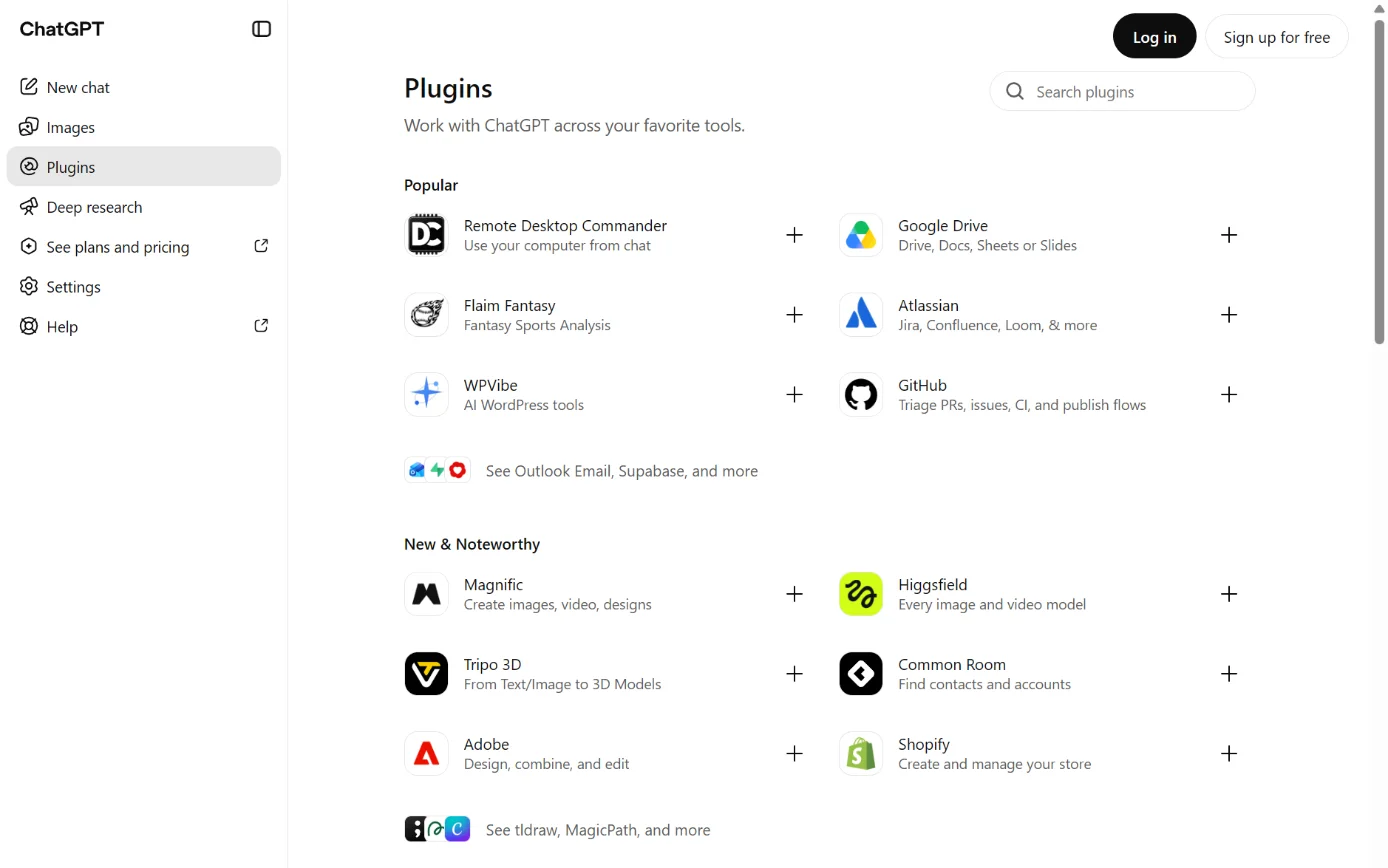
  1. Then: The plugin directory. Source 30

    ChatGPT’s Plugins page, with Plugins in the sidebar ringed.
    Screenshot: ChatGPT’s Plugins page, signed out, 18 October 2026.
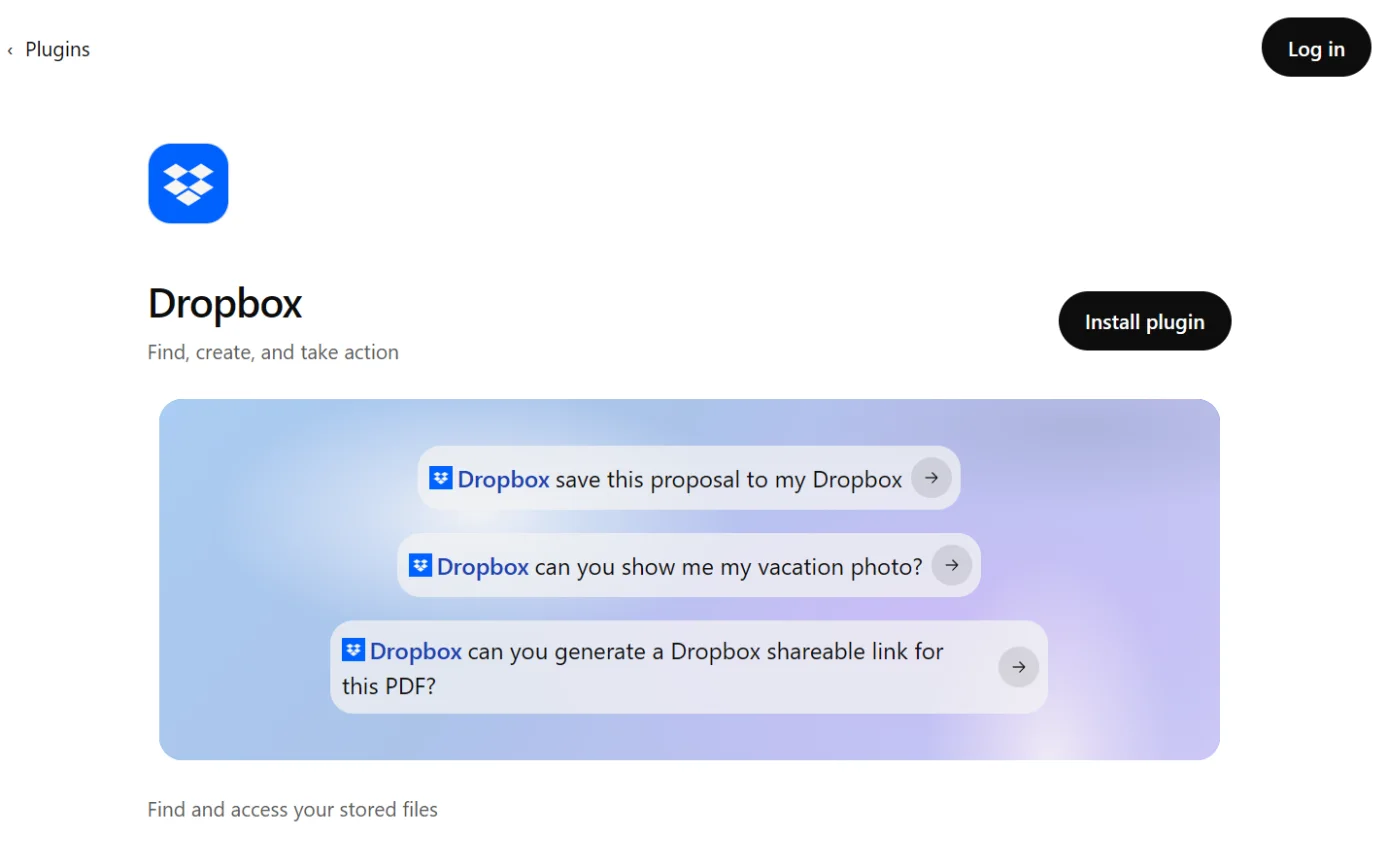
  2. Then: A prompt to sign in. Source 30

    The Dropbox page in ChatGPT’s plugin directory, with the Install plugin button ringed.
    Screenshot: ChatGPT’s plugin directory, the Dropbox page, signed out, 18 October 2026.
  3. Then: The Dropbox sign-in page. Source 30

    A drawing from the step’s own words. The real screen may look a little different.
  4. Then: Dropbox is connected. The exact approval screen wasn’t in the docs we read. Source 30

    A drawing from the step’s own words. The real screen may look a little different.
  5. Then: ChatGPT can find, summarise, organise, move, copy, delete, save and share. Dropbox says it asks permission before changing anything. Source 30

    A drawing from the step’s own words. The real screen may look a little different.

Pictures without a date are drawings from each step’s own words. The real screen may look a little different.

To disconnect In ChatGPT, users disconnect apps from Settings > Plugins.
  • In ChatGPT, users disconnect apps from Settings > Plugins.61
  • In Dropbox, log in to dropbox.com, click your avatar in the bottom-left corner, then Settings > Apps. Click the arrow next to ChatGPT, then Disconnect.30
  • Dropbox says “Team admins can also block the app for their organization.”30
Limits Dropbox’s page says: “Conversations and other Dropbox data in ChatGPT may be used for model training according to OpenAI’s policies.”
  • Dropbox’s page says: “Conversations and other Dropbox data in ChatGPT may be used for model training according to OpenAI’s policies.”30
  • OpenAI says that on Free, Plus, Go and Pro, information from apps may be used for training if your “Improve the model for everyone” setting is on. On Business, Enterprise and Edu it isn’t used for training by default.61
  • Dropbox says data that appears in a ChatGPT conversation is stored unless you delete the conversation.30
  • OpenAI’s listing says ChatGPT may share relevant chats and memories with the Dropbox app, under Dropbox’s terms and privacy policy. It also says “Use of apps may come with elevated risk.”58
Claude and Dropbox

Reads and makes changes.

Claude and Dropbox

Official? Yes. The Dropbox connector in Claude’s directory is “Made by Dropbox”, marked “Anthropic verified” and was added in June 2026.
  • Yes. The Dropbox connector in Claude’s directory is “Made by Dropbox”, marked “Anthropic verified” and was added in June 2026.51
  • Dropbox also publishes a Dropbox plugin for Claude Cowork and Claude Code, also marked Anthropic verified.3152
  • Dropbox announced the connector and plugins on 25 June 2026.39
What it can see and do Find files and folders and check the details of supported files.
  • Find files and folders and check the details of supported files.31
  • Organise folders, and create Dropbox links and file requests (a link others use to upload files to you).31
  • Save text that Claude writes back to Dropbox as a new file.31
  • The connector’s tool list also includes copy, move and delete.51
  • When you connect, Dropbox asks for permission to view and edit your files and folders, sharing information and file requests, and to view your account details.31
  • Claude can only save text-based files, such as .txt, .md, .html and .py. It can’t save images or PDFs this way.31
  • People who receive a link made through Claude have to request access to it.38
  • Dropbox says “Claude can only use content and complete actions that your connected Dropbox account already has permission to access.”38
  • If your team pays for Dash, the separate Dropbox Dash connection brings in content from your other work apps. Type @ and pick Dropbox Dash.34
What you need An active Dropbox account, on any plan. The Dropbox app or plugin must be allowed for your organisation.
  • An active Dropbox account, on any plan. The Dropbox app or plugin must be allowed for your organisation.31
  • Anthropic says directory connectors are available on Claude, Cowork, Claude Desktop and Claude mobile.53
  • Plugins need a paid Claude plan: Pro, Max, Team or Enterprise.54
  • On Claude Team and Enterprise, an owner turns the connector on for the organisation first. Each person then signs in to Dropbox.53

Steps to connect (Dropbox Help Center, updated 17 September 2026)

  1. Source 31

    A drawing from the step’s own words. The real screen may look a little different.
  2. Source 31

    A drawing from the step’s own words. The real screen may look a little different.
  3. Source 31

    A drawing from the step’s own words. The real screen may look a little different.
  4. Source 31

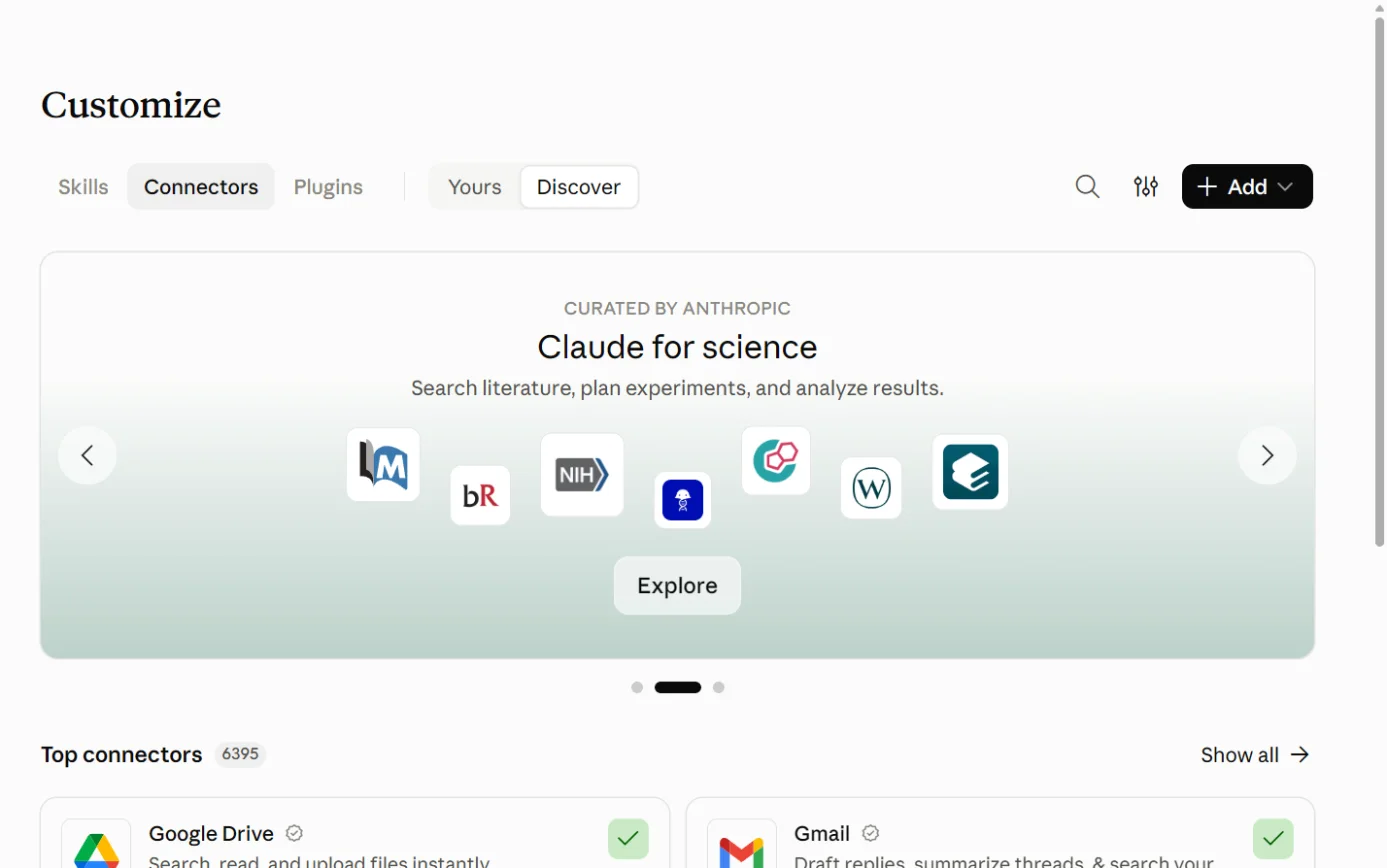
    Claude’s Customize page on the Connectors tab, with the + Add button ringed.
    Screenshot: Claude, the Connectors page under Customize, 18 October 2026.
  5. Source 31

    A drawing from the step’s own words. The real screen may look a little different.
  6. Source 53

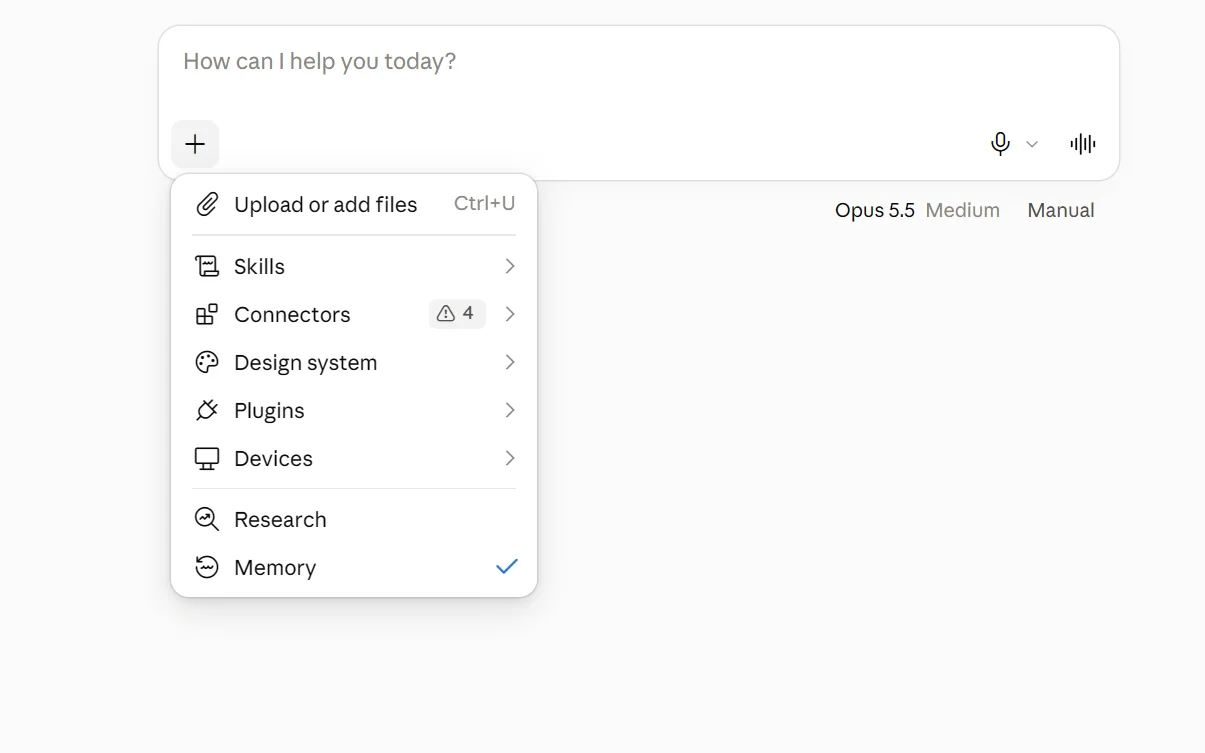
    The + menu under Claude’s message box, with Connectors ringed.
    Screenshot: Claude, the + menu in a new chat, 18 October 2026.

Pictures without a date are drawings from each step’s own words. The real screen may look a little different.

Dropbox says you only need to connect once, and the connector then works in claude.ai, Cowork and Code.31

For Claude Team and Enterprise owners Dropbox’s steps: in Claude’s Organizational Settings, go to Connectors, click Add+ and save. To block it, open the more options menu next to Dropbox and click Delete.
  • Dropbox’s steps: in Claude’s Organizational Settings, go to Connectors, click Add+ and save. To block it, open the more options menu next to Dropbox and click Delete.31
  • For the plugin, Dropbox lists the choices Not available, Installed by Default, Available to Install and Required.31
  • Anthropic’s own path is Organization settings > Connectors > Browse connectors > Add to your team. Owners can then set each tool to Always allow, Needs approval or Blocked.53
To disconnect In Claude, go to Customize > Connectors, select Dropbox and disconnect it.
  • In Claude, go to Customize > Connectors, select Dropbox and disconnect it.53
  • Dropbox’s Claude page doesn’t give steps for disconnecting from the Dropbox side. Its pages for the other assistants use Settings > Apps on dropbox.com.3132
Limits Anthropic’s listing warns that Anthropic “does not control which tools developers make available and cannot verify that they will work as intended.”
  • Anthropic’s listing warns that Anthropic “does not control which tools developers make available and cannot verify that they will work as intended.”51
  • On Claude’s Free, Pro and Max plans, Anthropic doesn’t train on raw content from connectors unless you copy it into the chat. Your chats are used for training only if you allow it.55
  • On Claude’s work plans, Anthropic doesn’t use inputs or outputs for training by default.56

Copilot and Dropbox

Reads and makes changes. Through Copilot Cowork.

Microsoft Copilot and Dropbox

Official? Yes, by two routes. Dropbox for Copilot is Dropbox’s own plugin, listed free in Microsoft’s Marketplace by Dropbox.com for Microsoft 365 Copilot.
  • Yes, by two routes. Dropbox for Copilot is Dropbox’s own plugin, listed free in Microsoft’s Marketplace by Dropbox.com for Microsoft 365 Copilot.6732
  • Microsoft also builds a Dropbox connector that an admin deploys. It indexes Dropbox content into Microsoft 365 Copilot and Microsoft Search.6366
What it can see and do: Dropbox for Copilot Find files and folders, and open and summarise supported content.
  • Find files and folders, and open and summarise supported content.32
  • Organise folders, create shared links and save text that Copilot writes.32
  • Saved files must be new UTF-8 text files up to 5 MB, in formats such as .txt, .md, .csv, .json and .html.32
  • Dropbox says “Copilot can only access Dropbox content you have permission to access.”32
  • Copilot Cowork, where the plugin runs, asks for your go-ahead before important actions. A dropdown lets you skip future prompts for similar actions.68
What it can see and do: Microsoft’s Dropbox connector It indexes files in team folders, shared folders and private folders, and shows them in Copilot answers and Microsoft Search.
  • It indexes files in team folders, shared folders and private folders, and shows them in Copilot answers and Microsoft Search.63
  • “Currently, only Dropbox Advanced and Enterprise plans are supported.”63
  • It doesn’t index folders, comments, Dropbox Paper or Google Docs, Sheets and Slides. Permissions that come from shared links aren’t supported.63
  • By default it indexes files updated in the past three years. It checks for changes every 4 hours and does a full crawl every day.64
  • The default access setting is: “All files accessible to anyone in Dropbox are visible to all Microsoft 365 users in your tenant.”64
  • To limit results to people who can open the file in Dropbox, choose Custom setup and then Only people with access to this data source.64
What you need Dropbox for Copilot works on any Dropbox plan, for customers “using Microsoft Copilot”.
  • Dropbox for Copilot works on any Dropbox plan, for customers “using Microsoft Copilot”.32
  • Microsoft says Cowork for work and school accounts is generally available to Microsoft 365 Copilot tenants worldwide “in tier-1 languages”. Cowork for personal accounts is in preview.7068
  • If you don’t see a plugin, Microsoft says your organisation might need to approve it first.69
  • Microsoft’s connector needs a Microsoft 365 admin, and a Dropbox admin to set up an app in the Dropbox App Console.6465

Steps to connect: Dropbox for Copilot (Dropbox Help Center, updated 30 September 2026)

  1. Then: Copilot opens. Microsoft gives copilot.cloud.microsoft as the web address for Cowork on work accounts. Source 32

    A drawing from the step’s own words. The real screen may look a little different.
  2. Then: Plugins you can add. Source 32

    A drawing from the step’s own words. The real screen may look a little different.
  3. Then: A Dropbox authorisation window. Source 32

    A drawing from the step’s own words. The real screen may look a little different.
  4. Then: Dropbox is connected to Cowork. Source 32

    A drawing from the step’s own words. The real screen may look a little different.
  5. Then: Copilot can find, summarise and organise files, make shared links and save new text files up to 5 MB. Cowork asks before important actions. Source 32

    A drawing from the step’s own words. The real screen may look a little different.

Pictures without a date are drawings from each step’s own words. The real screen may look a little different.

Microsoft’s own steps for Cowork plugins start from the + button and Customize.69 Microsoft gives copilot.cloud.microsoft as the web address for Cowork, while Dropbox’s page says copilot.com.6832

Steps for admins: Microsoft’s Dropbox connector (Microsoft Learn)

  1. Source 65

    A drawing from the step’s own words. The real screen may look a little different.
  2. Source 65

    A drawing from the step’s own words. The real screen may look a little different.
  3. Source 64

    A drawing from the step’s own words. The real screen may look a little different.
  4. Source 64

    A drawing from the step’s own words. The real screen may look a little different.
  5. Source 64

    A drawing from the step’s own words. The real screen may look a little different.

Pictures without a date are drawings from each step’s own words. The real screen may look a little different.

To disconnect Dropbox for Copilot: on dropbox.com, click your avatar, then Settings > Apps, the arrow next to Copilot, then Disconnect.
  • Dropbox for Copilot: on dropbox.com, click your avatar, then Settings > Apps, the arrow next to Copilot, then Disconnect.32
  • In Cowork, select + > Customize, find the plugin and select Remove from Cowork. Plugins your admin deployed can only be removed by the admin.69
  • Microsoft’s connector: admins review it in the Connectors section of the Microsoft 365 admin center. The pages we read don’t give steps to remove it.64
Limits Microsoft says prompts, responses and data accessed through Microsoft Graph “aren’t used to train foundation LLMs”. It tells you to check each agent’s privacy statement and terms.
  • Microsoft says prompts, responses and data accessed through Microsoft Graph “aren’t used to train foundation LLMs”. It tells you to check each agent’s privacy statement and terms.72
  • Dropbox’s page points to Microsoft for how data and training work, and says it depends on the Copilot product and account.32
  • Microsoft says customers outside the EU may have their queries processed in the US, the EU or other regions.72
  • Microsoft says Cowork keeps task history, and some interactions get automated and human review. That page covers personal accounts in preview.71

Gemini and Dropbox

No official link. US only for now.

Google Gemini and Dropbox

Official? Yes, but it isn’t offered in Australia. Dropbox announced its connected app for Gemini on 17 September 2026.
  • Yes, but it isn’t offered in Australia. Dropbox announced its connected app for Gemini on 17 September 2026.44
  • Google’s availability table lists Dropbox for personal Google accounts only, aged 18 or over, “US only”, in English only.74
What it can see and do Find and summarise files and pull information out of them.
  • Find and summarise files and pull information out of them.73
  • Create, rename, copy, move and delete files and folders.73
  • View a file’s version history and restore an earlier version.73
  • You must confirm sensitive actions, including deleting, sharing or changing permissions, and bulk actions.73
  • Dropbox says Gemini can save its output to Dropbox only as .csv or .txt files.33
  • Dropbox says Gemini asks for permission before making changes.33
What you need A personal Google account (work and school accounts aren’t supported yet), aged 18 or over, in the US, with Keep Activity turned on.
  • A personal Google account (work and school accounts aren’t supported yet), aged 18 or over, in the US, with Keep Activity turned on.73
  • It works in the Gemini web app and the Gemini app for Windows.74
  • Gemini Spark, Google’s tool for multi-step tasks, can also use Dropbox, for Google AI Pro and Ultra subscribers in the US.4576
  • Google’s general Spark rollout from 17 June 2026 excluded Australia, among other countries.76

Steps to connect (Dropbox Help Center, updated 21 September 2026)

  1. Source 33

    A drawing from the step’s own words. The real screen may look a little different.
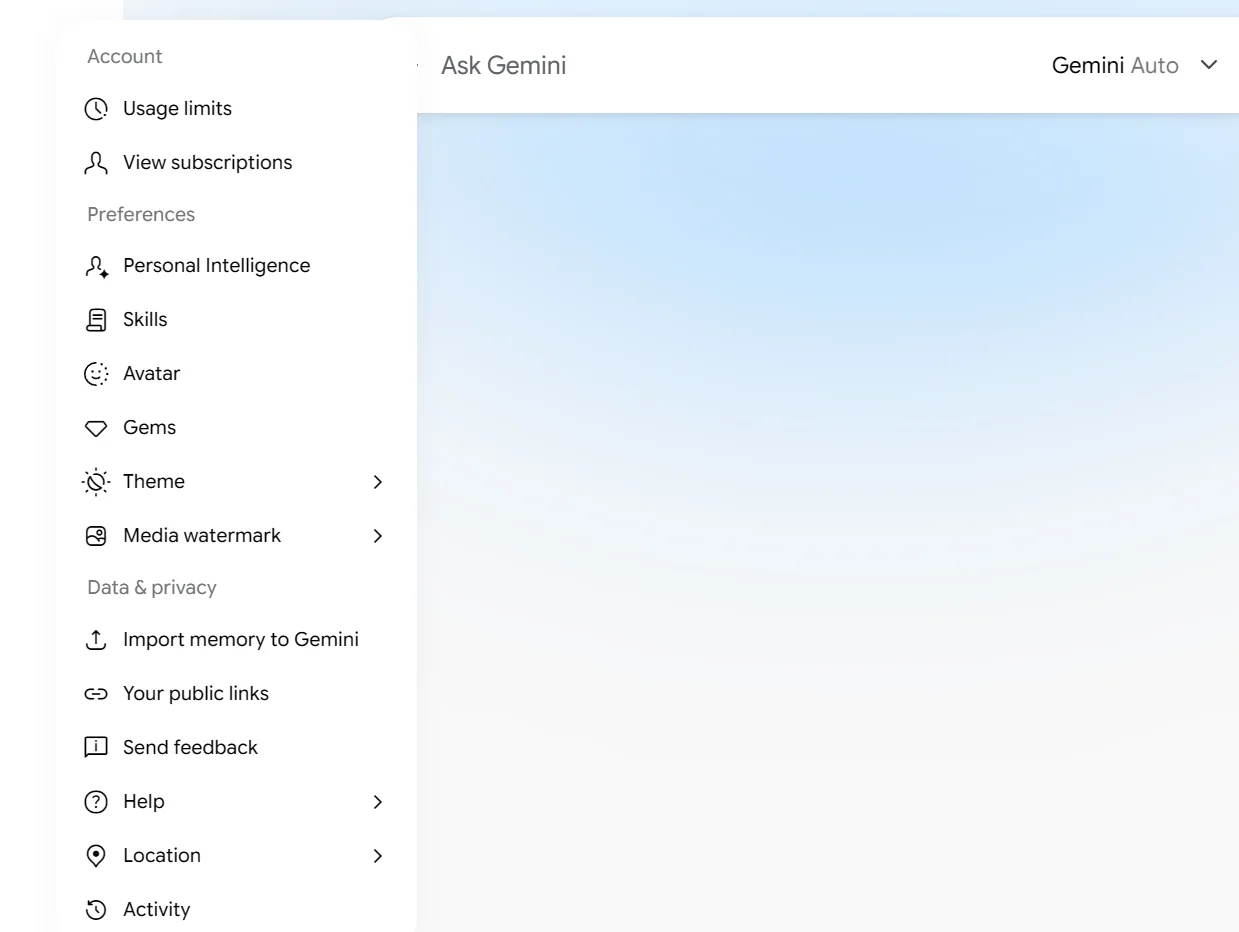
  2. Source 33

    Gemini’s settings menu, with Personal Intelligence ringed.
    Screenshot: Gemini, the settings menu, 18 October 2026.
  3. Source 33

    A drawing from the step’s own words. The real screen may look a little different.
  4. Source 33

    A drawing from the step’s own words. The real screen may look a little different.
  5. Source 33

    A drawing from the step’s own words. The real screen may look a little different.
  6. Source 33

    A drawing from the step’s own words. The real screen may look a little different.

Pictures without a date are drawings from each step’s own words. The real screen may look a little different.

Google’s general path for connected apps is Customize > Connectors > Add.75 Google’s Dropbox page adds that you can ask Gemini to do something in Dropbox and it will offer to connect.73

To disconnect In Gemini, disconnect Dropbox in your Connected Apps settings at any time.
  • In Gemini, disconnect Dropbox in your Connected Apps settings at any time.73
  • In Dropbox, click your avatar, then Settings > Apps, the arrow next to Gemini, then Disconnect.33
Limits Dropbox’s page says Gemini app conversations may be used for model training under Google’s policies.
  • Dropbox’s page says Gemini app conversations may be used for model training under Google’s policies.33
  • Google says Connected Apps availability varies by location, language, device and Gemini app.75
  • Google’s separate business product, Gemini Enterprise, has its own Dropbox connector, marked “For Organizations and Teams only”. Its actions include creating folders and uploading or downloading files up to 50 MB.7778

Other routes

Developer tools, automation tools and app stores.

Dropbox’s MCP servers (the developer route)

Official? Yes. Dropbox runs a remote MCP server at https://mcp.dropbox.com/mcp. Dropbox says it’s “now in beta”.
  • Yes. Dropbox runs a remote MCP server at https://mcp.dropbox.com/mcp. Dropbox says it’s “now in beta”.35
  • A separate Dash MCP server at https://mcp.dropbox.com/dash searches what Dash has indexed. Dropbox describes its connector actions as read-only.36
  • Dash’s release notes list the Dash MCP server in October 2025.9
  • DocSend, another Dropbox product, has its own MCP server, in open beta for Advanced Data Rooms users since August 2026.10
What it can see and do Read and browse files, folders, revisions and your storage use.
  • Read and browse files, folders, revisions and your storage use.35
  • Create folders and text files up to 5 MB.35
  • Copy, move and delete. Delete moves items to Deleted files, which you can recover within your plan’s window.35
  • Restore folders and earlier file versions, create shared links and manage file requests.35
  • Dropbox Sign tools can send a document for signature, send reminders and cancel requests. You review and confirm those actions before they happen.37
What you need Supported clients are Claude Code, Claude Web, ChatGPT Codex, ChatGPT Web and Cursor.
  • Supported clients are Claude Code, Claude Web, ChatGPT Codex, ChatGPT Web and Cursor.35
  • Dropbox says Claude custom connectors are “available on select Claude plans” and ChatGPT Developer Mode is “available on certain plans”.35
  • Your Dropbox admin may control whether you can register or connect apps.35
  • For Dropbox Sign tools, your Dropbox account must be connected to your Dropbox Sign account.37

Steps to connect (Dropbox Help Center, updated 30 September 2026)

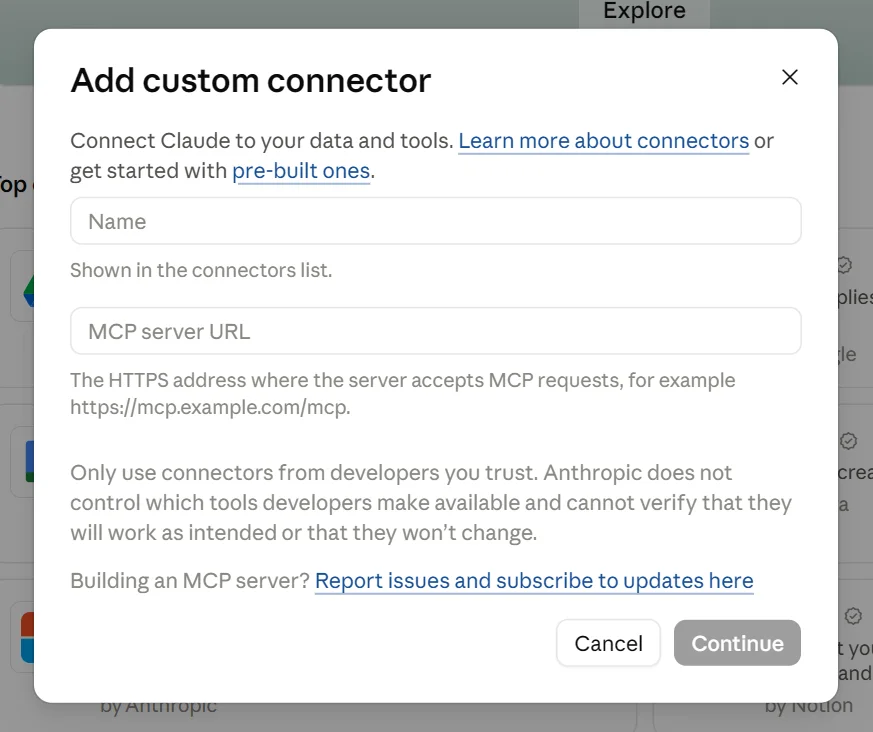
  1. Then: OpenAI’s current page says Enterprise and Edu users can add a custom MCP server from Plugins without turning on Developer Mode first. Source 35

    Claude’s Add custom connector box, with its Name and MCP server URL fields, with the Continue button (the step’s Add) ringed.
    Screenshot: Claude, the Add custom connector box, 18 October 2026.
  2. Then: A risk warning to acknowledge. Source 35

    A drawing from the step’s own words. The real screen may look a little different.
  3. Then: You’re asked to sign in to Dropbox. Source 62

    A drawing from the step’s own words. The real screen may look a little different.
  4. Then: The Dropbox MCP tools are available in ChatGPT. Source 35

    A drawing from the step’s own words. The real screen may look a little different.

Pictures without a date are drawings from each step’s own words. The real screen may look a little different.

Limits OpenAI says Pro users can connect custom MCP servers with read and fetch permissions only. Full MCP, including write actions, is for Business, Enterprise and Edu.
  • OpenAI says Pro users can connect custom MCP servers with read and fetch permissions only. Full MCP, including write actions, is for Business, Enterprise and Edu.62
  • Dropbox’s business agreement says beta services “have not been subjected to the same Security Measures and auditing” and are used at your own risk.21
  • Listing a folder returns up to 100 items per call, and reading a file works up to 5 MB.35
  • If you change your Dropbox app settings, such as adding a permission, you must reconnect.35

Automation tools Dropbox documents

  • Dropbox’s help centre has a Zapier guide for “all customers on a paid Dropbox plan”. Zapier links Dropbox with other apps to automate tasks.50

Jobs it’s good for

  • Finding the right version. Ask Dash for the latest copy of a document across Dropbox and your other apps, without knowing the file name.5
  • A long PDF before a meeting. Attach it in Dash Chat and ask for a summary, or ask ChatGPT to summarise it from Dropbox.730
  • Checking a clause. OpenAI’s example asks ChatGPT to find a contract’s renewal notice period, quote it and link the document so someone can check it.57
  • Collecting files from clients. Ask Claude or ChatGPT to create a Dropbox file request, which people can use to upload files to you.3130
  • Tidying a folder. Dropbox’s ChatGPT skills can organise folders.4157 Ask it to list what it plans to move before it starts. That’s our advice.
  • A project brief from your files. Ask Copilot Cowork to draft one from Dropbox files and save it back as a text file.32
  • Chasing a signature. Through the MCP server, send a Dropbox Sign reminder and confirm it before it goes.37

What to watch for

The AI sees what the login sees

  • All four official connections work within the Dropbox permissions of the person who connects.30313233
  • Dash shows only content each person can see in the original app.34
  • So an admin who connects with an admin login will reach everything that login can reach. That’s our inference from the above.

Microsoft’s connector shares widely by default

  • Its default setting makes every file anyone can open in Dropbox visible to all Microsoft 365 users in your organisation.64
  • Change it under Custom setup before you create the connection.64
  • It doesn’t support permissions that come from shared links.63

These connections can change and delete files

  • ChatGPT can move, copy, delete and restore files. Dropbox says it asks first.30
  • Gemini can delete files and folders, and you confirm each sensitive action.73
  • Claude’s connector tool list includes move and delete.51
  • Deleted items go to Deleted files. You can restore them for 30 days on Plus, 180 days on Standard and a year on Advanced.351
  • Blocking an app in the admin console “doesn’t disconnect team members who are already connected”.28

Training and who keeps what

  • Dropbox says it won’t build generative AI models from your content without consent, and its AI providers don’t train on your data.1412
  • Dropbox may review snippets of Dash questions and answers by hand.11
  • Your chat history on the AI side follows that company’s settings. Dropbox’s ChatGPT page warns ChatGPT data may be used for training under OpenAI’s policies.3061
  • Claude’s consumer plans train on chats only if you allow it, and its work plans don’t by default.5556

Where your data goes

  • Dash can’t yet store data outside the US.11
  • Its AI sub-processors are all listed in the US.15
  • Dropbox can keep a team’s files in Australia, but that covers file storage at rest.22
  • Microsoft says queries from outside the EU may be processed in the US, the EU or elsewhere.72

Untrusted text

  • Dropbox says it treats image metadata as untrusted, and uses a tool called Lakera Guard to detect attempts to extract personal data from training sets.11
  • Dropbox’s Trust Center says its AI features include protections against prompt injection. That’s an attack where instructions hidden in content try to steer the AI.12
  • A shared folder from outside your business can carry text like that. Keep a person checking before files are moved, shared or deleted. That’s our advice.

Beta and preview

  • The Dropbox MCP server is in beta, and Dropbox’s agreement says beta services are used at your own risk.3521
  • Cowork for personal Microsoft accounts is in preview.68

Cost surprises

  • Dash is an extra charge per user, and Dropbox may add item limits later.2
  • When a Dash trial ends without a paid plan, connected apps and search and chat history are deleted after 30 days.2
  • Microsoft bills Cowork by usage. Admins can set limits per user or group.70

What’s changing

Dropbox’s blog posts say timing and features may change from what’s described.3944

  • 21 June 2023: Dropbox announced Dropbox AI for file previews (alpha, US) and Dash (beta, by waitlist).48
  • 27 September 2025: Dropbox launched its AI Transparency resource in the Trust Center.13
  • 23 October 2025: Dash in Dropbox reached “a small group of existing customers”. Dash opened to teams of all sizes, and the Dash MCP server launched.469
  • January 2026: Dash added a model picker and web search, with notice when web search runs.9
  • March 2026: The Dropbox app in ChatGPT added file previews and saving to Dropbox.10
  • 16 April 2026: Dropbox launched its Dropbox, Dropbox Dash and Reclaim AI apps in ChatGPT.40
  • 29 April 2026: Dropbox updated both its Dash and Dropbox sub-processor lists.1516
  • May 2026: Dropbox Protect launched as a separate product, with features “previously available in Dropbox Dash as Protect and Control”.10
  • 25 June 2026: The Claude connector and plugins launched.39
  • 12 July 2026: ChatGPT, ChatGPT Work and Codex gained tools to organise files, make links and file requests, and run Dropbox skills.41
  • August 2026: DocSend’s MCP server entered open beta.10
  • 10 September 2026: Dropbox files appeared in ChatGPT’s Library on the web. Dropbox said mobile is coming soon.43
  • 17 September 2026: The Dropbox app for Gemini launched in the US.44
  • Later, no date: Dash plans may add a limit on items per member, with at least 30 days’ email notice.2
  • 1 January 2027: New Dropbox Terms of Service take effect. They were posted on 1 September 2026, and we found no AI clauses in them.2019
  • Dropbox’s product updates page still lists Dash in Dropbox and the remote MCP server as “Coming soon”. Other Dropbox pages say both are now available, so that page appears out of date.47335

What we couldn’t establish

  • The currency of Dash prices. The Dash plans page shows “$” with no currency, even from Australia.2
  • Which Dropbox plans include Dash features without a Dash plan. The Trust Center says many team plans include them, while the help centre describes Dash plans as the way to get Dash in Dropbox.133
  • A team-wide off switch for Dash. The admin help we read covers security settings, licences and cancelling a trial, but no single switch for a paid team.242527
  • Where Dash’s opt-out for usage data sits. Dropbox says the control exists but the pages we read don’t say where.11
  • Dropbox’s AI FAQ. It’s a PDF in the Trust Center that we didn’t open.12
  • How long Dash keeps chat history. The pages we read don’t say, apart from deletion after a trial ends.211
  • Whether the 90-day retention also covers web search through OpenAI. The Trust Center states it for “all models used to power Dropbox AI features”.126
  • Dropbox Paper and Microsoft’s connector. Microsoft’s overview says Paper isn’t crawled, while its setup page says the connector indexes Paper documents.6365
  • One Microsoft setup permission. The Dropbox-side setup asks for a permission named team_data.governance.write. Microsoft doesn’t explain what it writes.65
  • Which Copilot accounts Dropbox for Copilot supports. Dropbox’s page says copilot.com, Microsoft’s Marketplace lists Microsoft 365 Copilot, and the pages don’t say whether a paid Microsoft 365 Copilot licence is required.326770
  • How to remove Microsoft’s Dropbox connector. Not in the pages we read.64
  • Which ChatGPT plans can use the Dropbox plugin. Neither Dropbox nor OpenAI names them.3061
  • OpenAI’s Dropbox article. OpenAI’s plugin page links to a “Dropbox - app with sync” article, which now opens OpenAI’s general connected apps page.5761
  • Disconnecting Claude from the Dropbox side. Dropbox’s Claude page doesn’t cover it.31
  • GST on Australian prices. The plans page doesn’t say.1
  • The Dropbox Make listing. Dropbox’s App Center page for Make wouldn’t load for us.

Sources

Every line above was read at one of these pages, on the date shown. Vendors change their products and their pages often, so check the page before you rely on a detail.

  1. 1 Find your Dropbox plan (as shown in Australia) Dropbox Read 17 Oct 2026
  2. 2 Get Dropbox Dash (plans) Dropbox Read 17 Oct 2026
  3. 3 How to try Dash for Teams Dropbox Help Center Updated Updated Apr 22, 2026 Read 17 Oct 2026
  4. 4 Restrictions and limitations for team deployments of Dropbox Dash Dropbox Help Center Updated Updated May 12, 2026 Read 17 Oct 2026
  5. 5 What can I do with Dropbox Dash? Dropbox Help Center Updated Updated Apr 15, 2026 Read 17 Oct 2026
  6. 6 How to search and explore your content in Dropbox Dash Dropbox Help Center Updated Updated May 6, 2026 Read 17 Oct 2026
  7. 7 How to summarize and ask questions about your content in Dropbox Dash Dropbox Help Center Updated Updated May 5, 2026 Read 17 Oct 2026
  8. 8 How to choose a chat model in Dropbox Dash Dropbox Help Center Updated Updated Jan 23, 2026 Read 17 Oct 2026
  9. 9 Dropbox Dash release notes Dropbox Updated Monthly entries, latest March 2026 Read 17 Oct 2026
  10. 10 Dropbox release notes Dropbox Updated Monthly entries, latest August 2026 Read 17 Oct 2026
  11. 11 Dropbox Dash Security Whitepaper Dropbox Updated Version V2026.3 (no date) Read 17 Oct 2026
  12. 12 AI Transparency: AI FAQ, AI principles and model information Dropbox Trust Center Read 17 Oct 2026
  13. 13 Dropbox Trust Center (overview and updates) Dropbox Updated Update posts dated 1 Jul 2025 to 13 Mar 2026 Read 17 Oct 2026
  14. 14 Dropbox’s AI Principles Dropbox Updated Last updated Apr 4, 2025 Read 17 Oct 2026
  15. 15 Dash Sub-processor List Dropbox Updated Last updated Apr 29, 2026 Read 17 Oct 2026
  16. 16 Dropbox Sub-processor List Dropbox Updated Last updated Apr 29, 2026 Read 17 Oct 2026
  17. 17 The Dropbox Privacy Policy: frequently asked questions Dropbox Help Center Updated Updated Apr 8, 2024 Read 17 Oct 2026
  18. 18 Privacy Policy Dropbox Updated Posted and effective May 30, 2025 Read 17 Oct 2026
  19. 19 Terms of Service Dropbox Updated Posted and effective Jan 7, 2025 Read 17 Oct 2026
  20. 20 Terms of Service (from 1 January 2027) Dropbox Updated Posted Sep 1, 2026; effective Jan 1, 2027 Read 17 Oct 2026
  21. 21 Dropbox Services Agreement Dropbox Updated Posted and effective Dec 5, 2024 Read 17 Oct 2026
  22. 22 Where is my Dropbox data stored? Dropbox Help Center Updated Updated Aug 31, 2026 Read 17 Oct 2026
  23. 23 Data transfers between Asia-Pacific and the United States Dropbox Help Center Updated Last updated Dec 12, 2024 Read 17 Oct 2026
  24. 24 How to manage team security in Dropbox Dash Dropbox Help Center Updated Updated Sep 29, 2025 Read 17 Oct 2026
  25. 25 How to manage your team in Dropbox Dash Dropbox Help Center Updated Updated Sep 29, 2025 Read 17 Oct 2026
  26. 26 How to connect Dropbox to Dropbox Dash Dropbox Help Center Updated Updated Dec 3, 2025 Read 17 Oct 2026
  27. 27 How to disconnect and delete Dropbox Dash Dropbox Help Center Updated Updated Mar 6, 2026 Read 17 Oct 2026
  28. 28 How to manage apps for your Dropbox team Dropbox Help Center Updated Updated Oct 22, 2025 Read 17 Oct 2026
  29. 29 AI integrations Dropbox Help Center Read 17 Oct 2026
  30. 30 How to connect Dropbox to ChatGPT Dropbox Help Center Updated Updated Sep 30, 2026 Read 17 Oct 2026
  31. 31 How to connect Dropbox to Claude Dropbox Help Center Updated Updated Sep 17, 2026 Read 17 Oct 2026
  32. 32 How to connect Dropbox to Microsoft Copilot Dropbox Help Center Updated Updated Sep 30, 2026 Read 17 Oct 2026
  33. 33 Connect Dropbox to Gemini Dropbox Help Center Updated Updated Sep 21, 2026 Read 17 Oct 2026
  34. 34 Using Dropbox Dash in ChatGPT and Claude Dropbox Help Center Updated Updated Sep 17, 2026 Read 17 Oct 2026
  35. 35 How to connect the Dropbox remote MCP server Dropbox Help Center Updated Updated Sep 30, 2026 Read 17 Oct 2026
  36. 36 How to connect the Dropbox Dash remote MCP server Dropbox Help Center Updated Updated Aug 31, 2026 Read 17 Oct 2026
  37. 37 How to use Dropbox Sign with Dropbox MCP remote server Dropbox Help Center Updated Updated Sep 30, 2026 Read 17 Oct 2026
  38. 38 How to use the Claude Dropbox integration without losing project context Dropbox Updated Aug 30, 2026 Read 17 Oct 2026
  39. 39 Work seamlessly with Dropbox in Claude Dropbox Blog Updated Published Jun 25, 2026 Read 17 Oct 2026
  40. 40 Move your work forward with new Dropbox apps in ChatGPT Dropbox Blog Updated Apr 16, 2026 Read 17 Oct 2026
  41. 41 The context layer for AI: Bringing trusted Dropbox content into OpenAI workflows Dropbox Blog Updated Jul 12, 2026 Read 17 Oct 2026
  42. 42 Small businesses can move faster with Dropbox in ChatGPT Dropbox Blog Updated Sep 8, 2026 Read 17 Oct 2026
  43. 43 Dropbox brings trusted project context directly into the ChatGPT Library Dropbox Blog Updated Sep 10, 2026 Read 17 Oct 2026
  44. 44 Put your Dropbox context to work in Google Gemini Dropbox Blog Updated Sep 17, 2026 Read 17 Oct 2026
  45. 45 Dropbox Integration for Google Gemini Dropbox Read 17 Oct 2026
  46. 46 Fall 2025 release: Try the new Dropbox Dash, your context-aware AI teammate Dropbox Blog Updated Oct 23, 2025 Read 17 Oct 2026
  47. 47 Dropbox Product Updates Dropbox Read 17 Oct 2026
  48. 48 Introducing Dropbox Dash, AI-powered universal search, and Dropbox AI Dropbox Blog Updated Jun 21, 2023 Read 17 Oct 2026
  49. 49 AI Universal Search & Knowledge Workspace Dropbox Read 17 Oct 2026
  50. 50 Zapier + Dropbox Dropbox Help Center Updated Updated Aug 13, 2026 Read 17 Oct 2026
  51. 51 Dropbox (connector) Anthropic Updated "Added June 2026" Read 17 Oct 2026
  52. 52 Dropbox (plugin) Anthropic Read 17 Oct 2026
  53. 53 Use connectors to extend Claude’s capabilities Anthropic Help Center Updated "Updated today" (17 Oct 2026) Read 17 Oct 2026
  54. 54 Use plugins in Claude Anthropic Help Center Updated "Updated over a week ago" Read 17 Oct 2026
  55. 55 Is my data used for model training? (consumer products) Anthropic Privacy Center Updated Mar 16, 2026 Read 17 Oct 2026
  56. 56 Is my data used for model training? (commercial products) Anthropic Privacy Center Updated Aug 18, 2026 Read 17 Oct 2026
  57. 57 Dropbox plugin for ChatGPT OpenAI Read 17 Oct 2026
  58. 58 ChatGPT plugin listing: Dropbox OpenAI Updated Version 6.0.0; no date shown Read 17 Oct 2026
  59. 59 Dropbox Dash plugin for ChatGPT OpenAI Read 17 Oct 2026
  60. 60 ChatGPT plugin listing: Dropbox Dash OpenAI Updated Version 2.0.0; no date shown Read 17 Oct 2026
  61. 61 Connected apps in ChatGPT OpenAI Help Center Updated "Updated: 8 hours ago" (timestamp 17 Oct 2026, UTC) Read 17 Oct 2026
  62. 62 Connecting custom MCP servers in ChatGPT OpenAI Help Center Updated "Updated: 12 hours ago" (timestamp 16 Oct 2026, UTC) Read 17 Oct 2026
  63. 63 Dropbox connector overview Microsoft Learn Updated 24 Nov 2025 (page metadata; updated 25 Sep 2026) Read 17 Oct 2026
  64. 64 Deploy the Dropbox connector Microsoft Learn Updated 16 Dec 2025 (page metadata) Read 17 Oct 2026
  65. 65 Set up the Dropbox service for Dropbox connector ingestion Microsoft Learn Updated 21 Nov 2025 (page metadata) Read 17 Oct 2026
  66. 66 Microsoft-built connectors gallery Microsoft Learn Updated 30 Sep 2026 (page metadata) Read 17 Oct 2026
  67. 67 Dropbox for Copilot Microsoft Marketplace Read 17 Oct 2026
  68. 68 Copilot Cowork overview Microsoft Learn Updated 29 Sep 2026 (page metadata) Read 17 Oct 2026
  69. 69 Use plugins with Copilot Cowork Microsoft Learn Updated 27 Aug 2026 (page metadata) Read 17 Oct 2026
  70. 70 What’s new in Copilot Cowork Microsoft Learn Updated 14 Sep 2026 (page metadata) Read 17 Oct 2026
  71. 71 What Microsoft Copilot Cowork uses and stores (Preview) Microsoft Support Read 17 Oct 2026
  72. 72 Data, Privacy, and Security for Microsoft Copilot Microsoft Learn Updated 9 Jul 2026 (page metadata; updated 8 Oct 2026) Read 17 Oct 2026
  73. 73 Manage files & folders in your Dropbox in Gemini Apps Google Gemini Apps Help Read 17 Oct 2026
  74. 74 Check the availability & requirements of Connected Apps in Gemini Apps Google Gemini Apps Help Read 17 Oct 2026
  75. 75 Use & manage Connected Apps in Gemini (computer) Google Gemini Apps Help Read 17 Oct 2026
  76. 76 What’s new for Gemini Spark Google Gemini Apps Help Updated Dated entries; Dropbox entry 7 Jul 2026 Read 17 Oct 2026
  77. 77 Connect your Google apps and third-party data (Gemini Enterprise, Business edition) Google Updated Last updated Oct 15, 2026 Read 17 Oct 2026
  78. 78 Dropbox data store (Gemini Enterprise) Google Cloud Updated Last updated 2026-10-14 UTC Read 17 Oct 2026
  79. 79 What content can I search in Dropbox Dash? Dropbox Help Center Updated Updated Jul 24, 2026 Read 17 Oct 2026

Want your team shown this on its own Dropbox?

We teach on the tools your workplace already uses, with the checks that go with them.