Skip to content

Google Workspace and AI.

Its own AI is Gemini, in every business plan. ChatGPT, Claude and Copilot each connect officially to Gmail and Google Drive, and ChatGPT and Claude can also make changes, such as sending email, when you approve them.

Checked 15 October 2026 against 101 sources, each the vendor’s own page. See them all, or what’s changed since.

The short version

Every Google Workspace business plan now has Google’s Gemini AI built in, and it’s included in the plan price111. How much you get depends on the plan: Business Starter mostly gets Gemini in Gmail, while Business Standard and above add it to Docs, Sheets, Slides, Drive, Meet and Chat1. Google says your Workspace content isn’t read by human reviewers or used to train its AI models outside your organisation without your permission9. Gemini only pulls from files and emails the signed-in person can already open, so loose sharing settings will show up in its answers (our inference from9). There’s no Australian data region: Google’s data-regions setting offers the United States or Europe, and only on some plans10. ChatGPT, Claude and Microsoft Copilot each have an official way to connect to Gmail and Google Drive, and some of these connections can now make changes as well as read75808487. Out of the box, a Workspace admin’s settings let staff connect any third-party app to their work account, so it’s worth setting rules early55. Two defaults changed recently: Meet now takes AI notes automatically on Business Standard and Plus (from 29 September 2026), and Gemini’s links to apps like HubSpot and Salesforce are switched on for people who have Gemini2850. Google is replacing Gems with “skills”, and on business plans Gems stop working no sooner than 1 March 202749. Google’s own help pages warn that Gemini can get things wrong, so check summaries and drafts before you rely on them1735.

The plans

Google Workspace is Google’s paid set of work apps, sold per user per month1. This guide covers Gmail, Docs, Sheets, Slides, Drive, Meet, Calendar, Chat and Forms, plus the AI products Google sells alongside them16.

Business plans in Australia (A$ per user per month, excluding tax, read 15 October 2026)

PlanMonth to monthWith a one-year commitmentUsers
Business StarterA$11.80A$9.90Up to 300
Business StandardA$23.60A$19.80Up to 300
Business PlusA$37A$30.90Up to 300
EnterpriseContact Google salesContact Google salesNo limit
  • The prices come from Google’s Australian business and pricing pages21.
  • Google labels A$19.80 as the Business Standard price with a one-year commitment (“save 16%”); we’ve matched the Starter and Plus pairs the same way, which is our inference132.
  • The pricing page also showed introductory discounts for new customers when we read it, and its footnotes about how long they last didn’t agree with each other, so check the price at sign-up1.

What AI each plan gets

(Google’s Australian pricing table)1

Business StarterBusiness StandardBusiness PlusEnterprise
Gemini in GmailYesYesYesYes
Gemini in Docs, Sheets, Slides, Drive, Meet and ChatNoYesYesYes
Gemini in VidsYesYesYesYes
Gemini appBasic accessExpanded access, incl. Google’s most capable modelsExpandedExpanded
Gemini Notebook (formerly NotebookLM)Basic, up to 3 Audio Overviews a dayExpanded, up to 20 a dayExpandedExpanded
Workspace Studio (AI automations)YesYesYesYes
  • Enterprise also lists “AI classification for Google Drive”1.
  • Google’s feature table also lists a few Chat summary features (“AI Overviews”) for all Business plans, so Starter may see some Gemini in Chat6.

How Gemini came into the plans

  • In January 2025 Google folded its AI into Business and Enterprise plans so customers didn’t need a separate Gemini add-on11.
  • Existing customers’ prices changed from 17 March 2025 for monthly plans, or at renewal for annual plans11.

Add-ons and separate products

  • AI Expanded Access: a paid add-on that raises limits on advanced AI features, for Business Standard and Plus and Enterprise Standard and Plus12.
  • It’s sold in every country where Workspace is sold; Google’s page shows no price, and online purchases are billed on the Flexible Plan12.
  • Since 1 March 2026 it has been needed for higher use of advanced image generation and of video and avatar generation in Vids14.
  • AI Ultra Access (formerly Google AI Ultra for Business) is the highest access tier14.
  • Gemini Enterprise is a separate Google product and isn’t included in a Workspace subscription63.

Usage limits

  • AI limits apply to each person and aren’t pooled across the organisation15.
  • Daily limits reset at midnight US Pacific time, and monthly limits reset on the 1st15.
  • Google’s limits table shows “No access” for Business Starter on several Docs, Sheets, Slides and Drive AI features, such as the Sheets AI function and Drive audio overviews for PDFs15.

Google Workspace for Education (where it differs)

  • The Gemini app and Gemini Notebook are core services in Education Fundamentals, Standard and Plus59.
  • Google describes Gemini for Education as included free in all Workspace for Education editions58.
  • Students under 18 get a separate experience with extra guardrails58.
  • In primary and secondary schools, anyone not marked as 18 or older is treated as under 1861.
  • Google AI Pro for Education is a paid add-on that brings fuller Gemini into Workspace apps and higher limits5860.
  • That add-on is only available to users aged 18 and over60.
  • The Australian Gemini for Education page lists it at A$33.60 per user per month billed monthly, with lower one-year prices shown (A$28.00, and an asterisked A$21.00 that appears to be a discount)58.
  • Without the add-on, Education Plus (and the Teaching and Learning add-on) gets smaller limits on some AI features, and Fundamentals and Standard get none for most of them60.

Personal Google accounts

  • Staff who use Gemini with a personal Google account are covered by Google’s consumer terms, and their chats may be reviewed by human reviewers837.
  • Google tells admins to warn people in that situation not to enter confidential information8.

What’s built in

Gemini in Gmail Summarises long threads into bullet points and explains emails in simpler terms.
What it does
  • Summarises long threads into bullet points and explains emails in simpler terms16.
  • Drafts new emails, or rewrites your draft for tone and clarity (“Help me write”)1617.
  • Searches your inbox for details such as a booking time or a tracking number16.
  • Archives, deletes, labels or stars emails for you, after showing a confirmation16.
  • Uses Drive files you add with “Add sources”16.
  • Creates, moves or deletes events on your primary calendar16.
  • Google’s feature table also lists AI Overviews for threads and for Gmail search, “Suggested replies” and “Proofread”6.
Where to find it
  • Side panel: open Gmail on a computer, click “Ask Gemini” at the top right, type in the prompt box at the bottom, then click “Submit”16.
  • Drafting: click “Compose” (or reply), type in the prompt bar at the bottom of the message, then click “Create”; if the bar isn’t there, click the “Help me write” icon17.
  • To adjust a draft, use “Formalize”, “Friendly” or “Shorten”, or type a new instruction17.
  • The “Sources” icon shows which emails and Drive files Gemini used17.
Plans and cost
  • Included in every Business and Enterprise plan, Business Starter included61.
  • No separate charge1.
On by default, and who controls it
  • Gemini features in Workspace apps are on by default7.
  • Admins can turn Gemini off app by app under Menu > Generative AI > Gemini for Workspace > “Feature access”, but Google lists that panel for Enterprise Standard and Plus and some Education editions only7.
  • Google’s page doesn’t say how Business Starter, Standard or Plus admins switch Gemini off in a single app7.
  • Each person needs Workspace smart features turned on for Gemini to work in Workspace apps754.
Your data
  • Gemini only retrieves Workspace content the user already has access to9.
  • Content isn’t reviewed by humans or used to train generative AI models outside your domain without permission9.
  • On supported editions, your existing data loss prevention (DLP) rules apply when Gemini’s text goes into an email9.
  • Gemini chat history in Workspace apps is kept separately for each app; admins can set automatic deletion or keep it9.
Limits
  • It can’t create new labels or handle requests that match more than 10,000 threads16.
  • An action can only be undone within 60 seconds, or until you send another prompt16.
  • It can’t work with calendars other than your primary one16.
In Australia
  • Google says work accounts can use “Help me write” globally in supported languages; the personal-account version is US-only17.
  • “AI Inbox”, a Beta feature, is limited to Enterprise Plus users in the United States53.
Gemini in Google Docs Summarises your document, selected text, Drive files and Gmail emails.
What it does
  • Summarises your document, selected text, Drive files and Gmail emails18.
  • Rewrites sections, changes tone, and adds facts from Drive, Gmail or the web18.
  • Drafts new documents, and can create images, spreadsheets and presentations18.
  • One-click changes on selected text: “Rephrase”, “Shorten”, and under “More”, “Elaborate”, “More formal” or “More casual”; also “Bulletize” and “Summarize”19.
Where to find it
  • Click the “Ask Gemini” icon at the top right to open the side panel, then click “Insert” to keep an answer18.
  • Or click the Gemini icon and type in the bar at the bottom; review changes with “Accept suggestion”, “Accept all” or “Reject all”19.
  • To edit selected text, click “Refine” on the floating bar19.
  • To point Gemini at a file, click “Sources” or type “@” and pick the file19.
  • To build a reusable instruction, click Tools > “Skill builder”18.
Plans and cost
  • Business Standard, Business Plus, Enterprise Standard and Enterprise Plus; not Business Starter61.
  • No separate charge; matching writing style has a monthly cap15.
On by default, and who controls it
  • On by default; same admin controls as Gmail7.
Your data
  • Same Workspace commitments as Gmail9.
  • When a file is shared outside your organisation, the side panel warns that prompts and AI content may be visible to outsiders, and Gemini stops drawing on your wider Drive and Gmail by default9.
  • Feedback you send with the thumbs buttons may be read by people, so Google says to leave out personal or confidential details18.
Limits
  • Side-panel history disappears if you refresh, close the file or go offline18.
  • For web answers you need to ask, for example with “Use Google Search”18.
In Australia
  • No Australia-specific limits in the pages we read; some languages aren’t supported in the side panel18.
Gemini in Google Sheets (including the AI function) Builds tables and formulas, fixes formula errors, and makes charts.
What it does
  • Builds tables and formulas, fixes formula errors, and makes charts20.
  • Analyses data and carries out sheet actions such as pivot tables, filters and conditional formatting20.
  • Can bring in data through third-party connectors your admin has enabled20.
  • The AI function, written as =AI(“instruction”, range), fills cells with generated text, summaries, categories or sentiment, and can use Google Search21.
Where to find it
  • Click the “Ask Gemini” icon at the top right20.
  • For the AI function: type it in a cell, or go to Insert > Function > AI; select the cells, then click “Generate and Insert”21.
  • Use “Refresh and Insert” to run it again21.
Plans and cost
  • Business Standard and Plus, Enterprise Standard and Plus6.
  • Business Starter has “No access” to the AI function15.
On by default, and who controls it
  • On by default; same admin controls as Gmail7.
Your data
  • Same Workspace commitments9.
  • The side panel warns that content added by Gemini may be visible outside your domain on shared files20.
Limits
  • Works best on native Google Sheets; Excel files need converting first20.
  • Charts Gemini makes don’t update when the data changes20.
  • The AI function returns text only and can’t see the rest of the spreadsheet or other Drive files21.
  • Only the first 350 selected AI cells run at once, and there’s no undo21.
  • Results don’t refresh by themselves; you choose when to refresh21.
In Australia
  • No Australia-specific limits in the pages we read2021.
Gemini in Google Slides Generates images and new slides, summarises a deck, and rewrites text.
What it does
  • Generates images and new slides, summarises a deck, and rewrites text22.
  • Uses Drive files you reference while writing22.
Where to find it
  • Click “Ask Gemini” at the top right22.
  • For images: Tools > “Create images”, enter a prompt, click “Submit”, then “Insert”22.
  • For a slide: “Help me create a slide” from the toolbar, the Insert menu or the Slide menu22.
  • In an empty text box: “Write a title” or “Help me write”22.
Plans and cost
  • Business Standard and Plus, Enterprise Standard and Plus6.
  • Generating whole presentations has a monthly cap; Business Starter has no access15.
On by default, and who controls it
  • On by default; same admin controls as Gmail7.
Your data
  • Same Workspace commitments9.
Limits
  • Generated images are for use within Slides22.
  • History is lost if you refresh, close the deck or go offline22.
In Australia
  • No Australia-specific limits in the pages we read22.
Gemini in Google Drive Summarises files and folders and researches a topic across several files.
What it does
  • Summarises files and folders and researches a topic across several files23.
  • Finds files using AI Overviews in search23.
  • Suggests where to move loose files (“Suggest file moves”); it won’t move anything without your permission24.
  • Saves a set of source files as a “project” you can reuse in Docs, Sheets, Slides, Gmail, Chat and Meet25.
  • Google’s feature table also lists “Catch me up” and audio overviews for PDFs6.
Where to find it
  • Click “Ask Gemini” at the top right23.
  • In My Drive or a folder, click “Suggest file moves”, review, then click “Move files” and “Create and move”; “Undo” reverses it24.
  • For a project: click “New” > “New Project”, or “Save as a project” from the full-screen Ask Gemini view25.
Plans and cost
  • Business Standard and Plus, Enterprise Standard and Plus6.
  • Audio overviews for PDFs and file organising have caps, and Business Starter has no access15.
On by default, and who controls it
  • On by default; same admin controls as Gmail7.
Your data
  • Same Workspace commitments9.
  • Creating a project doesn’t move files or change who can see them25.
Limits
  • “Suggest file moves” works on the web only, in English only, and needs Editor access24.
  • Since 20 April 2026 you can no longer ask the side panel to move files or create folders26.
In Australia
  • File organising is English-only; no other Australia-specific limits in the pages we read24.
Gemini in Google Meet (“Take notes for me” and more) “Take notes for me” writes meeting notes into a Google Doc with a short summary, decisions and action items.
What it does
  • “Take notes for me” writes meeting notes into a Google Doc with a short summary, decisions and action items27.
  • People who join late can catch up with “Summary so far”27.
  • Google’s feature table also lists translated captions, speech translation, “Ask Gemini in Meet” and generated backgrounds6.
Where to find it
  • In a meeting, click “Take notes for me” at the top right, then “Start taking notes”27.
  • Before a meeting, in the Calendar event: “Video call options” > “Meeting records” > tick “Take notes with Gemini”27.
Plans and cost
  • Business Standard and Plus, Enterprise Standard and Plus6.
  • The meeting organiser’s edition has to include it27.
On by default, and who controls it
  • From 29 September 2026, automatic note-taking is on by default for Business Standard and Plus, and off by default for Enterprise28.
  • Admins can choose all meetings, or only meetings with three or more people; staff can change their own default afterwards28.
  • Admin settings live at Menu > Apps > Google Workspace > Google Meet > “Gemini settings”29.
  • The default sharing setting sends notes to “Invited guests in your organization”29.
  • Admins can require every participant to consent27.
  • Everyone in the meeting is told notes are being taken, and a pencil icon appears27.
Your data
  • Notes are saved in the organiser’s Drive, in a “Google Meet” folder27.
  • The Doc is emailed to the organiser and to whoever started the notes, and attached to the Calendar event29.
  • Notes follow your organisation’s Meet retention policy27.
Limits
  • Supported languages are English, French, German, Italian, Japanese, Korean, Portuguese and Spanish, one per meeting27.
  • Notes can be incomplete or missing for meetings under about 15 minutes or with connection problems27.
In Australia
  • English is supported; no other Australia-specific limits in the pages we read27.
Gemini for scheduling (Gmail and Calendar) “Help me schedule” suggests meeting times from your calendar inside an email; the recipient picks one and a Calendar invite goes to everyone.
What it does
  • “Help me schedule” suggests meeting times from your calendar inside an email; the recipient picks one and a Calendar invite goes to everyone30.
  • It suggests four times by default and handles up to 20 guests30.
  • Gemini in Gmail can also create, move or delete events on your primary calendar16.
Where to find it
  • In a new email or reply, click “Help me schedule” at the bottom (or “More options” > “Help me schedule”), check the times, then click “Send”30.
Plans and cost
  • Business Standard and Plus, and Enterprise plans6.
On by default, and who controls it
  • On by default; same admin controls as Gmail7.
Your data
  • Same Workspace commitments9.
Limits
  • If you change the recipients after inserting the times, you need to insert them again30.
In Australia
  • No Australia-specific limits in the pages we read30.
Gemini in Google Chat Summarises conversations, including unread messages, in direct messages, spaces and threads.
What it does
  • Summarises conversations, including unread messages, in direct messages, spaces and threads31.
  • Google’s feature table also lists “Ask Gemini in Chat”, answering questions and automatic translation for Business Standard and Plus6.
Where to find it
  • Hover over a conversation in Home and click “Summarize”, or open a conversation with unread messages and click “Summarize unread”31.
Plans and cost
  • “AI Overviews” in Chat are listed for all Business plans; the other Chat features for Standard and Plus6.
  • “Ask Gemini in Chat” is still a Beta feature53.
On by default, and who controls it
  • Summaries are on by default in busy spaces for eligible users31.
Your data
  • Same Workspace commitments9.
Limits
  • No summaries for messages with apps or conversations with history turned off31.
In Australia
  • Available in select languages only; no Australia-specific limits in the pages we read31.
Gemini in Google Forms Builds a draft form from a description, or from a Doc, Sheet, Slides file or PDF you point it at.
What it does
  • Builds a draft form from a description, or from a Doc, Sheet, Slides file or PDF you point it at32.
  • Google’s feature table also lists generating questions and summarising responses6.
Where to find it
  • In a form, describe what you want and Gemini drafts it; you can retry or edit the prompt32.
Plans and cost
  • Business Standard and Plus, Enterprise Standard and Plus326.
On by default, and who controls it
  • Needs smart features turned on32.
Your data
  • Same Workspace commitments9.
Limits
  • English only; no multi-section forms; inserting a draft replaces what’s already in the form (you’re warned first)32.
In Australia
  • English-only; no other Australia-specific limits in the pages we read32.
Google Vids Google’s video maker; its AI options include AI avatars, AI voiceover, AI video clips, music and “Slides to Vids”.
What it does
  • Google’s video maker; its AI options include AI avatars, AI voiceover, AI video clips, music and “Slides to Vids”6.
  • The start menu offers “Create AI videos”, “Edit videos” and “AI avatar”33.
Where to find it
  • Open Vids from your Workspace apps; AI options appear in the start menu if your account has AI access33.
Plans and cost
  • Vids AI features are listed for all Business plans, Business Starter included61.
  • Avatars, generated video seconds and music have monthly caps that rise with the plan15.
On by default, and who controls it
  • Admins have a separate “Google Vids access” control7.
Your data
  • Same Workspace commitments9.
Limits
  • New Vids features roll out gradually33.
In Australia
  • No Australia-specific limits in the pages we read33.
The Gemini app with a work account A chat assistant at gemini.google.com and in the mobile app.
What it does
  • A chat assistant at gemini.google.com and in the mobile app8.
  • Features include Deep Research, Audio Overviews, image and video generation, Canvas, Gems and scheduled actions37.
  • It can connect to your Workspace apps: find and summarise in Gmail, Drive and Chat; create and edit Calendar events; add tasks; and create Keep notes3534.
  • Third-party apps available to work accounts include GitHub (web, 18+), Monday.com (18+, English) and WhatsApp (Android)38.
  • Gemini in Chrome is covered by the same admin setting8.
Where to find it
  • Go to gemini.google.com and sign in with your work account; type “@” in the box and pick an app such as Gmail or Drive, then ask35.
  • A “Pro”, “Expanded” or “Ultra” badge at the top shows your access level; no badge means standard access37.
Plans and cost
  • A core service in Business Starter, Standard and Plus, and in Enterprise editions8.
  • Business Starter gets basic access; Standard and above get expanded access and Google’s most capable models1.
  • Usage caps apply, for example on Deep Research reports and image generation8.
On by default, and who controls it
  • Available by default to licensed users over 188.
  • Admin switch: Menu > Generative AI > Gemini app > “Service status”8.
  • Connections to Workspace apps are controlled under the same page’s “Apps” section, and “Workspace apps” is on by default36.
  • Google Chat as a source is off by default for users and admins34.
  • Third-party apps such as Gemini for GitHub are managed through the Marketplace app allowlist36.
Your data
  • On core-service editions, chats and uploads aren’t reviewed by humans or used to improve AI models without permission837.
  • Chat history is kept for 18 months by default; admins can choose 3 or 36 months, or turn history off8.
  • With history off, new chats are still kept for up to 72 hours9.
  • Gemini in Chrome reads the address and content of tabs you choose to share9.
  • Google’s “Personal Intelligence” feature isn’t available to Workspace accounts9.
Limits
  • Work-account users must be 18 or over, except in Education editions378.
  • On the mobile app, Workspace users can’t use Gems or Canvas8.
  • For Business editions, the mobile app needs a business email address or a verified domain8.
  • Through the Gemini app, Gmail can’t create drafts or delete emails, and Drive can’t move files35.
  • If a prompt needs an app that’s switched off, none of its actions run3536.
In Australia
  • Australia is on Google’s list of countries for the Gemini web app; the mobile app list may differ39.
Skills (replacing Gems) Skills are reusable custom instructions you call in a chat by typing “/” and the skill’s name.
What it does
  • Skills are reusable custom instructions you call in a chat by typing “/” and the skill’s name49.
  • They use an open Markdown format (SKILL.md), so instructions can move between tools49.
  • Skills are replacing Gems, Gemini’s earlier custom assistants49.
Where to find it
  • In the Gemini app; in Docs, through Tools > “Skill builder”1849.
Plans and cost
  • Gemini app skills: all Workspace editions and all ages48.
  • Skills inside Workspace apps: Business Starter, Standard and Plus; Enterprise Standard and Plus; Google AI Pro for Education; AI Expanded Access; 18+ only4849.
On by default, and who controls it
  • Admin setting for Workspace: “Allow people to use skills in Studio and Gemini in Workspace”48.
  • There are no admin controls for skills in the Gemini app48.
Your data
  • The skills pages we read don’t add data terms beyond Google’s general Workspace AI commitments9.
Limits
  • Skills and Gems don’t sync between the Gemini app and Workspace apps49.
  • Gemini app skills began rolling out on 13 October 2026; skills inside Workspace apps are delayed “until further notice”48.
In Australia
  • No Australia-specific limits in the pages we read48.
Gemini Notebook (formerly NotebookLM) A research assistant that answers only from the sources you add, with citations.
What it does
  • A research assistant that answers only from the sources you add, with citations341.
  • Turns sources into Audio Overviews, study guides, briefings and mind maps41.
  • Takes PDFs, websites, YouTube videos, audio files, Google Docs and Google Slides41.
  • Google renamed NotebookLM to Gemini Notebook on 16 July 2026; old links redirect4.
Where to find it
  • notebook.google.com40.
Plans and cost
  • A core service in Business Starter, Standard and Plus, Enterprise editions and Education editions40.
  • Business Starter gets basic access (up to 3 Audio Overviews a day); Standard and above get up to 20 a day and five times more notebooks1.
On by default, and who controls it
  • Admin switch: Menu > Generative AI > Gemini Notebook > “Service status”40.
  • Google’s page doesn’t state the default40.
Your data
  • Uploads, questions and answers aren’t reviewed by humans or used to train AI models4140.
  • When you add a Drive file, Gemini Notebook stores its own copy9.
  • Your data-region settings don’t apply to Gemini Notebook, and it isn’t connected to Workspace DLP910.
  • Chat questions and answers aren’t kept after the session; pin an answer as a note to keep it93.
Limits
  • People under 18 face stricter content rules, and some features are 18+ only41.
In Australia
  • No Australia-specific limits in the pages we read; data regions don’t cover it in any country10.
Google Workspace Studio (AI automations) A no-code tool for building automations (“flows”): a starter (an event, a schedule or a button) followed by steps.
What it does
  • A no-code tool for building automations (“flows”): a starter (an event, a schedule or a button) followed by steps42.
  • Steps can use Gemini, for example to recap unread emails and post the summary in Chat42.
  • Flows can take actions in other services, such as Asana, Mailchimp, Salesforce, HubSpot and monday, through Beta integration steps43.
  • Webhooks and custom steps written in Apps Script are also supported5.
  • Workspace Studio grew out of the earlier “Workspace Flows” alpha5.
Where to find it
  • Go to studio.workspace.google.com and browse templates on “Discover”, or choose “Choose a Starter” to build your own42.
  • Click “Test run”, then “Start”, then “Turn on”42.
Plans and cost
  • Business Starter, Standard and Plus; Enterprise Standard and Plus; Education Fundamentals, Standard and Plus4245.
  • Usage is on promotional access now; limits start being enforced on 1 November 202615.
  • You can have up to 25 flows, with up to 20 steps each, and there’s a daily cap on runs44.
On by default, and who controls it
  • By default everyone in the organisation can create and use flows45.
  • Admin switch: Menu > Apps > Google Workspace > Workspace Studio > “Flows” > “Create and use flows”45.
  • Admins can require staff to approve steps that share data outside the organisation, under “Approvals”46.
  • Google recommends using the Marketplace allowlist to control which integrations people can use47.
Your data
  • Integration steps can pass Gmail, Chat or Calendar content to the outside service; Google advises only using services you trust43.
  • A test run takes real actions42.
Limits
  • Users marked as under 18 can’t use AI steps45.
  • Paid outside services need your own subscription43.
In Australia
  • No Australia-specific limits in the pages we read42.
Gemini integrations with other business apps From the Gemini side panel in Gmail, Docs, Sheets, Slides, Drive or Chat, you can look things up in Asana, Atlassian Rovo (Jira and Confluence), HubSpot, Mailchimp, Monday.com, QuickBooks or Salesforce.
What it does
  • From the Gemini side panel in Gmail, Docs, Sheets, Slides, Drive or Chat, you can look things up in Asana, Atlassian Rovo (Jira and Confluence), HubSpot, Mailchimp, Monday.com, QuickBooks or Salesforce52.
  • These integrations only read for now; they can’t change anything in the other app52.
Where to find it
  • Open the Workspace Marketplace integrations page, pick the integration, click “Connect” and grant access52.
  • Then click “Ask Gemini”, type “@”, choose the integration and ask your question52.
Plans and cost
  • Google’s admin page lists Business Standard and Plus and Enterprise Standard and Plus51.
  • Some integrations need a paid subscription to the other app52.
On by default, and who controls it
  • On by default for people with Gemini, according to Google’s launch post50.
  • Integrations are managed as Marketplace apps; Google says API controls can’t restrict them51.
  • If you later set one to “Blocked”, people already using it can keep going51.
Your data
  • Data flows to the other company while connected; deleting the connection stops it52.
  • The pages we read don’t say which company’s terms cover that data5152.
Limits
  • Some integrations need a helper app installed from the other service51.
In Australia
  • No Australia-specific limits in the pages we read52.
Gemini in Google Classroom (schools) For teachers: drafts lesson plans, quizzes and feedback, re-levels texts, and more.
What it does
  • For teachers: drafts lesson plans, quizzes and feedback, re-levels texts, and more62.
  • For students: a “Gemini” tab with study help, plus Gemini Notebook tools such as flashcards and audio overviews62.
Where to find it
  • Inside Classroom; students use the “Gemini” tab on the web and in the app62.
Plans and cost
  • All Workspace for Education editions; some features, such as AI feedback on written work, need Education Plus or the Teaching and Learning add-on62.
On by default, and who controls it
  • Admins must enable it and can limit who has it; students also need the Gemini app or Gemini Notebook turned on62.
  • Age labels are set at Account settings > “Age-based access settings”61.
Your data
  • Google says student data in Gemini for Education and Gemini Notebook isn’t reviewed by humans or used to train AI models6258.
Limits
  • Some teacher features are English-only62.
In Australia
  • No Australia-specific limits in the pages we read5962.

Connect another AI

ChatGPT and Google Workspace

Reads and makes changes. Sends email only when you choose.

ChatGPT (Gmail and Google Drive apps) and Google Workspace

Official? Yes, built by OpenAI. OpenAI’s docs describe a Gmail plugin and a Google Drive plugin that works across Drive, Docs, Sheets and Slides.
  • Yes, built by OpenAI. OpenAI’s docs describe a Gmail plugin and a Google Drive plugin that works across Drive, Docs, Sheets and Slides75.
  • OpenAI’s training site calls these connections “apps” and uses Google Drive as an example74.
  • OpenAI’s help centre also covers Google Calendar and Google Contacts apps, and its plugin directory lists Google Calendar93100.
What it can see and do OpenAI’s examples include summarising today’s unread Gmail threads and pulling notes from Google Drive.
  • OpenAI’s examples include summarising today’s unread Gmail threads and pulling notes from Google Drive75.
  • OpenAI describes plugins as able to take actions in outside systems as well as read them75.
  • Gmail: OpenAI’s listing calls it “Read and manage Gmail”, including drafting replies99. With Gmail connected, ChatGPT can draft an email and you choose whether to send it. OpenAI’s release notes say that works on the web for Plus, Pro, Business and Enterprise98.
  • Google Drive: it searches and reads files the connected account can open, including Docs, Sheets and Slides. Where your workspace allows it, it can also create and update files, and share or delete them. ChatGPT may ask you to confirm first94.
  • Google Calendar: OpenAI’s listing says it can check availability and create, update or delete events100.
  • Google Contacts: OpenAI’s FAQ lists only read-only Google permissions for it93.
  • In Business and Enterprise workspaces, admins can limit connections that support “Action control” to read-only actions or an approved set76.
  • ChatGPT reaches only what the Google account you connect can open93. A company-managed connection uses its own account’s permissions, which can go beyond yours77.
What you need A ChatGPT plan that offers the apps. OpenAI’s help pages say it depends on your plan, location, workspace and Google’s settings, without listing plans. Its release notes name Plus, Pro, Business and Enterprise for recent Gmail features, such as sending email and connecting a second Google account. We couldn’t confirm Free, Go or Edu.
  • A ChatGPT plan that offers the apps. OpenAI’s help pages say it depends on your plan, location, workspace and Google’s settings, without listing plans94. Its release notes name Plus, Pro, Business and Enterprise for recent Gmail features, such as sending email and connecting a second Google account. We couldn’t confirm Free, Go or Edu98.
  • In ChatGPT Business or Enterprise, the ChatGPT admin decides which apps are available7476.
  • Business workspaces start with apps switched on, including Drive’s Docs, Sheets and Slides actions. In Enterprise and Edu those Drive actions stay off until an admin turns them on97.
  • On Google’s side, the Workspace admin’s API controls decide whether outside apps can reach Gmail and Drive55.
  • A Google Workspace admin may need to approve the Google permissions behind each action ChatGPT has switched on. If one is blocked, people may see an error when they connect or use that action93.

Steps to connect (OpenAI help centre, read 15 October 2026)

  1. Source 96

    A drawing from the step’s own words. The real screen may look a little different.
  2. Source 96

    A drawing from the step’s own words. The real screen may look a little different.
  3. Source 96

    A drawing from the step’s own words. The real screen may look a little different.
  4. Source 96

    A drawing from the step’s own words. The real screen may look a little different.
  5. Sources 9575

    A drawing from the step’s own words. The real screen may look a little different.

Pictures without a date are drawings from each step’s own words. The real screen may look a little different.

OpenAI Academy’s page, last updated 4 September 2026, still shows an older route through “Settings” > “Apps”74. OpenAI says very old versions of the phone apps may still show “Apps”95.

To disconnect To disconnect your Google account in ChatGPT: “Settings” > “Plugins” > the app > the account’s “•••” menu (or “Connection”) > “Disconnect”.
  • To disconnect your Google account in ChatGPT: “Settings” > “Plugins” > the app > the account’s “•••” menu (or “Connection”) > “Disconnect”96.
  • Open the plugin and choose “Uninstall plugin” where it’s offered; workspace-installed plugins are managed by admins75.
  • OpenAI’s help centre warns that uninstalling a plugin can disconnect all the accounts connected through it. Its Learn docs add that a separately connected integration stays connected9675.
  • Disconnecting doesn’t delete past chats or saved memories, and it leaves any admin-managed Drive index in place93.
  • On Google’s side, go to myaccount.google.com/linkedapps > “Access to your Google Account” > the app > “See details” > “Remove access” > “Confirm”57.
Limits OpenAI says information accessed through these connections isn’t used to train models for Business, Enterprise and Edu customers.
  • OpenAI says information accessed through these connections isn’t used to train models for Business, Enterprise and Edu customers7674.
  • On every plan, OpenAI says it doesn’t train its general models on data from connected Google apps. The exceptions are feedback you send and anything that ends up in the chat itself, such as pasted content or ChatGPT’s reply93.
  • With “Improve the model for everyone” turned off, OpenAI says app data isn’t used to improve its models, even when it appears in your chats93.
  • The connected service’s own retention and data-residency rules also apply76.

ChatGPT for Google Sheets and Google Workspace

Official? Yes. The “ChatGPT” add-on in the Google Workspace Marketplace is published by OpenAI; the listing was updated on 1 June 2026 and shows more than 3 million installs.
  • Yes. The “ChatGPT” add-on in the Google Workspace Marketplace is published by OpenAI; the listing was updated on 1 June 2026 and shows more than 3 million installs79.
What it can see and do Works in Google Sheets only, in a sidebar, to build, edit and analyse spreadsheets from plain-language requests.
  • Works in Google Sheets only, in a sidebar, to build, edit and analyse spreadsheets from plain-language requests79.
  • Can pull in context from your ChatGPT apps, such as Gmail79.
  • You can upload “Skills” for jobs you repeat79.
What you need ChatGPT Free, Go, Plus or Pro; OpenAI also lists Business, Enterprise, Edu and K-12 users. OpenAI says it’s available globally, with limited use on Free and Go.
  • ChatGPT Free, Go, Plus or Pro; OpenAI also lists Business, Enterprise, Edu and K-12 users79. OpenAI says it’s available globally, with limited use on Free and Go101.
  • Your Workspace admin has to allow Marketplace installs, or allowlist this add-on56.
  • If your ChatGPT workspace uses role-based access, an admin may need to switch it on under “Workspace settings” > “Permissions & roles”101.

Steps to connect

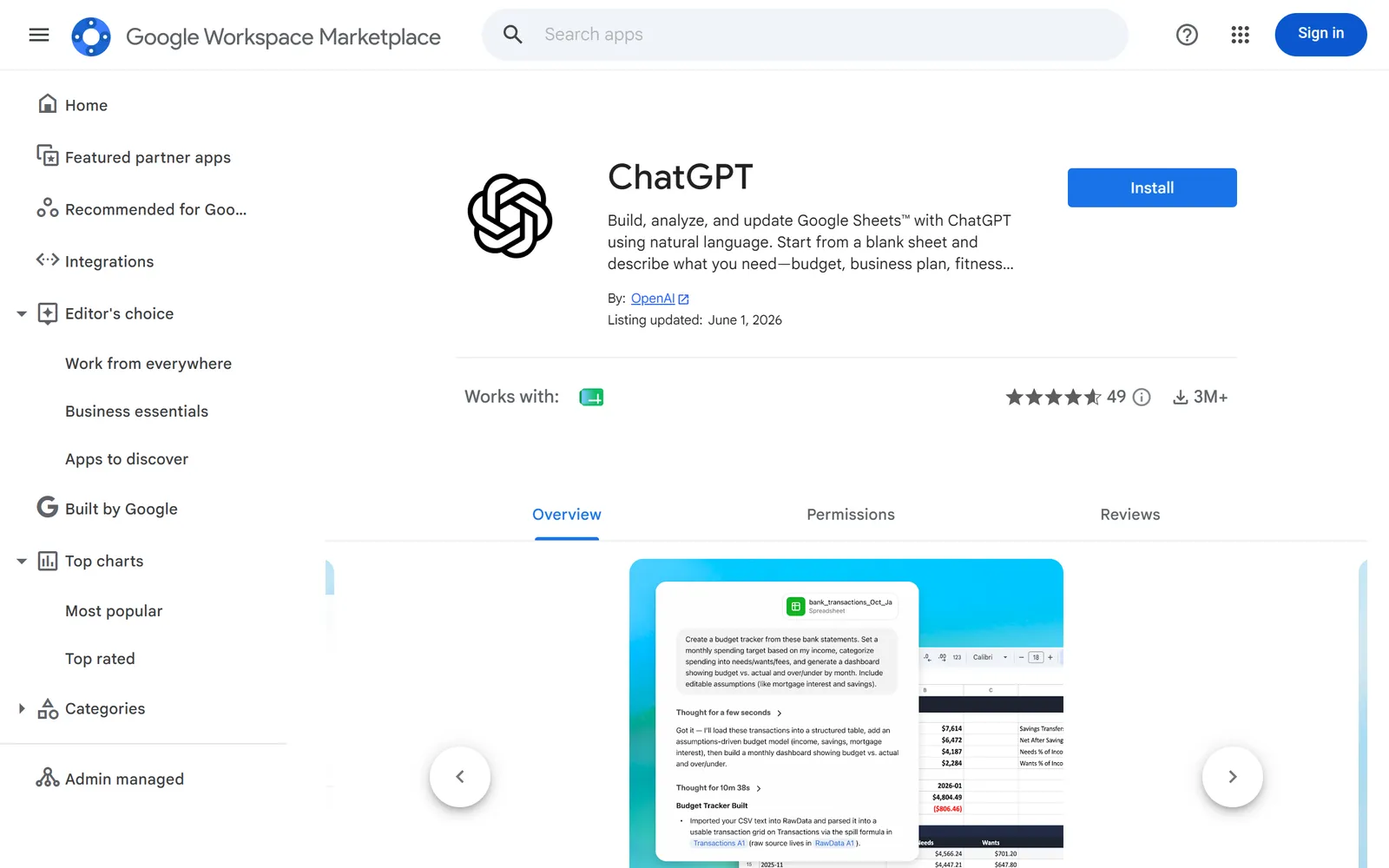
  1. Then: The add-on is added to your Google account Source 79

    The ChatGPT add-on’s listing on the Google Workspace Marketplace, with its Install button ringed.
    Screenshot: Google Workspace Marketplace, the ChatGPT for Google Sheets listing, 17 October 2026.
  2. Then: ChatGPT appears in a sidebar Sources 10179

    A drawing from the step’s own words. The real screen may look a little different.
  3. Then: You can ask ChatGPT to build, edit or analyse the sheet Source 79

    A drawing from the step’s own words. The real screen may look a little different.

Pictures without a date are drawings from each step’s own words. The real screen may look a little different.

To disconnect Delete or download your data from the add-on’s Settings.
  • Delete or download your data from the add-on’s Settings79.
  • Remove its access on your Google Account’s linked apps page57.
  • Admins can block it with the Marketplace allowlist or API controls5655.
Limits Memory isn’t available, and sheet chats don’t sync with your ChatGPT history.
  • Memory isn’t available, and sheet chats don’t sync with your ChatGPT history79.
  • It follows each person’s ChatGPT training setting, and chats, attachments and workbook content may be shared with Google and OpenAI79.

Claude and Google Workspace

Reads and makes changes. Asks first, unless you change that.

Claude (Gmail, Google Calendar, Google Drive, Docs, Sheets and Slides connectors) and Google Workspace

Official? Yes, built by Anthropic (“Google Workspace connectors”).
  • Yes, built by Anthropic (“Google Workspace connectors”)80.
What it can see and do Gmail: search and read emails, draft, send, reply and forward, and manage labels.
  • Gmail: search and read emails, draft, send, reply and forward, and manage labels80.
  • Google Calendar: view calendars, create, update and delete events, and find a time that suits everyone80.
  • Google Drive: search and read Docs, Sheets, Slides, PDFs and Office files, upload files, create folders, and share, move or trash files80.
  • Separate Docs, Sheets and Slides connectors can create new Google files and edit them live (beta)80.
  • By default Claude asks for your approval before sending email or sharing, moving or trashing files80.
  • Claude only sees data for the Google account you connect and can’t reach anything that account can’t open80.
What you need Anthropic says the connectors are available to all Claude users.
  • Anthropic says the connectors are available to all Claude users80.
  • On Team and Enterprise plans, an Owner or Primary Owner must turn them on for the organisation first80.
  • If your Workspace blocks unknown apps, a Google admin has to mark Claude as trusted80.

Steps to connect (Claude Help Center, "updated over 2 weeks ago" as of 15 October 2026)

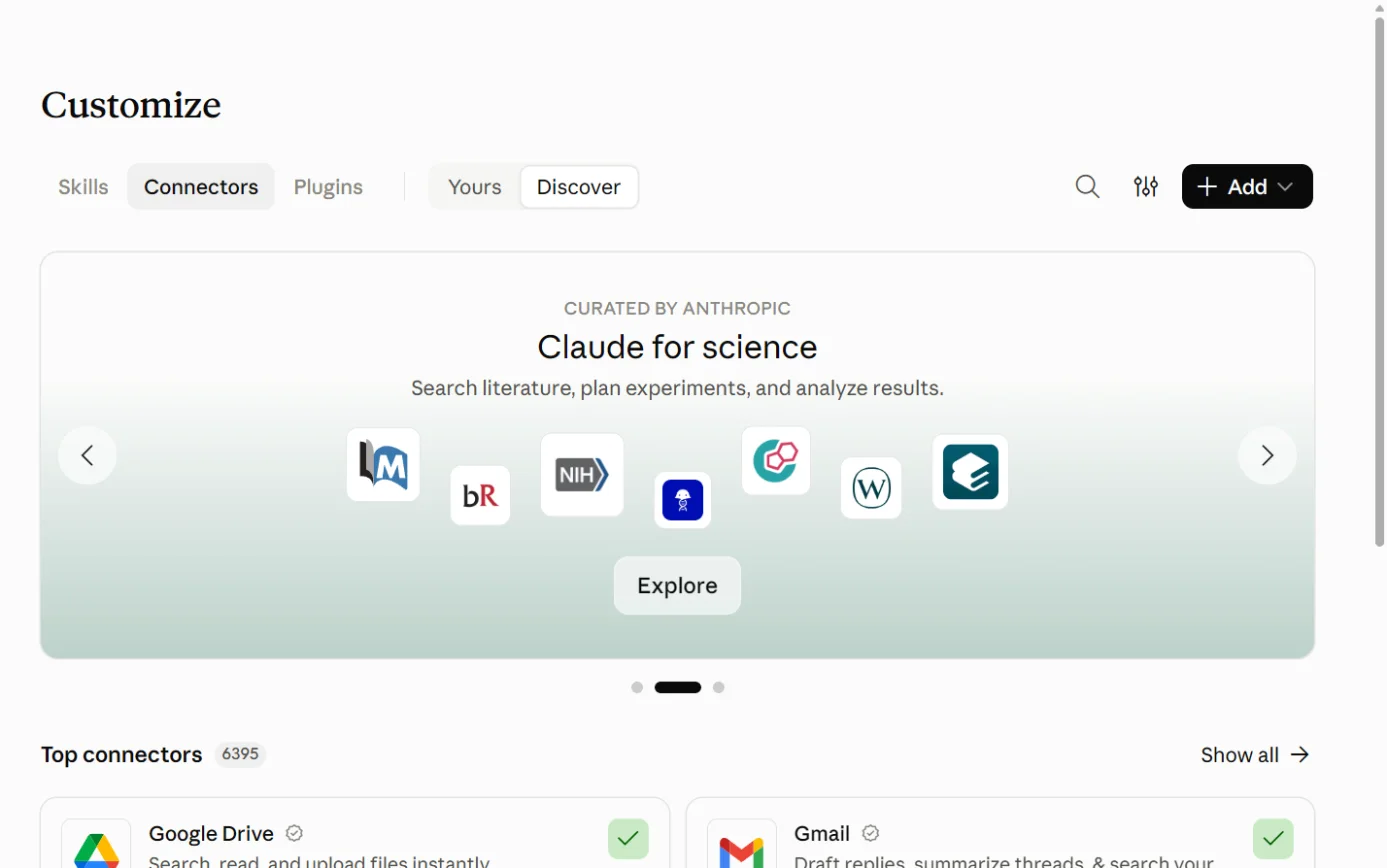
  1. Then: The connectors directory Source 81

    Claude’s Customize page on the Connectors tab, with the + Add button ringed.
    Screenshot: Claude, the Connectors page under Customize, 18 October 2026.
  2. Then: A Google sign-in screen Sources 8180

    A drawing from the step’s own words. The real screen may look a little different.
  3. Then: The connector shows as connected Source 80

    A drawing from the step’s own words. The real screen may look a little different.
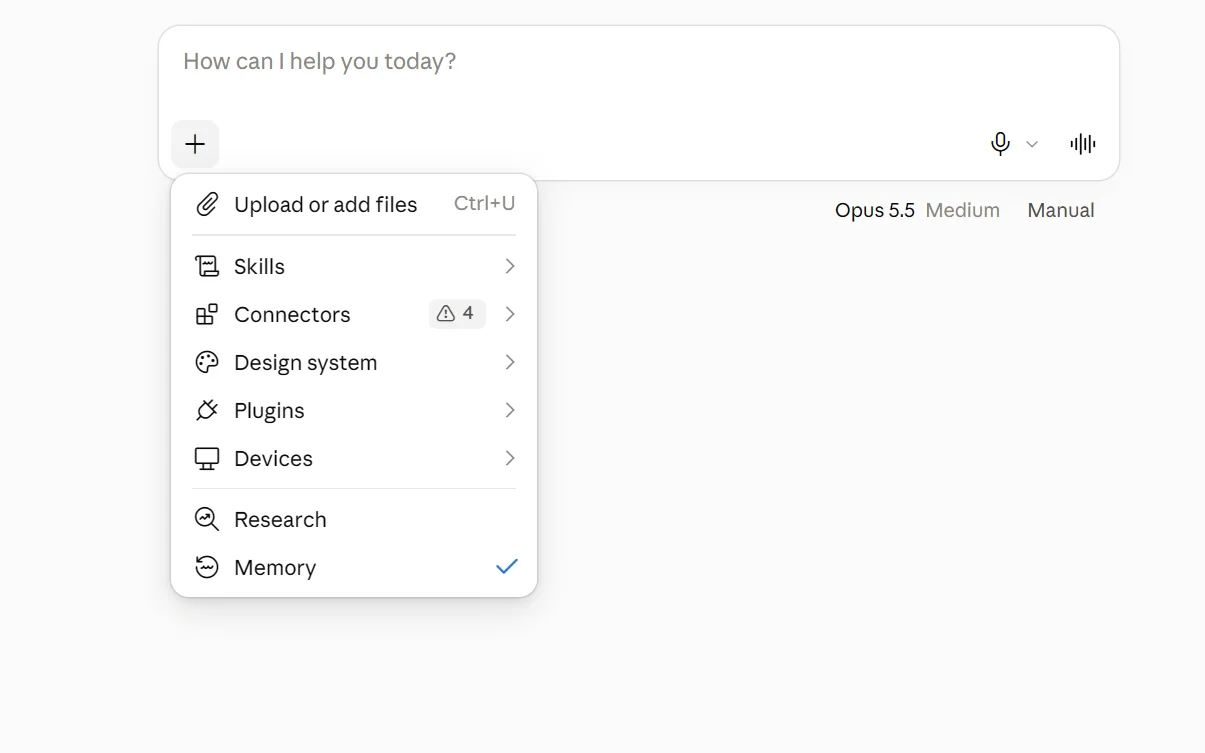
  4. Then: Claude can use them in that conversation Sources 8081

    The + menu under Claude’s message box, with Connectors ringed.
    Screenshot: Claude, the + menu in a new chat, 18 October 2026.

Pictures without a date are drawings from each step’s own words. The real screen may look a little different.

For Team and Enterprise owners, before step 1: Organization settings > “Connectors” > “Browse connectors” > “Add to your team”81.

For the Google admin, if access is blocked: admin.google.com > Security > Access and data control > API controls > Manage third-party app access, add the Claude app, set it to “Trusted”, then wait about 15 minutes80.

To disconnect In Claude: Customize > “Connectors”, select the Google connector, click “Disconnect” and confirm.
  • In Claude: Customize > “Connectors”, select the Google connector, click “Disconnect” and confirm80.
  • In Google: myaccount.google.com/connections, find Claude, and choose “Delete all connections”80.
Limits Claude can see attachment details from Gmail but can’t read what’s inside the attachments.
  • Claude can see attachment details from Gmail but can’t read what’s inside the attachments80.
  • Claude reads text from Drive files but not the images inside them80.
  • Files have to fit within the conversation’s size limit80.
  • The Drive connector can’t add files to shared projects80.
  • Anthropic says it doesn’t train its models on Gmail, Drive or Calendar connector data; on consumer plans, content you paste from them may be used if you’ve opted in to training80.
  • Team and Enterprise owners can set each tool to “Always allow”, “Needs approval” or “Blocked”81.

Claude for Google Docs, Sheets and Slides and Google Workspace

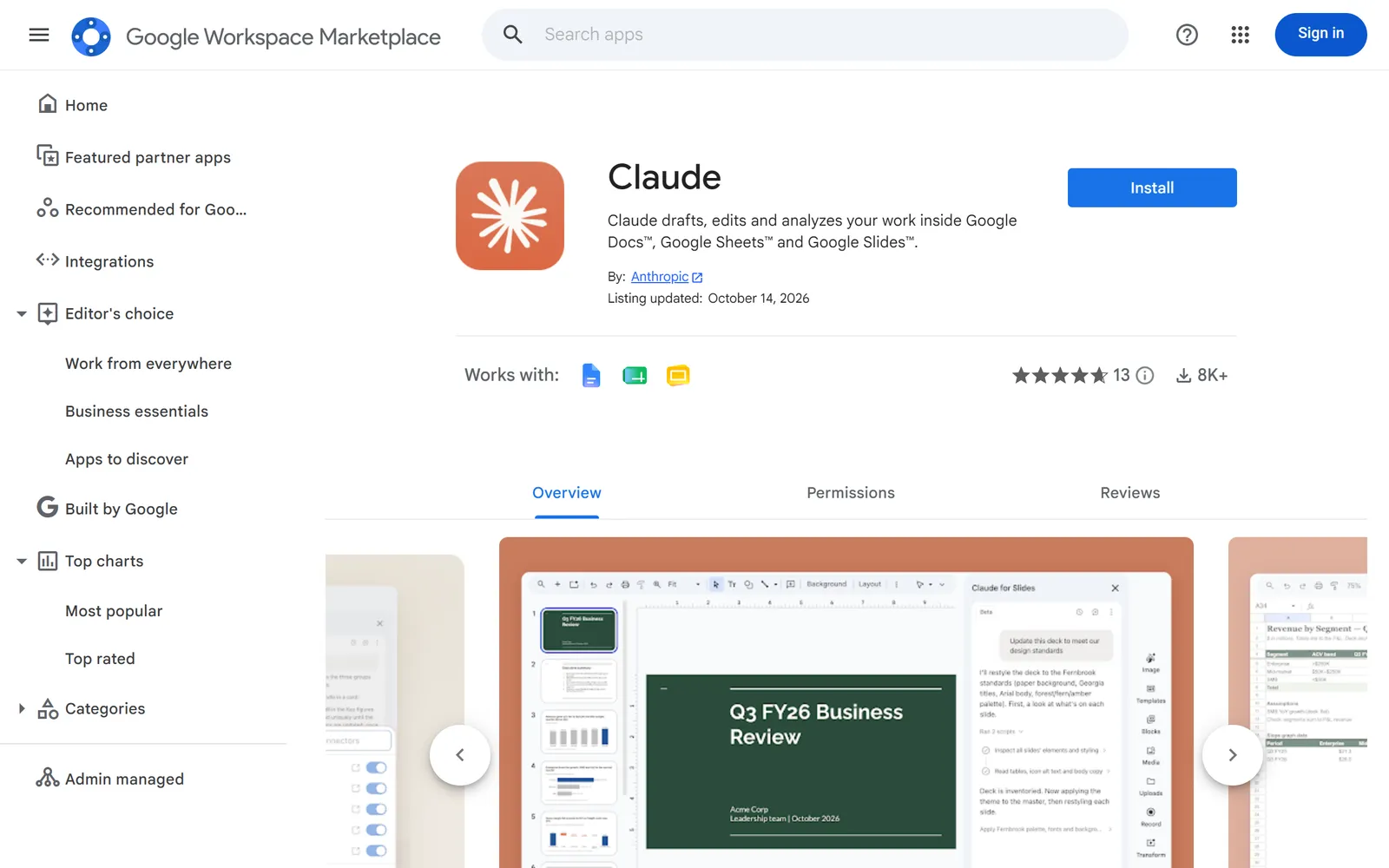
Official? Yes. The “Claude” add-on in the Workspace Marketplace is published by Anthropic; the listing was updated on 14 October 2026.
  • Yes. The “Claude” add-on in the Workspace Marketplace is published by Anthropic; the listing was updated on 14 October 202682.
  • Anthropic calls it beta83.
What it can see and do Adds a Claude sidebar that reads the open file and edits it in place; edits show in version history under your name.
  • Adds a Claude sidebar that reads the open file and edits it in place; edits show in version history under your name83.
  • In Docs it proposes changes as cards you accept or reject; in Sheets it builds models and fixes formulas; in Slides it creates and restyles slides83.
  • It can use connectors your organisation has set up in Claude83.
What you need A Claude Pro, Max, Team or Enterprise plan.
  • A Claude Pro, Max, Team or Enterprise plan83.
  • A Google account that’s allowed to install Marketplace apps83.

Steps to connect (Claude Help Center, "updated yesterday" as of 15 October 2026)

  1. Then: One install covers Docs, Sheets and Slides Source 83

    The Claude listing on the Google Workspace Marketplace, with its Install button ringed.
    Screenshot: Google Workspace Marketplace, the Claude listing, 17 October 2026.
  2. Then: The Claude sidebar opens Source 83

    A drawing from the step’s own words. The real screen may look a little different.
  3. Then: Claude can read and edit the open file Source 83

    A drawing from the step’s own words. The real screen may look a little different.
  4. Then: Claude is ready; reload any files that were already open Source 83

    A drawing from the step’s own words. The real screen may look a little different.

Pictures without a date are drawings from each step’s own words. The real screen may look a little different.

Admin install for the whole organisation: open the listing as a super admin, click “Admin install”, then “Continue”, choose everyone or specific groups, tick the agreement and click “Finish”83.

To disconnect Admins: Google Admin console > Apps > Google Workspace Marketplace apps > Apps list > “Claude” > “Uninstall app”.
  • Admins: Google Admin console > Apps > Google Workspace Marketplace apps > Apps list > “Claude” > “Uninstall app”83.
  • Anthropic’s page doesn’t describe how an individual removes it83.
Limits Native Google files only; Office files need converting.
  • Native Google files only; Office files need converting83.
  • It only works in the file it’s opened in and can’t share files83.
  • In Docs it can’t read or resolve comments or accept suggestions83.
  • Each task stops after six minutes; Firefox isn’t supported83.
  • Anthropic says it doesn’t train on this content and deletes inputs and outputs within 30 days83.
  • Pro and Max use falls under Anthropic’s consumer terms; Team and Enterprise under its commercial terms83.
  • Not for health information covered by HIPAA83.

Copilot and Google Workspace

Reads only. Changes rolling out from October 2026.

Microsoft 365 Copilot (Gmail, Google Calendar and Google Contacts) and Google Workspace

Official? Yes. Microsoft builds Gmail, Google Calendar and Google Contacts connectors for Microsoft 365 Copilot.
  • Yes. Microsoft builds Gmail, Google Calendar and Google Contacts connectors for Microsoft 365 Copilot84.
What it can see and do Gmail: search and read messages, threads and labels.
  • Gmail: search and read messages, threads and labels84.
  • Google Calendar: check events, invites and attendees84.
  • Google Contacts: look up names, emails and phone numbers84.
  • These are “federated” connectors: they fetch live data with your own sign-in and don’t copy it into Microsoft 36587.
  • Write, update and delete actions started rolling out in early October 2026 for connectors that offer them, and each one needs your approval87.
What you need A Microsoft 365 work account with Copilot Chat.
  • A Microsoft 365 work account with Copilot Chat87.
  • Microsoft-published connectors are switched on in a Microsoft 365 tenant unless the admin turns them off87.
  • Microsoft’s pages we read don’t say whether a paid Microsoft 365 Copilot licence is required (see gaps)8789.

Steps to connect (Microsoft Learn, 30 September 2026)

  1. Source 87

    A drawing from the step’s own words. The real screen may look a little different.
  2. Source 87

    A drawing from the step’s own words. The real screen may look a little different.
  3. Source 87

    A drawing from the step’s own words. The real screen may look a little different.
  4. Source 87

    A drawing from the step’s own words. The real screen may look a little different.
  5. Source 87

    A drawing from the step’s own words. The real screen may look a little different.

Pictures without a date are drawings from each step’s own words. The real screen may look a little different.

To disconnect Turn the source off in Copilot Chat settings or in the Researcher agent.
  • Turn the source off in Copilot Chat settings or in the Researcher agent87.
  • Microsoft 365 admins manage connectors under “Copilot connectors” > “Your connections”87.
  • On Google’s side, remove the app’s access on the linked apps page57.
Limits The Researcher agent stays read-only.
  • The Researcher agent stays read-only87.
  • Copilot can only see and change what your Google account is allowed to87.

Microsoft 365 Copilot (Google Drive connector) and Google Workspace

Official? Yes. Microsoft builds a Google Drive connector that copies an index of Drive files into Microsoft 365 for Copilot and Microsoft Search.
  • Yes. Microsoft builds a Google Drive connector that copies an index of Drive files into Microsoft 365 for Copilot and Microsoft Search85.
What it can see and do Lets people search and summarise Google Drive files from Copilot.
  • Lets people search and summarise Google Drive files from Copilot85.
  • It keeps Google Drive’s sharing permissions when set up as Microsoft recommends85.
  • Comments and folder details aren’t indexed85.
What you need A Google Workspace admin to create a Google Cloud service account with domain-wide delegation and read-only scopes.
  • A Google Workspace admin to create a Google Cloud service account with domain-wide delegation and read-only scopes86.
  • A Microsoft 365 admin to deploy the connector86.

Steps to connect (Microsoft Learn, 18 November 2025)

  1. Then: A service account key ready to paste Source 86

    A drawing from the step’s own words. The real screen may look a little different.
  2. Then: The connectors page Source 86

    A drawing from the step’s own words. The real screen may look a little different.
  3. Then: The connector setup page Source 86

    A drawing from the step’s own words. The real screen may look a little different.
  4. Then: Connection details filled in Source 86

    A drawing from the step’s own words. The real screen may look a little different.
  5. Then: Indexing starts straight away Source 86

    A drawing from the step’s own words. The real screen may look a little different.

Pictures without a date are drawings from each step’s own words. The real screen may look a little different.

To disconnect Microsoft’s deployment page doesn’t describe removal (see gaps).
  • Microsoft’s deployment page doesn’t describe removal (see gaps)86.
Limits Microsoft’s default setting shows files that anyone can access in Google Drive to all Microsoft 365 users in your tenant.
  • Microsoft’s default setting shows files that anyone can access in Google Drive to all Microsoft 365 users in your tenant86.
  • Microsoft recommends “Only people with access to this data source”86.
  • Permission changes only sync during the daily full crawl86.

Microsoft Copilot for personal accounts and Google Workspace

Official? Yes. Microsoft’s consumer Copilot can connect to Google Drive, Gmail, Google Calendar and Google Contacts.
  • Yes. Microsoft’s consumer Copilot can connect to Google Drive, Gmail, Google Calendar and Google Contacts90.
What it can see and do Finds files, emails, contacts and calendar events when you ask.
  • Finds files, emails, contacts and calendar events when you ask90.
What you need A personal Microsoft account, on Copilot.com or the Copilot mobile app.
  • A personal Microsoft account, on Copilot.com or the Copilot mobile app90.

Steps to connect (Microsoft Support, no date shown)

  1. Then: A list of services you can connect Source 90

    A drawing from the step’s own words. The real screen may look a little different.
  2. Then: A prompt to continue Source 90

    A drawing from the step’s own words. The real screen may look a little different.
  3. Then: Google’s sign-in Source 90

    A drawing from the step’s own words. The real screen may look a little different.
  4. Then: You’re returned to Copilot with the connector switched on Source 90

    A drawing from the step’s own words. The real screen may look a little different.

Pictures without a date are drawings from each step’s own words. The real screen may look a little different.

To disconnect Microsoft’s page only covers switching connectors off per conversation (“+” > “Use connectors”).
  • Microsoft’s page only covers switching connectors off per conversation (“+” > “Use connectors”)90.
  • Remove access fully on your Google Account’s linked apps page57.
Limits Microsoft says connected data isn’t used to train Copilot.
  • Microsoft says connected data isn’t used to train Copilot90.
  • Whether staff can point this at a work Google account depends on your Workspace admin’s third-party app settings (our inference from55).

Gemini and Google Workspace

Built in.

Gemini Enterprise and Google Workspace

Official? Yes, a Google product, sold separately from Workspace.
  • Yes, a Google product, sold separately from Workspace63.
What it can see and do An AI assistant and company search tool that works across Google and third-party data, and hosts custom AI agents.
  • An AI assistant and company search tool that works across Google and third-party data, and hosts custom AI agents64.
  • Prebuilt connectors include Microsoft SharePoint, OneDrive and Outlook, Jira Cloud, Confluence Cloud and ServiceNow, with many more listed66.
What you need A Gemini Enterprise licence; the Business edition covers 1 to 500 users.
  • A Gemini Enterprise licence; the Business edition covers 1 to 500 users65.
  • An admin turns it on at Menu > Generative AI > Gemini Enterprise > “Service status”63.
Steps to connect Admins connect data sources and set access per source in Google Cloud; we didn’t document the click path.
  • Admins connect data sources and set access per source in Google Cloud; we didn’t document the click path66.
To disconnect Set “Service status” to Off.
  • Set “Service status” to Off63.
Limits The Business edition falls under Google’s general Terms of Service and Privacy Policy plus extra Business edition terms; Standard, Plus and Frontline fall under Google Cloud terms.
  • The Business edition falls under Google’s general Terms of Service and Privacy Policy plus extra Business edition terms; Standard, Plus and Frontline fall under Google Cloud terms63.
  • We found no Australian price or data-residency statement (see gaps)65.

Other routes

Developer tools, automation tools and app stores.

Google’s MCP servers and OpenAI’s API connectors (for developers) and Google Workspace

MCP (Model Context Protocol) is a standard way for an AI tool to plug into another service; Google describes its MCP servers as letting AI applications use Google services67. These routes need a developer6978.

Official? Yes. Google runs MCP servers for Gmail, Google Drive, Google Calendar, Google Chat and the People API, all in “Developer Preview”.
  • Yes. Google runs MCP servers for Gmail, Google Drive, Google Calendar, Google Chat and the People API, all in “Developer Preview”68.
  • OpenAI maintains Gmail, Google Calendar and Google Drive connectors in its API78.
What it can see and do Google’s Gmail MCP server can search and read threads, list drafts and labels, create drafts and apply labels; it lists no tool for sending.
  • Google’s Gmail MCP server can search and read threads, list drafts and labels, create drafts and apply labels; it lists no tool for sending69.
  • Google’s Drive MCP server can search, read and download files, read permissions, and create or copy files70.
  • OpenAI’s Google connectors are built around searching and reading; the Drive one uses a read-only scope78.
What you need For Google’s servers: membership of the Workspace Developer Preview Program, a Google Cloud project, and an OAuth client set up as “an AI-powered agent”.
  • For Google’s servers: membership of the Workspace Developer Preview Program, a Google Cloud project, and an OAuth client set up as “an AI-powered agent”69.
  • Google’s guide names Google Antigravity and Claude (Pro, Max, Team or Enterprise, as a custom connector) as clients69.
  • For OpenAI’s connectors: your own Google OAuth app supplying an access token78.

Steps to connect (Google for Developers, 12 October 2026)

  1. Then: Both APIs enabled Source 69

    A drawing from the step’s own words. The real screen may look a little different.
  2. Then: Consent screen configured Source 69

    A drawing from the step’s own words. The real screen may look a little different.
  3. Then: A client ID and secret Source 69

    A drawing from the step’s own words. The real screen may look a little different.
  4. Then: The client lists the Gmail tools Source 69

    A drawing from the step’s own words. The real screen may look a little different.
  5. Then: The AI can search and read threads, create drafts and apply labels Source 69

    A drawing from the step’s own words. The real screen may look a little different.

Pictures without a date are drawings from each step’s own words. The real screen may look a little different.

To disconnect Remove the server from your AI tool and revoke its access on your Google Account.
  • Remove the server from your AI tool and revoke its access on your Google Account57.
Limits Google warns that emails can carry hidden instructions that hijack the AI session and lead to data being changed or stolen.
  • Google warns that emails can carry hidden instructions that hijack the AI session and lead to data being changed or stolen69.
  • OpenAI tells developers to trust any server they connect and to keep approvals on for sensitive actions78.
  • OpenAI’s “connector_id” method is deprecated for models released after 1 September 202678.

Apps Script and Workspace add-ons (build your own) and Google Workspace

Official? Yes. Apps Script is Google’s JavaScript platform for building tools that work with Workspace.
  • Yes. Apps Script is Google’s JavaScript platform for building tools that work with Workspace71.
  • Workspace add-ons are Google’s documented way to extend Gmail, Calendar, Drive, Docs, Sheets, Slides, Forms, Chat, Meet and Workspace Studio73.
What it can see and do Apps Script can add menus and sidebars to Docs, Sheets and Forms, and connect to Gmail, Calendar and Drive.
  • Apps Script can add menus and sidebars to Docs, Sheets and Forms, and connect to Gmail, Calendar and Drive71.
  • Its Vertex AI service lets a script call Gemini models72.
  • Add-ons can provide custom steps and starters for Workspace Studio73.
What you need For Gemini from Apps Script: a Google Cloud project with billing turned on and the Agent Platform API (formerly Vertex AI API) enabled.
  • For Gemini from Apps Script: a Google Cloud project with billing turned on and the Agent Platform API (formerly Vertex AI API) enabled72.
Steps to connect This is a route for developers, and there’s no one-click connection; see Google’s developer guides.
  • This is a route for developers, and there’s no one-click connection; see Google’s developer guides7173.
To disconnect Remove the script or add-on; admins can uninstall add-ons from the Marketplace apps list.
  • Remove the script or add-on; admins can uninstall add-ons from the Marketplace apps list56.
Limits Google’s pages we read don’t state what Apps Script costs, beyond needing a billed Cloud project for AI calls.
  • Google’s pages we read don’t state what Apps Script costs, beyond needing a billed Cloud project for AI calls7172.
  • Apps Script data is covered by data regions (US or Europe only)10.

Other AI add-ons in the Workspace Marketplace and Google Workspace

Official? Mostly not. A Marketplace search for “claude” returned around 100 apps, and only “Claude” itself was published by Anthropic.
  • Mostly not. A Marketplace search for “claude” returned around 100 apps, and only “Claude” itself was published by Anthropic91.
  • A search for “chatgpt” showed “ChatGPT” by OpenAI and no Microsoft apps in the visible results92.
  • Many of the rest offer GPT, Claude or Gemini inside Sheets, Docs or Gmail and are built by independent developers91.
What it can see and do Whatever access the person installing it approves (our inference from).
  • Whatever access the person installing it approves (our inference from55).
What you need Your admin’s Marketplace and API settings decide whether staff can install them.
  • Your admin’s Marketplace and API settings decide whether staff can install them5655.
Steps to connect Install from the Marketplace listing. Check the publisher name first, because many similar-looking apps come from independent developers (our advice, based on).
  • Install from the Marketplace listing. Check the publisher name first, because many similar-looking apps come from independent developers (our advice, based on91).
To disconnect Remove access on your Google Account’s linked apps page.
  • Remove access on your Google Account’s linked apps page57.
Limits Marketplace listings link to each developer’s own privacy policy and terms, as the ChatGPT and Claude listings do.
  • Marketplace listings link to each developer’s own privacy policy and terms, as the ChatGPT and Claude listings do7982.

Jobs it’s good for

  • Catch up on a long email thread and reply. Ask Gemini to summarise it, then use “Help me write”. All Business plans16176.
  • Book a meeting from an email. “Help me schedule” offers times from your calendar and the other person books one. Business Standard and Plus306.
  • Meeting notes without a note-taker. “Take notes for me” in Meet saves a summary, decisions and action items to Drive. Business Standard and Plus276.
  • Tidy a messy shared folder. “Suggest file moves” in Drive proposes folders, and nothing moves until you accept24.
  • Sort customer comments in a sheet. The =AI() function can categorise text or score sentiment down a column. Business Standard and Plus216.
  • Turn a policy document into a form or quiz. “Help me create” in Forms can start from a Doc or PDF (English only)32.
  • A Q&A for new starters. Load the staff handbook into Gemini Notebook; its answers come only from your sources and show citations341.
  • A morning digest of unread email. Workspace Studio has a ready-made template that recaps unread emails and posts to Chat42.
  • File email attachments automatically. A Workspace Studio flow can save attachments to a Drive folder42.
  • Check a deal while writing an email. Gemini’s HubSpot or Salesforce integration answers from the side panel (read only)52.
  • Create records in another app from an automation. Workspace Studio’s Beta steps can act in Asana, Mailchimp, Salesforce, HubSpot or monday43.
  • Mark up a contract in Docs. Claude’s Docs add-on proposes edits as cards you accept or reject83.
  • Build or clean up a spreadsheet by describing it. ChatGPT for Google Sheets, or Claude in Sheets7983.
  • Find Google Drive files from Microsoft 365. Microsoft’s Google Drive connector puts them in Copilot search85.
  • Plan a lesson (schools). Gemini in Classroom drafts lesson plans and quizzes for teachers62.

What to watch for

Permissions: AI sees what the person sees

  • Gemini only retrieves content the user can already access9.
  • Claude mirrors your Google permissions80, and Microsoft’s connectors use your own identity and permissions87.
  • So if a folder is shared with everyone in the company, any staff member’s AI tool can surface it (our inference from98087).
  • Company-managed ChatGPT connections act with the connected account’s permissions, which can be wider than a user’s own77.
  • Microsoft’s Google Drive connector, left on its default, shows files that anyone can access in Drive to all Microsoft 365 users in your tenant86.

These tools can now change things

  • Gemini in Gmail can delete, archive and label email after you confirm16.
  • Claude can send email and move or trash Drive files; it asks first by default, but Team and Enterprise owners can let members skip the prompt80.
  • Microsoft’s federated connectors began getting write and delete actions in early October 202687.
  • ChatGPT can send an email from Gmail once you choose to. Where those actions are allowed, it can also change or delete Drive files and Calendar events9894100.
  • A Workspace Studio test run does the real thing42.

Data and training

  • Google: Workspace content isn’t human-reviewed or used to train models outside your domain without permission9.
  • Thumbs-up or thumbs-down feedback to Google may be read by people, so leave out personal or confidential details1821.
  • Personal accounts, and editions where the Gemini app is only an “additional service”, have different terms and possible human review8.
  • OpenAI: no training on connected data for Business, Enterprise and Edu76; ChatGPT for Sheets follows each person’s own training setting79.
  • OpenAI, any plan: no training of its general models on data from connected Google apps, apart from feedback and anything that ends up in the chat itself93.
  • Anthropic: no training on Gmail, Drive or Calendar connector data80; the Docs, Sheets and Slides add-on isn’t for health information83.

Where data lives

  • Workspace data regions offer the United States or Europe only10.
  • Business Starter doesn’t get data regions at all10.
  • Gemini prompts and responses are covered for storage on every data-regions version, but processing is only covered on Enterprise and Assured Controls versions10.
  • Gemini Notebook isn’t covered by data regions, and it keeps its own copy of Drive files you add109.
  • Google’s Privacy Hub doesn’t name a country where Gemini processing happens9.

Defaults worth checking

  • Gemini in Workspace apps: on7.
  • Meet automatic notes: on for Business Standard and Plus from 29 September 202628.
  • Workspace Studio: everyone can build flows45.
  • Gemini integrations with outside apps: on for people with Gemini50.
  • Unknown third-party apps: by default people can connect any of them (“Allow users to access any third-party apps”)55.
  • Microsoft’s own Copilot connectors, including Gmail: on in Microsoft 365 tenants unless disabled87.
  • ChatGPT Business: apps are on, and so are Google Drive’s Docs, Sheets and Slides actions97.

Admin blind spots the vendors point out

  • API controls can’t restrict Gemini’s third-party integrations, and blocking one later doesn’t stop existing use51.
  • Allowlisting an app in the Marketplace doesn’t override API controls, and the Marketplace excludelist doesn’t stop apps installed from elsewhere56.
  • Setting a service to “Restricted” in API controls stops untrusted apps that were already installed and revokes their access55.
  • Disabling a company connection in ChatGPT doesn’t revoke the authorisation on the other side; that’s a separate step77.

Accuracy and checking

  • Google says Gemini may suggest inaccurate information and isn’t professional advice1721.
  • In the Gemini app, Gemini may pick an older email over a newer one; check the sources it lists35.
  • Meet notes can be incomplete for short meetings or with connection problems27.
  • Charts Gemini makes in Sheets don’t update with the data, and =AI() results only refresh when you ask2021.
  • Gemini Notebook “can make mistakes”, Google says41.

Costs that catch people out

  • Business Starter doesn’t include Gemini in Docs, Sheets, Slides, Drive, Meet or Chat1.
  • AI limits are per person and don’t pool15.
  • Heavier use of advanced image and video generation needs the paid AI Expanded Access add-on14.
  • Removing an AI Expanded Access licence mid-month can still be charged for the whole month12.
  • Workspace Studio limits start being enforced on 1 November 202615.
  • Outside apps reached through integrations may need their own paid plans52.
  • Claude’s Workspace add-on needs a paid Claude plan83, and Gemini Enterprise is a separate purchase63.

Students and anyone under 18

  • Under-18 users get a restricted Gemini experience, and some features are 18+ only858.
  • Under-18 users can’t use AI steps in Workspace Studio45.
  • Google AI Pro for Education can’t be assigned to anyone under 1860.

Hidden instructions in content (prompt injection)

  • Google warns that untrusted emails can contain hidden instructions that hijack an AI connected through its Gmail MCP server69.
  • Google says Gemini checks for threats before acting and blocks or leaves out malicious content9.

Personal and work accounts

  • Gemini with a personal account runs under consumer terms, with possible human review8.
  • Microsoft’s consumer Copilot can connect to Gmail and Google Drive with a personal Microsoft account90.
  • Claude Pro and Max use of the Docs, Sheets and Slides add-on is under Anthropic’s consumer terms83.

What’s changing

DateChangeSource
13 Oct 2026 to mid-Nov 2026Skills roll out in the Gemini app for everyone48
13 Oct 2026Skills inside Workspace apps delayed “until further notice”48
Early Oct 2026Microsoft’s federated Copilot connectors start getting write, update and delete actions87
1 Nov 2026Workspace Studio usage limits start being enforced1512
1 Nov 2026Promotional access to “Convert Slides to Vids with avatars” ends15
17 Nov 2026Gems move into Settings in the Gemini app; they can still be used49
No sooner than 1 Mar 2027Business and enterprise: Gems can’t be created, edited or used; remaining Gems become draft skills; Studio flows using “Ask a Gem” stop49
No sooner than 1 Jun 2027Education: the same, plus Gems removed from Classroom49
From Sept 2026Meet’s “Meet Recordings” folder renamed “Legacy Meet Recordings” and moved into a new “Google Meet” folder27
29 Sep 2026Meet automatic note-taking on by default for Business Standard and Plus28
1 Sep 2026OpenAI’s API “connector_id” deprecated for models released after this date78
28 Aug 2026ChatGPT allows more than one Google account per person in its Gmail, Google Calendar and Google Contacts plugins98
25 Aug 2026Microsoft’s set date for retiring its PowerShell switch for federated connectors, replaced by the “Allowed agent types” setting88
16 Jul 2026NotebookLM renamed Gemini Notebook4
8 Jun 2026ChatGPT can draft and send email through a connected Gmail account, on the web for Plus, Pro, Business and Enterprise98
20 Apr 2026Drive side panel can no longer move files or create folders26
19 Mar 2026Workspace Studio reached all release tracks5
1 Mar 2026AI Expanded Access needed for higher advanced image and video use14

What we couldn’t establish

  • Which ChatGPT plans include the Google apps. OpenAI’s help pages say it depends on plan, location and workspace without listing plans. We couldn’t confirm Free, Go or Edu, and no OpenAI page we read named a country where the apps are unavailable9498.
  • How Business plan admins switch Gemini off in one app. Google’s per-app “Feature access” page lists only Enterprise Standard and Plus and some Education editions7.
  • Exact usage limits per plan. Google’s limits table has four plan columns but three values in most rows, so we couldn’t map every number to a plan with confidence15.
  • Where Gemini processes Australian customers’ data. Google names no country, and its data regions cover only the US and Europe910.
  • Whether a paid Microsoft 365 Copilot licence is needed for the Gmail, Google Calendar and Google Contacts connectors878889.
  • How to remove Microsoft’s Google Drive connector. The deployment page doesn’t cover it86.
  • Whether Claude’s free plan includes the Google connectors. Anthropic says “all users” but doesn’t list plans80.
  • Default state of Gemini’s third-party integrations. Google’s launch post says on; the admin page doesn’t say5051.
  • Which company’s terms cover data sent through Gemini integrations to apps like HubSpot or Salesforce5152.
  • Default state of Gemini Notebook and of Workspace Studio’s third-party steps. The admin pages don’t state them clearly404647.
  • Gemini Enterprise prices and Australian data residency. Google Cloud’s pricing URL returned “not found”, and its editions page has no prices65.
  • The Australian promotional pricing terms. The pricing page’s footnotes disagree about how long introductory prices last1.
  • Google Contacts with Gemini. Contacts isn’t in Google’s list of Workspace apps the Gemini app can connect to36.

Sources

Every line above was read at one of these pages, on the date shown. Vendors change their products and their pages often, so check the page before you rely on a detail.

  1. 1 Google Workspace pricing (Australia) Google Read 15 Oct 2026
  2. 2 Google Workspace for business (Australia) Google Read 15 Oct 2026
  3. 3 Gemini Notebook (formerly NotebookLM) for business Google Read 15 Oct 2026
  4. 4 NotebookLM is now Gemini Notebook (Workspace Updates) Google Updated 16 Jul 2026 Read 15 Oct 2026
  5. 5 Workspace Studio (Workspace Updates) Google Updated 3 Dec 2025; update 19 Mar 2026 Read 15 Oct 2026
  6. 6 Get started with Google Workspace with Gemini Google (Docs Editors Help) Read 15 Oct 2026
  7. 7 Manage access to Gemini features in Workspace services Google (Workspace Admin Help) Updated 13 Oct 2026 Read 15 Oct 2026
  8. 8 Turn the Gemini app on or off Google (Workspace Admin Help) Updated 13 Oct 2026 Read 15 Oct 2026
  9. 9 Generative AI in Google Workspace Privacy Hub Google (Workspace Admin Help) Updated 6 Oct 2026 (footer 13 Oct 2026) Read 15 Oct 2026
  10. 10 Data covered by Data Regions Google (Workspace Admin Help) Updated 13 Oct 2026 Read 15 Oct 2026
  11. 11 Google Workspace enables the future of AI-powered work for every business Google (Workspace blog) Updated 16 Jan 2025; updated 28 Apr 2025 Read 15 Oct 2026
  12. 12 AI Expanded Access Google (Workspace Admin Help) Updated 13 Oct 2026 Read 15 Oct 2026
  13. 13 AI tools for business Google Read 15 Oct 2026
  14. 14 Google Workspace AI Expanded Access (Workspace Updates) Google Updated 5 Feb 2026 Read 15 Oct 2026
  15. 15 About AI usage limits Google (Workspace Admin Help) Updated 13 Oct 2026 Read 15 Oct 2026
  16. 16 Collaborate with Gemini in Gmail Google (Gmail Help) Read 15 Oct 2026
  17. 17 Draft emails with Gemini in Gmail Google (Gmail Help) Read 15 Oct 2026
  18. 18 Collaborate with Gemini in Google Docs Google (Docs Editors Help) Read 15 Oct 2026
  19. 19 Write & edit with Gemini in Docs Google (Docs Editors Help) Read 15 Oct 2026
  20. 20 Collaborate with Gemini in Google Sheets Google (Docs Editors Help) Read 15 Oct 2026
  21. 21 Use the AI function in Google Sheets Google (Docs Editors Help) Read 15 Oct 2026
  22. 22 Collaborate with Gemini in Google Slides Google (Docs Editors Help) Read 15 Oct 2026
  23. 23 Get started with Gemini in Google Drive Google (Drive Help) Read 15 Oct 2026
  24. 24 Let Gemini organize your files Google (Drive Help) Read 15 Oct 2026
  25. 25 Organize, save, and share your Gemini sources using projects in Drive Google (Drive Help) Read 15 Oct 2026
  26. 26 Execute basic organizational tasks using Gemini in Drive (Workspace Updates) Google Updated 7 Jul 2025; update 20 Apr 2026 Read 15 Oct 2026
  27. 27 “Take notes for me” in Google Meet Google (Meet Help) Read 15 Oct 2026
  28. 28 New Google Meet ‘Take notes for me’ settings for admins and end users take effect September 29th (Workspace Updates) Google Updated 22 Sep 2026 Read 15 Oct 2026
  29. 29 Let Google Meet AI take notes for my users Google (Workspace Admin Help) Updated 13 Oct 2026 Read 15 Oct 2026
  30. 30 Suggest times to meet with Gemini in Gmail Google (Gmail Help) Read 15 Oct 2026
  31. 31 Summarize chats in Google Chat Google (Chat Help) Read 15 Oct 2026
  32. 32 Help me create with Gemini in Google Forms (Workspace Updates) Google Updated 11 Jun 2025 Read 15 Oct 2026
  33. 33 Get started with Google Vids Google (Docs Editors Help) Read 15 Oct 2026
  34. 34 Google Chat now available as a data source in the Gemini app (Workspace Updates) Google Updated 25 Feb 2026 Read 15 Oct 2026
  35. 35 Use apps connected to Gemini with a work or school Google Account Google (Gemini Apps Help) Read 15 Oct 2026
  36. 36 Control Gemini App access to Workspace services Google (Workspace Admin Help) Updated 13 Oct 2026 Read 15 Oct 2026
  37. 37 Use Gemini Apps with a work or school Google Account Google (Gemini Apps Help) Read 15 Oct 2026
  38. 38 Check the availability & requirements of Connected Apps in Gemini Apps Google (Gemini Apps Help) Read 15 Oct 2026
  39. 39 Where you can use the Gemini web app Google (Gemini Apps Help) Read 15 Oct 2026
  40. 40 Turn Gemini Notebook on or off for users Google (Workspace Admin Help) Updated 13 Oct 2026 Read 15 Oct 2026
  41. 41 Learn about Gemini Notebook Google (Gemini Notebook Help) Read 15 Oct 2026
  42. 42 Get started with Google Workspace Studio Google (Workspace Studio Help) Read 15 Oct 2026
  43. 43 Take actions in third-party services with flows (Beta) Google (Workspace Studio Help) Read 15 Oct 2026
  44. 44 Learn about Google Workspace Studio limits Google (Workspace Studio Help) Read 15 Oct 2026
  45. 45 Allow people to create and use flows Google (Workspace Admin Help) Updated 13 Oct 2026 Read 15 Oct 2026
  46. 46 Require approval for flows Google (Workspace Admin Help) Updated 13 Oct 2026 Read 15 Oct 2026
  47. 47 Set up Workspace Studio Google (Workspace Admin Help) Updated 13 Oct 2026 Read 15 Oct 2026
  48. 48 An update on the launch of skills in the Gemini app and Workspace (Workspace Updates) Google Updated 13 Oct 2026 Read 15 Oct 2026
  49. 49 About the transition to skills Google (Workspace Admin Help) Updated 30 Sep 2026 (footer 13 Oct 2026) Read 15 Oct 2026
  50. 50 Connect to more tools with Gemini in Google Workspace (Workspace Updates) Google Updated 15 Sep 2026; update 30 Sep 2026 Read 15 Oct 2026
  51. 51 Support access to Workspace Integrations Google (Workspace Admin Help) Updated 13 Oct 2026 Read 15 Oct 2026
  52. 52 Use integrations with Gemini in Workspace Google (Gmail Help) Read 15 Oct 2026
  53. 53 Turn access to Google Workspace with Gemini Beta on or off Google (Workspace Admin Help) Updated 13 Oct 2026 Read 15 Oct 2026
  54. 54 Learn about smart features & controls for Google Workspace & other Google products Google (Gemini Apps Help) Read 15 Oct 2026
  55. 55 Control which apps access Google Workspace data Google (Workspace Admin Help) Updated 13 Oct 2026 Read 15 Oct 2026
  56. 56 Manage the Marketplace app allowlist for your organization Google (Workspace Admin Help) Updated 13 Oct 2026 Read 15 Oct 2026
  57. 57 Manage links between your Google Account & apps from other developers Google (Google Account Help) Read 15 Oct 2026
  58. 58 Gemini for Education (Australia) Google for Education Read 15 Oct 2026
  59. 59 Gemini for Google Workspace FAQ (Education) Google (Workspace Admin Help) Updated 13 Oct 2026 Read 15 Oct 2026
  60. 60 Google AI Pro for Education Google (Workspace Admin Help) Updated 13 Oct 2026 Read 15 Oct 2026
  61. 61 Control access to Google services by age Google (Workspace Admin Help) Updated 13 Oct 2026 Read 15 Oct 2026
  62. 62 Learn about Gemini in Google Classroom Google (Classroom Help) Read 15 Oct 2026
  63. 63 Turn Gemini Enterprise on or off for users Google (Workspace Admin Help) Updated 13 Oct 2026 Read 15 Oct 2026
  64. 64 What is Gemini Enterprise? Google Cloud Updated 14 Oct 2026 Read 15 Oct 2026
  65. 65 Gemini Enterprise editions Google Cloud Updated 14 Oct 2026 Read 15 Oct 2026
  66. 66 Introduction to connectors and data stores Google Cloud Updated 14 Oct 2026 Read 15 Oct 2026
  67. 67 Google Cloud MCP servers overview Google Cloud Updated 13 Oct 2026 Read 15 Oct 2026
  68. 68 Supported products (Google Cloud MCP servers) Google Cloud Updated 13 Oct 2026 Read 15 Oct 2026
  69. 69 Configure the Gmail MCP server Google for Developers Updated 12 Oct 2026 Read 15 Oct 2026
  70. 70 MCP Reference: drivemcp.googleapis.com Google for Developers Updated 16 Jul 2026 Read 15 Oct 2026
  71. 71 Google Apps Script overview Google for Developers Updated 3 Sep 2026 Read 15 Oct 2026
  72. 72 Vertex AI Service (Apps Script) Google for Developers Updated 3 Sep 2026 Read 15 Oct 2026
  73. 73 Add-ons overview (Google Workspace add-ons) Google for Developers Updated 9 Oct 2026 Read 15 Oct 2026
  74. 74 Apps (OpenAI Academy) OpenAI Updated 28 Oct 2025; last updated 4 Sep 2026 Read 15 Oct 2026
  75. 75 Plugins (ChatGPT Learn) OpenAI Read 15 Oct 2026
  76. 76 Plugin controls (ChatGPT Learn) OpenAI Read 15 Oct 2026
  77. 77 Workspace connections (ChatGPT Learn) OpenAI Read 15 Oct 2026
  78. 78 MCP servers (API docs, connectors) OpenAI Read 15 Oct 2026
  79. 79 ChatGPT (Google Workspace Marketplace listing, by OpenAI) Google Workspace Marketplace / OpenAI Updated Listing updated 1 Jun 2026 Read 15 Oct 2026
  80. 80 Use Google Workspace connectors Anthropic (Claude Help Center) Updated "Updated over 2 weeks ago" Read 15 Oct 2026
  81. 81 Use connectors to extend Claude’s capabilities Anthropic (Claude Help Center) Updated "Updated over 2 weeks ago" Read 15 Oct 2026
  82. 82 Claude (Google Workspace Marketplace listing, by Anthropic) Google Workspace Marketplace / Anthropic Updated Listing updated 14 Oct 2026 Read 15 Oct 2026
  83. 83 Use Claude in Google Docs, Sheets, and Slides Anthropic (Claude Help Center) Updated "Updated yesterday" Read 15 Oct 2026
  84. 84 Microsoft-built connectors gallery Microsoft Learn Updated 30 Sep 2026 Read 15 Oct 2026
  85. 85 Google Drive connector overview Microsoft Learn Updated 15 Dec 2025 Read 15 Oct 2026
  86. 86 Deploy the Google Drive connector Microsoft Learn Updated 18 Nov 2025 Read 15 Oct 2026
  87. 87 Federated connectors overview Microsoft Learn Updated 30 Sep 2026 Read 15 Oct 2026
  88. 88 Manage federated connector availability Microsoft Learn Updated 28 Apr 2026 Read 15 Oct 2026
  89. 89 Copilot connectors overview Microsoft Learn Updated 6 Oct 2026 Read 15 Oct 2026
  90. 90 Connecting Microsoft Copilot to other services (Copilot connectors) Microsoft Support Read 15 Oct 2026
  91. 91 Search results for “claude” Google Workspace Marketplace Read 15 Oct 2026
  92. 92 Search results for “chatgpt” Google Workspace Marketplace Read 15 Oct 2026
  93. 93 Google app data controls FAQ OpenAI Updated "Updated: 20 days ago" (25 Sep 2026, UTC) Read 15 Oct 2026
  94. 94 Google Drive app and setup in ChatGPT OpenAI Updated "Updated: 6 days ago" (9 Oct 2026, UTC) Read 15 Oct 2026
  95. 95 Connected apps in ChatGPT OpenAI Updated "Updated: 4 days ago" (11 Oct 2026, UTC) Read 15 Oct 2026
  96. 96 Connecting and managing app accounts in ChatGPT OpenAI Updated "Updated: 13 days ago" (2 Oct 2026, UTC) Read 15 Oct 2026
  97. 97 Admin controls, security, and compliance for plugins and apps OpenAI Updated "Updated: 17 hours ago" (14 Oct 2026, UTC) Read 15 Oct 2026
  98. 98 ChatGPT release notes OpenAI Updated "Updated: 6 days ago" (9 Oct 2026, UTC) Read 15 Oct 2026
  99. 99 Gmail (ChatGPT plugin listing) OpenAI Read 15 Oct 2026
  100. 100 Google Calendar (ChatGPT plugin listing) OpenAI Read 15 Oct 2026
  101. 101 ChatGPT for Excel and Google Sheets OpenAI Updated "Updated: 2 months ago" (16 Aug 2026, UTC) Read 15 Oct 2026

Want your team shown this on its own Google Workspace?

We teach on the tools your workplace already uses, with the checks that go with them.