Skip to content

MYOB and AI.

Its own AI is Iris. Claude and ChatGPT can read your MYOB figures through MYOB’s own connector. We found no official link for Copilot or Gemini.

Checked 15 October 2026 against 71 sources, each the vendor’s own page. See them all, or what’s changed since.

Which AI connects to MYOB. Reads and makes changes Reads only No official link

The short version

MYOB has built AI into its small-business software under the name Iris by MYOB, and it has its own read-only connector for Claude and ChatGPT.14

Inside MYOB Business, Ask Iris answers plain-English questions about your numbers on Lite, Pro and AccountRight in the browser, and MYOB says that data is processed in Australia and isn’t used to train AI models.3

AI BAS helps you prepare your BAS through the quarter on Lite and Pro, but it’s a paid add-on with a 12-month commitment, and it doesn’t lodge for you.78

Smart Reconciliation and category suggestions match bank transactions for you, and some of the suggestions come from how other MYOB businesses coded similar transactions.1213

The MYOB Connector lets Claude or ChatGPT read figures such as profit and loss, sales, receivables and payables. It can’t change anything in MYOB, and the business owner has to allow it in My Account first.46

Once you connect, the figures you ask about go into the AI company’s systems under its own terms, so MYOB tells you to turn off model training in Claude or ChatGPT.4

There’s no official MYOB link for Microsoft Copilot, Google Gemini, Zapier or Power Automate that we could find, so the documented fallback is exporting a report and uploading it, which copies your data out of MYOB.1324155

Building your own link through MYOB’s API needs a paid developer membership, and MYOB’s developer terms put firm limits on using its data with AI.4748

MYOB’s AI pages warn that the AI can get things wrong, and its terms make you responsible for checking AI output before you rely on it.13827

The plans

What AI you get depends on which MYOB product and plan you’re on, so check yours first.2

Small-business plans in Australia

(prices are the “after offer period” figures shown on MYOB’s pages on 15 October 2026; intro discounts were also showing)225

PlanWhat it isPrice after the intro offerAI features MYOB lists for it
Solo by MYOBA phone app for sole traders and freelancers, one user, no web version26$99/year2Category Suggestions2
MYOB Business LiteFor sole traders and small businesses, payroll for up to 2 employees22$315/year2Ask Iris, Category Suggestions, Smart Invoice Reminders. AI BAS is “Available as an additional purchase”2
MYOB Business ProPayroll for unlimited employees at an extra $3/month each23$70/month2Ask Iris, AI Business Insights (beta), Smart Reconciliation (beta), Category Suggestions, Smart Invoice Reminders. AI BAS is an extra purchase2
AccountRight PlusNeeds a Windows computer for setup and some features; unlimited payroll included24$165/month2The same list as Pro, without AI BAS2
AccountRight PremierFor multiple locations, jobs or currencies; Windows needed for setup and some features25$210/month25The product page mentions AI category suggestions25. Premier isn’t in the pricing page’s AI comparison table2
Payroll OnlyA payroll-only plan2$15/month2None listed2
  • The pricing page doesn’t say whether these prices include GST.2
  • MYOB says it will change the prices of Payroll Only and the per-user Payroll premium feature from 1 November 2026, without showing the new prices.2
  • AccountRight Plus and Premier now sit under “MYOB Business” on MYOB’s support site.63

Other MYOB products this guide covers

  • MYOB Assist, a phone app for quotes, invoices and receipt capture, included at no extra cost with Lite, Pro and AccountRight.17 It replaced the older MYOB Invoice and MYOB Capture apps.1718
  • MYOB Acumatica, MYOB’s cloud ERP for mid-sized businesses.4056
  • For accountants and bookkeepers: MYOB Practice in the cloud (including Practice Compliance, Practice Management, Practice Tax, Practice BAS, Client Accounting and Nimbus Document Manager), plus the desktop products Accountants Office (AO) and Accountants Enterprise (AE).61

Where MYOB keeps your data

  • MYOB says its cloud storage is “hosted in Australia by Microsoft Azure and Amazon Web Services”.29
  • MYOB says its information security management system is certified each year to ISO 27001.29
  • MYOB’s privacy policy (August 2026) says related companies and third parties may be overseas, “including in New Zealand, the Philippines and the United States”.28
  • The privacy policy doesn’t mention artificial intelligence, machine learning or AI training.28

What’s built in

MYOB groups most of its small-business AI under the name Iris by MYOB, which it calls the “intelligence engine built into your accounting software”.1 It says availability “varies by feature and plan”.1 MYOB says it designs these features in line with the Australian Government’s Guidance for AI Adoption, with human oversight and transparency among its principles.1 You can see the data behind a suggestion, and override or ignore it.1

MYOB’s terms of use (June 2026) say it will tell you when a feature relies on AI, and that you’re responsible for checking AI-generated information before relying on it.27 Beta features are used “at your own risk” under the same terms.27

Ask Iris (previously called AI Assistant) A chat inside MYOB Business where you ask questions in plain English. It gives read-only answers about income, expenses, cash flow, profit and outstanding invoices, using your MYOB data. It also answers how-to questions about MYOB Business and general accounting terms. It handles follow-up questions and keeps your chat history. The help page says “Ask Iris only reads your data” and can’t change your file, settings or business data.
What it does

A chat inside MYOB Business where you ask questions in plain English.3 It gives read-only answers about income, expenses, cash flow, profit and outstanding invoices, using your MYOB data.3 It also answers how-to questions about MYOB Business and general accounting terms.3 It handles follow-up questions and keeps your chat history.3 The help page says “Ask Iris only reads your data” and can’t change your file, settings or business data.3

Where to find it

In MYOB Business, click Ask Iris at the top of the screen.3 Use the New chat icon to start again and the Chat history icon to go back to an earlier chat.3

Plans and cost

Available on MYOB Business Lite, Pro and AccountRight in the browser.3 The pricing page ticks it for Lite, Pro and AccountRight Plus. Solo doesn’t have it.2 No extra charge is listed; it appears as a plan feature.2 The help page labels it “(Beta)”3, while MYOB’s AI page says it’s available now.1

On by default, and who controls it

The docs we read don’t say whether it’s on by default or can be switched off.3 They don’t mention any user-role limits either.3

Your data

“Ask Iris doesn’t use your business data to train AI models.”3 “Your data is processed in Australia, kept within Australian systems”, and MYOB says it isn’t shared with third parties.3 The page doesn’t say how long chats are kept.3 It warns “Ask Iris can make mistakes” and tells you to check important figures in your MYOB file before acting.3

In Australia

Yes, and MYOB says Ask Iris data is processed in Australia.3

AI BAS (beta, paid add-on) It works away during the quarter, as transactions come in. It:
What it does

It works away during the quarter, as transactions come in.7 It:

  • flags missing documents and possible GST issues8
  • suggests GST codes and categories, with an explanation for each8
  • suggests matches between uploaded documents and bank transactions8

It shows a BAS readiness percentage that rises as you clear tasks.8 When you approve a suggestion, it updates your books.8 For employers, it also prepares PAYG withholding (labels W1 and W2).7810 It covers simple quarterly BAS and cash-based scenarios (labels G1, 1A and 1B), with support due to expand.8 It produces a BAS decision report and a CSV of BAS-related transactions to share with your adviser.78

What it doesn’t do

“AI BAS doesn’t lodge with the ATO.”8 You or your BAS agent lodge through your usual channel.8 MYOB says it “is not a registered tax agent” and you remain responsible for accuracy when you lodge.8

Where to find it

Accounting menu > AI BAS.8 Its checklist has sections for Missing documents, GST review, Categorise and Manual updates required, each opened with Review.8 Suggestions have Accept, Reject and Edit buttons.8 When you’re done, click Save report, and it moves to Past BAS reports.8

Plans and cost.
  • MYOB Business Lite or Pro only, for GST-registered Australian businesses.78 It isn’t offered on AccountRight or Solo in the pricing table.2
  • “AI BAS is a Premium Feature”, an extra charge on top of your subscription.8 It’s a 12-month subscription with an annual commitment, billed monthly in advance.89 MYOB’s terms describe it as a rolling 12-month term.27
  • On 15 October 2026 the AI BAS page showed it at $25 a month, labelled beta.7 From year two the page shows prices by BAS transactions per BAS period:7
BAS transactions per periodNon-employingEmploying
1 to 1007$25/month$30/month
101 to 7507$40/month$45/month
750+7$70/month$75/month
  • The help page says the exact amount is shown in My Account before you confirm.8 MYOB was also advertising a bundle that discounts Lite or Pro for 12 months when bought with AI BAS, with bundle totals marked “(inc. GST)”.7
  • Only the Primary Contact or Billing Contact on the MYOB account can add or cancel it.89 Cancelling needs 10 days’ notice by phone (1300 940 281), and you’re billed for the rest of the 12-month commitment.8
  • Existing beta users: “You can continue using AI BAS, without any additional cost, for a limited time.”8 After that they need to add it as a Premium Feature.8
On by default, and who controls it

It’s off until the Primary or Billing Contact adds it, either from Accounting > AI BAS or in My Account under Manage my product > Manage my subscription > Add AI BAS.8 Nothing in your books changes until you approve: “Your books will only update with your approval.”7

Your data

AI BAS “uses your MYOB data and AI models”.8 It learns from your accepts, rejects and edits.7 The pages don’t name the AI model provider or say where processing happens.78 They also don’t say whether your data trains models.78 The help page warns “AI may omit or generate incorrect information”.8

In Australia

Australian businesses only.78

Smart Reconciliation (beta) MYOB matches bank feed transactions to your records as they arrive, so there’s less to do at reconciliation time. It works in this order:
What it does

MYOB matches bank feed transactions to your records as they arrive, so there’s less to do at reconciliation time.1213 It works in this order:13

  • automatches to existing records using amount, date and contact name13
  • your bank rules13
  • AI category matches based on how you’ve matched similar transactions in your file13
  • suggested records that might match13
  • AI predictions, drawn from “how similar transactions have been matched across other MYOB businesses”13
  • manual matching by you13

Each match shows a method label: Logic, Rule, History, Prediction or Manual.12 AI category matching works on a confidence score:1213

  • 90% or more: matched automatically1213
  • 70% to 90%: shown as a suggestion1213
  • below 70%: you match it yourself1213

AI category matching only covers recent transactions, dated within 30 days of today and in the current financial year or later.13 It also skips anything dated before your lock date.13

Where to find it

Banking > Bank transactions, with tabs All, Not matched, Matched and Reconcile.12 Expand a transaction and click Accept, or select several and click Accept suggestions.12 To reconcile, confirm the Statement end date and Bank balance, then click Finalise once the Difference is $0.00.12 If your page doesn’t look like MYOB’s examples, you don’t have these features yet.1213

Plans and cost

Ticked for Pro and AccountRight Plus, with a beta label. Lite and Solo don’t have it.2 No extra charge is listed.2

On by default, and who controls it

The help page says “Automatching settings are switched on by default” and, a line later, “You just need to switch on some settings to start.”13 Check your own settings. To stop matching to records, deselect Match to MYOB records on the Bank rules page under the Banking menu.13 Category matching has its own setting on the same page.13 MYOB’s FAQ says AI doesn’t make final decisions; you finalise the reconciliation yourself.12 The pages don’t say which user roles can change these settings.1213

Your data

History matching learns from your own file.13 Predictions use patterns from other MYOB businesses, and MYOB says this happens “without exposing your business data to other customers”.12 The pages don’t say where the AI runs or which provider is used.1213

In Australia

These are Australian help pages.1213 They don’t say whether “other MYOB businesses” includes New Zealand businesses.1213

Category Suggestions When you connect a bank account, AI suggests how to categorise transactions and explains each suggestion. On AccountRight it suggests matches for bills and expenses. It’s the same AI category matching and prediction described under Smart Reconciliation.
What it does

When you connect a bank account, AI suggests how to categorise transactions and explains each suggestion.2223 On AccountRight it suggests matches for bills and expenses.2425 It’s the same AI category matching and prediction described under Smart Reconciliation.13

Where to find it

In bank transaction matching.13

Plans and cost

Ticked for Solo, Lite, Pro and AccountRight Plus.2 No extra charge is listed.2

On by default, and who controls it

Category matching is controlled on the Bank rules page.13 We found no Solo help article covering it.26

Your data

Predictions draw on how other MYOB businesses matched similar transactions.13

In Australia

Yes, on the Australian plans above.2

Smart Invoice Reminders Sends reminder emails for unpaid invoices on a schedule you set, up to five reminders. You choose a tone for each: Friendly, Neutral, Firm or Urgent. In the Overdue view, “For each overdue invoice, MYOB can suggest the next step”: Send reminder, Contact customer or Watch and wait, based on invoice age, history and activity. The Overdue view also shows days overdue and each customer’s average days to pay.
What it does

Sends reminder emails for unpaid invoices on a schedule you set, up to five reminders.14 You choose a tone for each: Friendly, Neutral, Firm or Urgent.14 In the Overdue view, “For each overdue invoice, MYOB can suggest the next step”: Send reminder, Contact customer or Watch and wait, based on invoice age, history and activity.14 The Overdue view also shows days overdue and each customer’s average days to pay.14

Where to find it

In MYOB Business: Settings (gear icon) > Sales settings > Reminders tab > select Send reminders to all customers, edit each reminder, then Save.14 For one customer: Contacts > open the customer > Invoice reminders > Send reminders to this customer.14 Overdue suggestions: Sales menu > Invoices > Overdue.14 In AccountRight, use the Sales command centre > Invoice Reminders, which opens the browser settings.14

Plans and cost

Ticked for Lite, Pro and AccountRight Plus. Solo doesn’t have it.2 No extra charge is listed.2

On by default, and who controls it

Reminders only go out after you switch them on.14 Once saved, they’re emailed to customers automatically on the schedule.14 Turn them off by deselecting Send reminders to all customers, then Confirm and Save.14 They don’t go out for invoices on Prepaid or Cash on delivery terms.14 The page doesn’t say which user roles can change the settings.14

Your data

The help page describes “intelligent insights and suggested actions” but doesn’t explain what technology is used or how data is handled.14

In Australia

Yes, on the Australian plans above.2

Note

MYOB’s March 2026 announcement said the feature would offer tone suggestions11; the current help page has you pick the tone yourself.14

AI Business Insights (beta) AI-written summaries and charts about your sales, customers, cash flow and spending, with “Your numbers” charts behind them. Metrics include total income, average invoice value, cash runway, average time to get paid, net profit and profit margin. Insights refresh overnight, at most once every 24 hours per ledger and only when there are meaningful changes. It doesn’t replace your standard reports.
What it does

AI-written summaries and charts about your sales, customers, cash flow and spending, with “Your numbers” charts behind them.1516 Metrics include total income, average invoice value, cash runway, average time to get paid, net profit and profit margin.16 Insights refresh overnight16, at most once every 24 hours per ledger and only when there are meaningful changes.15 It doesn’t replace your standard reports.16

Where to find it

On the MYOB Business dashboard, look for the purple AI Business Insights banner and click View Latest Insights.16 Use Check recent insights for the feed, or Your numbers for the charts.16

Plans and cost

Selected Pro and AccountRight browser customers in Australia and New Zealand, during beta.15 The pricing page ticks it for Pro and AccountRight Plus with a beta label.2 No extra charge is listed.2 You can ask MYOB support for early access.16

On by default, and who controls it

Beta participants see a banner and in-product message.16 Only users with the Administrator or Accountant/Bookkeeper role can see the insights.1516 It needs an active bank feed.16

Your data

It uses the financial data already in your MYOB file, including bank feed transactions and balances.1516 The first release doesn’t use outside marketing or CRM data.15 The pages don’t say whether the data trains models or where it’s processed.1516 They don’t mention third parties either.1516 MYOB says “AI can still get things wrong” and that the insights aren’t financial advice.15

In Australia

Yes, for selected customers.15

Reading bills and receipts (Uploads, In Tray and the MYOB Assist app) When a bill or receipt reaches Uploads or the In Tray, MYOB pre-fills a bill or spend money transaction from it, with details such as supplier, dates, amounts and invoice number. MYOB Assist “uses AI to read and process the captured receipts and bills”. The Assist product page says AI pulls out the total, GST and date. MYOB’s 2025 updates list “upgraded AI-powered OCR” for receipts and bills.
What it does

When a bill or receipt reaches Uploads or the In Tray, MYOB pre-fills a bill or spend money transaction from it, with details such as supplier, dates, amounts and invoice number.2019 MYOB Assist “uses AI to read and process the captured receipts and bills”.18 The Assist product page says AI pulls out the total, GST and date.17 MYOB’s 2025 updates list “upgraded AI-powered OCR” for receipts and bills.21

Where to find it.
  • MYOB Business (browser): Uploads in the Purchases area. Click the ellipsis (...) on a document, then Create bill, Create spend money transaction or Link to existing bill.20
  • AccountRight desktop: Purchases command centre > In Tray (online company files only).20
  • Each company file has its own uploads email address, shown on the Uploads screen.20
  • In the MYOB Assist app, photograph the receipt or pick a saved photo, then crop it and add a note if you like. It goes to Uploads or the In Tray.19
Plans and cost

MYOB Assist is included at no extra cost with Lite, Pro and AccountRight.17 Uploads take PDF, JPG, TIFF and PNG files up to 10 MB.20 No charge for uploads is mentioned.20

On by default, and who controls it

Documents are read when you upload them, and you choose what to create.20 In AccountRight desktop, an administrator can remove In Tray access from a role (Setup > User Access > Manage Roles).20 The Field role gives staff the Assist app only, without access to MYOB Business.1831

Your data

Deleted uploads are gone for good, so download a copy first if you need one.1920 The pages make no statement about AI training or processing location for document reading.1720

In Australia

Yes.1720

Coming

MYOB says Assist will add “agentic AI capabilities” over time, with no timeline.17

For practices: AI mapping in MYOB Practice Compliance Client ledger data “intelligently maps to one standardised chart of accounts”, so one workflow works across clients. Data comes in by live sync or CSV, and the page names MYOB and QuickBooks as sources, plus trial balance imports. It also surfaces “risk flags and client insights” inside the workflow.
What it does

Client ledger data “intelligently maps to one standardised chart of accounts”, so one workflow works across clients.60 Data comes in by live sync or CSV, and the page names MYOB and QuickBooks as sources, plus trial balance imports.60 It also surfaces “risk flags and client insights” inside the workflow.60

Where to find it

In MYOB Practice, signed in at partner.myob.com.61

Plans and cost

AI mapping and insights are included in Core Compliance and Pro Compliance. Starter Compliance doesn’t include them.60 We didn’t capture Practice Compliance prices.

On by default, and who controls it

Not stated.60

Your data

The page doesn’t say how the AI mapping handles data or where it’s processed.60 It’s also silent on training.60

In Australia

Yes, on MYOB’s Australian site.60

Other practice AI

MYOB’s accountants and bookkeepers page names no other AI features for practices.61 Advisers can review and adjust a client’s AI BAS work with their usual MYOB access7, and the Accountant/Bookkeeper role can see AI Business Insights.16

MYOB Acumatica AI (larger businesses) MYOB lists these features:
What it does

MYOB lists these features:56

  • AI Assistant, for plain-English questions about revenue, customers, invoices, inventory and performance56
  • AI Automation, for building AI-powered workflows (approvals, document processing, pricing, notifications)56
  • AP Bill Entry, which reads supplier bills and checks them against supplier records56
  • Expense Management, which captures expenses from receipts in the mobile app56
  • Anomaly Detection, which flags unusual transactions56
  • Production Variance Anomaly Detection, Cross-Sell Assistant and Auto Complete56

In version 2026.1.1, “AI Studio” was renamed AI Automation and “Detection of Anomalies in Generic Inquiries” became Anomaly Detection.58 Journal entry anomaly detection marks entries Normal, Medium or Significant for you to review.59

Where to find it

Switch on AI Studio and Anomaly Detection on the Enable/Disable Features (CS100000) form.5859 Journal anomalies appear in Journal Entries Analysis (GL3010ML).59

Plans and cost

Not stated on the pages we read.5658 AI Studio opened in early access in May 2026, with wider availability planned later in the year.57

On by default, and who controls it

These features have to be enabled on the CS100000 form.5859 MYOB says the AI respects the user permissions and access controls already in place.56

Your data.
  • “Customer data is not used to train external AI models.”56
  • “MYOB Acumatica stores customer data in Australia.”56
  • Depending on the feature, data may be processed in Australia or on AI infrastructure run by providers including Anthropic, AWS and Microsoft, which MYOB says “cannot store it or use it to train their models”.56
  • AI Automation runs on MYOB’s managed infrastructure on AWS, with models through AWS Bedrock.56 MYOB says AI Studio processing runs in local data centres.57
  • Customers can also use their own preferred AI model.57
  • Journal entry anomaly detection sends the inquiry data to an external AI service, which the release note doesn’t name.59
In Australia

Data is stored in Australia.56
Connect another AI

In plain words, a connector lets a chat assistant such as Claude or ChatGPT look things up in another app while you’re chatting.33 MYOB has built one, called the MYOB Connector, for Claude and ChatGPT.14 It runs on an MCP server, which is the standard kind of plug that Claude’s connectors use.634 MYOB’s sits at https://mcp.myob.com/mcp.6

Before anyone can connect, the business owner has to allow it. The help page says “the business owner (the Owner user in the MYOB Business file) must allow access”.4 After that, “a user who has access to the MYOB Business file and their own Claude or ChatGPT account” can connect.4

ChatGPT and MYOB

Reads only.

ChatGPT and MYOB

Official? Yes. MYOB says the same MYOB Connector is installed in ChatGPT as a plugin. OpenAI’s plugin directory, which replaced its App Directory on 9 July 2026, lists MYOB, made by MYOB Australia Pty Ltd, version 1.0.0. The listing says “This feature is currently in beta.”

Yes. MYOB says the same MYOB Connector is installed in ChatGPT as a plugin.145 OpenAI’s plugin directory, which replaced its App Directory on 9 July 2026, lists MYOB, made by MYOB Australia Pty Ltd, version 1.0.0. The listing says “This feature is currently in beta.”6671

What it can see and do MYOB describes the same read-only connector for both Claude and ChatGPT, with the same supported and unsupported topics as above. OpenAI’s listing describes a read-only view of profit and loss, sales, receivables and payables. It says access is “read-only in this phase, with no write actions”, and it doesn’t list the individual tools.

MYOB describes the same read-only connector for both Claude and ChatGPT, with the same supported and unsupported topics as above.4 OpenAI’s listing describes a read-only view of profit and loss, sales, receivables and payables. It says access is “read-only in this phase, with no write actions”, and it doesn’t list the individual tools.66

What you need. An active MYOB Business Pro, Lite or AccountRight subscription. OpenAI’s listing asks for an active MYOB Business subscription in Australia or New Zealand.
  • An active MYOB Business Pro, Lite or AccountRight subscription.4 OpenAI’s listing asks for an active MYOB Business subscription in Australia or New Zealand.66
  • Your own ChatGPT subscription.4 MYOB doesn’t name a ChatGPT plan.4 OpenAI doesn’t list plans for it either. It says using any plugin depends on your plan, workspace, role and region.67
  • In ChatGPT Business, apps start switched on. In Enterprise and Edu, new plugins and apps generally stay off until an admin reviews them.68
  • Your MYOB username and password.4
  • The MYOB file’s Owner user must first allow ChatGPT in My Account (the same five steps as for Claude).4

Steps to connect

(MYOB help page, no date shown, read 15 October 2026)4

  1. Source 4

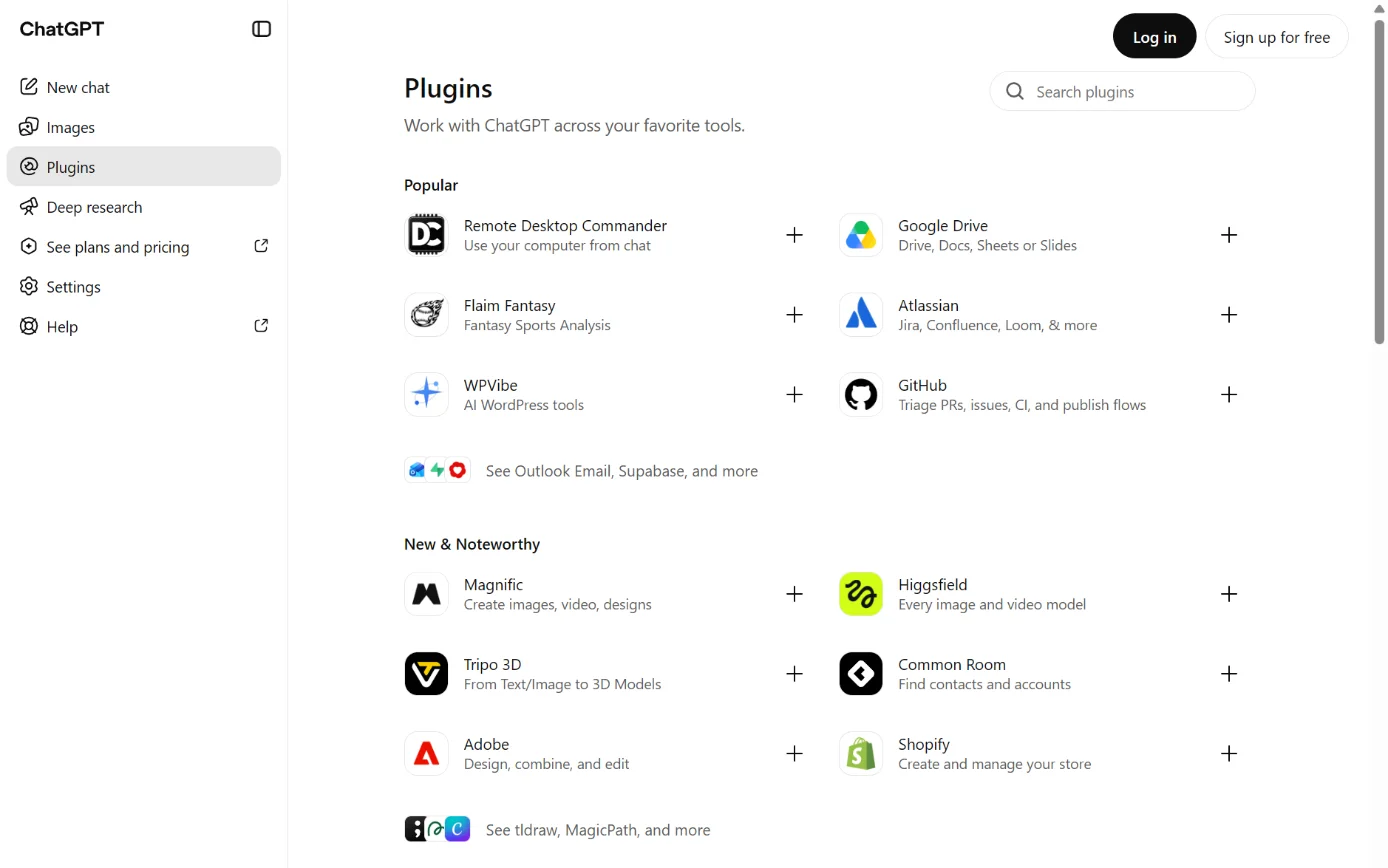
    ChatGPT’s Plugins page, with Plugins in the sidebar ringed.
    Screenshot: ChatGPT’s Plugins page, signed out, 18 October 2026.
  2. Sources 439

    A drawing from the step’s own words. The real screen may look a little different.
  3. Source 4

    A drawing from the step’s own words. The real screen may look a little different.
  4. Source 4

    A drawing from the step’s own words. The real screen may look a little different.
  5. Source 4

    A drawing from the step’s own words. The real screen may look a little different.

Pictures without a date are drawings from each step’s own words. The real screen may look a little different.

To disconnect. In ChatGPT, open Plugins and find MYOB.
  1. In ChatGPT, open Plugins and find MYOB.4
  2. Click the three dots at the top right and choose Uninstall.4

OpenAI’s own guide says “Separately connected MCP server integrations remain connected in ChatGPT until you disconnect them there.”39 After uninstalling, check that no MYOB connection is left in ChatGPT. (This is our caution; MYOB’s page doesn’t mention it.)

OpenAI’s help centre adds that uninstalling a plugin can disconnect every account connected through it, after a warning. To disconnect only the account, go to Settings > Plugins > MYOB > the account’s ••• menu (or Connection) > Disconnect.69

Limits. ChatGPT doesn’t use MYOB automatically. Select the MYOB plugin before each question; “If it isn’t selected, ChatGPT defaults to a web search.” MYOB warns you could get a plausible-looking answer that isn’t based on your MYOB data.
  • ChatGPT doesn’t use MYOB automatically. Select the MYOB plugin before each question; “If it isn’t selected, ChatGPT defaults to a web search.”4 MYOB warns you could get a plausible-looking answer that isn’t based on your MYOB data.4
  • MYOB tells you to turn off Improve the model for everyone in Settings > Data Controls.4 OpenAI says that on Free, Go, Plus and Pro it may use information from apps to train its models while that setting is on. Business, Enterprise and Edu aren’t used for training by default.70
  • OpenAI’s listing says ChatGPT may share relevant chats and memories with MYOB, under MYOB’s terms and privacy policy.66
  • Manage memory in Settings > Personalization > Memory.4 Deleting a chat may not delete memories made from it.4
  • When ChatGPT sends data through an MCP server, that service’s terms and privacy policy apply.39

Claude and MYOB

Reads only.

Claude and MYOB

Official? Yes. It’s MYOB’s own connector, listed in Anthropic’s Connectors Directory as “MYOB”, made by MYOB, with the “Anthropic verified” label. The listing says it was added in July 2026 and “This feature is currently in beta.” MYOB announced it on 17 August 2026, with a phased rollout from August. Anthropic says verification means it tested the tools for quality, and it “isn’t a security audit”.

Yes. It’s MYOB’s own connector, listed in Anthropic’s Connectors Directory as “MYOB”, made by MYOB, with the “Anthropic verified” label.6 The listing says it was added in July 2026 and “This feature is currently in beta.”6 MYOB announced it on 17 August 2026, with a phased rollout from August.5 Anthropic says verification means it tested the tools for quality, and it “isn’t a security audit”.35

What it can see and do. Read-only. “The connection with MYOB is read-only.” MYOB says it “can’t create, edit or delete anything in your MYOB account”.
  • Read-only. “The connection with MYOB is read-only.”4 MYOB says it “can’t create, edit or delete anything in your MYOB account”.4
  • Anthropic’s listing shows seven tools, all for getting information: business details, financial year dates, outstanding customer balances, outstanding payables, profit and loss, sales invoice totals, and standard payment terms.6
  • MYOB says you can ask about revenue and profit, expenses, receivables and overdue invoices, and cash position.4
  • It doesn’t cover payroll, inventory or job tracking, year-end tax advice or lodgement, or MYOB help content.4
  • It can only reach what your own MYOB user permissions allow.4 Claude inherits each person’s permissions from the connected service.33
  • Example questions from MYOB: “Do I have any overdue invoices?” and “What is my cash position?”4
What you need. An active MYOB Business Pro, Lite or AccountRight subscription.
  • An active MYOB Business Pro, Lite or AccountRight subscription.4
  • Your own Claude account.4 Anthropic says web connectors are available for all users on Claude, Claude Desktop and Claude Mobile.33
  • Your MYOB username and password.4
  • The MYOB file’s Owner user must first allow Claude in My Account.4
  • On Claude Team and Enterprise plans, an Owner or Primary Owner must enable the connector for the organisation before members can connect.3334 On Team plans, members without that permission see a Request button that goes to the Owners.34
  • Access is being rolled out gradually, so MYOB may not show up for you yet.4

Steps to connect

(MYOB help page, no date shown, read 15 October 2026)4

First, the Owner user in MYOB:

  1. Source 4

    A drawing from the step’s own words. The real screen may look a little different.
  2. Source 4

    A drawing from the step’s own words. The real screen may look a little different.
  3. Source 4

    A drawing from the step’s own words. The real screen may look a little different.
  4. Source 4

    A drawing from the step’s own words. The real screen may look a little different.
  5. Source 4

    A drawing from the step’s own words. The real screen may look a little different.

Pictures without a date are drawings from each step’s own words. The real screen may look a little different.

Then anyone with access to that file, in Claude:

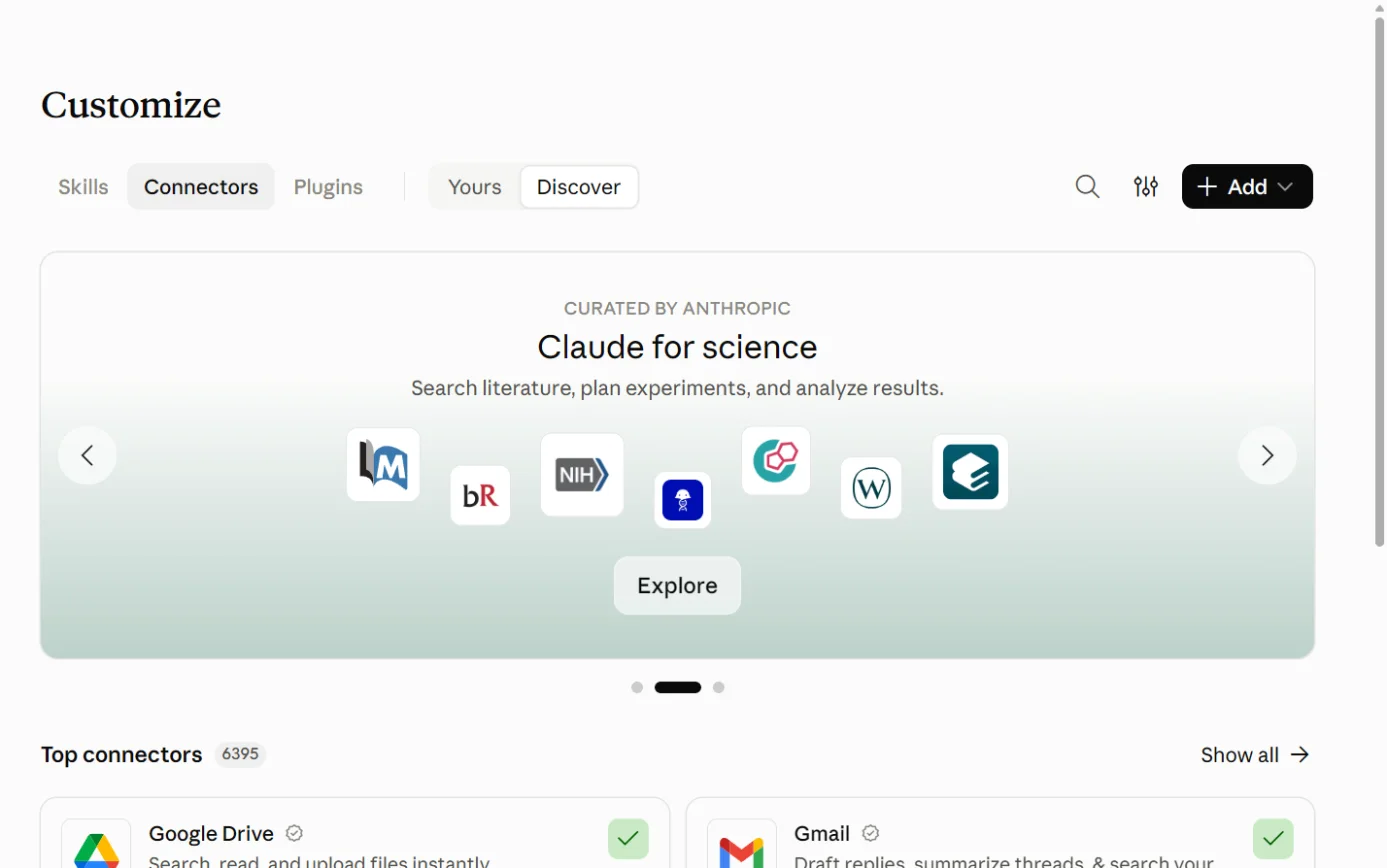
  1. Then: The list of available connectors (on a Claude Team plan without permission to enable connectors, you see a Request button that goes to your Owners) Sources 433

    Claude’s Customize page on the Connectors tab, with the + Add button ringed.
    Screenshot: Claude, the Connectors page under Customize, 18 October 2026.
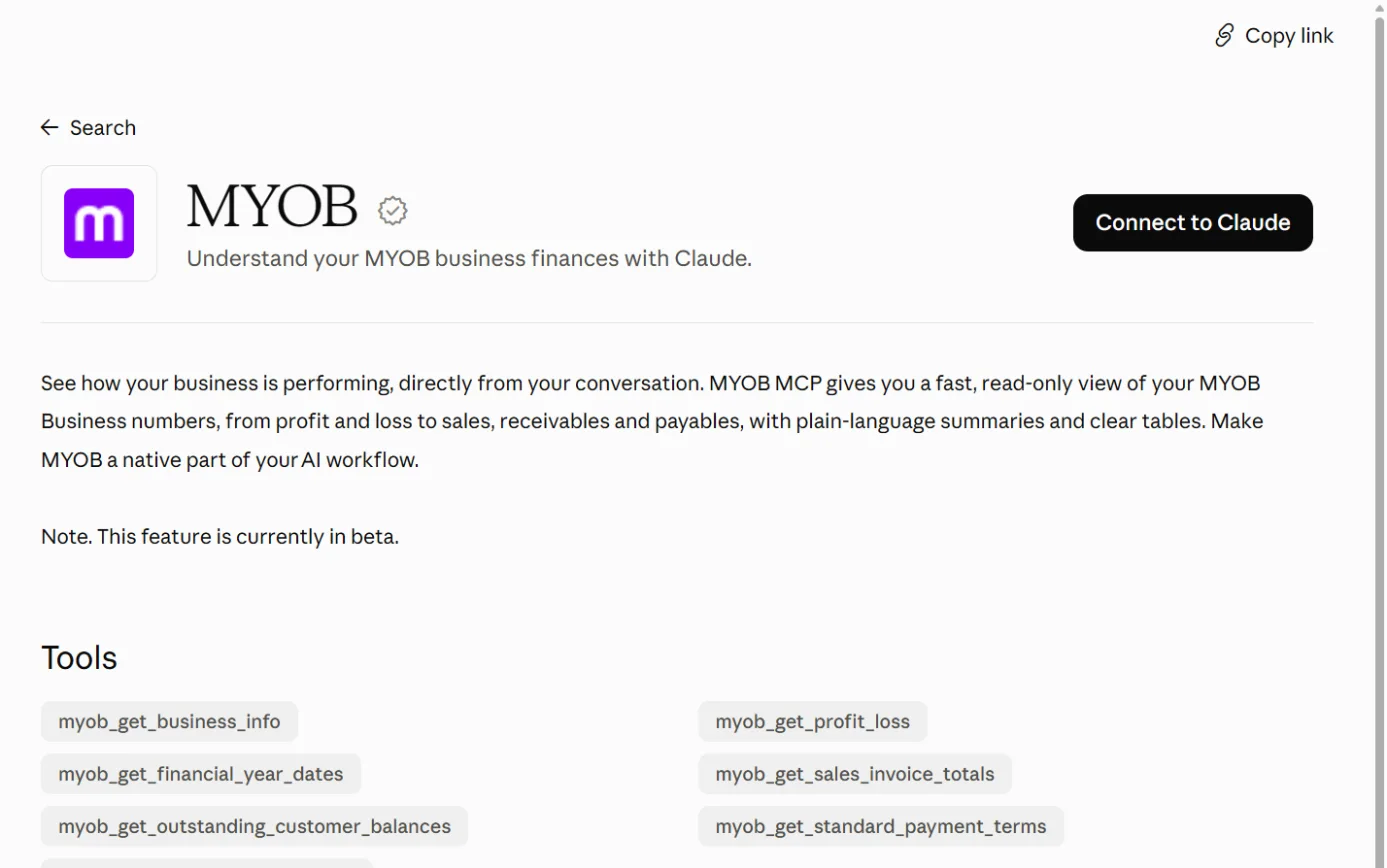
  2. Then: MYOB’s sign-in, if you’re not already signed in Source 4

    The MYOB listing in Claude’s connector directory, with the Connect to Claude button ringed.
    Screenshot: Claude’s connector directory, the MYOB listing, 18 October 2026.
  3. Then: MYOB asks which business file to connect, if you have more than one Source 4

    A drawing from the step’s own words. The real screen may look a little different.
  4. Then: A connection confirmation Source 4

    A drawing from the step’s own words. The real screen may look a little different.
  5. Then: MYOB is connected. In a chat, use + > Connectors to switch it on or off for that conversation Source 4

    A drawing from the step’s own words. The real screen may look a little different.

Pictures without a date are drawings from each step’s own words. The real screen may look a little different.

In a chat, you can switch connectors on or off for that conversation from the + menu > Connectors.33

To disconnect. In Claude, go to the Connectors directory and open MYOB.
  1. In Claude, go to the Connectors directory and open MYOB.4
  2. Click Disconnect.4

To switch to a different business file, disconnect and then connect the other one, which must also be allowed in My Account.4 The help page doesn’t explain how the Owner withdraws access in My Account.4

Limits. Beta, rolling out gradually.
  • Beta, rolling out gradually.46
  • One business file per connection, going by MYOB’s switching instructions.4
  • In Customize > Connectors, each of the connector’s tools can be set to Always allow, Needs approval or Blocked. On Team and Enterprise plans, Owners can restrict these for everyone.33
  • MYOB’s sign-in protects your password: “Claude or ChatGPT doesn’t see or store your MYOB password”.4
  • Your chat is still covered by Claude’s own privacy settings and terms.4 MYOB tells you to go to Settings > Privacy and turn off Help improve our AI models.436 On Claude’s Free, Pro and Max plans, if that setting is on, Anthropic says chats may be kept in de-identified form for up to five years in training pipelines.3637 Deleted chats are removed from Anthropic’s back-end within 30 days.37
  • Claude’s memory can hold older figures that aren’t live MYOB data.4 Manage it in Settings > Memory.4
  • For anything the connector doesn’t cover, the fallback is exporting a MYOB report and uploading the file to Claude, which accepts PDF, CSV and XLSX files.3238 Payroll reports carry employees’ personal details, so think before uploading those. (Our note.)
  • Anthropic says connected services process data on their own infrastructure under their own terms.33 Anthropic’s advice for any connector it didn’t build: “Only use connectors from developers you trust.”635

Copilot and MYOB

No official link.

Microsoft Copilot and MYOB

Official? No. We found no MYOB connector for Microsoft 365 Copilot or the Copilot apps.

No. We found no MYOB connector for Microsoft 365 Copilot or the Copilot apps.4041

  • MYOB and Microsoft signed a five-year partnership on 8 April 2026.40 It’s about MYOB building its own AI with Microsoft technology: Microsoft Foundry for customer-facing AI agents, Copilot Studio for MYOB’s own staff, and Agent 365 for governance.40 The announcement doesn’t describe any link between MYOB and Microsoft 365 Copilot.40
  • The first jointly built customer features were due “later in 2026”.40
  • Microsoft’s list of connectors for Power Automate, Power Apps and Logic Apps (updated 2 October 2026) has no MYOB connector.41

The documented alternative: export to Excel, then use Copilot in Excel.

  • What it can see and do: whatever is in the exported report. Copilot in Excel can summarise data, make charts and PivotTables, and answer questions about it.42 It can also edit the sheet, and opens in Allow editing mode by default.42 Any edits stay in the copy and never reach MYOB. (Our note.)
  • What you need: a MYOB report you can open, desktop Excel 2010 or later for MYOB’s Excel export32, and a Microsoft 365 setup that includes Copilot. Microsoft says Copilot may not be included in your subscription.42
  • Steps:
  1. Source 32

    A drawing from the step’s own words. The real screen may look a little different.
  2. Source 32

    A drawing from the step’s own words. The real screen may look a little different.
  3. Source 32

    A drawing from the step’s own words. The real screen may look a little different.
  4. Source 42

    A drawing from the step’s own words. The real screen may look a little different.
  5. Source 42

    A drawing from the step’s own words. The real screen may look a little different.

Pictures without a date are drawings from each step’s own words. The real screen may look a little different.

  • In AccountRight desktop, export from File > Export as PDF, Excel, XPS, CSV or TSV.32
  • To disconnect: there’s no live connection, only a copied file. Delete it when you’re done if you don’t need it. (Our note.)
  • Limits: the copy is out of date as soon as it’s made, and MYOB’s access controls don’t follow it. (Our inference.)

Gemini and MYOB

No official link.

Google Gemini and MYOB

Official? No. MYOB’s AI pages name only Claude and ChatGPT. We found no MYOB extension for Gemini.

No. MYOB’s AI pages name only Claude and ChatGPT.14 We found no MYOB extension for Gemini.

The documented alternative: export, then upload the file to Gemini.

  • What it can see and do: only what’s in the file you upload.43
  • What you need: a Google account signed in to Gemini Apps.43 Gemini accepts spreadsheets and documents, up to 10 files per prompt and 100 MB per file.43
  • Steps:
  1. Source 32

    A drawing from the step’s own words. The real screen may look a little different.
  2. Source 43

    A drawing from the step’s own words. The real screen may look a little different.
  3. Source 43

    A drawing from the step’s own words. The real screen may look a little different.

Pictures without a date are drawings from each step’s own words. The real screen may look a little different.

  • To disconnect: there’s no connection. Uploaded files count toward your Gemini Apps activity storage, and deleting that activity frees the space.43
  • Limits: Google’s upload page doesn’t say how uploaded files are used for model training.43

Other routes

Developer tools, automation tools and app stores.

Other AI tools and MYOB’s MCP server

Official? Only for Claude and ChatGPT. The My Account screen lets the Owner allow “Claude, ChatGPT or both”, and MYOB documents no other AI tools.

Only for Claude and ChatGPT. The My Account screen lets the Owner allow “Claude, ChatGPT or both”, and MYOB documents no other AI tools.4

What it can see and do Not documented for other tools.

Not documented for other tools.4

What you need, steps, disconnecting Not documented.

Not documented.4

Limits Anthropic notes that any connector URL can be added to Claude as a custom connector. Because MYOB’s permission screen only names Claude and ChatGPT, it appears other AI tools can’t use MYOB’s server. That’s our inference; MYOB doesn’t say.

Anthropic notes that any connector URL can be added to Claude as a custom connector.35 Because MYOB’s permission screen only names Claude and ChatGPT, it appears other AI tools can’t use MYOB’s server. That’s our inference; MYOB doesn’t say.

Your own app or automation and MYOB (the MYOB API)

Official? Yes, MYOB has a public API, called the MYOB Business API (also known as the AccountRight API). An API is how other software reads and writes data in MYOB, under rules MYOB sets. Using it is a job for a developer, who has to register an app with MYOB first.

Yes, MYOB has a public API, called the MYOB Business API (also known as the AccountRight API).44 An API is how other software reads and writes data in MYOB, under rules MYOB sets.4447 Using it is a job for a developer, who has to register an app with MYOB first.44

What it can see and do Apps can read and write. For example, the sale invoice endpoint supports “GET | PUT | POST | DELETE”, meaning read, update, create and delete. Access is split into granular scopes such as sme-sales, sme-purchases, sme-banking, sme-payroll and sme-general-ledger, and apps should request only the ones they need.

Apps can read and write. For example, the sale invoice endpoint supports “GET | PUT | POST | DELETE”, meaning read, update, create and delete.65 Access is split into granular scopes such as sme-sales, sme-purchases, sme-banking, sme-payroll and sme-general-ledger, and apps should request only the ones they need.4546

What you need. Membership of MYOB’s Developer Program. The cheapest listed tier is $110 a month, and the page says “Pricing includes GST”. The page mentions no free API access.
  • Membership of MYOB’s Developer Program. The cheapest listed tier is $110 a month, and the page says “Pricing includes GST”.48 The page mentions no free API access.48
  • An app registered in my.MYOB to get an API key and secret.44
  • A file administrator to approve access: MYOB’s consent flow “requires an admin to approve consent to a single ledger”.46
  • The app also sends the company file’s username and password in a header with each call.45

Steps to connect (developer docs: Getting Started updated April 2023, Authentication March 2025, Granular Data Scopes November 2025)

  1. Source 48

    A drawing from the step’s own words. The real screen may look a little different.
  2. Source 44

    A drawing from the step’s own words. The real screen may look a little different.
  3. Source 44

    A drawing from the step’s own words. The real screen may look a little different.
  4. Source 44

    A drawing from the step’s own words. The real screen may look a little different.
  5. Sources 4546

    A drawing from the step’s own words. The real screen may look a little different.
  6. Source 46

    A drawing from the step’s own words. The real screen may look a little different.
  7. Source 45

    A drawing from the step’s own words. The real screen may look a little different.

Pictures without a date are drawings from each step’s own words. The real screen may look a little different.

To disconnect The developer docs we read don’t describe how a business revokes an app’s access. Either party can end the developer agreement with 30 days’ notice, and MYOB may switch off credentials unused for 12 months.

The developer docs we read don’t describe how a business revokes an app’s access. Either party can end the developer agreement with 30 days’ notice, and MYOB may switch off credentials unused for 12 months.47

Limits, including MYOB’s AI rules for developers (Developer Program and Platform Terms, updated 12 March 2026)

(Developer Program and Platform Terms, updated 12 March 2026)47

  • Developers must not use MYOB data to train or improve any AI model (clause 31).47
  • If an app uses an outside AI service, that service must be contractually barred from training on MYOB data (clause 32).47
  • Developers “must not operate, expose or offer any model‑context, agent‑orchestration or similar protocol server” that wraps MYOB’s API as generic tools for outside AI agents (clause 34).47
  • Bulk or persistent export of MYOB data is restricted (clause 27).47
  • MYOB may monitor and rate-limit to catch “behaviour indicative of LLM‑related misuse” (clause 42).47
  • Data must not be stored or processed in a country that would breach MYOB’s data residency requirements (clause 29).47 MYOB’s security requirements treat Australia and New Zealand as low-risk and ask developers to contact MYOB before storing data elsewhere.49

Zapier, Make and Power Automate and MYOB

Official? No official MYOB integration that we could confirm on any of the three.

No official MYOB integration that we could confirm on any of the three.4155

  • Zapier: Zapier’s MYOB page, as shown in search results, says MYOB “has not yet built an integration on Zapier”.55 The page itself returned “not found” when we loaded it directly.55
  • Make: We couldn’t confirm either way. Make’s MYOB page didn’t load properly. (See gaps.)
  • Power Automate: Microsoft’s connector list has no MYOB connector.41
What it can see and do, what you need, steps Nothing official to document. Zapier suggests building your own connection with webhooks or code, and with MYOB that would mean using the API, which needs Developer Program membership. That’s our inference about how it would work.

Nothing official to document. Zapier suggests building your own connection with webhooks or code55, and with MYOB that would mean using the API, which needs Developer Program membership.48 That’s our inference about how it would work.

Limits A home-made automation that feeds MYOB data to an AI would fall under MYOB’s developer terms above.

A home-made automation that feeds MYOB data to an AI would fall under MYOB’s developer terms above.47

Marketplace AI apps and MYOB

Official? These are third-party apps listed in MYOB’s marketplace. A listing is a directory entry. MYOB says “The apps on this site are developed by third parties.” It adds that it “can’t guarantee that the apps are suitable for your business”.

These are third-party apps listed in MYOB’s marketplace. A listing is a directory entry. MYOB says “The apps on this site are developed by third parties.”51 It adds that it “can’t guarantee that the apps are suitable for your business”.52

What MYOB checks before listing It reviews the app’s sign-in (OAuth) flow, company file access and the data flowing between the app and MYOB. MYOB describes its role as “a directory type service”.

It reviews the app’s sign-in (OAuth) flow, company file access and the data flowing between the app and MYOB.50 MYOB describes its role as “a directory type service”.50

Apps listed that describe themselves as using AI (we checked a handful of the 350+ apps)

(we checked a handful of the 350+ apps)51

  • Dext (Dext Software Limited): “AI-powered extraction” of receipts, invoices and expenses, plus “Dext AI Assist”. Works with MYOB AccountRight, MYOB Business and MYOB Essentials.52
  • Accounts Payable – AP Automation Solution for MYOB (Dataline Group): “AI driven data extraction and validation” for supplier invoices. Works with AccountRight, MYOB Acumatica and MYOB EXO Business.53
  • Lightyear: purchasing and accounts payable with line-item extraction from scanned documents; it describes “intelligent automation”. Works with AccountRight and MYOB Acumatica.54
What you need, steps, disconnecting Each app has its own sign-up and pricing, shown on its own site.

Each app has its own sign-up and pricing, shown on its own site.525354

Limits Under MYOB’s terms, installing an outside app means you consent to it accessing your data “as required” to work with MYOB Business. MYOB’s terms limit its liability for what an outside app does with your data.

Under MYOB’s terms, installing an outside app means you consent to it accessing your data “as required” to work with MYOB Business.27 MYOB’s terms limit its liability for what an outside app does with your data.27

Jobs it’s good for

For a small business

  • ”How did last month go?” without building a report. Ask Iris answers questions like “What was my total income last month?” inside MYOB, with data processed in Australia.3
  • Checking who owes you from a chat you already use. With the MYOB Connector, ask Claude or ChatGPT “Do I have any overdue invoices?” or “Who are my biggest customers by revenue?”.4 The connector can’t send anything, so any follow-up still goes out from MYOB.4
  • Getting paid sooner. Set up to five automatic reminders with the tone you want, and check the Overdue tab’s suggested next step for each late payer.14
  • Keeping on top of the bank feed. On Pro or AccountRight Plus, Smart Reconciliation matches transactions as they arrive; you accept suggestions in bulk and finalise.212
  • BAS through the quarter. If you’re GST-registered on Lite or Pro with a simple quarterly cash BAS, AI BAS flags missing documents and GST codes as you go, then gives your BAS agent a decision report and CSV.78 You or your agent still lodge.8
  • Receipts on the road. Staff photograph receipts in MYOB Assist, and MYOB pre-fills the bill or expense for you to check.181920 Give them the Field role so they don’t see your accounts.1831
  • A monthly check-in with your accountant. If you’re in the AI Business Insights beta, its plain-English commentary and charts give you something to talk through.111516

For accounting practices and bookkeepers

  • One workflow across messy client ledgers. Practice Compliance AI mapping standardises client data to one chart of accounts (Core and Pro Compliance).60
  • Reviewing a client’s AI BAS. Advisers use their normal MYOB access to review and adjust, and get the BAS decision report and CSV.78
  • Seeing a client’s AI insights. The Accountant/Bookkeeper role can view AI Business Insights.16
  • Asking Claude about a client file. Only after the client’s Owner user has allowed it in My Account.4 MYOB’s wording suggests any user with file access, including an adviser, could then connect their own Claude or ChatGPT account. That’s our reading; the page doesn’t mention advisers by name.4

For larger businesses on MYOB Acumatica

  • Supplier bills. AP Bill Entry reads supplier bills and checks them against supplier records.56
  • Spotting odd journal entries. Anomaly Detection rates journal entries Normal, Medium or Significant for review.59

What to watch for

Your data leaves MYOB when you use Claude or ChatGPT.

  • MYOB’s promise that data is processed in Australia and not used for training is made for Ask Iris.3 The connector page says instead that your conversation is subject to Claude’s or ChatGPT’s own privacy settings and terms.4
  • Turn off model training: Help improve our AI models in Claude, Improve the model for everyone in ChatGPT.436
  • Check memory settings in both, because memory can hold older figures.4
  • In ChatGPT, select the MYOB plugin each time, or you may get an answer from the web.4

Who can connect a file.

  • Once the Owner allows it, any user with access to the file and their own AI account can connect.4
  • The connector reaches whatever that user’s MYOB permissions allow.4 MYOB’s “Read only” access level still lets a user read, so it won’t stop the connector reading. (Our inference from how MYOB describes access levels.)31
  • For practices: if an adviser connects a client’s file, the adviser’s own Claude or ChatGPT settings govern that client’s figures. (Our inference.)4
  • MYOB doesn’t document how the Owner withdraws AI access in My Account.4

Check the answers.

  • MYOB says you can ask the connector about cash position4, but none of the seven tools on Anthropic’s listing is named for bank balances.6 We couldn’t find how cash position is worked out, so check it against MYOB.
  • Smart Reconciliation and category predictions can be wrong, and some predictions come from other businesses’ coding.1213 Review the Matched tab before you finalise.12
  • AI BAS “may omit or generate incorrect information”.8 MYOB isn’t a registered tax agent, so you stay responsible for what you lodge.8
  • MYOB’s terms say you must verify AI output before relying on it, and that MYOB makes no guarantee about its accuracy.27

Things that happen automatically.

  • Smart Invoice Reminders email every customer with reminders switched on, on schedule, once you save the settings.14 Check your list before turning it on.
  • Automatching may already be on in your bank rules.13

Cost surprises.

  • AI BAS is a 12-month commitment with 10 days’ notice to cancel, and you pay out the term.8 Beta users get it free only “for a limited time”.8
  • From year two, AI BAS pricing moves with your BAS transaction count.7
  • Building your own AI link through the API starts at $110 a month for Developer Program membership.48

What MYOB’s terms let it do with your data.

  • You give MYOB a licence to use your data “to develop and improve our products and services”.27
  • You also give MYOB a permanent licence to use anonymised or aggregated data derived from your data.27
  • MYOB’s privacy policy doesn’t mention AI.28

Unofficial connections.

  • If someone offers a third-party MCP server or automation for MYOB, MYOB’s developer terms bar developers from running MCP servers that wrap MYOB’s API for outside AI agents.47 Ask the vendor how it complies before you connect your books, and ask MYOB.
  • Marketplace apps are third-party products, and installing one lets it access your data.2751

Protect the MYOB login.

  • Connecting Claude or ChatGPT uses your MYOB username and password.4
  • MYOB recommends passkeys, or an authenticator app with SMS as backup, and says “Email 2FA is not recommended and will be phased out in 2027.”30

Larger businesses.

  • In MYOB Acumatica, journal entry anomaly detection sends the inquiry data to an external AI service.59

What’s changing

WhenWhatSource
1 November 2026Prices change for MYOB Business Payroll Only and the per-user Payroll premium feature (new prices not shown).2
2027Email two-factor authentication to be phased out.30
“For a limited time” (no date)AI BAS beta users keep free access, then must add AI BAS as a paid Premium Feature.8
Through 2026AI BAS support to expand; employing businesses joined the beta from September 2026.710
From August 2026Phased rollout of the MYOB Connector in Claude and ChatGPT. “Further integration capabilities are expected to follow”.5
Later in 2026First jointly built MYOB and Microsoft customer features.40
No dateWider access to AI Business Insights planned.15
No date“Agentic AI capabilities” to come to MYOB Assist over time.17
May 2026, then later in 2026MYOB Acumatica AI Studio in early access from May, wider availability later in the year.57
Version 2026.1.1Acumatica’s AI Studio renamed AI Automation; anomaly detection renamed and moved out of experimental features; the old GL Anomaly Detection is deprecated.5859
Already happened, plus “the near future”AccountRight offline files phased out. PC Edition only shows online files from 17 June (year not stated). The temporary Server Edition will stop working “in the near future”.6263
Already happenedMYOB Invoice and MYOB Capture apps replaced by MYOB Assist.1718
12 March 2026New Developer Program terms, with AI and MCP limits. Earlier members bound from 13 April 2026.47
Pilot, no dateMYOB and Mastercard’s agentic payments pilot “remains in testing”.64

What we couldn’t establish

  • OpenAI’s side of the ChatGPT connection. OpenAI doesn’t list which ChatGPT plans can install the MYOB plugin, or the plugin’s individual tools.6667 We found no retention period for data the plugin fetches.
  • Where Claude and ChatGPT process data for Australian users. The pages we read don’t say.
  • Switching MYOB’s own AI off. We found no documentation on whether Ask Iris, category suggestions or AI Business Insights can be turned off, or by whom.
  • Which AI models power Iris. MYOB names Anthropic, AWS and Microsoft for Acumatica56, but no provider for MYOB Business features. Only Ask Iris has a stated processing location and training promise.3
  • How long AI data is kept. We found no retention periods for Ask Iris chats or AI BAS decisions. The connector page doesn’t give one for connector activity either.
  • Revoking access from MYOB’s side. How the Owner withdraws AI file access in My Account, and what happens to a connection when a user loses file access.
  • Other AI tools on MYOB’s MCP server. Whether anything besides Claude and ChatGPT can use mcp.myob.com.
  • New Zealand customers and the connector. MYOB’s Australian help page doesn’t say whether New Zealand subscriptions can use the MYOB Connector.4 OpenAI’s listing for the ChatGPT plugin asks for a MYOB Business subscription in Australia or New Zealand.66 We couldn’t confirm the same for Claude.
  • How “cash position” is answered through the connector.
  • The API scope deadline. An MYOB community forum post says the old “CompanyFile” API scope was removed on 1 September 2026, forcing integrations to move to granular scopes. MYOB’s developer pages we could load don’t state it, and MYOB’s API support site blocked our reader. If an older integration stopped working in September, this is the likely lead, but it isn’t confirmed here.
  • API rate limits. Not on the public pages we read.4447
  • Make.com. Whether Make lists a MYOB app.
  • Microsoft’s Copilot connector gallery. We checked Microsoft’s Power Platform connector list41 but not the Microsoft 365 Copilot connector gallery.
  • The full marketplace. We checked a handful of the 350+ listed apps for AI features.51 The marketplace pages we loaded had no AI category or search filter we could use.
  • New Zealand data in predictions. Whether “other MYOB businesses” in Smart Reconciliation includes New Zealand businesses.
  • AccountRight Premier and Solo AI. Premier isn’t in the pricing page’s AI comparison2, and Solo’s only AI item, Category Suggestions, has no Solo help article.226
  • Prices we didn’t capture. Practice Compliance, MYOB Acumatica AI features, and whether plan prices include GST.
  • Our search allowance ran out near the end of this research, so we couldn’t run a final sweep for Google or Microsoft announcements about MYOB, or for an official MYOB page on the API scope deadline.

Sources

Every line above was read at one of these pages, on the date shown. Vendors change their products and their pages often, so check the page before you rely on a detail.

  1. 1 MYOB AI Accounting Software (Iris by MYOB) MYOB Read 15 Oct 2026
  2. 2 Plans and pricing MYOB Read 15 Oct 2026
  3. 3 Understand your business with Ask Iris (Beta) MYOB Read 15 Oct 2026
  4. 4 Connecting Claude or ChatGPT to MYOB MYOB Read 15 Oct 2026
  5. 5 MYOB brings SME financial intelligence into Claude and ChatGPT MYOB Updated 17 August 2026 Read 15 Oct 2026
  6. 6 MYOB (connector listing) Anthropic Updated "Added July 2026" Read 15 Oct 2026
  7. 7 AI BAS MYOB Read 15 Oct 2026
  8. 8 Get BAS-ready faster with AI BAS MYOB Read 15 Oct 2026
  9. 9 MYOB Premium Features MYOB Read 15 Oct 2026
  10. 10 MYOB expands AI BAS beta to employing businesses MYOB Updated 15 September 2026 Read 15 Oct 2026
  11. 11 MYOB rolls out suite of AI products to power up SME productivity MYOB Updated 2 March 2026 Read 15 Oct 2026
  12. 12 Review as you go for easier reconciliation MYOB Read 15 Oct 2026
  13. 13 Matching transactions with automatches and suggestions MYOB Read 15 Oct 2026
  14. 14 Send Smart Invoice Reminders MYOB Read 15 Oct 2026
  15. 15 AI Business Insights MYOB Read 15 Oct 2026
  16. 16 Business Insights, including AI Business Insights (Beta) MYOB Read 15 Oct 2026
  17. 17 MYOB Assist MYOB Read 15 Oct 2026
  18. 18 Getting started with the MYOB Assist app MYOB Read 15 Oct 2026
  19. 19 Capture an expense MYOB Read 15 Oct 2026
  20. 20 Working with uploaded documents MYOB Read 15 Oct 2026
  21. 21 What’s new and what’s next (product roadmap) MYOB Read 15 Oct 2026
  22. 22 MYOB Business Lite MYOB Read 15 Oct 2026
  23. 23 MYOB Business Pro MYOB Read 15 Oct 2026
  24. 24 MYOB Business AccountRight Plus MYOB Read 15 Oct 2026
  25. 25 MYOB Business AccountRight Premier MYOB Read 15 Oct 2026
  26. 26 Solo by MYOB (product page) and Solo support home MYOB Read 15 Oct 2026
  27. 27 MYOB Business Terms of Use MYOB Updated "Last updated: June 2026" Read 15 Oct 2026
  28. 28 Privacy Policy MYOB Updated "August 2026" Read 15 Oct 2026
  29. 29 Security Practices (Trust Centre) MYOB Read 15 Oct 2026
  30. 30 Security at MYOB MYOB Read 15 Oct 2026
  31. 31 Manage users (user access) MYOB Read 15 Oct 2026
  32. 32 Exporting reports MYOB Read 15 Oct 2026
  33. 33 Use connectors to extend Claude’s capabilities Anthropic Updated "Updated over 2 weeks ago" (as at 15 Oct 2026) Read 15 Oct 2026
  34. 34 Connectors directory Anthropic Read 15 Oct 2026
  35. 35 Connector verification Anthropic Read 15 Oct 2026
  36. 36 How do I change my model improvement privacy settings? Anthropic Updated 3 August 2026 Read 15 Oct 2026
  37. 37 How long do you store my data? Anthropic Updated 1 July 2026 Read 15 Oct 2026
  38. 38 Upload files to Claude Anthropic Updated 23 July 2026 Read 15 Oct 2026
  39. 39 Plugins (ChatGPT Learn) OpenAI Read 15 Oct 2026
  40. 40 MYOB and Microsoft sign five-year strategic partnership Microsoft (Source Asia) Updated 8 April 2026 Read 15 Oct 2026
  41. 41 List of all connectors (Azure Logic Apps, Power Automate, Power Apps) Microsoft Learn Updated 2 October 2026 (page metadata) Read 15 Oct 2026
  42. 42 Get started with Copilot in Excel Microsoft Support Read 15 Oct 2026
  43. 43 Upload & analyze files in Gemini Apps Google Read 15 Oct 2026
  44. 44 MYOB Business API: Getting Started MYOB Developer Updated April 2023 Read 15 Oct 2026
  45. 45 MYOB Business API: Authentication MYOB Developer Updated "Date Updated: Mar 2025" Read 15 Oct 2026
  46. 46 Granular Data Scopes MYOB Developer Updated Nov 2025 Read 15 Oct 2026
  47. 47 MYOB Developer Program and Platform Terms MYOB Developer Updated "Last Updated 12 March 2026" Read 15 Oct 2026
  48. 48 What is the Developer Program MYOB Developer Read 15 Oct 2026
  49. 49 MYOB Developer Security Requirements MYOB Developer Read 15 Oct 2026
  50. 50 MYOB App Marketplace (listing your app) MYOB Developer Read 15 Oct 2026
  51. 51 MYOB App Marketplace MYOB Read 15 Oct 2026
  52. 52 Dext (marketplace listing) MYOB Read 15 Oct 2026
  53. 53 Accounts Payable – AP Automation Solution for MYOB (marketplace listing) MYOB Read 15 Oct 2026
  54. 54 Lightyear (marketplace listing) MYOB Read 15 Oct 2026
  55. 55 MYOB integrations Zapier Read 15 Oct 2026
  56. 56 AI tools for MYOB Acumatica MYOB Read 15 Oct 2026
  57. 57 MYOB Acumatica launches new AI Studio in collaboration with AWS MYOB Updated 28 April 2026 Read 15 Oct 2026
  58. 58 AI Studio: Renaming of AI Features (2026 R1 release notes) MYOB Updated Version 2026.1.1; no date shown Read 15 Oct 2026
  59. 59 Finance: Anomaly Detection for Journal Entries (2026 R1 release notes) MYOB Updated Version 2026.1.1; no date shown Read 15 Oct 2026
  60. 60 Practice Compliance MYOB Read 15 Oct 2026
  61. 61 Accountants and bookkeepers MYOB Read 15 Oct 2026
  62. 62 Move your company file online to keep working MYOB Read 15 Oct 2026
  63. 63 MYOB Support (home) MYOB Read 15 Oct 2026
  64. 64 MYOB and Mastercard pilot agentic payments for SMEs MYOB Updated 15 June 2026 Read 15 Oct 2026
  65. 65 Sale Invoice endpoint (MYOB Business API v2) MYOB Developer Updated Last updated January 2022 Read 15 Oct 2026
  66. 66 MYOB (ChatGPT plugin listing) OpenAI Read 15 Oct 2026
  67. 67 Plugins in ChatGPT OpenAI Help Center Updated "Updated: 17 hours ago" (14 Oct 2026, UTC) Read 15 Oct 2026
  68. 68 Admin controls, security, and compliance for plugins and apps OpenAI Help Center Updated "Updated: 17 hours ago" (14 Oct 2026, UTC) Read 15 Oct 2026
  69. 69 Connecting and managing app accounts in ChatGPT OpenAI Help Center Updated "Updated: 13 days ago" (2 Oct 2026, UTC) Read 15 Oct 2026
  70. 70 Connected apps in ChatGPT OpenAI Help Center Updated "Updated: 4 days ago" (11 Oct 2026, UTC) Read 15 Oct 2026
  71. 71 ChatGPT release notes OpenAI Help Center Updated "Updated: 6 days ago" (9 Oct 2026, UTC) Read 15 Oct 2026

Want your team shown this on its own MYOB?

We teach on the tools your workplace already uses, with the checks that go with them.